
2:16
Explore
Runinfra launch 720p60
RightNow · Nov 2026 · 0:37 · AI-annotated
- Length
- 0:37
- Scenes
- 23 · 1.6 s avg
- Product on screen
- 0:04
- Features shown
- 3
- Voiceover
- No
00:00:00 / 00:37:03
RightNow’s 0:37 launch film runs 23 scenes, about 1.6 s each. The product shows up at 0:04 and 3 features are revealed. There is no explicit call to action. A chain of locked-off typographic claims on a white dashed grid, each claim typed in letter by letter and underlined by a sliding lime highlight bar. Interface cards type code and dissolve while the green pixel blocks wipe between claims, with the pixel R mark bookending the film on a steady ~144 BPM pulse.
No filming indicatedEstimated needs: 4 capture groups — your screens or recordings · 1 official logo — reused across the film · 5 graphic passages — draw or supply
Is this your launch? to your site or press kit.
More like this
1:27
RoboColosseum - Introducing RoboColosseum An open robot eval initiative by @huggingf
RoboColosseum · Nov 2026
1:08

Kanopy - Spatial Intelligence for Physical Infrastructure
Kanopy · Industrials · Oct 2026
Runinfra launch 720p60, scene by scene
· 23 scenes as text
01 · Problem · 0:00–0:01
On a white background, the words “Your agent” type out letter by letter in the center. Four small green squares drift in from scattered positions and settle at the corners of a pale green box that frames the text.
On-screen text: “Your agent”
Techniques: Kinetic type
Camera: Static
02 · Problem · 0:01–0:02
A light code-editor panel framed by green corner brackets and dashed guides sits on white, code lines typing in at the top. Left, the headline builds word by word, a green highlight sliding behind each phrase.
On-screen text: “Sends the same”, “context.”
Techniques: Kinetic type
Camera: Static
03 · Problem · 0:02–0:04
On a white grid canvas with green selection handles, two interface windows sit side by side, one with code and one with a context-token list. They reflow into a single window pairing the two, while the token count ticks up. Large black headlines with lime highlights fill the open space.
On-screen text: “Sends the same context.”, “Every turn”
Techniques: Morph
Camera: Pan
04 · Product intro · 0:04–0:05
A white pixelated R, built from square blocks, sits centered on a flat green field, held static in a locked-off frame.
On-screen text: “R”
Camera: Static
05 · Product intro · 0:05–0:07
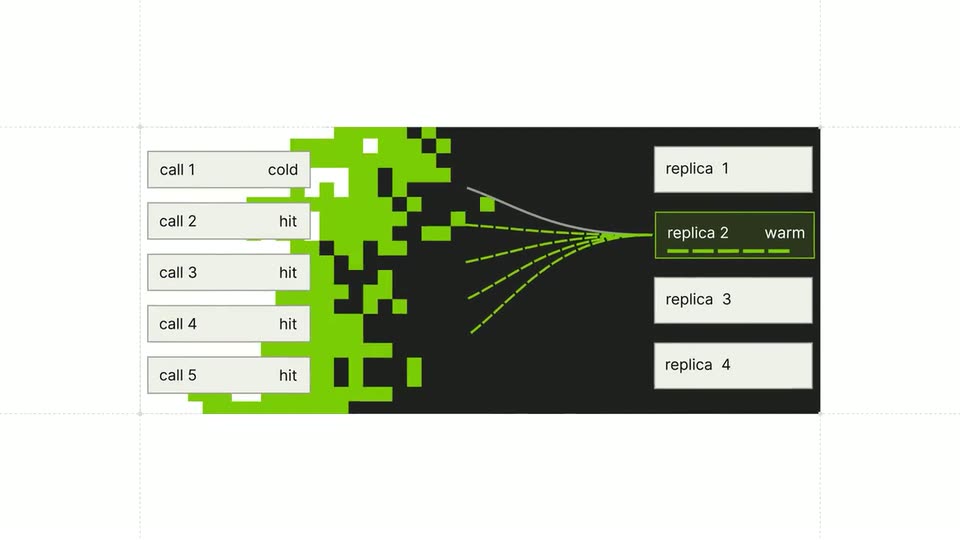
On a plain white background, the green RunInfra mark and wordmark fade in at center, hold, then dissolve. A dark rounded card with a green-bordered label reading “replica 2 warm” scales up in the same spot, the word “warm” tinted green, framed by faint dashed layout guides.
On-screen text: “replica 2 warm”
Techniques: Kinetic type
Camera: Static
06 · Feature reveal · 0:07–0:09
A dark panel expands from a narrow strip to a wide banner. Dashed green lines draw from the five call rows to a central point where a pixelated green and purple image resolves, while the replica 2 cell is boxed green with a warm label.
Camera: Static
07 · Feature reveal · 0:09–0:11
A faint dashed grid sits on a white field. The phrase “Up to 98% cache hits” scales in at center, the last words set in white on a green highlight bar, then it vanishes, leaving the bare grid for the rest of the clip.
On-screen text: “Up to 98% cache hits”
Techniques: Kinetic type
Camera: Pull out
08 · Feature reveal · 0:11–0:13
On a white canvas with dashed grid lines, a dark panel fills with green from the top-left corner beside a circular Z badge. On the right, a grid of green squares morphs into vertical bars under a green dropdown. A green-highlighted headline reads Up to 98% cache hits.
On-screen text: “Up to 98% cache hits”
Techniques: Masking, Morph
Camera: Static
09 · Feature reveal · 0:13–0:14
On a white grid, a black block dissolves through green pixel squares to reveal a GLM 5.3 tag, then the layout snaps into an Optimized label, a check icon, and a code panel with pixel noise.
On-screen text: “GLM 5.3”, “98.9% cache hits”, “Optimized”, “DeepSeek V4.1 Flash”, “96.3% cache hits”
Techniques: Masking
Camera: Static
10 · Feature reveal · 0:14–0:15
A white dashed-grid layout builds as the headline assembles with a lime-green highlight, while a dark code panel types out a function and three stat columns fade in beneath it.
On-screen text: “Optimized down to the GPU kernel”, “DeepSeek V4.1 Flash”, “96.3% cache hits”, “Fast output”, “140 tok/s”, “End-to-end, on the buyer path”, “Low cost”, “$0.01 /1M”, “Cached input”, “Cache hit rate”
Techniques: Kinetic type, Masking
Camera: Pull out
11 · Feature reveal · 0:15–0:16
A three-row pricing table for Kimi K3, DeepSeek V4.1 Flash and GLM-5.3 sits on a white grid, listing prices and multipliers. The heading 'Cached input from' holds top-left with a green highlight, and a green '$0.01' pops in at the bottom right as the rows settle.
On-screen text: “Cached input from”, “$0.01”
Camera: Pull out
12 · Feature reveal · 0:16–0:17
A white comparison table lists three models, each with a horizontal bar marking list price against effective input. The headline 'Cached input from' sits top left and '$0.01 per million token.' sits bottom right, both with green highlights. The frame holds static.
On-screen text: “Cached input from”, “$0.01 per million token.”
Camera: Pull out
13 · Feature reveal · 0:17–0:20
A green arrow and caret hold on a white field, then the headline types in letter by letter with a green highlight behind the words. The text switches to /Coding plans/, the highlight splits into two bars, and the frame clears to white.
On-screen text: “Introducing Arc”, “/Coding plans/”
Techniques: Kinetic type
Camera: Static
14 · Feature reveal · 0:20–0:24
On a white dotted grid, the word For holds above a green tag that cycles through Claude Code, Codex, and a pixel-font open-code label. Then And and agents flank a large 20+ inside the tag, while From slides in at the top left and the tag widens into a full-width green band.
On-screen text: “For”, “Claude Code”, “Codex”, “open-code”, “20+”, “And”, “agents”, “From”
Techniques: Kinetic type, Morph
Camera: Static
15 · Pricing · 0:24–0:25
A pricing card on a white background with a faint grid. The headline 'From $10 a month' is at the top. Two bullet points fade in sequentially below it. A green button with an arrow is at the bottom.
On-screen text: “From $10 a month”, “Usage included, resets every 5h and weekly”, “At a limit: credits or free Standby”
Techniques: Kinetic type
Camera: Static
16 · Pricing · 0:25–0:26
On a white card over a faint grid, the headline and two checkmark lines settle into place as a pixelated green hand cursor rises to the green See plans button. The cursor clicks the button, firing a small white glow at the point of contact.
Techniques: Cursor demo
Camera: Pull out
17 · Pricing · 0:26–0:27
A white pricing interface shows three plan cards side by side, with a pixelated green hand cursor resting on the green button of the middle card. The card labels and prices crossfade between two states while the cursor holds its position.
On-screen text: “From $10 a month”
Techniques: Cursor demo
Camera: Pull out
18 · Feature reveal · 0:27–0:28
On a white background, two green-outlined pills labeled “Your agents” and “One connection” slide toward the center. A link icon between them fills with solid green as the pills merge into one connected shape.
On-screen text: “Your agents”, “One connection”
Techniques: Kinetic type, Morph
Camera: Static
19 · Feature reveal · 0:28–0:29
A light background holds two green-outlined pills, 'Your agents' and 'One connection', split by a green link icon. The pills scale and slide out as a developer UI fades in: model tabs over a code block typing a curl command, with a green 'Open models' tag appearing top right.
On-screen text: “Your agents”, “One connection”, “Open models”
Techniques: Kinetic type
Camera: Static
20 · Feature reveal · 0:29–0:31
A code snippet card types out a curl command line by line under model badges and language tabs, with “Open models” highlighted upper right. A hand cursor clicks the Copy button, then the green-highlighted caption “built for agents.” pops in at lower left.
On-screen text: “Open models”, “built for agents.”
Techniques: Cursor demo, Kinetic type
Camera: Pull out
21 · Feature reveal · 0:31–0:32
A code snippet card, flanked by green highlighted labels, dissolves as a grid of green pixels wipes across the frame. The pixels expand to cover the interface, then scatter and clear, leaving a blank white screen.
On-screen text: “Open models”, “built for agents.”
Techniques: Masking, Particles
Camera: Static
22 · Outro · 0:32–0:33
A small white pixel-art mark, shaped like a flag or letter R, sits centered on a flat green field. The green field narrows horizontally as white bars slide in from the left and right edges, framing the logo.
Techniques: Masking
Camera: Static
23 · Outro · 0:33–0:37
The RunInfra logo, a green pixelated R mark beside a black wordmark, sits centered on a plain white background. The text fades in from a soft blur to a sharp lockup while the mark settles into place, then holds on a locked-off frame.
On-screen text: “RunInfra”
Camera: Static