0:37
RightNow: RunInfra launch
RightNow · B2B · Nov 2026
RightNow · 0:37 · Code only · AI-annotated
RightNow’s 0:37 launch film runs 20 scenes, about 1.9 s each. The product shows up at 0:04 and 3 features are revealed. There is no explicit call to action. The video is a rapid chain of one-line headline cards and UI demos on a white dashed grid, each claim punctuated by a lime highlight that slides across the key word. Signature moves are the pixel-block wipes and assemblies, the selection marquee that locks around text, and the green hand cursor clicking through the interface.
Is this your launch? to your site or press kit.
RightNow · B2B · Nov 2026
AgentMail · B2B · Nov 2026
Spacesheep · B2B · Nov 2026
The words “Your agent” scale up at the center of a white field while four small green squares glide inward and lock to the corners of a pale green rounded box that frames the text like a selection handle.
On-screen text: “Your agent”
Techniques: Kinetic type
Camera: Static
A code editor sits centered in a green selection marquee on a white grid; code types in while the side panel stacks Turns 1 to 4. 'Sends the same context.' builds word by word on the left, 'Every turn' appears right, then a pixelated green wipe exits.
On-screen text: “Sends the same context.”, “Every turn”
Techniques: Kinetic type, Masking
Camera: Pan
A small white pixelated R mark holds center on a flat green field. The mark brightens from a pale green tint to solid white, and two white vertical bars rise at the left and right edges.
Camera: Static
A green pixel logo forms beside the dark gray RunInfra wordmark on white, then the headline Keep your session warm appears with a scaling green highlight behind the blue word warm. A dark card with a green-outlined monospace tag replica 2 warm closes the scene.
On-screen text: “RunInfra”, “Keep your session warm”, “replica 2 warm”
Techniques: Kinetic type
Camera: Static
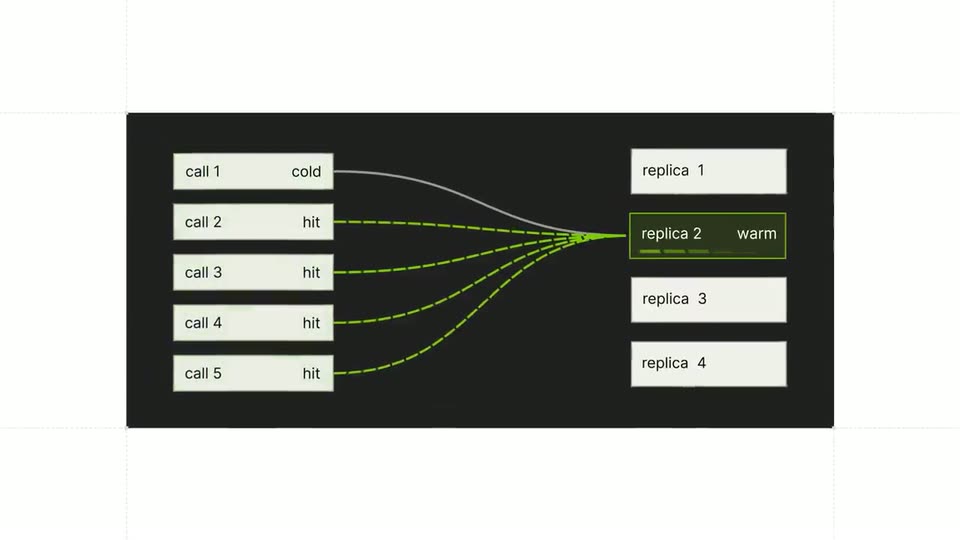
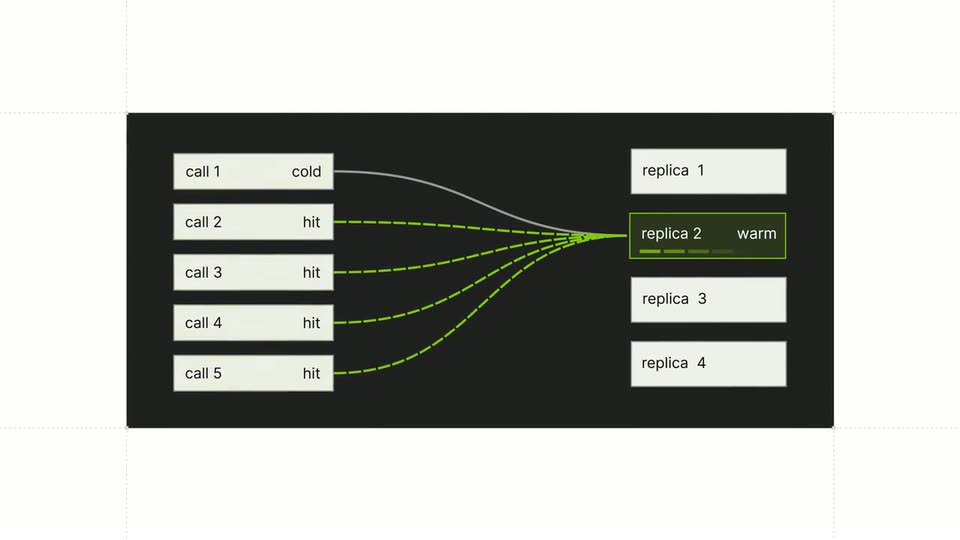
A dark panel floats on a white gridded background. A green pixelated cloud grows in its center while dashed green lines and a white line arc from left labels (cold, hit) to right labels (replica 1 to 4), with a green box highlighting replica 2 and the word warm.
On-screen text: “cold”, “hit”, “hit”, “hit”, “hit”, “replica 1”, “replica 2”, “warm”, “replica 3”, “replica 4”
Techniques: Particles
Camera: Static
On a white dashed grid, the line Up to 98% cache hits slides in and scales up, its tail boxed in green, then settles to the lower left. A green pixel cluster, a green GLM dropdown and a grid of green squares fade in on the right.
On-screen text: “Up to 98% cache hits”
Techniques: Kinetic type
Camera: Pull out
Split-screen motion graphic: a dark panel with a small Z badge sits left of a green dropdown tag and a grid of green squares that fill in from the bottom rows. Below, a caption reads Up to 98% cache hits with a green highlight.
On-screen text: “Up to 98% cache hits”
Techniques: Split screen
Camera: Static
Green pixel blocks on a dotted grid assemble into a dark code editor window on the right, while the headline “Optimized down to” highlights in on the left. Stat captions and a model badge fade in beneath each side.
On-screen text: “Optimized down to”, “DeepSeek V4.1 Flash”, “96.3% cache hits”, “Fast output”, “140 tokens”, “End-to-end, in the buyer path”, “50.01”
Techniques: Kinetic type, Morph
Camera: Static
A white dashed grid holds a dark code editor on the right as JavaScript types itself line by line, while a left headline reads “Optimized down to the” and a green highlight sweeps across to reveal “GPU kernel”. Spec stats fade in beneath the panel.
On-screen text: “Optimized down to the GPU kernel”
Techniques: Masking
Camera: Static
A white pricing table with three model rows (Kimi K3, DeepSeek V4 Flash, GLM-5.3) and green sliders sits on a plain background with a dashed grid. Top-left, the headline “Cached input from” carries a lime highlight; a lime “$0.01” tag scales in at bottom-right.
On-screen text: “Cached input from”, “$0.01”
Camera: Pull out
A white pricing chart lists three models, each row a green effective-price marker far left of a gray list-price marker on a dollar axis. Headlines 'Cached input from' and '$0.01 per million token.' frame it top and bottom with lime-green highlights. The layout eases gently into place.
On-screen text: “Cached input from”, “$0.01 per million token.”
Camera: Pull out
A thick green arrow on white shrinks into a small pointer as “Introducing” types in over a green highlight bar. The bar slides and the line becomes the monospace tag “</Coding plans/>”, the highlight sliding away to leave plain black text.
On-screen text: “Introducing”, “</Coding plans/>”
Techniques: Morph, Kinetic type
Camera: Static
On a white grid, the word For sits above a green badge that swaps from the Claude Code mark to Codex, then reflows so And sits left of a smaller badge scaling in with 20+. The badge carries an offset shadow layer.
On-screen text: “For”, “Claude Code”, “Codex”, “And”, “20+”
Techniques: Kinetic type
Camera: Static
A white field with a faint dashed grid. A green block holding white 20+ sits center, with And to the left and agents to the right. The green block scales up over the shot while the side words hold still.
On-screen text: “And”, “20+”, “agents”
Techniques: Kinetic type
Camera: Static
A pricing card assembles on a white grid: the heading and two checkmark bullets fade and scale in, then a green See plans button with an arrow appears. A white hand cursor with a green outline slides in from the lower right and hovers over the button.
On-screen text: “From $10 a month”, “Usage included, resets every 5h and weekly”, “At a limit: credits or free Standby”, “See plans”
Techniques: Kinetic type, Cursor demo
Camera: Pull out
Three pricing cards for Starter, Pro and Team sit side by side on a white dotted grid. The Pro card carries a green outline, and a pixelated green hand cursor hovers over its button, which brightens to solid green.
On-screen text: “From $10 a month”
Techniques: Cursor demo
Camera: Pull out
Two olive-green outlined pills slide inward from left and right on a plain off-white field, while a green circle with a white link icon scales up between them. The pills settle centered, the icon linking the two phrases.
On-screen text: “Your agents”, “One connection”
Techniques: Kinetic type
Camera: Static
A white page shows a code block with model badges and language tabs. Green-highlighted labels 'Open models' and 'built for agents.' scramble into place, then a green hand cursor glides to the Copy button and clicks it, turning it into Copied.
On-screen text: “Open models”, “built for agents.”
Techniques: Kinetic type, Cursor demo
Camera: Pull out
A small white pixelated R mark sits centered on a flat green field and scales up. White pixel blocks step in from the left and right edges, shrinking the green area as the mark grows.
Techniques: Masking
Camera: Static
The green square icon with a white pixel R scales into place beside the black RunInfra wordmark, centered on a plain off-white background, then holds still.
Camera: Static