1:34


Perplexity Computer
Perplexity · AI · Feb 2026
Glass Health · Jun 2026 · 2:26 · Code only · AI-annotated
Glass Health’s 2:26 launch film runs 21 scenes, about 7.0 s each. The product is on screen from the first frame. There is no explicit call to action; a voiceover carries the film. The video is a single continuous product demo built as floating white UI cards on a purple gradient, with each feature introduced by a slow push into the relevant panel and a line-by-line stream of typed text, while a dark caption pill tracks the voiceover along the bottom. Pacing is calm and steady near 84 bpm, and the signature moves are the push-in and pull-out camera on the card, the streaming text, and the closing line-drawn logo.
Is this your launch? to your site or press kit.
Perplexity · AI · Feb 2026
Wix Harmony · Feb 2026
Linear · Productivity · Sep 2025
Films whose music sounds like this one, voice left out
Tasklet · Modern electronic
Rippling · Modern electronic
Ramp · Upbeat electronic
A white app window fades and scales up from a dimmed state over a blue field, revealing a left sidebar titled GLASS and a centered empty-state headline with a search bar and a row of action chips.
Camera: Push in
A flat chat-interface mockup sits centered on white. A headline above the input box crossfades through three phrases as a clinical case query types itself into the field, while a dark gray caption pill at the bottom displays the voiceover in short segments.
On-screen text: “Clinical Intelligence to search the latest medical evidence”, “Clinical Intelligence to clarify complex diagnostic cases”, “Glass is the leading AI platform for clinical care.”, “Clinical Intelligence to create guideline-directed treatment plans”, “Ask any clinical question, and Glass”, “will search the medical literature in real time”, “and give you an evidence-based answer with in-text citations”, “Clinical Intelligence to complete documentation in seconds”
Techniques: Kinetic type, Cursor demo
Camera: Static
A centered headline sits above a product input box where a clinical query types out. A caption pill at the bottom updates, then the frame zooms out to reveal the full interface with a sidebar and a response field.
On-screen text: “Clinical Intelligence to complete documentation in seconds”, “and give you an evidence-based answer with in-text citations”, “to the latest guidelines.”
Techniques: UI zoom
Camera: Pull out
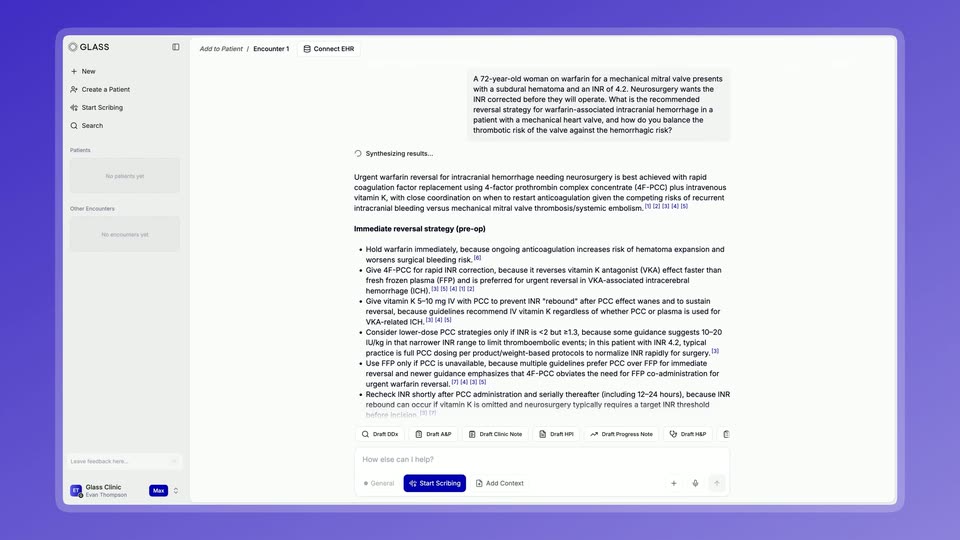
A white GLASS app card on a purple field streams a clinical answer: a summary paragraph, then bullet points and references type in line by line. At 8s the view zooms into the text as a dark caption pill with white text slides up at the bottom.
On-screen text: “Every response is grounded in primary evidence and peer-reviewed literature,”
Techniques: Kinetic type, UI zoom
Camera: Push in
A long clinical document scrolls downward, its lines overlapping mid-motion, while a dark rounded caption pill stays pinned at the bottom of the frame.
On-screen text: “is grounded in primary evidence and peer reviewed literature.”
Camera: Pan
A document view scrolls down through a bulleted clinical summary into a numbered references list, while three caption pills cycle at the bottom. A cursor glides to the Collapse references button and hovers it.
On-screen text: “is grounded in primary literature reviewed,”, “are independently reviewed,”, “verifiable in one click.”
Techniques: Cursor demo
Camera: Pan
A document screen with a references list and a row of draft buttons zooms out, widening the frame to reveal a left sidebar and a bottom input bar. The page scrolls up slightly as the view expands.
Techniques: UI zoom
Camera: Pull out
A light GLASS clinical interface fills the frame. The view zooms into the bottom toolbar, a specialty dropdown opens and Hospital Medicine is selected, the draft buttons swap, then it zooms back out. A dark rounded caption box at the bottom cycles through lines.
On-screen text: “Glass adapts to how you practice.”, “Select your specialty, and Glass tailors”, “scribing, insights, and documentation”
Techniques: UI zoom
Camera: Static
A medical AI interface, tilted in 3D on a purple field, rotates flat to face the viewer as a dark caption pill reads 'to your clinical setting.' and then fades out.
On-screen text: “to your clinical setting.”
Techniques: 3D mockup
Camera: Static
A flat GLASS clinical interface on a purple gradient opens on a long medical note, then zooms as the note clears to an empty Jane Doe encounter and an Encounter Overview panel slides in. The view pushes into the bottom command bar while subtitle captions track the voiceover.
On-screen text: “allows you to upload context, pre-chart, scribe,”, “and generate documentation for your encounter.”, “First, upload any context Glass should have awareness of.”
Techniques: UI zoom
Camera: Push in
A close crop on the Encounter Overview panel and file chips zooms out to reveal the whole GLASS window as a floating card on a purple gradient. The sidebar, patient entry and draft chips remain static beneath a fixed lower-third caption.
On-screen text: “First, upload any context Glass should have awareness of.”
Techniques: UI zoom, 3D mockup
Camera: Pull out
The camera pulls back from a close-up of the input bar, where the words Pre-chart ahead of your visit. are typed, to reveal the full Glass window with its sidebar, chat pane and encounter panel. A dark caption bar sits along the bottom.
On-screen text: “From there, pre-chart before seeing your patient.”
Techniques: UI zoom
Camera: Pull out
Flat front-on view of the GLASS scribing interface on a purple field. The pre-chart summary streams in line by line, the chat column collapses so the document fills the pane, and it scrolls through its sections. The frame then zooms to the input bar with the Scribe button.
On-screen text: “From there, pre-chart before seeing your patient.”, “Glass pulls in all available context”, “and produces a pre-encounter summary along with suggestions”, “for your visit.”, “When you're ready, start scribing.”
Techniques: UI zoom
Camera: Push in
A white “Ambient Scribing” document window fades in over blurred medical text that settles to flat purple. A blue waveform pulses with a recording timer counting up at the bottom, while a lower-third caption updates in sync.
On-screen text: “Glass listens to your patient conversation, captures”, “a full transcript, and surfaces”
Camera: Pull out
A two-column 'Ambient Scribing' note updates in place, checkboxes ticking and the right column gaining text above a purple wave. A gray caption bar at the bottom swaps phrases in time with the voiceover.
On-screen text: “a full transcript, and surfaces”, “real-time clinical insights:”, “suggested history questions, exam maneuvers,”, “emerging diagnoses, and next steps, as the visit unfolds.”
Techniques: Kinetic type
Camera: Pull out
A white modal dialog scales into the center over a dimmed medical record screen, listing draft-note buttons in a grid plus a context field and Close / Draft New buttons. White subtitle captions fade in at the bottom edge.
On-screen text: “After scribing, generate your”, “documentation in seconds.”, “Glass analyzes your transcript, uploaded context,”
Camera: Push in
A tilted interface mockup glows on a purple gradient; the right panel populates with a pre-chart summary while the center panel shows a submitting state, and a white caption in a dark bar sits at the bottom.
On-screen text: “Glass analyzes your transcript, uploaded context,”
Techniques: 3D mockup
Camera: Pull out
The Glass app screen on a purple field: a History & Physical note fills the right pane line by line, then the view scrolls the finished note and zooms into the document. A cut lands on the Pre-chart tab's file timeline. White captions on dark pills run along the bottom.
On-screen text: “and the medical literature to produce complete clinical notes”, “with evidence-based assessments,”, “treatment plans, and citations on every recommendation”, “ready for you to edit, sign, and attest.”, “Glass also generates”, “an encounter overview with a clinical summary,”
Techniques: UI zoom
Camera: Push in
The GLASS app window sits tilted in 3D perspective on a purple background as its document panel fills in from loading placeholders into a clinical summary. The view zooms into the right-hand document, holds, then pulls back to the full window. Dark caption pills swap at the bottom.
On-screen text: “actionable insights, and key details”, “updated as your visit progresses,”, “keeping you oriented at every step of the encounter.”
Techniques: 3D mockup, UI zoom
Camera: Pull out
A flat front-on view of a medical AI scribing interface on a purple background. The frame opens zoomed and soft, then pulls back to a sharp full window as a cursor hovers over the History and Physical card, then fades to black.
Techniques: UI zoom, Cursor demo
Camera: Static
Thin white lines on black draw and morph into an interlocking rosette of circles and rounded squares at center. The mark shifts left as GLASS HEALTH slides in beside it, settling into a centered lockup.
On-screen text: “GLASS HEALTH”
Techniques: Morph
Camera: Static