0:18
Explore
Wix Harmony: Big Game Commercial Extended 2026 | The New Way to Create
Wix Harmony · Feb 2026 · 0:56 · AI-annotated
produced John Truelove
- Length
- 0:56
- Scenes
- 37 · 1.5 s avg
- Product on screen
- 0:00
- Voiceover
- Yes
- Views
- 17M on YouTube
as of November 18, 2026
00:00:00 / 00:56:18
- Length
- 0:56
- Scenes
- 37 · 1.5 s avg
- Product on screen
- 0:00
- Voiceover
- Yes
- Views
- 17M on YouTube
as of November 18, 2026
Wix Harmony’s 0:56 launch film runs 37 scenes, about 1.5 s each. The product is on screen from the first frame. There is no explicit call to action; a voiceover carries the film. The video is built as three back-to-back user stories, each running the same loop: a translucent prompt box types the user's brief over live-action footage, a generation checklist ticks off, the finished page assembles in the editor, and a one-line request refines it. Pacing is brisk at about 36 cuts per minute, alternating locked-off live-action shots with UI close-ups, and the signature move is the typed prompt overlay that bridges the human and the interface.
Footage neededEstimated needs: 2 capture groups — your screens or recordings · 1 official logo — reused across the film · 26 filmed passages — shoot, supply or replace · 5 3D passages — build or supply
Is this your launch? to your site or press kit.
More like this

0:33

Airtable - Stop talking to a wall of predictive text and start doing real resear
Airtable · Productivity · Jan 2026
0:30

Introducing Instant Soundtracks
ElevenLabs · AI · Oct 2026
Similar soundtrack
Films whose music sounds like this one, voice left out
1:58

Hedra - Introducing Hedra Model Factory: an autonomous inference and training
Hedra · Electronic, cinematic hybrid
4:46
Introducing Galaxy Z Fold7 | Galaxy AI | Samsung
Galaxy Z Fold7 · Modern electronic
4:43

DJI - Introducing the DJI Mavic
DJI · Cinematic orchestral intro transitioning into high-energy electronic dance music
Wix Harmony: Big Game Commercial Extended 2026 | The New Way to Create, scene by scene
· 37 scenes as text
01 · Product intro · 0:00–0:01
A warm interior close-up of a woman's profile, with a second male profile briefly ghosted over it in a cross-dissolve. The white WIX logo holds centered on the face as the overlay fades out.
On-screen text: “WIX”
Camera: Static
02 · Demo · 0:01–0:03
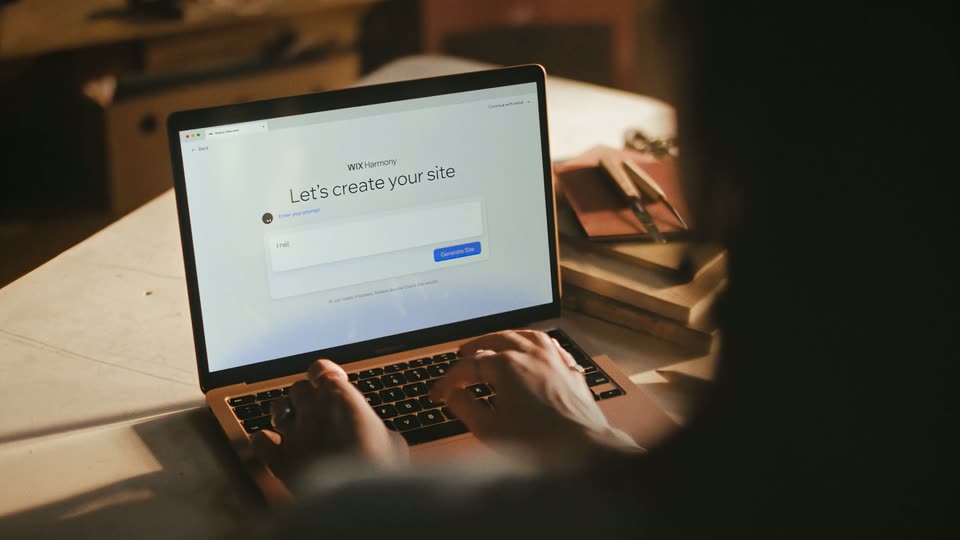
Over-the-shoulder, locked-off shot of a person typing on a laptop at a warm, sunlit desk. The screen shows the Wix Harmony prompt, Let's create your site, with a blue Generate Sito button. Hands type into the text field while books and a notebook rest to the right.
Camera: Static
03 · Demo · 0:03–0:04
A woman in a sunlit room types on a laptop at a desk while an overlay input box fills in with her prompt, word by word, beside a Generate Site button. The WIX wordmark scales in and the line Let's create your site holds below it.
On-screen text: “WIX”, “Let's create your site”
Techniques: Kinetic type, Masking
Camera: Static
04 · Demo · 0:04–0:05
A woman assembles a wooden chair in a dim workshop while a translucent prompt box overlays the frame. The sentence is typed out letter by letter with a blinking caret, and a Generate Site button sits below the box.
On-screen text: “I need a website for my handmade furniture business.”
Techniques: Kinetic type
Camera: Push in
05 · Demo · 0:05–0:07
A woman carves a wooden piece at a workbench in a workshop, framed mid-shot on a locked-off camera. A rounded prompt box overlays her, typing a request line by line, with a Generate Site button below it.
On-screen text: “I need a website for my handmade furniture business.”, “Each piece is unique, colorful, and ready to sell.”
Techniques: Kinetic type
Camera: Static
06 · Demo · 0:07–0:07
Filmed hands smooth a blue cloth on a workbench behind a translucent prompt box. The typed request fills in word by word to end with a blinking caret, while a Generate Site button rests at the lower right.
Techniques: Kinetic type
Camera: Static
07 · Demo · 0:07–0:08
A craftsman's hands rest on blue fabric over a workbench, blurred wooden spindles and a yellow tool behind. A rounded prompt box types out a request word by word, with a Generate Site button below it.
On-screen text: “I need a website for my handmade furniture business.”, “Each piece is unique, colorful, and ready to sell.”
Techniques: Kinetic type
Camera: Static
08 · Demo · 0:08–0:09
A woman in a dim workshop rubs her temple in profile, looking tired, while a rounded chat box with her website request and a Generate Site button is overlaid on the frame. A text caret blinks at the end of the prompt as the camera holds a locked-off medium shot.
Camera: Static
09 · Demo · 0:09–0:10
A dim close-up profile of a dark-haired woman in a workshop looks down, smiling. A thin rounded outline text box carrying her website request appears over her face, then fades away.
On-screen text: “I need a website for my handmade furniture business.”, “Each piece is unique, colorful, and ready to sell.”
Camera: Static
10 · Demo · 0:10–0:11
A hand types on a gold laptop keyboard in a warm, shallow-focus over-the-shoulder shot. The screen shows a Wix Harmony prompt: Let's create your site, with a typed brief about a furniture website and a blue Generate Site button; a cursor rests on the button.
Techniques: Cursor demo
Camera: Static
11 · Demo · 0:11–0:13
A woman in a workshop sets a blue upholstered chair with light wood legs down on a white pedestal, then walks out to the left. A site-generation progress panel with section labels sits on the right side of the frame.
Camera: Pull out
12 · Demo · 0:13–0:15
The Wix editor fills the frame as the Aria panel on the right ticks off sections while the hero text rubi marlowe fades in over a chair photo. The view then pulls back to reveal the editor on a laptop resting on a wooden desk.
Techniques: 3D mockup
Camera: Pull out
13 · Demo · 0:15–0:16
A laptop sits on a desk with blurred books behind it, its screen showing a Wix editor. A furniture website assembles itself: the heading scales in, product photos and a list of items slide into place, and the page scrolls down to a new section while a planning checklist fills the right panel.
Techniques: 3D mockup
Camera: Pull out
14 · Demo · 0:16–0:17
A laptop on a wooden desk shows the Wix editor with a rust-colored furniture site. The white serif headline “Soulful Design” scales up over a chair photo while two short lines slide in from the left and right.
Techniques: Kinetic type
Camera: Pull out
15 · Demo · 0:17–0:20
A woman in a dim pottery workshop looks down and breaks into a smile while white text holds at right. A thin-outlined speech bubble with her reply pops in below the first lines, then everything stays locked off.
On-screen text: “Your site is ready.”, “What's next?”, “Love it, now let's add some more soul.”
Camera: Static
16 · Demo · 0:20–0:22
A locked-off shot of a monitor showing a website canvas on the left and an AI chat panel on the right. The chat streams in two checked responses while the central chair photo shifts from a faded, desaturated frame to a warmer, more saturated composition with a lamp and colored blocks, then takes a selection outline. A cursor hovers over the canvas.
Camera: Static
17 · Demo · 0:22–0:22
Close-up of two hands on a gold laptop at a table. One hand rests on the trackpad with fingers moving, the other holds near the chin, a ring on each finger. Warm low light, shallow focus blurs a workshop background.
Camera: Static
18 · Demo · 0:22–0:23
A blue selection box labeled Text frames the bold brown words this is my way of while the footage behind it cuts from a blue cushion chair to a hand on wood to a magazine spread. A cursor arrow rests at the box's lower edge and a caption strip sits below.
On-screen text: “this is my way of”, “The Funky Den Chair: 70's rec vibes.”
Techniques: Cursor demo
Camera: Static
19 · Demo · 0:23–0:25
A design editor canvas shows a text box with a blue selection frame. The headline types in word by word in bold brown sans, then creating fades in below in italic serif. The box and cursor clear as the view pulls back over body copy and furniture photos.
On-screen text: “this is my way of”, “creating”
Techniques: Kinetic type
Camera: Static
20 · Demo · 0:25–0:28
A woman sits at a workbench in a hazy workshop, typing on a laptop showing her portfolio site. A caption box on the right reads “Perfect. Am I set?”, then “You're ready to go live.” appears below as the camera slowly pulls back.
On-screen text: “Perfect. Am I set?”, “You're ready to go live.”
Camera: Pull out
21 · Demo · 0:28–0:31
A mustached man in a brown jacket stands with crossed arms in a gallery of backlit shelves holding orange glassware, gazing upward. A rounded input bar fades in at the lower right and types the command with a blinking caret.
On-screen text: “I want to promote my new capsule”
Techniques: Kinetic type
Camera: Push in
22 · Demo · 0:31–0:32
Extreme close-up of a man in round glasses, lenses reflecting a yellow light fixture, against a blurred shop interior. A white-outlined input field overlays the lower right, typing out a prompt letter by letter with a blinking caret while mic and send icons sit below it.
Camera: Static
23 · Demo · 0:32–0:33
A locked-off shot of eyeglasses resting on lit shelves beside yellow and orange blocks. A rounded input box sits at lower right; its grey placeholder reads while a white prompt types out character by character behind a blinking cursor, with plus, mic and arrow icons below.
On-screen text: “I want to promote my new capsule”, “frame collection”
Techniques: Kinetic type
Camera: Pan
24 · Demo · 0:33–0:34
A locked-off shot of orange and pink eyeglasses resting on stacked stones, with a branded pouch in the foreground. A thin white frame outline draws around the glasses while a prompt box types a sentence, then a loading spinner card fades in at the center.
Camera: Static
25 · Demo · 0:34–0:36
A man in round glasses and a rust jacket leans over a laptop at a wooden table in a dimly lit eyewear showroom. A rounded card shows two photos of glasses while a bulleted list checks off line by line beside it, as the camera drifts slowly left.
On-screen text: “I want to promote my new capsule”, “frame collection”, “Organizing your images into a curated showcase”, “Arranging products into a storefront display”, “Preparing the collection”
Camera: Push in
26 · Demo · 0:36–0:38
A real laptop on a wooden counter in an eyewear shop shows a design tool with an Eyku storefront mockup. A hand rests on the trackpad as a bespectacled person leans into frame from the right while the camera pushes in.
On-screen text: “Organizing your images into”, “a curated showcase”, “Arranging products into a”, “storefront display”, “Preparing the collection”
Techniques: Kinetic type
Camera: Pull out
27 · Demo · 0:38–0:39
A family around a laptop showing an 'Earth needs you' page in a dark room; the live-action set morphs into a bright white geodesic dome where the same page appears on the laptop and on large wall screens.
Techniques: Morph, 3D mockup
Camera: Pull out
28 · Demo · 0:39–0:40
A dim, futuristic room with a circular ceiling holds two large vertical displays showing an Earth needs you webpage. Children and an adult sit on the floor, touching the screens, while glowing sphere lamps rest on pedestals. The camera holds a wide locked-off shot.
Camera: Static
29 · Demo · 0:40–0:41
Close profile of a woman with braids in a dim, blue-lit room, looking down at a glowing monitor while a warm lamp blurs in the background. The caption “Earth needs you” slides in over the shot and holds.
On-screen text: “Earth needs you”
Techniques: Kinetic type
Camera: Pull out
30 · Demo · 0:41–0:43
Over-the-shoulder shot of two people at a desk in a dim room. One points at a laptop screen showing a website editor with a globe image and a green heading. A second monitor glows softly in the background. The camera stays locked off.
Camera: Static
31 · Demo · 0:43–0:44
A dim room at night, a woman with braided hair and a child sit at desks facing two monitors showing a globe poster reading Earth needs you. An outlined prompt box in the upper left types out Add more colors, character by character.
On-screen text: “Add more colors,”
Camera: Static
32 · Demo · 0:44–0:46
Dim room: a child sits at right, an adult's shoulder fills the left foreground, a tablet behind shows an Earth graphic. A prompt box overlays the left, typing 'Add more colors, make it cartoony' letter by letter. Cut to a wider locked-off shot: a man sits cross-legged with a tablet, two large screens behind him display the same Earth canvas.
Techniques: Kinetic type
Camera: Pull out
33 · Demo · 0:46–0:48
A dim 3D lounge with two wall screens showing a webpage. The globe on the page morphs into a cartoon green landmass with flowers while the headline shifts to yellow. Stylized figures sit on the floor, one on a laptop, as two others stand and walk toward the screens.
Techniques: 3D mockup, Morph
Camera: Static
34 · Demo · 0:48–0:50
A hand slides in from the right and pinches the temple of green hexagonal glasses resting on a white stone block. A small tagline scales in over the plain olive backdrop.
On-screen text: “Earthneedsyou”
Camera: Pull out
35 · Demo · 0:50–0:51
A laptop mockup rests on a desk before a blurred office set. On its screen an eyewear website transitions from a New Arrivals hero showing glasses on a stone block to a Custom work page featuring a woman holding a chair.
Techniques: 3D mockup
Camera: Pull out
36 · Demo · 0:51–0:52
A laptop sits on a wooden desk, angled in 3D perspective, its screen showing a terracotta furniture portfolio page with a photo of a woman holding a blue chair and large italic serif lines around it. The camera slowly pushes in as the shallow focus blurs the books and pens on the desk.
Techniques: 3D mockup
Camera: Pull out
37 · Outro · 0:52–0:56
On a pale blue gradient, the WIX Harmony wordmark and the tagline below it wipe in from left to right with a soft gradient edge, then hold still in the center of a locked-off frame.
On-screen text: “WIX Harmony”, “The new way to create”
Techniques: Masking
Camera: Static