2:08


Leeroo Continuous Learning Agents
Leeroo · B2B · May 2025
GitHub · May 2025 · 1:56 · Full motion · AI-annotated
GitHub’s 1:56 launch film runs 19 scenes, about 6.1 s each. The product is on screen from the first frame and 2 features are revealed. The call to action lands at 1:44 (90% in), over a voiceover. The video is one continuous feature demo: it announces Agent Mode, walks through MCP setup and issue triage, then shows the agent fixing a validation bug and verifies the result in a phone simulator. Signature moves are smooth 3D camera moves (zooms, tilts, pans) between flat UI panels and a floating iPhone mockup over a blurred multicolor gradient, closing on a black card and a 3D logo animation.
Is this your launch? to your site or press kit.
Leeroo · B2B · May 2025
Boom AI · B2B · Oct 2025
Freesolo · B2B · May 2025
Films whose music sounds like this one, voice left out
Pinch · Speech with electronic sound effects
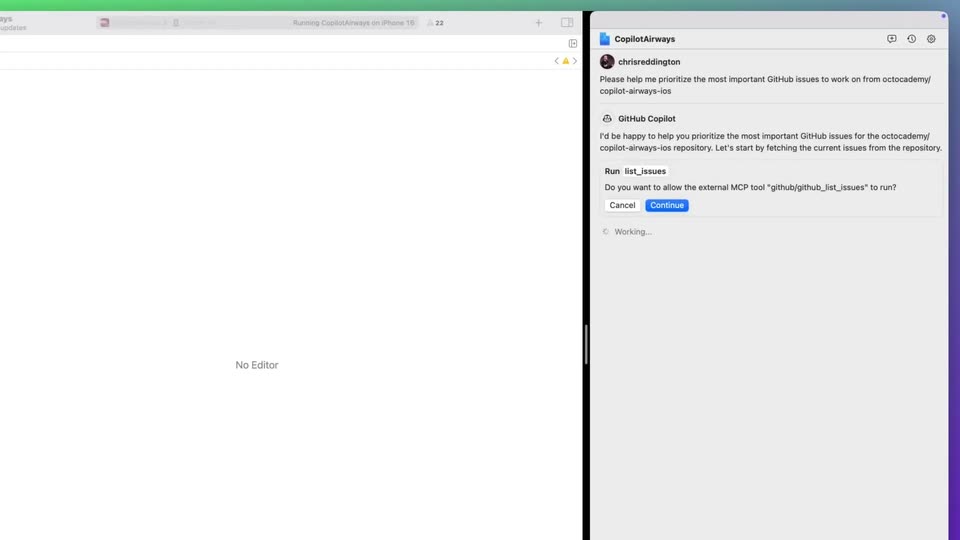
Xcode's Copilot chat pane fills the right side. The camera zooms in as the cursor clicks the Agent toggle and types a prompt about GitHub issues, then sends it. Copilot replies with a tool approval card; the cursor clicks Continue and the view zooms back out.
Techniques: UI zoom, Cursor demo
Camera: Pan
A macOS settings window for GitHub Copilot sits over a colorful abstract wallpaper. The cursor clicks the MCP tab, then the list of available tools scrolls down as the window scales up slightly before fading out.
Techniques: Cursor demo, UI zoom
Camera: Push in
A macOS settings window listing GitHub Copilot MCP tools floats centered over a colorful 3D abstract backdrop. It then slides left and shrinks, revealing a second IDE window on the right with a file tree sidebar and an empty editor pane.
Techniques: Split screen
Camera: Pull out
Two macOS windows sit side by side: a file explorer on the left, a Copilot chat on the right. The view zooms into the chat panel, where a markdown document lists two GitHub issues and a priority recommendation, then scrolls slightly down.
Techniques: UI zoom
Camera: Push in
A flat desktop editor window tilts into 3D perspective and slides left as a 3D iPhone mockup scales in at center, showing a flight search screen. The right-side AI panel stays in view.
Techniques: 3D mockup
Camera: Pull out
A phone simulator window sits centered on a blurred multicolor background. A cursor moves down and taps the My Booking tab, crossfading the screen from a flight search form to a find-booking form with red validation errors.
Techniques: Cursor demo
Camera: Static
A flat iPhone mockup of a Find Booking form sits centered on a blurred multicolor background, with red required-field errors under the confirmation code and last name inputs. In the final second the view pans right, pushing the phone to the edge and revealing a document window on the left.
Camera: Pan
A split screen shows an empty code editor beside a Copilot chat. A cursor types a long prompt into the chat box, switches to Agent mode, and sends it; the panel scrolls up as Copilot's reply and a file-editing block stream in.
Techniques: Split screen, Cursor demo
Camera: Static
A code editor and an AI chat panel share the screen. The assistant's reply streams into the right panel line by line over the static Swift code on the left, then a replace dialog opens and the cursor moves to its Cancel button.
Techniques: Cursor demo
Camera: Pan
A split view holds a Swift code editor on the left and an agent chat on the right; the left panel swaps to a tilted iPhone mockup showing an app home screen while the chat stays static.
Techniques: Split screen, 3D mockup
Camera: Pan
A front-on iPhone 16 home screen fills a simulator window over a blurred multicolor gradient. The device eases slightly larger while a mouse cursor fades out at the left edge.
Techniques: UI zoom
Camera: Static
A centered phone mockup holds a white Copilot Airways logo over a sunset wallpaper. The splash screen cross-fades into a flight search form as origin, destination and date fields fill in, while the logo stays locked in the center.
Camera: Static
Centered iPhone mockup on a blurred multicolor background. The screen switches from a search form to Find Booking; the camera pushes in while a cursor types a code and name, taps the blue button, and a flight card appears as the cursor moves to the close X.
Techniques: UI zoom, Cursor demo
Camera: Push in
A phone mockup in 3D perspective displays a Find Booking form with a confirmation code and last name field. A cursor hovers at the right edge while the interface text resolves from a doubled overlay into a clean layout, set against a blurred multicolor gradient.
Techniques: 3D mockup
Camera: Static
A front-facing iPhone mockup on a blurred multicolor backdrop shows a booking form. A cursor backspaces the confirmation code, a red format error appears under the field, then the view zooms out to reveal the simulator window frame.
Techniques: Cursor demo, UI zoom
Camera: Pull out
A black screen holds two centered lines of text for the full duration: a gray prompt above a white URL. The type stays static with no motion, serving as the closing call to action.
On-screen text: “Learn more at”, “gh.io/copilot/xcode”
Camera: Static
A glowing purple-blue rounded 3D form with two cyan dots drifts in from the upper left, blurred, then settles at center on a black field. A thin teal light trail trails behind it, looping into a loose curve below the form.
On-screen text: “Learn more at”, “gh.io/copilot/xcode”
Techniques: Speed ramp
Camera: Pull out
On a black field, a small purple glowing logo with two round eyes settles in the center, then flattens to a white outline as the wordmark GitHub Cop fades in to its right.
Techniques: Morph
Camera: Static
A white GitHub Copilot logo and wordmark sit centered on a black background. The lockup eases slightly into alignment in the first moment, then holds still for the rest of the shot.
On-screen text: “GitHub Copilot”
Camera: Static