3:01

Introducing Enterprise AppGen: AI-Assisted Development from Retool
Retool · Developer tools · Oct 2025
GitHub’s 3:54 launch film runs 21 scenes, about 11 s each. The product shows up at 0:08 and 2 features are revealed. The call to action lands at 3:47 (97% in), over a voiceover. The video alternates between a presenter in front of autumn foliage and screen recordings of the Copilot interface, moving from a problem statement to a feature demo to an animated diagram deep dive. Its signature moves are zoom-in/zoom-out reframes on the UI, red highlight boxes marking model selections, and self-drawing workflow diagrams on soft gradients.
Is this your launch? to your site or press kit.
Retool · Developer tools · Oct 2025
primitive · B2B · Oct 2026
Replit · Developer tools · Sep 2024
Films whose music sounds like this one, voice left out
DroneTector · Corporate tech promotional voiceover
Prized · Tech advertisement with a jazz piano outro
A bearded man in an olive green bomber jacket sits before red and yellow autumn foliage, speaking to camera and gesturing with both hands. The shot fades up from black.
Camera: Static
A man in an olive bomber jacket stands centered against a blurred wall of orange and red autumn leaves. He speaks to the camera, smiling and gesturing with both hands, in a static medium close-up.
Camera: Static
A man in an olive-green bomber jacket stands centered in a medium shot in front of a dense wall of orange and red autumn leaves. He speaks directly to the camera, gesturing with both hands, while the camera holds a static frame.
Camera: Static
A man in a green bomber jacket speaks to the camera, framed from the chest up against a dense backdrop of orange and red autumn foliage. He smiles and gestures slightly as the static shot holds on his face.
Camera: Static
A screen recording of the GitHub Copilot app. The cursor moves to the Windows taskbar and clicks the Clipboard Next icon, and a Clipboard Next popup slides up over the interface, showing the current and next snippets with a Resume button.
Techniques: Cursor demo
Camera: Static
A Demo queue window lists numbered terminal commands beside a blue Resume button. The cursor drifts across the panel, then the window closes to reveal the main chat screen with a GitHub mark and three suggestion cards.
Techniques: Cursor demo
Camera: Static
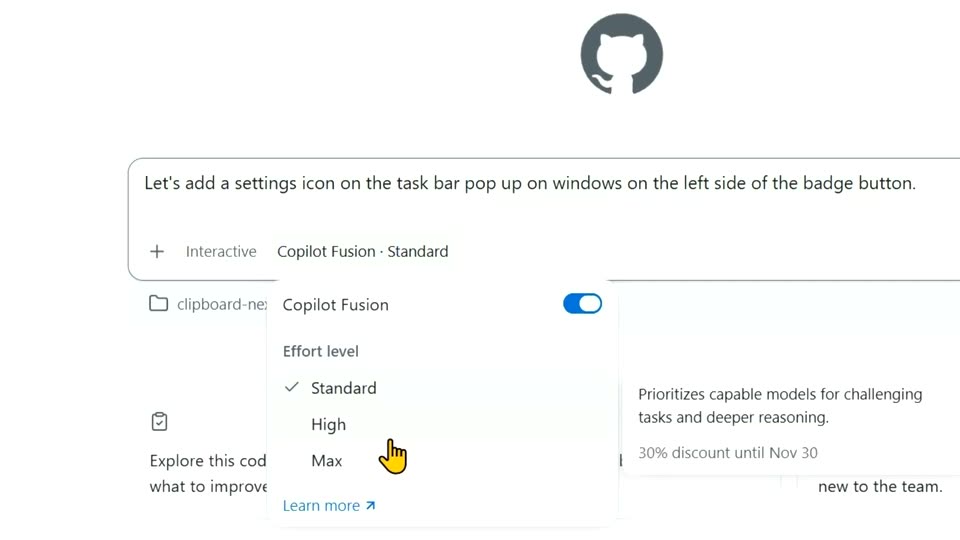
A screen capture of the GitHub Copilot app shows a prompt typed into the input field. The view zooms in as the cursor opens the model menu, flips on Copilot Fusion, and hovers the effort levels Standard, High, Max, each updating a side panel.
Techniques: UI zoom, Cursor demo
Camera: Push in
A white Copilot session screen: the cursor sends a prompt, status lines update and a timer counts up. A red outline highlights the line where Copilot Fusion selects GPT-6 Luna; the cursor selects it and opens a copy menu, then a Thinking note and branch rename appear.
Techniques: Cursor demo
Camera: Pull out
On a white GitHub Copilot screen, a text caret types a prompt into the input field, a phrase flashes highlighted, then a hand cursor clicks the round send button and the field empties.
Techniques: Cursor demo
Camera: Static
A white Copilot session window updates its status lines as the session starts, then a red rounded box highlights the model-selection line while a cursor selects the text and opens a copy menu. The view zooms out to reveal the full workspace with a left sidebar.
Techniques: Cursor demo, UI zoom
Camera: Pull out
A two-panel chat UI on a soft gradient background. A cursor opens the Copilot Fusion menu, selects the Standard effort level, then types two prompts. The right panel analyzes each task, fills a complexity meter, highlights the routed model, and replies appear in the chat.
Techniques: Cursor demo, UI zoom
Camera: Static
A Copilot window shows a typed prompt. The cursor picks Plan mode and sets Copilot Fusion effort to High, then sends it. The view zooms into the prompt bar, back out as the session starts, and in again on a red-boxed Main pass line.
Techniques: UI zoom, Cursor demo
Camera: Static
A full app window cuts to a clean two-panel mockup on a soft gradient. The frame zooms onto the chat bar, where the cursor clicks the model selector and a dropdown of model names with colored dots slides open.
Techniques: UI zoom, Cursor demo
Camera: Push in
A cursor moves over a model list and an effort-level panel, then clicks High. The view reframes onto a workflow card labeled Single, where a flow diagram draws itself: a prompt arrow feeds a model node that loops on tools, checks off, and hands off to an Answer node.
Techniques: Cursor demo, UI zoom
Camera: Pull out
A white Copilot Fusion panel on a soft gradient. A workflow diagram builds left to right: Prompt feeds a First pass node, then a Quality check node; each spinner turns into a green check, and curved Accept and Escalate branches draw to an Answer pill and a Fresh start node.
Camera: Static
A white Copilot Fusion card, Critique tab active, animates a multi-model flow diagram: boxes labeled Drafts, Revises, Reviews, Approves connect with arrows, a REQUEST REVISION loop, and an APPROVE arrow to a green Answer pill. The frame then pulls back to reveal a Copilot chat panel on the left.
Camera: Pull out
A prompt is typed into the Copilot chat and sent, then the Critique workflow on the right builds a draft, review, revise chain of agent cards. The plan list updates with orange review notes and green fixes, and the view pulls back to a full desktop at the end.
Techniques: Split screen, UI zoom
Camera: Static
The Copilot chat panel in VS Code zooms in on the session transcript. A cursor expands the review pass row to reveal a score and feedback paragraph, drags to select a sentence, then collapses the row. The view zooms back out to the full window as the session list refreshes.
Techniques: UI zoom, Cursor demo
Camera: Pan
A smiling man in a green jacket fades in at the center over an autumn leaf backdrop, superimposed on a semi-transparent product interface showing a Named queue library plan and session list. The UI text stays legible as a ghosted overlay while the presenter emerges for the sign-off.
Camera: Static
A man in a green bomber jacket sits centered before a wall of orange and red autumn leaves, talking to the camera and gesturing with both hands. Faint white code text from the previous scene fades out over the first frame.
Camera: Static
A man in an olive green bomber jacket stands centered before a dense wall of red, orange and yellow autumn leaves. He speaks and smiles toward the camera, holding a small white object in his hand at the lower right. The medium close-up stays static.
Camera: Static