
3:51
Explore
00:00:00 / 04:21:05
- Length
- 4:21
- Scenes
- 53 · 4.9 s avg
- Product on screen
- 0:00
- Features shown
- 7
- Call to action
- 4:04 · 94%
- Voiceover
- Yes
- Views
- 535K on YouTube
as of November 22, 2026
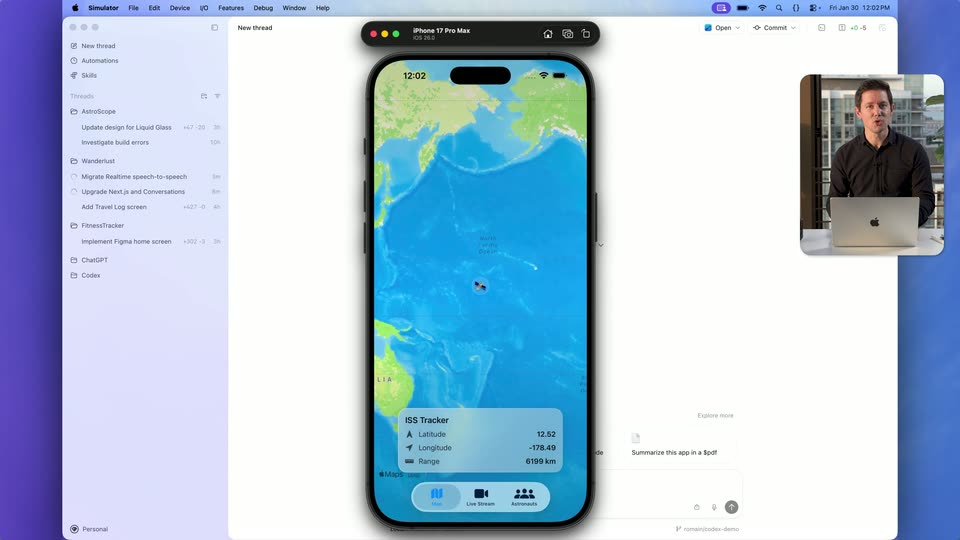
OpenAI’s 4:21 launch film runs 53 scenes, about 4.9 s each. The product is on screen from the first frame and 7 features are revealed. The call to action lands at 4:04 (94% in), over a voiceover. The video alternates a locked-off presenter in a bright office with screen recordings, using picture-in-picture to keep the speaker visible during interface demos. Pacing is brisk around 123 BPM, with frequent zooms into panels, blur transitions, and floating 3D device mockups to mark each feature.
Footage neededEstimated needs: 11 capture groups — your screens or recordings · 1 official logo — reused across the film · 13 filmed passages — shoot, supply or replace · 2 3D passages — build or supply
Is this your launch? to your site or press kit.
More like this
1:55


Asakana: Automating sales and the entire back office for food distributors
Asakana · B2B · Oct 2026
2:00

Introducing the Codex app, scene by scene
· 53 scenes as text
01 · Product intro · 0:00–0:08
A man in a black shirt sits at a white desk with a closed silver laptop, a black mug, and a phone, gesturing as he speaks. A city skyline and large potted plants frame the window behind him. A white lower-third caption fades in at the bottom.
On-screen text: “Romain Huet”, “Head of Developer Experience at OpenAl”
Camera: Static
02 · Product intro · 0:08–0:16
A man in a black shirt sits at a table behind a silver laptop, speaking to the camera and gesturing with both hands. Plants flank him and a city street shows through a large window. The frame is locked off; he glances down at the laptop near the end.
Camera: Static
03 · Demo · 0:16–0:24
The Codex app window fills the frame, then zooms into the left sidebar as a cursor moves down the thread list, hovering each project and its subtasks. A small video of the presenter at a desk sits top right. The view zooms back out at the end.
Techniques: UI zoom, Cursor demo
Camera: Push in
04 · Demo · 0:24–0:28
A Codex app window with a thread sidebar and a central panel reading 'Let's build AstroScope'. The view zooms into the panel, the cursor drifts, then zooms back out. A presenter at a laptop sits in a small video inset at the top right.
Techniques: UI zoom, Cursor demo
Camera: Static
05 · Demo · 0:28–0:29
A CodeX app window fills the frame, its empty state showing a small icon and the centered line Let's build AstroScope, with a thread list on the left. A man at a laptop sits in a small video inset at the top right. The center text scales slightly.
Camera: Static
06 · Feature reveal · 0:29–0:35
A macOS window shows a chat app sidebar and a phone simulator with a live map and an ISS Tracker card, while a video inset of a man at a laptop waves and gestures top right. The coordinates tick over, then the view zooms into the phone.
Techniques: UI zoom
Camera: Push in
07 · Feature reveal · 0:35–0:45
A light Codex screen shows three suggestion cards and a prompt bar, with a small inset video of a man at a laptop top right. A large cursor clicks the mic, the bar becomes a waveform, then the cursor moves to send as the spoken prompt fills the field.
Techniques: Cursor demo
Camera: Pull out
08 · Demo · 0:45–0:47
A Codex app window fills the frame, its left sidebar listing threads and a prompt line at the top. A picture-in-picture video of a man at a laptop sits in the top-right corner. The interface resolves from a soft blur into sharp focus across the shot.
Camera: Static
09 · Demo · 0:47–0:55
A white coding-agent interface shows a prompt bubble at top and a status list on the left that fills with file names, while a small video of a presenter sits in the top right. A cursor glides in and hovers a thread row, revealing action icons.
Techniques: Cursor demo
Camera: Static
10 · Demo · 0:55–0:59
A two-pane Codex window shows a thread list on the left and an activity feed with a small video on the right. It reframes to a single column with a Thinking line and a four-item task checklist, two items checked, while a cursor hovers near the top.
Techniques: Cursor demo, UI zoom
Camera: Pan
11 · Demo · 0:59–1:01
A task list and a scrolling activity log sit side by side in a light interface. A large arrow cursor hovers over the highlighted row for migrating realtime speech-to-speech while log entries on the right scroll upward.
Techniques: Cursor demo
Camera: Pan
12 · Demo · 1:01–1:05
A prompt bubble tops a white activity log that starts blurred and snaps into focus, then scrolls down past repeated search and tool-call lines to a Thinking line at the bottom.
Camera: Pan
13 · Problem · 1:05–1:15
A man in a black shirt sits at a desk with a silver laptop and a black OpenAI mug, framed by plants and a city window. He glances down, then looks up and talks to camera, gesturing with both hands. Static medium shot.
Camera: Static
14 · Problem · 1:15–1:19
A man in a dark button-up shirt sits at a laptop in a high-rise office, framed by two leafy plants and a city view through floor-to-ceiling windows. He talks to camera with open-hand gestures, then glances down at the laptop.
On-screen text: “OpenAl”
Camera: Static
15 · Feature reveal · 1:19–1:29
A coding assistant chat shows a prompt bubble and a list of file actions that grows row by row, with a small video of a presenter at a laptop on the right. The view then scrolls down to a summary paragraph, bullet list, and a changes card.
Camera: Pan
16 · Feature reveal · 1:29–1:37
A code-review interface opens on an agent chat listing changed Swift files, then settles into a three-panel diff view. The cursor clicks files in the right tree to swap the green diff, then the frame zooms in as a Request change comment box pops up over a line.
Techniques: Cursor demo, UI zoom
Camera: Pull out
17 · Feature reveal · 1:37–1:49
A screen recording of the Codex app blurs between a Swift file, the source-control panel, and the full window. A cursor hovers over the Commit and Open buttons before the terminal shows the build running.
Techniques: Cursor demo, UI zoom
Camera: Pull out
18 · Demo · 1:49–1:59
A man in a black shirt sits behind a silver laptop at a desk, gesturing with both hands as he speaks. He faces a window with a city view, framed by leafy plants on both sides, with a black mug on the desk. The camera stays locked off.
Camera: Static
19 · Demo · 1:59–2:02
A Mac desktop shows an iPhone simulator on a map app with an ISS Tracker card. A cursor taps the APOD tab, switching the screen to a Picture of the Day view with a loading spinner. A video call window on the right shows a man gesturing.
Techniques: UI zoom, Cursor demo
Camera: Push in
20 · Demo · 2:02–2:05
A 3D iPhone mockup floats centered over a static desktop UI, its screen showing the AstroScope Picture of the Day with a nebula image and caption. The phone's content scrolls up to reveal the article text, while a terminal and a small presenter video sit behind it.
Techniques: 3D mockup
Camera: Static
21 · Demo · 2:05–2:08
A man in a black shirt sits behind a white desk with a silver laptop, speaking to camera and gesturing with both hands. A black mug and leafy plants flank him against a window view of city buildings.
Camera: Static
22 · Demo · 2:08–2:11
A browser window shows a fitness tracker dashboard titled Today's Progress, with three stat cards and a recent activity list. A cursor hovers at the edge of the Steps card. A small picture-in-picture video of a presenter at a laptop sits in the top right corner.
Camera: Static
23 · Demo · 2:11–2:13
A browser window displays a fitness tracker dashboard, then cuts to a Codex new-thread screen reading Let's build FitnessTracker. A frosted app-icon dock fades out across the center as a cursor moves to the send button, and a small webcam feed of the presenter stays in the top-right corner.
Techniques: Cursor demo
Camera: Static
24 · Feature reveal · 2:13–2:18
A man in a black shirt sits at a desk before a city-window backdrop, talking and gesturing, with a MacBook and black OpenAI mug on the desk; the shot cuts to the Codex interface showing a Let's build prompt and a cursor on the send button.
Techniques: Cursor demo
Camera: Static
25 · Feature reveal · 2:18–2:23
The view zooms into the top-right corner of the Codex app as a cursor clicks a pop-out icon. The conversation detaches into a floating window that appears centered over the blurred app, then the cursor hovers the pin icon, opening a small tooltip.
Techniques: UI zoom, Cursor demo
Camera: Static
26 · Feature reveal · 2:23–2:26
A fitness dashboard fades in from a ghosted copy as its green, orange and pink goal bars fill to their values, while a Codex chat window settles on the right with a blinking text cursor in the prompt field.
Techniques: Cursor demo
Camera: Push in
27 · Feature reveal · 2:26–2:32
A close-up of a chat panel shows a voice waveform animating and a timer counting up as the cursor hovers the mic button; a “Transcribe and send” tooltip appears. The view zooms out to reveal the full dashboard with three progress cards and the panel docked bottom right.
Techniques: Cursor demo, UI zoom
Camera: Pull out
28 · Feature reveal · 2:32–2:36
A man in a black shirt sits at a desk with a silver laptop, gesturing with both hands as he speaks. Leafy plants and a window showing city traffic frame him. A black mug rests on the desk. At the end he looks down at the laptop.
Camera: Static
29 · Feature reveal · 2:36–2:38
A health dashboard screen shows three stat cards under the heading Today's Progress. The Steps bar fills from 9,208 to 10,000 and turns green, while the Calories bar climbs from 1,123 to 1,568.
On-screen text: “OpenAI”
Camera: Static
30 · Feature reveal · 2:38–2:41
A man in a black shirt sits behind a silver laptop, talking to camera and gesturing with both hands before opening his left palm. A city skyline fills the window behind him, plants frame the shot, and a black OpenAI mug sits at the lower left.
Camera: Static
31 · Feature reveal · 2:41–2:47
A cursor hovers over the Skills item in the app sidebar as the sidebar fades out and the Skills page fills the frame. The page, headed Skills with the tagline Give Codex super powers, scrolls slowly down through installed and recommended skill cards, then blurs out.
Techniques: Cursor demo, UI zoom
Camera: Pull out
32 · Feature reveal · 2:47–2:54
A coding assistant UI shows a project sidebar and a chat log of tool calls. The view blurs and zooms into the chat panel; a cursor hovers over the Figma prompt and link, then a row of app icons slides up from the bottom.
Techniques: UI zoom, Cursor demo
Camera: Pan
33 · Feature reveal · 2:54–2:55
A chat agent interface shows a prompt bubble about building a Figma home screen, with tool-call logs below and a macOS dock at the bottom. The view then zooms out with motion blur to reveal the generated Today's Progress web page with three metric cards.
Techniques: UI zoom
Camera: Pull out
34 · Feature reveal · 2:55–2:56
A fitness tracker dashboard appears in a tilted 3D perspective on a blue gradient background. The page settles from a brief doubled-text transition, and a cursor hovers near the top navigation bar.
Techniques: 3D mockup, Morph
Camera: Pull out
35 · Feature reveal · 2:56–3:06
A Figma canvas shows a Fitness Tracker design with desktop and mobile panels beside a React code panel, while a small video of a man at a laptop sits in the top right. The view zooms into the code block and a cursor clicks through the interface.
Techniques: UI zoom, Cursor demo, Speed ramp
Camera: Push in
36 · Feature reveal · 3:06–3:08
A static close-up of a code panel listing import statements and conversion instructions in gray monospace type, with a bold black header line and a black mouse cursor hovering at the top right.
Camera: Pull out
37 · Feature reveal · 3:08–3:09
A light interface list of tool calls and file edits sits static, with a summary paragraph pinned at the bottom. A black arrow cursor hovers near the top row and drifts slightly.
Techniques: Cursor demo
Camera: Static
38 · Feature reveal · 3:09–3:18
A man in a black shirt sits at a desk with a MacBook in front of him, gesturing as he speaks, framed by houseplants and a window showing a city skyline. He glances down at the laptop and back to camera. The camera stays locked off.
Camera: Static
39 · Feature reveal · 3:18–3:20
A flat Codex app window shows the Skills page, with a left sidebar of threads and a right panel listing installed and recommended skills. A cursor rests over the sidebar, then the whole interface blurs out for a transition.
Camera: Pan
40 · Feature reveal · 3:20–3:23
A Mac app window shows a skills list; a cursor taps the dark New skill pill and the view crossfades to an empty new-thread screen. A thread sidebar fades in at left as a terminal icon, Let's build, and FitnessTracker slide and scale into the center.
Techniques: Cursor demo
Camera: Pull out
41 · Feature reveal · 3:23–3:24
A white app screen: the centered headline “Let's build” with “FitnessTracker” beneath it slides up and scales out, leaving the prompt bar with the purple “Skill Creator” chip and the Code, GPT-5.2-Codex and Medium dropdowns.
On-screen text: “Let's build”, “FitnessTracker”
Techniques: Kinetic type
Camera: Push in
42 · Feature reveal · 3:24–3:29
A man in a dark shirt sits at a white desk behind a closed laptop, talking and gesturing with his right hand. A window with a city skyline and leafy plants frame him, and a black mug with the OpenAI logo rests at the left.
On-screen text: “OpenAl”, “Let's build”, “FitnessTracker”
Camera: Static
43 · Feature reveal · 3:29–3:31
A macOS Codex window shows the Skills page with installed and recommended skill lists. A white card with a cloud icon and the words Let's build FitnessTracker fades out over the center of the screen, revealing the right column with a brief motion blur.
Camera: Push in
44 · Feature reveal · 3:31–3:32
A cursor clicks the Automations tab in the left sidebar, and the main panel updates to show a list of scheduled tasks with icons and descriptions.
Techniques: Cursor demo
Camera: Push in
45 · Feature reveal · 3:32–3:35
A product page under a clock icon shows the heading “Let's automate” above a grid of task cards. The grid scrolls up to reveal more cards while a cursor hovers over one, highlighting it with a border.
Techniques: Cursor demo
Camera: Pan
46 · Feature reveal · 3:35–3:40
A Create automation modal floats over a blurred template list. The Name field reads Issue triage. A cursor clicks the Workspaces field, a dropdown opens, and FitnessTracker is picked as a chip. The screen then wipes white to an empty state showing a cloud icon and No unread automations.
Techniques: Cursor demo
Camera: Static
47 · Feature reveal · 3:40–3:43
A tilted macOS app window shows an empty Automations panel. A cursor moves up and clicks the Issue triage row, opening an Edit automation dialog, then the view zooms into the dialog.
Techniques: 3D mockup, Cursor demo, UI zoom
Camera: Push in
48 · Feature reveal · 3:43–3:43
A close-up of the white Edit automation dialog zooms out to reveal the full Codex app window, the thread list on the left and a video thumbnail on the right.
Techniques: UI zoom
Camera: Static
49 · Feature reveal · 3:43–3:50
The Codex app window fills the frame, then the view reframes down to the prompt bar and three suggestion cards. A cursor glides to the Worktree tab and selects it, while a small video of a presenter at a laptop stays pinned in the top right corner.
Techniques: UI zoom, Cursor demo
Camera: Push in
50 · Feature reveal · 3:50–3:57
A man in a black shirt sits at a desk before a window showing a city skyline, speaking and gesturing with both hands. A closed laptop and a black mug sit on the desk, framed by leafy plants on either side. The camera holds a static medium shot.
Camera: Static
51 · Feature reveal · 3:57–4:04
Codex interface with three suggestion chips and a prompt bar; a cursor clicks the Cloud tab and a tooltip reads Work in cloud environment. A presenter in a small upper-right inset talks at his laptop, then the UI fades to white.
On-screen text: “OpenAI”
Techniques: Cursor demo, Split screen
Camera: Static
52 · CTA · 4:04–4:19
A man in a black shirt stands behind a white table holding a closed MacBook, a black mug and a phone on a stand. He gestures with both hands while speaking to the camera. Large plants and a city window frame the locked-off shot.
Camera: Static
53 · Outro · 4:19–4:21
A black line-drawn knot logo with a hexagon at its center sits on a plain white field. The mark scales up from a small size to a large one, its strokes thickening as it grows, then holds still.
On-screen text: “OpenAI”
Camera: Static