1:03

A Fresh Look for Gem | UI Animation & Sound Design
Gem · Sep 2026
Neo AI · Jul 2025 · 3:51 · AI-annotated
Neo AI’s 3:51 launch film runs 48 scenes, about 4.8 s each. The product shows up at 0:09 and 8 features are revealed, with social proof. The call to action lands at 3:20 (87% in), over a voiceover. The video is built as a founder-led walkthrough that alternates talking-head segments, frosted 3D card reveals, and dark UI screen recordings, moving through three labeled pipeline phases before closing on architecture diagrams and a waitlist card. Its signature moves are white cards that dolly in and out of focus on a soft gray field, plus particle fly-throughs and corridor pushes that punctuate each phase transition.
Is this your launch? to your site or press kit.
The frame holds on solid black, then a handful of faint dots fade in at scattered positions across the screen.
Techniques: Particles
Camera: Static
A white field with a faint grid and scattered dots holds, then a washed-out shot of people seated at desks with laptops fades in at low opacity. The pace is slow and static.
Camera: Static
A white two-column comparison: left lists The Superintelligence Industrial Complex with three checkmark bullets over a cut-out photo of three people at laptops; right lists NEO with three bullets over one person at a laptop. Headlines and bullets fade in line by line as the stock footage loops.
On-screen text: “The Superintelligence Industrial Complex”, “$100M Signing Bonus”, “2 Months”, “Army of PhDs”, “NEO”, “One Engineer”, “One Day”, “Full ML Pipeline”
Techniques: Kinetic type, Split screen
Camera: Static
Five white cards naming ML pipeline stages resolve from blur into 3D perspective on a gray field as the camera tracks along them; dotted lines link the row to a glass NIO tile that fades in. It cuts to a presenter in a black sweater on white.
Techniques: 3D mockup, Parallax
Camera: Static
A man in a black sweater stands centered on a plain white background, speaking and gesturing to camera. A white name caption fades in at the lower right, then four black icon-and-text lines appear one after another in the upper left and fade out.
On-screen text: “Saurabh Vij”, “Founder and CEO, NEO”, “Cleans data”, “Engineers Features”, “Finds, Trains, Evaluates”, “Deploys to production”
Techniques: Kinetic type
Camera: Static
A dark chat screen shows a prompt typed letter by letter into the bottom input bar, then the send icon flashes blue as the view scrolls up to reveal the assistant's bulleted plan. A cursor rests on the send button.
Techniques: Cursor demo
Camera: Pull out
A dark IDE window opens on a chat panel where an agent outlines an object-detection task, then the frame pulls back to reveal the full editor with a file explorer and command list on the right.
Techniques: UI zoom, Speed ramp
Camera: Pull out
A dark product interface fills the frame. On the left, a chat log between @User and @Neo scrolls upward, revealing new messages as Neo breaks the task into phases. On the right, a File Explorer panel with a placeholder graphic and shortcut list stays static.
Camera: Static
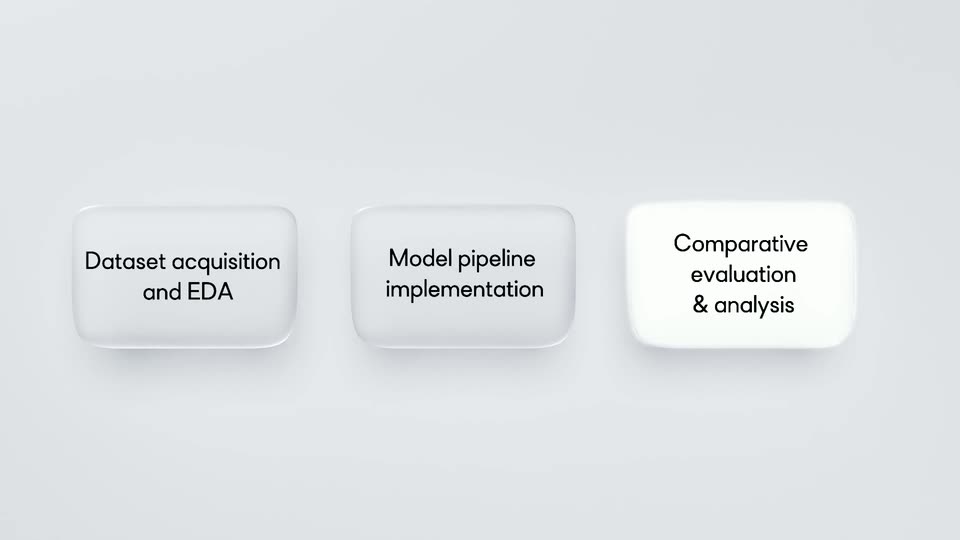
Three white rounded cards with dark labels float on a light gray field. The right card begins blurred and low, then all three align in a row. A soft highlight sweeps left to right, brightening each card in turn.
On-screen text: “Dataset acquisition and EDA”, “Model pipeline implementation”, “Comparative evaluation & analysis”
Techniques: Parallax, Light sweep
Camera: Static
Three white rounded cards with phase labels sit on a light gray field. The camera dollies in on the left card, which sharpens and grows while the others blur and slide out of frame.
On-screen text: “Dataset acquisition and EDA”, “Model pipeline implementation”
Techniques: Parallax, UI zoom
Camera: Static
A white rounded card carrying the black title sits on a pale gray field. The frame drifts slowly leftward, so the card slides right and the soft edge of a second card emerges at the right margin.
On-screen text: “Dataset acquisition and EDA”
Camera: Static
A dark product UI split into two panels. Left: a chat feed scrolls up, revealing @Executor execution logs and dataset summary cards. Right: a file explorer tree expands step by step from the data folder to nuScenes-aws subfolders while a cursor hovers over each entry.
Techniques: Split screen, Cursor demo
Camera: Pan
Three frosted white rounded cards with soft drop shadows sit on a pale gray gradient, each labeling a pipeline phase. The camera slowly pushes in on the center card, Model pipeline implementation, until the outer cards crop off the frame edges.
On-screen text: “Dataset acquisition and EDA”, “Model pipeline implementation”, “Comparative evaluation & analysis”
Techniques: UI zoom
Camera: Static
A row of white rounded 3D tiles drifts horizontally across a light gray field. The center tile, printed with “Model pipeline implementation,” holds focus while partial tiles pass at the frame edges, with soft motion blur at the start and end.
On-screen text: “Model pipeline implementation”
Techniques: 3D mockup
Camera: Static
The dark IDE splits into an agent chat panel left and a code editor right. The chat scrolls through execution logs and task cards for an ML pipeline while the Python file and file tree hold still. The view then zooms into the left panel's task cards.
Techniques: UI zoom
Camera: Push in
A dark IDE interface fills the frame, split into a chat log on the left and a code editor with file tree on the right. The chat scrolls upward through messages about training Faster R-CNN and RT-DETR for 50 epochs while the Python file scrolls to reveal its configuration block.
Techniques: Split screen
Camera: Pull out
A dark IDE fills the locked-off frame, its left panel listing generated artifacts and file paths while the right side shows a file explorer tree and a Python training script. A large three-line headline, Comparative evaluation & analysis, scales in over the interface.
On-screen text: “Comparative”, “evaluation”, “& analysis”
Techniques: Kinetic type
Camera: Static
Three white rounded tiles with beveled edges and soft drop shadows float on a light gray background, each holding a centered black label. The tiles and their text pulse with a subtle, staggered scale.
On-screen text: “Dataset acquisition and EDA”, “Model pipeline implementation”, “Comparative evaluation & analysis”
Techniques: Kinetic type
Camera: Static
A row of three frosted-glass cards with stage labels sits on a light gray field. The camera tracks right and pushes in, reframing onto the right card, “Comparative evaluation & analysis”, which scales up to fill the center.
On-screen text: “Dataset acquisition EDA and EDA”, “Model pipeline implementation”, “Comparative evaluation & analysis”
Techniques: 3D mockup
Camera: Static
A white 3D rounded card with a soft shadow sits in perspective on a light gray field. Black sans-serif text on its face reads Comparative evaluation and analysis. The card drifts slowly right while the text scales up, frame locked-off.
On-screen text: “Comparative evaluation & analysis”
Techniques: 3D mockup, Kinetic type
Camera: Static
A dark product UI shows a chat panel with an execution summary on the left and a file explorer on the right. A cursor clicks comparative_analysis_report.pdf, which opens as a tab. Then the words Comparative evaluation & analysis scale in large over the interface.
On-screen text: “Comparative”, “evaluation”, “& analysis”
Techniques: Cursor demo, Kinetic type
Camera: Static
A dark IDE-style screen shows an evaluation report scrolling up on the left, a file explorer in the middle, and a PDF report on the right. The PDF then scales up to the center while the rest of the interface blurs behind it.
Techniques: UI zoom
Camera: Push in
A white report page scrolls vertically over a blurred dark app interface. Blue section headings and a results table pass through the frame as the page moves, revealing the executive summary, dataset setup, and quantitative metrics.
Camera: Pan
A white document panel scrolls vertically, pushing a metrics table off the top and centering a bar chart that compares Faster R-CNN and RT-DETR with red and teal bars. The panel sits between two blurred dark notebook sidebars.
Camera: Pan
A white report page scrolls up over a blurred dark workspace, a red and teal bar chart exits the top as the indigo heading and a body paragraph slide in from the bottom.
Camera: Static
A white report document scrolls upward between two blurred dark side panels. A purple heading and a red subhead pass by, followed by street photos marked with green and red bounding boxes.
Camera: Pan
A white documentation page scrolls down between two blurred dark UI panels, showing street footage with green and red object-detection boxes. The caption RT-DETR Predictions slides into view beneath the second image as the page moves.
On-screen text: “RT-DETR Predictions”
Camera: Pan
A diagonal grid of identical black slabs, each with a white frame and two black discs joined by a white line, fills the frame on a light background. The camera trucks slowly across the repeating pattern as a small caption slides in.
On-screen text: “RT-DETR Predictions”
Techniques: 3D mockup
Camera: Pan
A white panel in 3D perspective shows a line chart titled Target v/s Predictions with two jagged lines and a legend. The camera tilts up and reframes onto the top axis, revealing numbers 0 to 500, while beige curved walls frame the lower corners.
Techniques: 3D mockup, UI zoom
Camera: Pull out
Two line charts, a loss curve and a target-versus-predictions plot, sit on a white plane at the end of a beige 3D corridor. The camera dollies backward through the corridor, the side walls sliding outward and the charts shrinking in perspective.
Techniques: 3D mockup, Parallax
Camera: Pull out
The camera dollies forward through a narrow corridor of metallic server racks. Flat data charts float in the air at varying depths, showing train/loss, GPU power usage and memory allocation graphs, drifting past the lens as it advances.
Techniques: 3D mockup, Parallax
Camera: Pull out
On black, a horizontal bar chart builds up: six rounded gradient bars rise from the baseline, the leftmost white bar tallest, with white percentage figures above each and white agent names below. A vertical axis label sits at left. Bars finish growing in the first second, then hold static.
On-screen text: “% of medals won”, “34.2%”, “29.3%”, “22.4%”, “16.9%”, “5.1%”, “1.3%”, “NEO”, “ML-Master deepseek-r1”, “RD-Agent o1-previewAIDE o1-previewOpenHands gpt-4o-2024-08-06MLAB gpt-4o-2024-08-06”
Camera: Pull out
A flat architecture diagram titled Trinity opens as a tight crop on its top row, then pulls back to reveal the full layout of labeled boxes and arrows, and finally zooms into the central Multi Agent Orchestrator panel.
On-screen text: “Trinity”
Techniques: UI zoom
Camera: Pull out
A rounded diagram titled Trinity sits on a soft gray gradient. Panels hold a brain icon for Reasoning Engine, a shield for Context Transfer Protocol, Data science and ML agent rows, and a large Multi Agent Orchestrator block. The panels brighten to white in sequence, then settle.
On-screen text: “Trinity”, “Reasoning Engine”, “Context Transfer Protocol”, “Data science agent”, “ML agent”, “Multi Agent Orchestrator”
Camera: Static
A white 3D chip titled Trinity displays internal agent labels, then its face clears to a plain panel holding an extruded white logo, while the chip tilts forward to expose a row of connector pins along the bottom edge.
Techniques: 3D mockup
Camera: Static
A light gray canvas holds a workflow diagram of white rounded tiles with black line icons, clock, snowflake, dolphin, database, envelope, spreadsheet, linked by dotted lines around a central πΣ□ tile. After a crossfade, the view tilts down to reveal a lower row with n8n and Data Lakes tiles.
Techniques: UI zoom
Camera: Pan
A soft-focus close-up pulls back to a gray hub-and-spoke diagram. A central white card with a TΣO mark links via dotted lines to four icon tiles: n8n, data lakes, HPC compute, and data warehouses, with a three-line caption beneath.
On-screen text: “n8n”, “Data Lakes (S3, BigQuery, etc.)”, “HPC & Distributed Compute”, “Data Warehouses & Live Reporting”, “Clean and Enrich Process Data Train Models”
Camera: Pan
A light input field labeled Provide an ML Task with gear and paperclip icons sits on a soft gradient. A cursor clicks the paperclip as blurred file icons fly in. The field dissolves into four dark dots that multiply into a connected node graph.
Techniques: Cursor demo, Morph
Camera: Pull out
A pale gray field holds a network of black dots joined by thin lines. The cluster of nodes drifts and the view pulls back, the dense core shrinking toward the center while outer nodes scatter to the edges.
Techniques: Particles
Camera: Pull out
A swarm of black particles coalesces from a blurred cloud into a rotating wireframe globe on a light gray background. The globe spins slowly, then blurs out as white text fades in centered.
On-screen text: “One More Thing...”
Techniques: Particles
Camera: Pull out
White text reading “One More Thing...” is centered over a blurred, light gray sphere. The text remains static throughout the short clip, while the background stays out of focus.
On-screen text: “One More Thing...”
Camera: Static
A dark File Explorer interface with a search field reading app slides downward under a static One More Thing headline.
On-screen text: “One More Thing.”
Camera: Static
A tight close-up of a dark settings screen. A white arrow cursor clicks a red toggle labeled Human in the Loop, switching it off. Below, a File Explorer row with a search field reading app sits in the lower half of the frame.
Techniques: Cursor demo
Camera: Push in
A dark settings panel fills the frame in close-up. A white cursor taps the toggle beside the label Human in the Loop, flipping the switch from a red-green split to solid green. The frame then holds on the active toggle.
Techniques: Cursor demo
Camera: Static
A man in a black sweater stands centered against a plain white backdrop, speaking to the camera in a static medium close-up. He gestures with both hands throughout, a lavalier mic clipped to his collar and a smartwatch on his wrist. A still headline reads across the frame.
On-screen text: “Human in the Loop”
Camera: Static
A solid black screen holds for the full duration of the clip. No elements, text, or motion are visible; the frame remains uniformly dark throughout.
Camera: Static
A black frame shows a centered silver NEO wordmark with a soft glow behind it. The logo brightens, holds, and dims while the URL below stays locked off.
On-screen text: “heyneo.so/waitlist”
Camera: Static
A black frame holds the NEO wordmark centered with the URL below it, both dim and static. The mark and text sit locked off as a quiet sign-off, fading in low contrast against the dark background.
On-screen text: “heyneo.so/waitlist”
Camera: Static