1:27

Sona8: general demo
Sona8 · B2B · Nov 2026
GitHub · May 2025 · 1:54 · Full motion · AI-annotated
GitHub’s 1:54 launch film runs 12 scenes, about 9.5 s each. The product is on screen from the first frame and 1 feature is revealed. There is no explicit call to action; a voiceover carries the film. A single continuous screen capture of the Eclipse IDE, where slow push-ins on the Copilot chat panel and the code diffs do the work of cuts and the pace stays steady until the end. The signature moves are the zoom-to-panel transitions and the closing white glow that blooms into the 3D robot head and the GitHub Copilot lockup.
Is this your launch? to your site or press kit.
Sona8 · B2B · Nov 2026
Polylane
Cursor · Developer tools · Aug 2026
Films whose music sounds like this one, voice left out
Pinch · Speech with electronic sound effects
Software Mansion · Digital promo / Tech demo
The Eclipse IDE fills the frame as a comment and method body appear in the Java editor. The view zooms to the Copilot chat panel, where the cursor attaches a file, types a slash command, and selects a model.
Techniques: UI zoom, Cursor demo
Camera: Push in
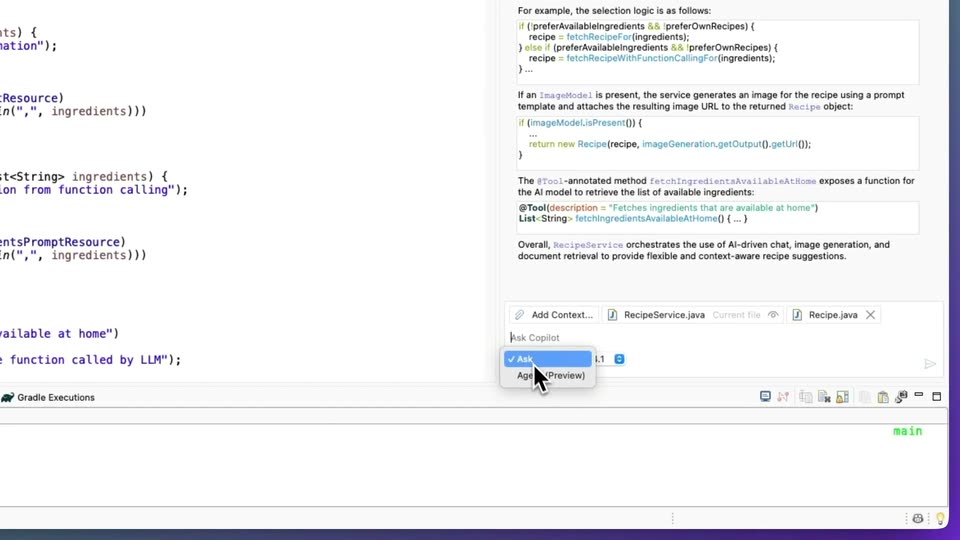
An Eclipse IDE window shows Java code beside a Copilot chat panel that scrolls upward. The view zooms to the panel footer where a cursor clicks the Ask button, and the panel switches to agent mode under an Edit with Copilot header.
Techniques: UI zoom, Cursor demo
Camera: Static
A full Eclipse IDE window shows Java code beside a Copilot chat panel. The view zooms into the chat as a cursor confirms a GitHub MCP tool, and a list of open issues streams in. It zooms back out as new code appears and a second reply types out.
Techniques: UI zoom, Cursor demo
Camera: Static
A full-screen recording of the Eclipse IDE shows a Copilot edit changes view. The right panel builds a numbered list of steps while the Java source compare panes update to reveal new differences.
Camera: Static
A full-screen Eclipse IDE shows a side-by-side code diff in the center while a Copilot chat panel on the right logs each step. New chat lines appear as the central compare view switches from a Java file to an HTML template.
Camera: Static
The Eclipse IDE fills the frame with code on the left and an agent chat panel on the right. The view zooms into the panel as a cursor clicks the Continue button on a terminal command prompt, then pulls back to show the bottom terminal running the gradle build.
Techniques: UI zoom, Cursor demo
Camera: Static
A full-screen Eclipse IDE shows a Thymeleaf template in the editor, a project tree on the left, and an agent chat panel on the right filling with a task checklist. A bottom terminal logs the Gradle boot run while a cursor drifts to hover over a changed file.
Techniques: Cursor demo
Camera: Static
A static screen capture of Eclipse IDE. The center pane shows a side-by-side Java source compare of RecipeService.java, while the right Copilot chat panel lists the applied file changes. The view holds still with no visible motion.
Camera: Static
A static view of the Eclipse IDE shows a code editor and an AI assistant panel on the right. A cursor moves to the right panel and clicks the 'Keep' button next to a file change. The panel updates to show a new section with a 'Done' button.
Techniques: Cursor demo
Camera: Static
A full-screen Eclipse IDE window shows an HTML template in the editor, a project tree on the left, a console at the bottom, and an AI assistant panel on the right reporting that it is applying changes. A mouse pointer rests at the panel's corner, then a soft white circular glow blooms in the center of the screen as a transition.
Techniques: Masking
Camera: Static
The dark code editor fades to black as a glowing purple orb at the bottom center rises and resolves into a 3D robot head with cyan eyes, centered on the void.
Techniques: Morph
Camera: Static
On a black field the GitHub mark sits centered above a rounded outline pill holding the URL. The mark slides left as the wordmark GitHub Copilot wipes in to its right, forming the lockup while the URL pill stays fixed below.
On-screen text: “gh.io/copilot”, “GitHub Copilot”
Camera: Static