1:33

The new Copilot: where work comes together
Microsoft · AI · Sep 2026
Sona8 · Nov 2026 · 1:27 · AI-annotated
Sona8’s 1:27 launch film runs 29 scenes, about 3.0 s each. The product is on screen from the first frame and 11 features are revealed. There is no explicit call to action; a voiceover carries the film. Built as a chain of flat UI vignettes, each opened by a serif headline and narrated by a black caption pill that swaps phrase by phrase with the voiceover. Motion stays simple and 2D: cards slide in, purple highlights trace one job across systems, and the Sona face marks every assistant moment.
Is this your launch? to your site or press kit.
Microsoft · AI · Sep 2026
Cursor · Developer tools · Oct 2025
Cursor · Developer tools · Mar 2026
The previous layout, with a large serif headline and two cards, dissolves out as the Sona8 logo and a new serif headline fade in above a flat chat card showing the AI interview exchange. A black caption bar at the bottom reads “Sona8 interviews employees and.”
On-screen text: “Before you improve a workflow, ask the people doing it.”, “Sona8 interviews employees and”
Camera: Static
Under a serif headline, a flat AI-interview mockup sits left of an arrow; a workflow card slides in on the right, its three step boxes appearing in sequence, the middle one filled purple. A black caption pill at the bottom swaps phrases with the voiceover.
On-screen text: “Before you improve a workflow, ask the people doing it.”, “Sona8 interviews employees and”, “captures their workflows,”, “what needs to change.”
Techniques: Kinetic type
Camera: Static
A Sona8 webpage shows a serif headline above three team cards; the right two cards and six use-case pills fade in from low opacity. A dark caption box at the bottom updates its line to follow the narration.
On-screen text: “Strategy and operations teams,”, “consultants and PE operations”
Camera: Static
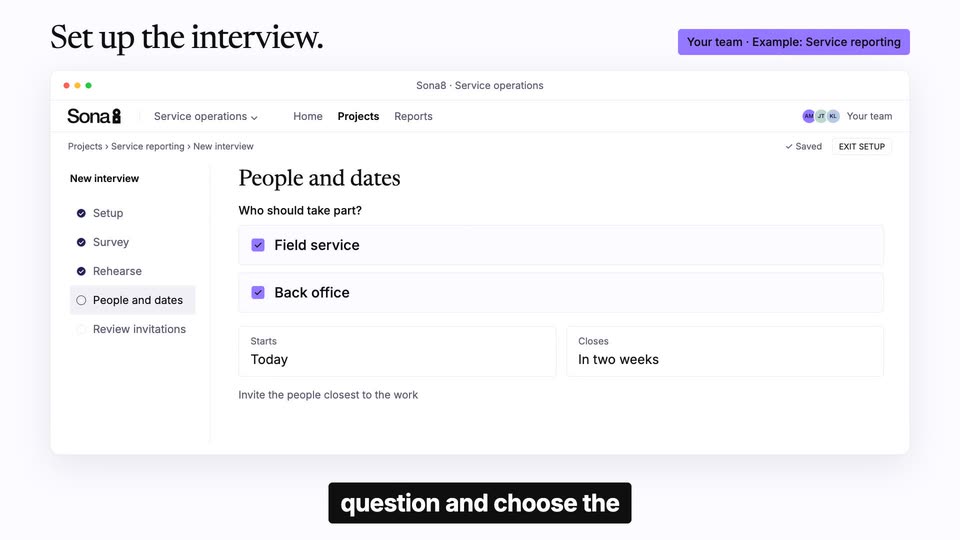
A flat Sona8 interface window sits under a serif headline. The view wipes from a typed question box to a people-and-dates panel with two checked boxes, then to a review list. Black caption boxes swap phrases at the bottom.
On-screen text: “Set up the interview.”, “Your team · Example: Service reporting”, “consultants and PE operations”, “start with a”, “question and choose the”
Techniques: Kinetic type, Masking
Camera: Static
A flat Sona8 browser window on a white field shows the Review invitations panel. A cursor taps the purple Send invitations button, which flips to a dark Sent state, while a dark caption bar at the bottom rolls the words of the voiceover.
On-screen text: “Set up the interview.”, “Your team · Example: Service reporting”, “question and choose the”, “employees.”
Techniques: Cursor demo
Camera: Static
A large dark serif headline sits on a light background. It shrinks and slides up as a flat invitation card with a purple button fades in beneath it. A black caption pill reads Employees receive an invitation at the bottom.
On-screen text: “Invite the people who do the work.”, “Employees receive an invitation”
Techniques: Kinetic type
Camera: Static
A crossfade resolves into flat UI cards for email, Slack and SMS under a serif headline. A black caption pill at the bottom swaps phrases with the voiceover. A cursor clicks the purple Start interview button, crossfading the email card into an interview screen with an audio waveform.
On-screen text: “Employees · Invitation to an AI interview”, “Invite the people who do the work.”, “by email,”, “Slack or SMS,”, “or join by phone.”, “In an AI interview,”, “they explain in their”, “own language what makes”
Techniques: Cursor demo
Camera: Static
Three flat interface cards (email, AI interview, Slack) sit stacked under a serif headline, then the central interview card widens and the side cards slide off to reframe onto a single full-width interview window with a face icon, waveform and control buttons. The UI then dims as a new light sans headline fades in at the top left.
On-screen text: “Employees · Invitation to an AI interview”, “Invite the people who do the work.”, “work difficult and what”, “could help.”, “One report. Recorded in several places.”
Techniques: Morph, UI zoom
Camera: Static
A flat Sona8 interview window sits under a serif headline. A transcript line and waveform fade in on the left, a technician reply bubble on the right, its last line highlighting purple as a tag row appears below. A black caption pill at the bottom updates phrase by phrase.
On-screen text: “Example: Service reporting · Employee interview”, “One repair. Recorded in several places.”, “For example,”, “a technician finishes a”, “repair and records the”, “job in several places.”, “Sona8 asks them to”, “show the steps.”
Techniques: Kinetic type
Camera: Static
A flat screen-share dialog fades out to reveal a service report form, where a cursor hovers over the serial number field and a tooltip appears. A serif headline sits top left while a white caption types in word by word on a dark pill at the bottom.
On-screen text: “Example: Service reporting · Live screen share”, “Share your screen. Explain the step.”, “During the interview, they”
Techniques: Kinetic type, Cursor demo
Camera: Static
A flat ServiceHub visit report mockup sits right, its Serial number field highlighted purple under a cursor tooltip. Left, a Sona avatar and the line Where do you enter this again? appear, then a technician quote. Bottom captions swap and a Paper to ServiceHub to SAP flow row slides in.
On-screen text: “Example: Service reporting · Live screen share”, “Share your screen. Explain the step.”, “Sona”, “Where do you enter this again?”, “Technician”, “Here. Then the office copies it into SAP.”, “they share their screen”, “they copy which fields”, “they copy into another system”, “Paper · SV-0248 → ServiceHub · SV-0248 → SAP · SV-0248”
Techniques: Cursor demo
Camera: Static
Two flat desktop windows settle into place on a light gray field: a 'Complete service visit' card with a purple-highlighted serial number field, and a timeline strip labeled 'Steps across the day' whose progress bar extends. A serif headline sits above and a black caption pill below.
On-screen text: “Employees - Desktop app”, “Captures workflows in the background.”, “The Sona8 desktop app”
Camera: Static
A flat desktop-app mockup sits under a serif headline as its clock ticks forward and the timeline bar fills. The service form dissolves into an update form while a black caption pill reads the phrase word by word.
On-screen text: “Employees - Desktop app”, “Captures workflows in the background.”, “The Sona8 desktop app”, “the background,”
Techniques: Kinetic type
Camera: Static
A flat desktop-app mockup sits under a black serif headline. The in-app clock advances from 12:22 to 15:01, the SAP form crossfades from a service record to a confirmation, a third step slides into the right timeline, and a black caption pill at the bottom updates phrase by phrase.
On-screen text: “Employees · Desktop app”, “Captures workflows in the background.”, “capturing how employees work”, “across apps throughout the”
Techniques: Kinetic type
Camera: Static
A flat desktop app mockup shows a Word form, a day timeline, and a step list; the clock ticks to 17:00, the timeline fills, and a job card appears. It cuts to a phone mockup showing a rear-camera view of a gray breaker panel, with a black caption pill below.
On-screen text: “Employees · Desktop app”, “Captures workflows in the background.”, “across apps throughout the”, “without a live interview.”, “Example: Service reporting · Live interview on your phone”, “Show the physical workspace.”, “For physical work,”
Camera: Static
A flat phone mockup on the left plays a live camera view of a hand flipping breakers in an electrical panel. On the right, a chat panel with a purple waveform fades in, then chips and a purple detail card slide up, while black caption boxes swap at the bottom.
On-screen text: “Example: Service reporting · Live interview on your phone”, “Show the physical workspace.”, “For physical work,”, “Can you show me that step?”, “Show the equipment and the task as it happens around you.”, “they open the interview”, “Equipment”, “The task”, “Workspace”, “show the equipment and the task as it happens around you. the task as it”
Techniques: Split screen
Camera: Static
A purple block wipes off the right edge, revealing a flat Sona8 report page where the serial number SN-4831 is highlighted in two stacked fields. A serif headline sits above the window and a black caption pill below swaps from one tagline to another.
On-screen text: “Explore a finding. Check the evidence.”, “Analyse everything together.”, “Explore a finding,”
Techniques: Masking
Camera: Static
A light slide shows a serif headline and context pills above a Sona8 Reports window. The window's bar charts fill in, then the view switches to an Employee evidence tab with a quote and a purple serial-number card. A black caption at the bottom cycles through phrases.
On-screen text: “Your team · Shared analysis”, “Explore a finding. Check the evidence.”, “Shared context”, “Interview”, “Screen share”, “Phone camera”, “Background capture”, “Explore a finding,”, “compare teams and locations,”, “and check the evidence', 'behind it.”
Techniques: Kinetic type
Camera: Static
A serif headline sits on a light gray background as three white quote cards, Field service, Back office and Customer service, fade in from left to right. Each card holds a short quote above a purple underline. A black pill reading “Sona8 connects the steps” fades in below.
On-screen text: “For your team - Example: Service reporting”, “The same repair is recorded four times.”, “Field service”, ““First, I write it on paper.””, “Back office”, ““We enter it again in SAP.””, “Customer service”, ““Then we prepare the form.””, “Sona8 connects the steps”, “Reconstructed from employee conversations.”
Techniques: Kinetic type
Camera: Static
A black serif headline tops a white panel divided into three rows. Four cards, Paper log, ServiceHub, SAP and Word form, fade in one after another, joined by purple arrows, while a dark chip and a purple chip pop in. A black subtitle bar cycles the spoken line.
On-screen text: “For your team · Example: Service reporting”, “The same repair is recorded four times.”, “Sona8 connects the steps”, “and finds that the”, “Re-enter the same data”, “One repair. Four entries.”, “same repair is recorded”, “four times.”
Camera: Static
A product dashboard pairs a horizontal bar chart on the left with an evidence card on the right. Bars extend and counts tick up as a cursor hovers the top row, the right card fills with a quote and a link, and a black bottom caption cycles through phrases.
On-screen text: “Themes show how often”, “problems come up across”, “teams and sites”
Techniques: Kinetic type, Cursor demo
Camera: Static
Light slide under a serif headline. Two white cards animate in, left with the Sona8 logo and evidence copy, right with Claude and ChatGPT marks and a green Connected tag, joined by a purple MCP arrow. A purple panel wipes off the right edge, and the bottom caption glitches from one phrase to the next.
On-screen text: “Go deeper in Claude or ChatGPT.”, “Your team · Connected to Sona8”, “Sona8”, “Your interviews and workflow evidence”, “MCP”, “Claude or ChatGPT”, “Explore the findings in your AI tool.”, “Connected to Sona8”, “Connect Sona8 to Claude”, “or ChatGPT through MCP”
Techniques: Masking
Camera: Static
A flat Claude app window with a Sona8 evidence panel and a highlighted prompt box sits under the headline. A black pill caption at the bottom cycles through the phrases “or ChatGPT through MCP”, “to analyse the findings”, “further.” in time with the voiceover, then fades out.
On-screen text: “Go deeper in Claude or ChatGPT.”, “Your team · Connected to Sona8”, “Choose output”, “Process map”, “Product specification”, “AI instructions”, “or ChatGPT through MCP”, “to analyse the findings”, “further.”
Techniques: Kinetic type
Camera: Static
A flat Claude interface fills the frame under a serif headline and a row of feature tabs. The table view cuts to a process map as the highlighted tab moves, and a black lower-third caption updates phrase by phrase.
On-screen text: “Go deeper in Claude or ChatGPT.”, “Your team · Connected to Sona8”, “Choose output”, “Process map”, “Product specification”, “AI instructions”, “Compare functions and locations.”, “Choose what you need:”, “a detailed process map,”
Camera: Static
A flat process-map UI holds static under a serif headline and a row of output tabs. Four swim lanes, Coordination, Field service, Back office, Finance, hold connected step nodes, three tinted purple. A black pill caption at the bottom reads “a detailed process map,”.
On-screen text: “Go deeper in Claude or ChatGPT.”, “Your team · Connected to Sona8”, “Choose output”, “Process map”, “Product specification”, “AI instructions”, “a detailed process map,”
Camera: Static
Under the headline “Go deeper in Claude or ChatGPT.,” a flat browser mockup of the Claude interface displays a product specification page. The right-hand lists and bottom-left table cells sharpen and fill in during the second, with a black caption pill reading “a product specification,” below.
On-screen text: “Go deeper in Claude or ChatGPT.”, “Your team · Connected to Sona8”, “a product specification,”
Camera: Static
A flat Claude interface panel sits under a black serif headline. A dark navy card titled Weekly sales report sits left of a checklist whose four numbered rows fill in with green checks. A black pill at the bottom types out the caption word by word.
On-screen text: “Go deeper in Claude or ChatGPT.”, “Your team · Connected to Sona8”, “or reusable instructions for”, “AI agents”
Techniques: Kinetic type
Camera: Static
Light gray stage, serif headline, and a white service-entry card. A browser-style card slides in from the right with a slight tilt, then shows an employee quote and two status pills. A black pill below rolls the voiceover word by word; the left card fades out at the end.
On-screen text: “Implementation + follow-up”, “Your company makes the change. Sona8 checks the result.”, “Your company updates its service system so staff enter the job once. Sona8 asks employees again to check whether it helped.”
Techniques: Kinetic type
Camera: Static
A light card holds the Sona logo top-left and a serif headline 'Listen and move forward' on the left, with a small black face icon (round and square eyes, a smile) on the right. A violet panel on the right edge wipes away to reveal the headline and icon.
On-screen text: “Listen and move forward”
Techniques: Masking
Camera: Static