1:19

Slack - Canvas
Salesforce
Fuser’s 3:34 launch film runs 40 scenes, about 5.4 s each. The product is on screen from the first frame and 2 features are revealed. There is no explicit call to action; a voiceover carries the film. The video is built as one continuous screen-recorded workflow: a short talking-head intro, then a prompt-generated contact sheet tool that is tuned, a library tool that is dragged in, and a keyer composite that lands in a phone mockup, closed by an upstream color change that ripples through every node. Signature moves are fast zooms and pans across the gray node canvas, green bezier wires fanning between nodes, purple-glow tool cards, and a persistent corner inset of the presenter that anchors a
Is this your launch? to your site or press kit.
Salesforce
oh-my-hermes · Nov 2026
Films whose music sounds like this one, voice left out
FutureClinic · Corporate Tech / Ambient Electronic
Linear · Modern electronic, lo-fi hip-hop
Windsurf · Upbeat electronic
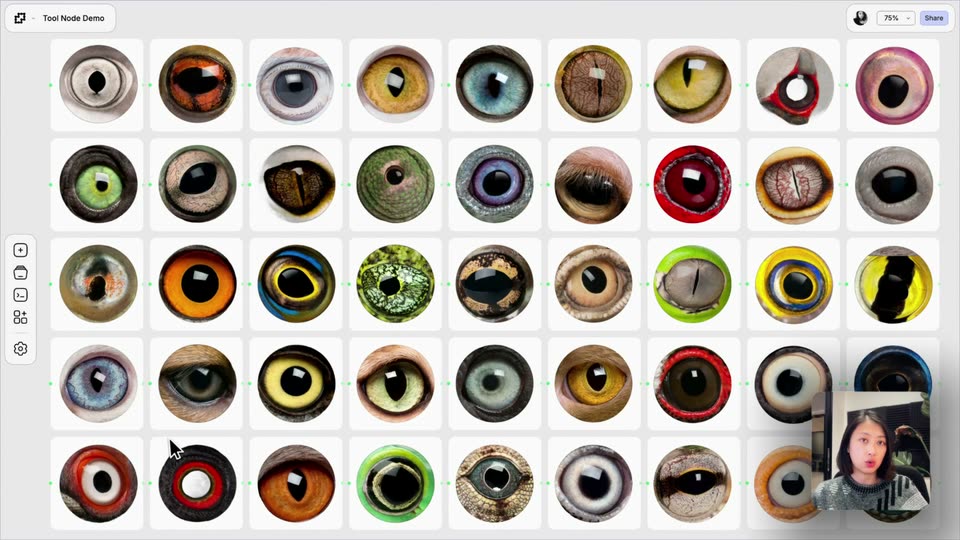
A light gray canvas displays a grid of eye images, framed by edge toolbars. A small video call window in the corner, showing a woman, scales up to fill the entire screen.
Techniques: UI zoom
Camera: Push in
A woman in a gray patterned sweater talks to the camera in a locked-off medium close-up, seated in an office with a glass room behind her and a tall plant at right. The feed opens inside a video-call frame with a left icon rail, then fills the screen.
Camera: Static
A woman with short dark hair in a gray knit sweater speaks to the camera in an office, raising one hand to gesture. A glass wall behind her reveals a desk area, and a tall leafy plant stands to her right.
Camera: Pull out
A light gray node editor shows a grid of eye photos on the left; a video of a talking woman on the right starts large and blurred, then scales down to a small sharp thumbnail in the bottom right corner.
Techniques: UI zoom
Camera: Static
A node-editor canvas holds a grid of animal-eye photos linked by green node dots, with a small presenter video pinned to the bottom-right corner. A cursor drifts across the grid, then hovers the plus button on the left rail as the frame zooms into a list of node cards.
Techniques: Cursor demo, UI zoom
Camera: Push in
Close-up of a node panel: the cursor hovers a purple plus button, then 'tool' is typed into the search bar and the Tool node highlights. The view zooms out to a canvas of eye images linked in a node graph, with a webcam video in the corner.
Techniques: Cursor demo, UI zoom
Camera: Pull out
A grid of circular animal eye photos fills the frame on white tiles, linked by thin green lines. A small video thumbnail of a woman at a microphone sits in the bottom right corner. The grid drifts slowly upward.
Camera: Push in
A node editor shows a grid of eye close-ups behind an open search field reading tool, with a dropdown listing Tool highlighted in purple and video nodes below. A small webcam self-view sits in the corner as the frame settles into focus.
Techniques: UI zoom
Camera: Push in
A grid of circular eye images fills a light canvas behind a Tool dialog with a prompt field and Generate button. The blurred view sharpens and zooms in and out on the panel as the cursor double-clicks; a webcam feed of the presenter sits in the corner.
Techniques: UI zoom, Cursor demo
Camera: Pull out
A white Tool card on a dotted canvas with a purple glow. The cursor clicks the Inspiration field and a prompt types in character by character. A webcam feed of the presenter sits in the corner, then the view zooms onto the Generate button as the cursor clicks it.
Techniques: Cursor demo, UI zoom
Camera: Push in
A small Tool card with an animated dot grid sits center, then expands into a taller Contact sheet grid panel with sliders. A cursor drifts over the panel while a webcam inset of the presenter holds the bottom right corner.
Techniques: Morph, Cursor demo
Camera: Pull out
A node-editor screen recording: the view zooms out over a grid of animal-eye photos, then the cursor shift-clicks the grid and drags green wires from its ports into the contact-sheet node's Images socket, filling the node with the assembled sheet. A presenter's webcam inset sits in the corner.
Techniques: UI zoom, Cursor demo
Camera: Pan
A node editor shows iris photos linked to a contact sheet node. The view zooms into the node as a cursor drags the Columns slider, the grid reflows live, then types a hex value that turns the sheet background black. A presenter's webcam sits in the corner.
On-screen text: “Updates when you let go”
Techniques: UI zoom, Cursor demo
Camera: Pull out
A cursor drags the Columns slider in a node editor, reflowing a grid of small circular eye thumbnails. Green wires connect a left strip of colored eyes to the panel, and a presenter's webcam sits in the bottom-right corner.
Techniques: Cursor demo
Camera: Static
A node editor shows a grid of colorful eye photos linked by green lines to a properties panel. The view zooms and scrolls as the Columns value changes to 3, collapsing the eye grid into one vertical strip. A presenter speaks from a small video-call box at the bottom right.
Techniques: UI zoom
Camera: Static
A node editor screen shows a vertical contact sheet of colored eye photos in a white panel. The view zooms out to reveal the node's control rows, then zooms back in on the lower grid. A small webcam feed of a woman sits in the corner.
Techniques: UI zoom
Camera: Static
A light UI panel shows a 3-column grid of colored eye photos on black, with Columns, Padding and Image fit controls above. The view zooms out to reveal the full multi-column eye grid and a #000000 field, while a small webcam of the presenter sits in the corner.
Techniques: UI zoom
Camera: Pan
A cursor hovers over the prompt field of a Contact sheet grid card while a sentence about spacing controls is typed in, then the view pulls back to show the card as a node with green wires fanning in from the left.
Techniques: Cursor demo, UI zoom
Camera: Pull out
A floating “Contact sheet grid” card sits over green node lines on a white canvas; its status text cycles as a dot grid fills in. The view zooms into a slider panel and eye-photo grid, then pulls back to the full contact sheet.
Techniques: UI zoom, Cursor demo
Camera: Pull out
A woman in a grey sweater speaks to camera in a bright office, a leafy plant and black slat panel behind her. At the start she sits inside a video call window with a top bar and left tool rail, which then clears to a full-frame shot of her.
Camera: Static
Cuts from the presenter's webcam to the app screen: a grid of eye photos linked by green node lines to an Images node, with a left toolbar and a small webcam inset. The cursor hovers over the toolbar icons as the voiceover continues.
On-screen text: “MY”
Techniques: Cursor demo
Camera: Push in
A light Library window fills the frame, showing a grid of tool cards with live thumbnails. A cursor moves from the left toolbar to the Featured tab, then the view reframes onto the grid as the cursor hovers a card.
Techniques: Cursor demo, UI zoom
Camera: Pan
A template library panel fills the frame, its grid of video cards scrolling up as a mouse cursor moves to the Scrolling image video tile. A properties list sits at right and a small webcam feed of the presenter anchors the corner. The panel then blurs as it is dragged.
Techniques: Cursor demo
Camera: Pull out
A node-based editor canvas with an open Library panel of tool cards and two node panels, plus a small webcam feed of a presenter in the corner. The frame starts mid-zoom with motion blur, then settles into a locked-off view as the cursor hovers a node.
Techniques: UI zoom, Speed ramp, Cursor demo
Camera: Pull out
A node editor canvas shows a contact-sheet grid of iris photos wired to a scrolling-video node. A cursor drags the connection, then sets direction to top-to-bottom, raises duration, and switches aspect ratio to 9:16 portrait as a vertical preview scrolls the images.
Techniques: UI zoom, Cursor demo
Camera: Pan
A node editor canvas shows a scrolling-image node wired to a contact sheet of eye photos, then the view zooms onto a phone mockup with a green keying screen while the cursor moves across it. A presenter's video call stays in the corner.
Techniques: UI zoom, Cursor demo
Camera: Static
In a node editor, a cursor drags a green line from a phone mockup card to the Source image input of a Keyer and Composite node, updating its preview. The view then zooms out, revealing a second node on the left. A presenter's webcam sits in the corner.
Techniques: Cursor demo, UI zoom
Camera: Pull out
A node editor screen shows two settings panels flanking a canvas with a green phone mockup on white. A green connection line links the nodes while a cursor hovers in the empty center. A small presenter video plays in the bottom-right corner as she speaks.
Camera: Static
A node editor shows a grid of colored eyes on the left and a settings panel on the right. A cursor types a hex code into the replacement video field, then the view reframes onto the eye grid. A small video call of a woman sits in the corner.
Techniques: Cursor demo, UI zoom
Camera: Pan
A node editor fills the frame. A grid of animal eye photos occupies the left panel. A cursor drags a curved wire from the panel to the replacement video node on the right, linking the two. A small clip of a woman on camera sits in the bottom right corner.
Techniques: Cursor demo
Camera: Static
A node editor interface shows a blue bezier curve linking nodes. On the right, a keying properties panel lists values and a Running status; a phone preview of a colored-circle grid fades in below it as a cursor moves across the panel. A small webcam of the presenter sits bottom-right.
Techniques: Cursor demo
Camera: Static
A node-editor screen zooms into a phone mockup playing a scrolling grid of colorful cat eyes, while a cursor hovers over the canvas and a small presenter webcam sits in the bottom corner.
Techniques: UI zoom, Cursor demo
Camera: Push in
The editor canvas zooms out, exposing a node graph of circular eye photos wired by green lines to contact sheets and a tilted composite panel. A presenter video sits in the lower right and a cursor drifts across the gray background.
Techniques: UI zoom, Cursor demo
Camera: Pull out
A node graph of eye photos zooms in from a wide overview to one node holding a vertical contact sheet. The view pans right along a blue connector to a phone mockup playing the sheet as a scrolling clip, with a presenter's webcam in the corner.
Techniques: UI zoom
Camera: Push in
A flat node editor shows a grid of eye thumbnails linked by a green line to small panels on the right, then cuts to a woman in a gray striped sweater speaking to camera in a bright office with a plant.
Camera: Push in
A woman with shoulder-length dark hair in a gray knit sweater talks to the camera, seated in a black mesh chair. Behind her, a glass-walled office room and a tall leafy plant fill the frame. The shot is a static medium close-up.
Camera: Static
A woman in a patterned knit sweater speaks to camera in an office with a plant behind her, then the shot cuts to a screen recording of a node-based editor. Green wires link nodes, a yellow circular element sits at the right edge, and a settings panel floats top right.
Camera: Pull out
A node editor interface shows green lines linking iris thumbnails on the left, a settings panel in the center, and a preview grid of eye images over a video-call window on the right. A cursor moves to the #000000 color field and clicks it, highlighting its border purple.
Techniques: Cursor demo
Camera: Static
A screen recording of a node editor. A cursor types a hex color into a field, turning the eye-grid contact sheet red as a Running timer counts up. The view then zooms out to reveal the wider node graph, with a small webcam feed of the presenter in the corner.
Techniques: Cursor demo, UI zoom
Camera: Pull out
A node-based editor canvas shows three cards linked by green and blue wires, with large eye photos at the left edge. The view pans right and zooms into the Keyer and Composite card, whose phone-shaped preview fills with the red eye grid, while a small webcam feed of a presenter holds the corner.
Techniques: Cursor demo, UI zoom
Camera: Pull out