1:19
Slack - Canvas
Salesforce
oh-my-hermes · Nov 2026 · 0:18 · Code only · AI-annotated
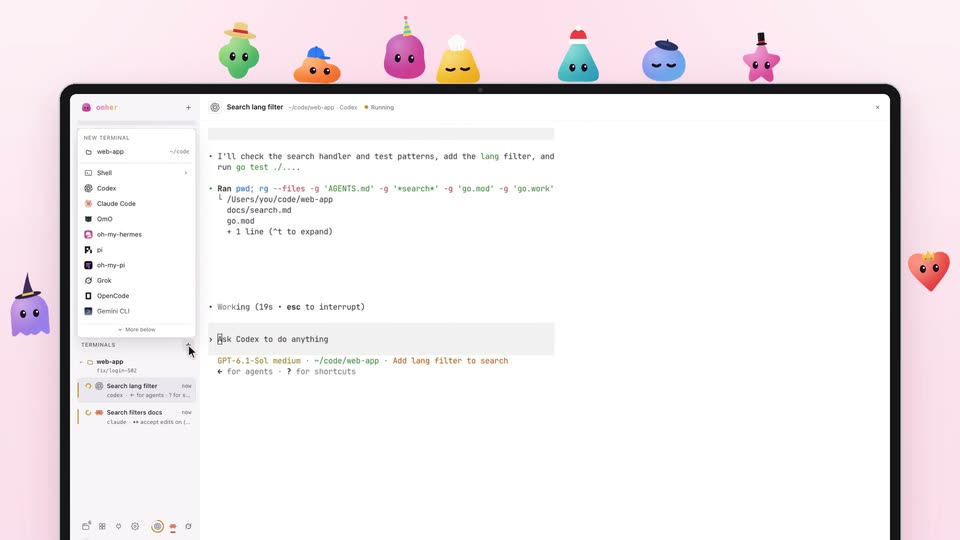
oh-my-hermes’s 0:18 launch film runs 11 scenes, about 1.6 s each. The product is on screen from the first frame and 3 features are revealed. There is no explicit call to action. An 18-second product tour built as a fixed-frame laptop or tablet mockup on a flat pink stage, cut into eleven short beats at about 16 cuts per minute. Each beat swaps the UI state in place while the blob mascots bob along the top edge and a cursor drives every action, keeping the product chrome constant.
Is this your launch? to your site or press kit.
Films whose music sounds like this one, voice left out
Jester · High-energy electronic, chiptune
Elva (by Theneo) · Electronic
Stilta · Cinematic orchestral with electronic sound design
A chat app window on a pink background, topped by a row of blinking cartoon blobs. The bot replies to a user's 502-fix request with a diagnosis message and three thread links, while task rows and a working status appear in the left sidebar.
Camera: Static
A flat desktop-app UI on a pink background with a row of cartoon blob mascots across the top. The interface switches from a task-planning board on the right to a terminal chat panel, while the left sidebar changes from an agent list to a terminal menu.
Camera: Pan
A flat front view of a laptop on a pink background, framed by cartoon blobs wearing hats. The onher interface shows a sidebar of bots and terminals; in the main pane a terminal line types out 'plan mode /help' as a small cursor appears below.
Camera: Static
A flat laptop mockup on a pink background, ringed by cartoon blob mascots, shows the onher app. The left sidebar lists bots and terminals; the main panel types the command plan mode /help at a prompt while a mouse cursor drifts across the empty area.
Camera: Static
A tilted laptop mockup on a pink background shows the app interface: a bot sidebar, a terminal log, and a code panel. A row of cartoon mascots bobs above the screen while a ghost and two hearts idle at the sides.
Techniques: 3D mockup
Camera: Static
A tilted tablet mockup on a pink stage shows the onher app. The split chat-and-terminal view collapses into the Pudding chat as digest messages slide in, an approval card appears, then a checkmark and closing note. Mascots along the top blink and shift expressions.
Techniques: 3D mockup, UI zoom
Camera: Static
A pink backdrop holds a row of cartoon blob mascots above a laptop showing the Pudding app. Two workspace panes sit side by side with bot lists and chat threads. The screen content swaps from the Pudding view to the Blob view.
Camera: Static
A laptop mockup sits at a slight angle on a pink backdrop, a row of cartoon blob mascots lined along its top edge. Inside the onher chat app, a new message bubble from Blob fades in at the bottom of the thread.
Techniques: 3D mockup
Camera: Static
A laptop in 3D perspective displays a chat app, framed by a row of party-hat blob mascots above and two side characters. The interface updates as a cursor opens a dropdown menu next to the contact Pudding.
Techniques: 3D mockup, Cursor demo
Camera: Pan
A laptop mockup in 3D perspective sits on a pink background with cartoon blob characters. Inside, the onher app shows a chat and a Connect over SSH dialog; a cursor clicks the host dropdown, the dialog expands with an ssh command, and the button switches to Connect.
Techniques: 3D mockup, Cursor demo
Camera: Static
A chat interface sits on a tilted laptop mockup against a pink wall, while a row of cartoon mascots bobs along the top edge. A cursor rests in the message pane and the frame stays locked off.
Techniques: 3D mockup
Camera: Static