3:36

Arc Browser | Introducing Live Captures on Easel with Rosey
The Browser Company · Productivity · Dec 2022
Salesforce · 1:19 · Full motion · AI-annotated
Salesforce’s 1:19 launch film runs 10 scenes, about 7.9 s each. The product is on screen from the first frame and 1 feature is revealed. There is no explicit call to action; a voiceover carries the film. The video opens with a playful illustrated title card, holds a static hero shot of the Slack workspace, then walks through a single sales account use case with cursor driven zooms and scrolls, and closes on the same hero shot. Pacing is slow and deliberate, built on long locked off frames punctuated by single zoom, scroll and modal beats.
Is this your launch? to your site or press kit.
The Browser Company · Productivity · Dec 2022
An illustration of a surfing bear in floral shorts, with a small bear parachuting in from a rainbow canopy, sits in a circular cutout on the right while Canvas and Slack hold still on the left. The final beat slides the artwork right to reveal a Slack workspace screenshot.
On-screen text: “Canvas”, “Slack”
Camera: Static
A locked-off full screen of the Slack desktop app: the #project-galaxy thread in the center, a purple sidebar of channels and direct messages on the left, and the Canvas panel on the right with a Project Galaxy title, nebula image, and weekly tracker. The frame holds static throughout.
Camera: Static
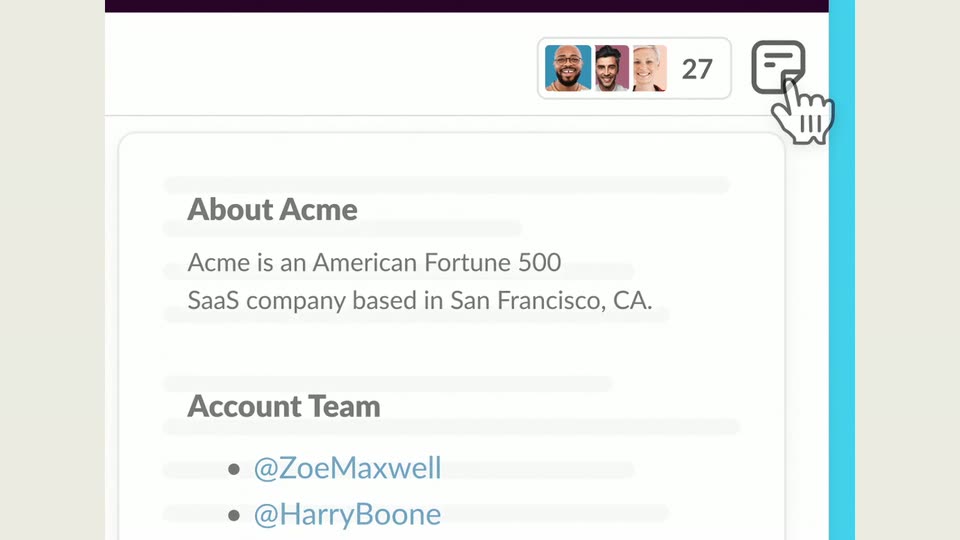
A full Slack-style window sits on a teal field. The view zooms into the top-right corner where a white hand cursor clicks the canvas icon. A document panel opens, revealing an About Acme section and an Account Team list of blue handles.
Techniques: UI zoom, Cursor demo
Camera: Push in
A white Canvas panel on a beige backdrop scrolls upward at a steady pace, moving from the About Acme paragraph and Account Team list past Key Contacts and Exec Briefing Prep, then a row of four avatar photos, ending on a Sales Cloud Opportunities card.
Camera: Pan
A white Salesforce card sits over a dimmed list view, a hand cursor hovering its button. A modal dialog opens over the darkened screen; the cursor types a new Next Step value and clicks Save. The modal slides away and the card slides back in showing the updated value.
Techniques: Cursor demo
Camera: Push in
A Slack-style workspace fills the frame: dark purple sidebar with a channel list, white pane with gray placeholder lines and colored avatar squares. The view zooms in slightly while a hand cursor hovers at the right.
Techniques: UI zoom
Camera: Push in
A Canvas account page is shown zoomed in on the About Acme block, a hand cursor points at the comment icon, then the view pulls back and scrolls down past the account team and leadership grid to the Sales Cloud Opportunities card.
Techniques: Cursor demo, UI zoom
Camera: Push in
A hand cursor clicks Update next step on a white opportunity card; a modal slides over the dimmed screen. The field fills with typed text, the cursor hits Save, and the card refreshes with the new note.
Techniques: Cursor demo
Camera: Push in
A Slack Canvas card titled New Business - 128K sits centered on a light background, the frame easing out from a tighter crop that briefly shows a heading above. The Next Step field swaps its grayed placeholder for black text reading Identifying decision makers and stakeholders.
Techniques: UI zoom
Camera: Static
A static Slack workspace fills the frame in three columns: a purple sidebar with the channel list, a center thread of messages, and a right-hand Canvas panel showing a Project Galaxy document with an image and a tracker. Nothing moves.
Camera: Static