2:02
Explore
Service Cloud - Service Catalog
Salesforce · 1:18 · Full motion · AI-annotated
- Length
- 1:18
- Scenes
- 13 · 6.0 s avg
- Product on screen
- 0:00
- Voiceover
- Yes
00:00:00 / 01:18:03
- Length
- 1:18
- Scenes
- 13 · 6.0 s avg
- Product on screen
- 0:00
- Voiceover
- Yes
Salesforce’s 1:18 launch film runs 13 scenes, about 6.0 s each. The product is on screen from the first frame. There is no explicit call to action; a voiceover carries the film. The video bookends one continuous screen recording of the Service Catalog builder and the self-service portal with a static flat beach illustration, so the only motion inside the UI shots is the cursor, form fills and small modal pop-ins. Pacing is calm at about seven cuts per minute with long locked-off frames, and the signature move is the deliberate cursor path that walks the viewer through each field, dropdown and publish step.
No filming indicatedEstimated needs: 1 capture group — your screens or recordings · 2 graphic passages — draw or supply
Is this your launch? to your site or press kit.
More like this

Service Cloud - Service Catalog, scene by scene
· 13 scenes as text
01 · Product intro · 0:00–0:13
A flat vector illustration fills the right half: a brown bear in a blue floral swim trunk on an orange surfboard gazes up at a smaller bear drifting down on a rainbow parachute over a teal sea. Dark blue titles hold on the white left panel, locked off.
On-screen text: “Service Catalog”, “Service Cloud”
Camera: Static
02 · Demo · 0:13–0:21
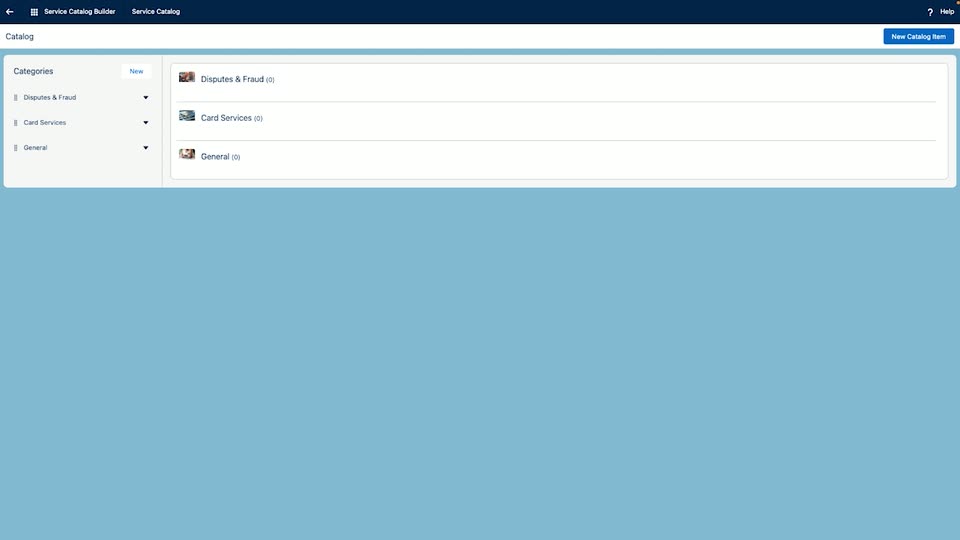
A light-blue service catalog screen shows a categories list on the left and three empty category rows on the right. A cursor drifts across the empty lower area, then moves up to hover the New Catalog Item button in the top-right corner.
Techniques: Cursor demo
Camera: Static
03 · Demo · 0:21–0:30
A web form for a new catalog item loads with a brief blue tint and spinner, then a cursor types “Replace credit card” into the Item Name field, fills the description box, and opens the Primary Category dropdown to pick “Disputes & Fraud”.
Techniques: Cursor demo
Camera: Static
04 · Demo · 0:30–0:33
A catalog item form with an open Select Image dialog. A macOS file browser pops up over it, listing image thumbnails in the Downloads folder, while the cursor moves to hover over the replace-credit-card file.
Techniques: Cursor demo
Camera: Static
05 · Demo · 0:33–0:34
A dimmed catalog screen frames an Upload Files modal where a blue progress bar fills left to right, a green checkmark pops in beside the file row, and the cursor lands on the Done button as it darkens.
Techniques: Cursor demo
Camera: Static
06 · Demo · 0:34–0:34
Over the catalog item form, a Select Image dialog shows a credit card thumbnail loading in the file box, then the cursor clicks Choose and the dialog closes, revealing the image in the form's Image field.
Techniques: Cursor demo
Camera: Static
07 · Demo · 0:34–0:43
A service catalog form scrolls as the cursor opens the Case Priority dropdown, selects High, and clicks Save. A green toast announces the save at the top while the breadcrumb updates, then the cursor clicks Activate and a spinner appears.
Techniques: Cursor demo
Camera: Static
08 · Demo · 0:43–0:46
A full-screen view of a service catalog builder form for the item Replace credit card, with a green activation banner across the top. A mouse cursor drifts from the Deactivate button to the header bar. The page itself stays static.
Techniques: Cursor demo
Camera: Static
09 · Demo · 0:46–0:53
A page editor fills the frame. A cursor types 'service' in the components panel, drops the Service Catalog List onto the canvas so three service cards appear, then clicks Publish to open a confirmation dialog.
Techniques: Cursor demo
Camera: Static
10 · Demo · 0:53–0:57
A dimmed portal builder screen centers a publish dialog. The cursor clicks Publish, the dialog swaps to a loading spinner, then to a green checkmark confirming the publish, with a Got it button.
Techniques: Cursor demo
Camera: Static
11 · Demo · 0:57–0:58
A locked-off view of a service catalog web page. A search bar and user menu sit in the top bar above a nav row. The heading All Self-Service Flows introduces three cards, each with a photo and a title, while the cursor rests idle at the right edge.
Camera: Static
12 · Demo · 0:58–1:06
A static web form titled Replace credit card with a photo of stacked cards on the right. The cursor clicks the Description field, types a short request, then clicks Next, and a green checkmark with a confirmation line appears in the form.
Techniques: Cursor demo
Camera: Static
13 · Outro · 1:06–1:18
A flat vector illustration shows a brown bear in floral shorts surfing a turquoise wave while a smaller bear descends on a rainbow parachute. On the left, the title Service Catalog sits above Service Cloud on a pale field. The frame is locked and static.
On-screen text: “Service Catalog”, “Service Cloud”
Camera: Static