1:00

Introducing DALL·E 3
OpenAI · AI · Sep 2023
Salesforce · 1:00 · Full motion · AI-annotated
Salesforce’s 1:00 launch film runs 10 scenes, about 6.1 s each. The product is on screen from the first frame. There is no explicit call to action; a voiceover carries the film. The video opens and closes on a static flat bear illustration title card and fills the middle with one continuous screen-recording tour of the Salesforce interface, moving through connector, segment, and campaign screens via crossfades and zoom-ins. Pacing is steady at roughly eight cuts per minute, so the only signature moves are the UI transitions and the whimsical bear bookend that frames the technical walkthrough.
Is this your launch? to your site or press kit.
OpenAI · AI · Sep 2023
Conversion · May 2026
Stripe · Finance · Sep 2025
A flat cartoon illustration of a brown bear in blue floral shorts on an orange surfboard looks up at a smaller bear descending with a rainbow parachute over a blue sea, beside a left-aligned headline on a pale background. The frame holds still for the full clip.
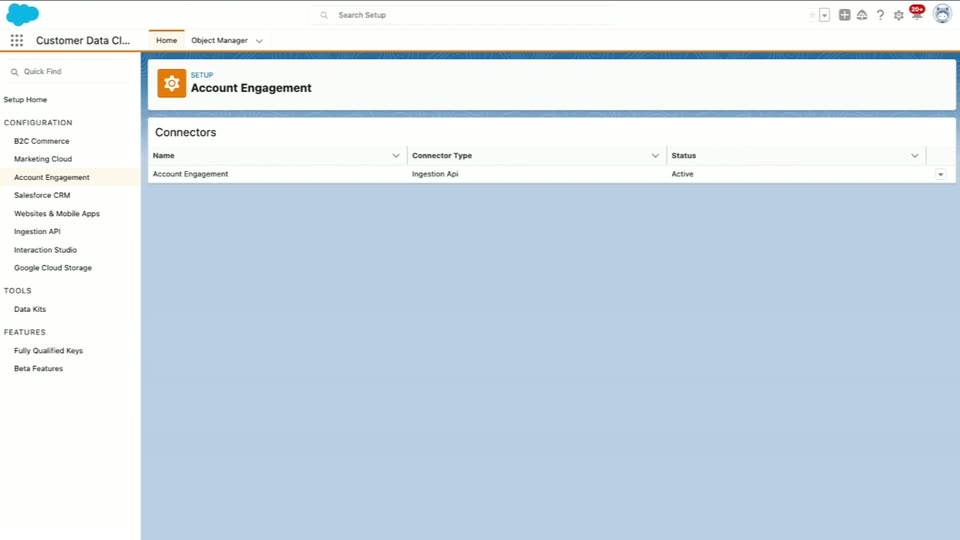
On-screen text: “Account Engagement: Data Cloud Integration”, “Marketing Cloud”
Camera: Static
A Salesforce setup view for Account Engagement holds still, listing a single active connector in a table. Around the eight second mark the frame zooms in on the header and table, pushing the left navigation menu out of view.
Techniques: UI zoom
Camera: Push in
A dark setup panel crossfades into a light segments list. Twelve rows of segment names with publish type, population and date columns fill the table beneath a top navigation bar and search field.
Camera: Static
A customer data cloud segment list sits behind a centered New Segment dialog that fades and scales in while the background dims. The dialog holds a filled Segment Name and Description field above a Save button.
Camera: Push in
A white New Segment dialog box is centered over a dimmed audience list. The form shows a segment named Product in Cart, a description field, and a blue Save button at the bottom. The frame stays static.
Camera: Static
A dimmed interface with a centered New Segment modal. The modal fades out, revealing the segment detail page: an attributes list on the left, a population counter with a filling progress bar, and a publish schedule panel on the right.
Camera: Static
A crossfade at the start resolves into a static segment editor screen. The left panel lists attributes, the right panel stacks rule blocks for the Product in cart segment, and a population figure of 11,356 sits at the top.
Camera: Static
An email-send dialog floats over a marketing platform; the frame zooms into the dialog, then the recipient search refilters from 'pro' to 'ca' lists while the campaign switches to Customer Onboarding.
Techniques: UI zoom
Camera: Push in
A locked-off view of the Engagement Studio screen. A left sidebar lists modules, the main area shows the heading Remind customer of item in cart with a draft badge, and a form panel on the right fills name, folder and recipient list fields with Mon to Fri highlighted.
Camera: Static
A flat illustration shows a brown bear in blue floral shorts surfing, gazing up at a smaller bear on a rainbow parachute over a blue sea. Dark blue headline text sits at left. The frame opens on a product UI, then cuts to the illustration and holds still.
On-screen text: “Account”, “Engagement:”, “Data Cloud”, “Integration”, “Marketing Cloud”
Camera: Static