2:02
Explore
Commerce Cloud - TikTok Integration for Commerce Enhancements
Salesforce · 1:23 · Full motion · AI-annotated
- Length
- 1:23
- Scenes
- 16 · 5.2 s avg
- Product on screen
- 0:00
- Features shown
- 4
- Voiceover
- Yes
00:00:00 / 01:23:09
- Length
- 1:23
- Scenes
- 16 · 5.2 s avg
- Product on screen
- 0:00
- Features shown
- 4
- Voiceover
- Yes
Salesforce’s 1:23 launch film runs 16 scenes, about 5.2 s each. The product is on screen from the first frame and 4 features are revealed. There is no explicit call to action; a voiceover carries the film. The video opens and closes on a flat vector title card with a surfing bear and a parasailing bear, then runs a continuous screen-recording walkthrough of the Salesforce and TikTok interfaces. Pacing is steady and instructional, with the cursor guiding each click and a phone mockup breaking the UI tour to show the in-app checkout.
No filming indicatedEstimated needs: 5 capture groups — your screens or recordings · 2 graphic passages — draw or supply
Is this your launch? to your site or press kit.
More like this


Commerce Cloud - TikTok Integration for Commerce Enhancements, scene by scene
· 16 scenes as text
01 · Product intro · 0:00–0:21
A flat vector illustration fills a circle on the right: a brown bear in blue floral trunks surfs an orange board, gazing up at a smaller bear on a rainbow parachute over a blue sea. A dark blue headline sits on the pale left. The locked-off frame holds throughout.
On-screen text: “TikTok Integration for Commerce Enhancements”, “Commerce Cloud”
Camera: Static
02 · Problem · 0:21–0:21
A static Salesforce Business Manager screen shows the top nav with a hand cursor resting on Merchant Tools, a welcome heading, and an Alerts card with a Security bell. A purple counter in the corner drops to zero.
Camera: Static
03 · Problem · 0:21–0:27
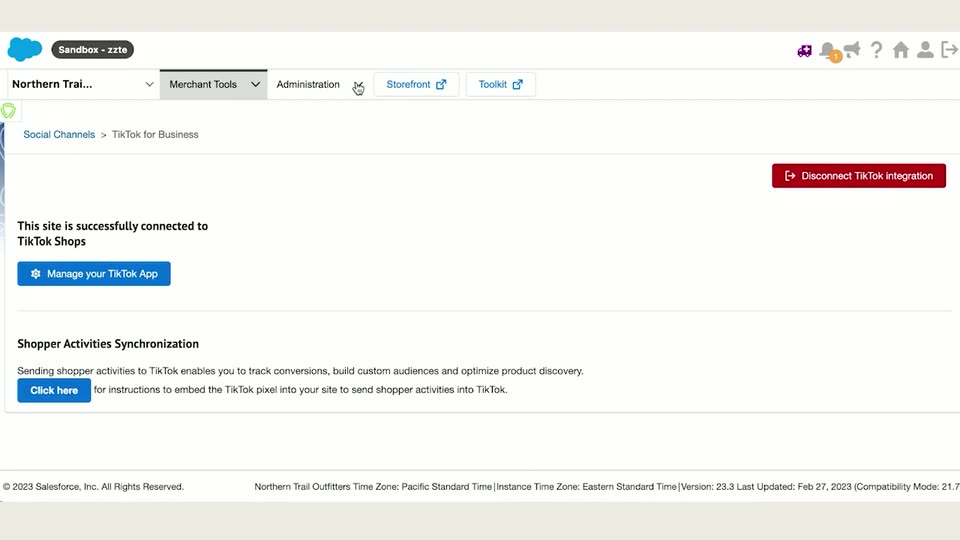
A screen capture of a commerce admin menu scrolls down as the cursor hovers over TikTok for Business, a tooltip pops up, then a click opens a page confirming the TikTok Shops connection beside a red disconnect button.
Techniques: Cursor demo
Camera: Static
04 · Feature reveal · 0:27–0:31
A static screen recording of the Commerce Cloud admin panel shows the TikTok for Business integration page with its connected status and action buttons. The cursor moves up to the top navigation and clicks Administration, opening a wide dropdown menu filled with columns of settings links.
Techniques: Cursor demo
Camera: Static
05 · Feature reveal · 0:31–0:34
A Salesforce admin screen shows a multi-column menu of tools. A cursor moves from the Administration dropdown down to the Social Product Feeds Definition link, which underlines on hover, while a red TikTok integration button sits at the right edge.
Techniques: Cursor demo
Camera: Static
06 · Feature reveal · 0:34–0:37
A Salesforce admin lookup screen lists configuration categories; the cursor clicks the Social Product Feeds Definition link. The view cuts to a product feed form for a TikTok feed, with CSV export settings and a code template, while the cursor hovers over the template field.
Techniques: Cursor demo
Camera: Static
07 · Feature reveal · 0:37–0:39
A Salesforce admin screen shows the Product Feeds form dissolving away to reveal the Job Steps tab of the tiktok-feed-export-nto job, with two parameter rows. A cursor glides to the blue Run Now button in the top right.
Techniques: Cursor demo
Camera: Static
08 · Feature reveal · 0:39–0:40
A screen capture of the TikTok Shop Seller Center dashboard. A cursor travels down the left menu, clicks Products to expand it, then hovers over Manage Products. The center panel holds Action Needed and Data Compass cards on a white background.
Techniques: Cursor demo
Camera: Static
09 · Feature reveal · 0:40–0:48
The TikTok Shop Seller Center loads the Manage Products page: a spinner resolves into a product table with images, SKUs, prices and green Active tags. The cursor hovers over the list as it scrolls down through rows of watches, jackets and bike lights.
Techniques: Cursor demo
Camera: Pan
10 · Feature reveal · 0:48–0:52
A centered phone mockup on a flat illustrated landscape shows a TikTok product page for a teal jacket. A size and color selection sheet appears over the page, then the view scrolls up to a checkout screen with Add to Cart and Buy now buttons.
Camera: Static
11 · Feature reveal · 0:52–0:59
Phone mockup centered on a flat illustrated landscape. The checkout UI types a name and phone into the shipping form, flips to Order Summary, slides up an Apple Pay sheet with a card, then drops a payment notification over a loading spinner.
On-screen text: “'23”
Camera: Static
12 · Feature reveal · 0:59–1:00
A flat phone mockup sits centered on an illustrated hillside. Its dark screen shows an order confirmation with a green check and address text; a top notification banner slides away and the view nudges up. A small figure at a desk and a leaf badge reading 23 sit top right.
Camera: Static
13 · Feature reveal · 1:00–1:02
A Salesforce order list shows one summary row; the cursor clicks the order number, opening a new tab where the order detail page loads with its fields and related-list quick links.
Techniques: Cursor demo
Camera: Static
14 · Feature reveal · 1:02–1:10
A Salesforce order page scrolls vertically down a long form. A blue dot spinner loads the product table, then rows populate. The viewport pans past the Totals, product, fulfillment, and payment tables while a cursor follows the scroll.
Techniques: Cursor demo
Camera: Pan
15 · Feature reveal · 1:10–1:14
On a Salesforce Business Manager order page, a cursor moves to the FO-0068 link in the Fulfillment Orders table and clicks it. A detail card opens showing recipient, address and created date, then closes back to the list.
Techniques: Cursor demo
Camera: Static
16 · Outro · 1:14–1:23
A static 2D illustration features a brown bear surfing on an orange board while a smaller bear parasails above it. Dark blue text is locked on the left side.
On-screen text: “TikTok”, “Integration for”, “Commerce”, “Enhancements”, “Commerce Cloud”
Camera: Static