0:45
Explore
Brett - Introducing GatherOS™ [beta]. The Mac app for design inspiration, bu
GatherOS · May 2026 · 1:09 · AI-annotated
- Length
- 1:09
- Scenes
- 26 · 2.7 s avg
- Product on screen
- 0:00
- Features shown
- 5
- Voiceover
- No
00:00:00 / 01:09:28
GatherOS’s 1:09 launch film runs 26 scenes, about 2.7 s each. The product is on screen from the first frame and 5 features are revealed. There is no explicit call to action. A fast UI tour of a reference library app that jumps between the card grid, the asset details panel and feature toggles, with each cut landing on a new interaction. The signature moves are the push-in zooms into panels, the 3D tilt on the grid and the cross-fade tab switches, all cut to a quick beat.
No filming indicatedEstimated needs: 9 capture groups — your screens or recordings · 1 3D passage — build or supply
Is this your launch? to your site or press kit.
More like this
Brett - Introducing GatherOS™ [beta]. The Mac app for design inspiration, bu, scene by scene
· 26 scenes as text
01 · Product intro · 0:00–0:02
A light library grid of design thumbnails scrolls down as the cursor moves to a blue sky and hands card. That card scales up to the center of the frame while the rest of the grid dims behind it.
Techniques: Cursor demo, UI zoom
Camera: Push in
02 · Feature reveal · 0:02–0:11
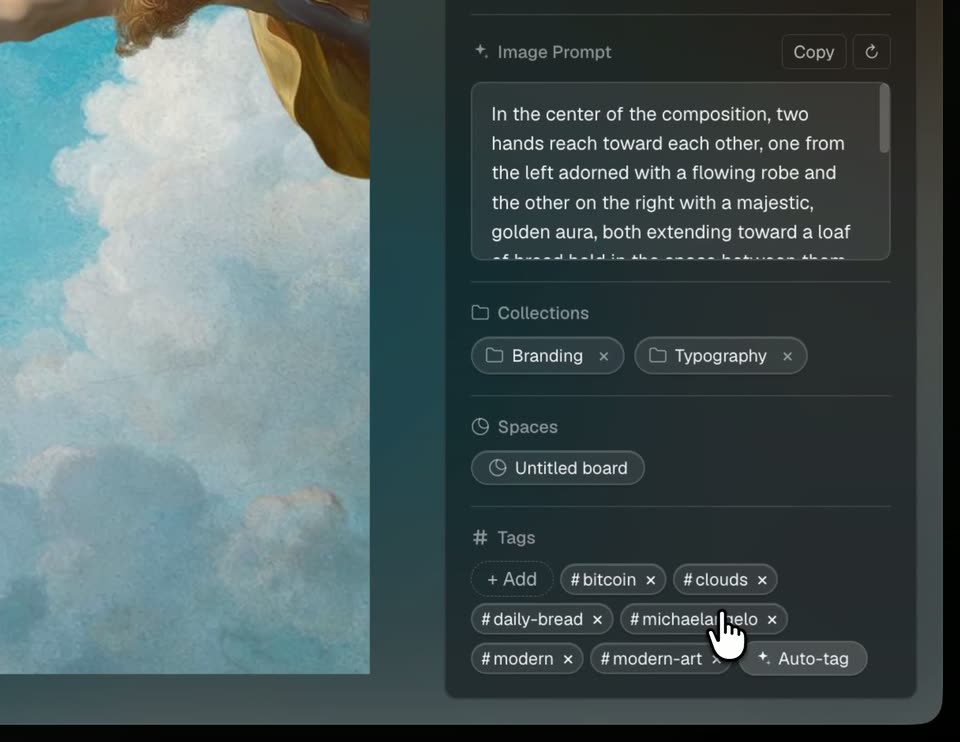
A dark image-library UI shows a Bread poster with a cursor; it zooms into the right details panel where the cursor clicks Auto-tag and hashtag chips appear, then cuts back to the full poster and a Library grid view.
On-screen text: “Bread”, “generalbread.co”, “The only modern Bitcoin app, built for everyone. Earn, spend, trade, and get your daily bread.”
Techniques: UI zoom, Cursor demo
Camera: Pan
03 · Feature reveal · 0:11–0:15
The Library view fills the frame with a grid of collection cards and image tiles. The camera zooms in on the two top cards, Branding and Typography, as a cursor glides from one to the other.
Techniques: UI zoom, Cursor demo
Camera: Push in
04 · Feature reveal · 0:15–0:16
A macOS-style Library window shows two project cards, Branding and Typography, with a cursor hovering the Branding card. The view then zooms into the Branding folder, revealing a grid of colorful image thumbnails as the cursor moves to the first one.
Techniques: Cursor demo, UI zoom
Camera: Pull out
05 · Feature reveal · 0:16–0:16
A blurry library interface zooms into focus, revealing a grid of images. A cursor hovers over the top-left image, which shows red flowers.
Techniques: UI zoom, Cursor demo
Camera: Pull out
06 · Feature reveal · 0:16–0:17
A light gray library grid of image thumbnails sits in a window. The cursor moves to the central abstract heatmap tile and clicks it; the tile expands to fill the frame while a details panel with color swatches slides in from the right.
Techniques: Cursor demo, UI zoom
Camera: Static
07 · Feature reveal · 0:17–0:22
A dark image viewer shows an abstract swirl of blue, red and yellow with white squares. The camera zooms into the top-right toolbar as a cursor taps the wand icon and a hex color chip pops over the image, then pulls back to the full window.
Techniques: UI zoom, Cursor demo
Camera: Pan
08 · Feature reveal · 0:22–0:23
A dark product window displays an abstract swirling image with a white square cluster beside a details panel. A cursor drifts up from the top left toward the circular back button. The view holds steady with no other motion.
Techniques: Cursor demo
Camera: Static
09 · Feature reveal · 0:23–0:25
A light product window shows a Library grid of image cards on a white canvas. The cursor drifts from the top left down to the back arrow beside the Branding label and hovers there.
Techniques: Cursor demo
Camera: Static
10 · Feature reveal · 0:25–0:25
A macOS Library window fills in: the middle and right image cards fade up from blank, a dot spinner resolving into a colorful abstract, and a blurred red flower field labeled Bread appears, while a hand cursor hovers over the All tab.
Camera: Static
11 · Feature reveal · 0:25–0:26
A library grid of image thumbnails and folders fills the screen. A cursor hovers over a red flower image, then the top bar updates and a right-side details panel appears, showing the image's metadata.
Techniques: Cursor demo
Camera: Static
12 · Feature reveal · 0:26–0:39
A dark asset interface pairs a blurred red flower image with a Details panel. A cursor clicks a pink swatch, a Copied #CBA09C tooltip pops up, then clicks Generate prompt as a paragraph of text fills in. The frame zooms between the full window and the panel.
Techniques: UI zoom, Cursor demo
Camera: Push in
13 · Demo · 0:39–0:41
A blurred browser window zooms out and tilts into a 3D perspective, then flattens to a front view of a library grid. A hand cursor moves from the back button to a poster thumbnail.
Techniques: UI zoom, 3D mockup, Cursor demo
Camera: Pull out
14 · Demo · 0:41–0:44
A dark design-tool window displays a webpage mockup of a woman on a bike beneath a bold headline. The view zooms in on the page as a white cursor glides from the left margin to the handlebar.
Techniques: UI zoom, Cursor demo
Camera: Push in
15 · Demo · 0:44–0:44
A product landing page for OLTO electric scooters scrolls upward inside a design tool, revealing a two-column comparison of the OLTO and P1 models with specs and Order buttons, while a hand cursor hovers over the page.
Techniques: Cursor demo
Camera: Pan
16 · Demo · 0:44–0:46
A white product website for OLTO scooters scrolls down at a steady pace, passing the model lineup, the 'The Best Non-Cars on Earth' heading and the awards row, while a cursor holds at the center. A dark side panel with input fields lines the right edge.
Camera: Pan
17 · Demo · 0:46–0:48
Inside a design tool, a white Infinite Machine webpage scrolls up, sliding the Awards block and its three logos down past a centered hand cursor. A dark property panel with name, URL and tags fields stays fixed on the right edge.
Camera: Pan
18 · Demo · 0:48–0:49
A light webpage displays a rider on a white electric bike, framed by an OLTO logo, price, and Order button. The view slowly zooms in on the bike, while a dark sidebar of form fields remains fixed along the right edge.
Techniques: UI zoom
Camera: Pull out
19 · Demo · 0:49–0:50
A design app window opens zoomed into a poster of a woman riding a white scooter, then pulls back to the full interface, revealing a left folder panel and a dark details sidebar with a thumbnail and color swatches.
Techniques: UI zoom
Camera: Pull out
20 · Demo · 0:50–0:51
A flat library interface fills the frame, showing a grid of colorful saved cards under a top navigation bar. A cursor drifts from the top-left corner toward the Collections tab. The screen stays locked-off, with the card thumbnails static throughout.
Techniques: Cursor demo
Camera: Static
21 · Demo · 0:51–0:54
A light app window with a top tab bar reads Library, Collections, Spaces. A hand cursor taps each tab in turn, and the card grid below cross-fades between collection stacks and a board preview.
Techniques: Cursor demo
Camera: Static
22 · Feature reveal · 0:54–0:57
A flat library window of colorful image cards fills the frame. The camera zooms into the top-right corner, tightening on the dark-mode toggle and the 'Most recent' sort control, while a hand cursor hovers on the moon icon.
Techniques: Cursor demo, UI zoom
Camera: Push in
23 · Feature reveal · 0:57–1:00
A dark library window is shown zoomed in on its toolbar as a white cursor hovers the theme toggle. The frame then pulls back to the full window, revealing collection tiles and a grid of saved image thumbnails.
Techniques: UI zoom, Cursor demo
Camera: Pull out
24 · Demo · 1:00–1:01
A dark library interface shows a grid of design thumbnails under Library, Collections and Spaces tabs. A hand cursor hovers over the orange BLOCH tile as the left column of cards settles into place.
Techniques: Cursor demo
Camera: Pan
25 · Demo · 1:01–1:08
A dark app window shows an orange abstract poster titled BLOCK beside a details sidebar. The cursor hovers the poster, then the view zooms into the sidebar, where a tooltip highlights the Branding chip. It pulls back and the cursor moves to the back arrow.
On-screen text: “INFINITE MACHINE”
Techniques: UI zoom, Cursor demo, Kinetic type
Camera: Static
26 · Demo · 1:08–1:09
A dark Library view of a design file app shows a grid of saved cards, Branding, Typography, INFINITE MACHINE, BLOCK, a blurred flower photo and abstract gradients. A cursor sits at the top left as a right details panel slides out and the grid brightens to full.
Techniques: Cursor demo
Camera: Static