0:30

cy - Today we're launching Raylight Capture. 100% free. One click capture
Raylight · Sep 2026
flowscope’s 1:38 launch film runs 12 scenes, about 8.2 s each. The product is on screen from the first frame and 1 feature is revealed. The call to action lands at 1:31 (93% in), over a voiceover. The film alternates full-bleed serif title cards on a dark green dot grid with tilted 3D browser mockups that tour the interface one step at a time, joined by slow fades at a pace of about one cut per ten seconds. Signature moves include centered serif headlines that fade in and out, a persistent small wordmark in the lower-left corner, and a single muted green accent for highlights and the agent card.
Is this your launch? to your site or press kit.
Raylight · Sep 2026
/dev/fast · B2B · Feb 2026
Framer · Design · Oct 2025
Films whose music sounds like this one, voice left out
Arcade · EDM, lo-fi hip-hop, chiptune
Dessn · Upbeat electronic, funk/disco, and hip-hop
Pitch · Upbeat electronic
A near-black green field with a faint dot grid holds the white flowscope wordmark and italic tagline centered; they fade as the wordmark shrinks to the bottom-left corner. The serif line “Introducing our AI process consultant.” fades in centered and holds.
On-screen text: “flowscope”, “AI, delivered.”, “flowscope”, “Introducing our AI process consultant.”
Techniques: Kinetic type
Camera: Static
A dark green dotted field holds a centered serif headline that fades out, while the small flowscope wordmark stays fixed at the bottom left.
On-screen text: “Introducing our AI process consultant.”
Camera: Static
A dark green field with a faint dot grid holds a centered white serif headline that fades in from dim to bright. The small “flowscope” wordmark sits in the lower-left corner throughout.
On-screen text: “Here is how it works”, “flowscope”
Techniques: Kinetic type
Camera: Static
On a dark green dotted background, a white serif headline reads 'Here is how it works' while three rounded cards fade in left to right, each captioned Map, Optimize, Automate. The middle card condenses its icon flow to a single agent, then the scene fades to black.
On-screen text: “Here is how it works”, “Map”, “Optimize”, “Automate”
Camera: Static
A dark green dotted background holds the 'Here is how it works' headline and three labeled cards (Map, Optimize, Automate). The whole layout fades to black, leaving only the flowscope wordmark in the corner.
On-screen text: “Here is how it works”, “Map”, “Optimize”, “Automate”
Camera: Static
A browser window of the flowscope app fades in from black, showing a Workflows page. A left sidebar lists navigation items with Workflows highlighted, while the main panel holds a Workflows heading and a potential savings figure at right. The frame stays locked off.
Camera: Static
A tilted browser mockup of the Workflows page floats on a dark green field as its list rows fill in. The camera zooms in, an AI consultant panel slides in, answers a typed question, and a cursor click highlights the Invoice processing row as the page dims.
On-screen text: “flowscope”
Techniques: 3D mockup, UI zoom, Cursor demo
Camera: Static
A tilted 3D browser mockup of the flowscope app on dark green pairs the invoice-processing step list with an AI consultant chat. Bubbles fill in as a cursor clicks Open and Show the re-engineered workflow, then two manual steps collapse into a green Invoice matcher agent card.
Techniques: 3D mockup, Cursor demo, Morph
Camera: Static
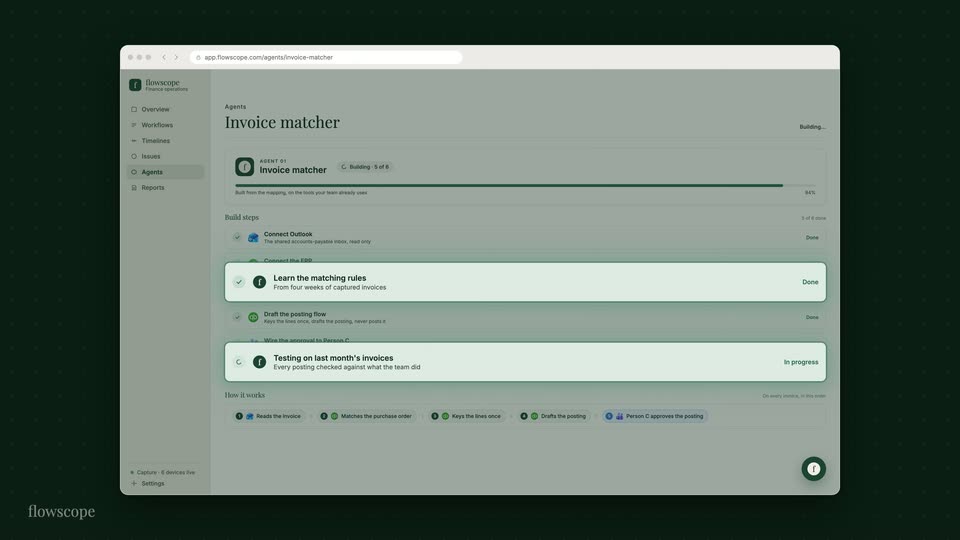
A flat browser window on a dark grid shows the flowscope Invoice matcher page; its progress bar fills and build steps flip from queued to done. The view then spotlights two rows, lifts the dim, and a cursor rests on the new Deploy the agent button.
Techniques: Masking, Cursor demo
Camera: Static
A flat browser mockup of the flowscope app sits on a dark grid background. The right panel dissolves from the agent build-steps list into an approvals queue table with four invoice rows, while a cursor moves from the deploy button to the top right.
Techniques: Cursor demo
Camera: Static
A browser window of the Invoice matcher app floats over a dark dotted backdrop. A new invoice enters the queue, matches, and moves to Approvals; a cursor clicks Approve, the card becomes a Posted to the ERP note, then the window fades out.
On-screen text: “flowscope”
Techniques: Cursor demo
Camera: Static
On a dark green field with a faint dot grid, 'Check it out at' fades in above a large 'flowscope.com', then fades out. The wordmark 'flowscope' and italic tagline 'AI, delivered.' fade in and hold; a small logo sits in the lower left.
On-screen text: “Check it out at”, “flowscope.com”, “flowscope”, “AI, delivered.”
Camera: Static