1:04
Framer - 🖌️ Vectors are now available on the Framer Marketplace. Easily add re
Framer · Design · Oct 2025
Raylight App · Sep 2026 · 0:30 · AI-annotated
Raylight App’s 0:30 launch film runs 18 scenes, about 1.7 s each. The product is on screen from the first frame and 2 features are revealed. The call to action lands at 0:28 (93% in). A 30 second promo set in a black void that opens with a logo sting and a one bar toolbar demo, then cuts through window and phone capture montages at a steady 83 BPM. Signature moves are the red cyan glitch text reveals, shallow focus racks across dark UI, and a white hand cursor tracing every click.
Is this your launch? to your site or press kit.
Framer · Design · Oct 2025
Semble · B2B · Nov 2026
A dark laptop glows in a black void, its blue screen streaked with light and holding five app icons. The focus sharpens and the camera pushes in as the black R icon lifts out of the dock, then morphs into the white R logo on navy.
Techniques: 3D mockup, UI zoom, Morph
Camera: Push in
A white R mark scales up at center on black. The wordmark Raylight Capture slides in from the left beside it. The pair then gives way to a dark rounded toolbar edged in blue glow, showing Screen, Window and Area capture icons.
On-screen text: “Raylight Capture”
Techniques: Kinetic type
Camera: Static
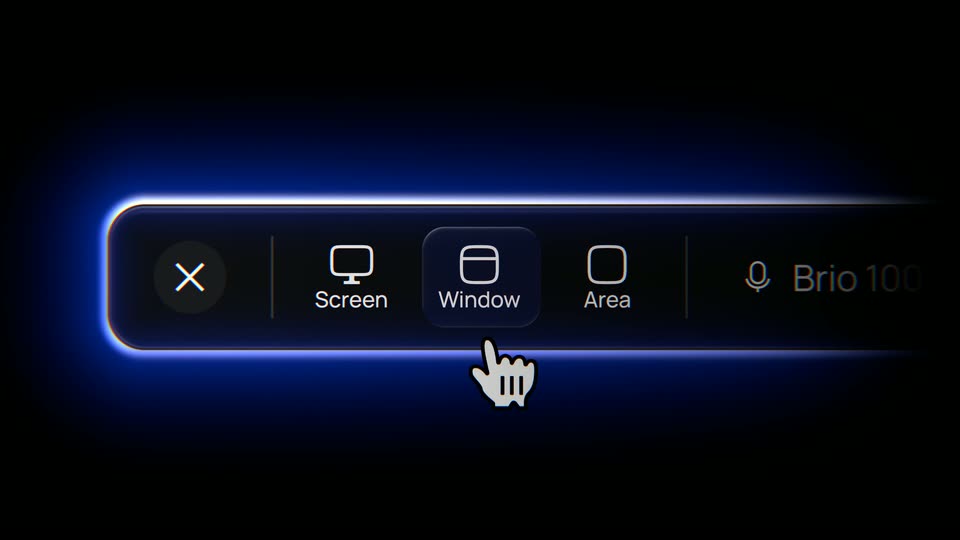
A dark rounded toolbar with a glowing blue edge floats on black, showing Screen, Window and Area capture icons, a mic icon and a Brio 10 label. A white hand cursor rises from the lower right and presses the Window button, which lights up.
Techniques: Cursor demo
Camera: Static
A dark recording toolbar with Screen, Window and Area options fills the frame, the Window tile highlighted, then it cuts to black where the word bar pops in, followed by a larger One centered.
On-screen text: “bar”, “One”
Techniques: Kinetic type
Camera: Static
Three white phrases appear in sequence on a black background, each flickering in with a red-cyan glitch before settling to clean text.
On-screen text: “Footage in.”, “No export step.”, “and 100% free”
Techniques: Kinetic type
Camera: Static
A dark project-management window with a left sidebar and a Gary Memory panel fills the frame. A white hand cursor drags a blue selection rectangle from the top-left corner, expanding it across the upper half, while a second hand cursor appears at the box's bottom-right corner.
On-screen text: “and 100% free”
Techniques: Cursor demo
Camera: Static
A dark project-management interface fills the frame, its detail page listing properties, labels and a QA review, with a white hand cursor resting at the right. The entire screen slips out of focus, blurring to a soft dark shape.
Camera: Push in
A dark product screen sits in shallow focus. The left navigation sidebar, listing Inbox, My Issues, Reviews and Workspace items, racks from blur into sharp view while the right-hand panel and its green button stay soft and out of focus.
Camera: Pull out
A dark design-tool interface frames a heavily blurred app mockup on its central canvas, with sharp layers and properties panels on either side. The timeline playhead creeps right along the bottom.
Camera: Pull out
A dark phone mockup floats in 3D perspective over a blurred blue backdrop. A white hand cursor moves from the menu button to the Add a device tile, then to the list below, as a thin blue rectangle draws itself around the screen.
Techniques: 3D mockup, Cursor demo
Camera: Static
A dark phone mockup in 3D perspective shows the app home screen: a row of quick-action tiles above a dashboards list with a red badge. A white hand cursor hovers at the list's left edge, then the frame drifts slightly as the cursor leaves.
Techniques: 3D mockup, Cursor demo
Camera: Push in
A tight macro of a black smartphone corner, its glossy screen catching highlights, quickly pulls back to reveal the full video editor interface with project panel, inspector and a multi-track timeline.
Techniques: UI zoom
Camera: Pull out
On a black background, a white word enters with a red-blue chromatic aberration glitch and scales, then the phrase “as a layer” materializes to its right as the split eases off the trailing letters. The frame stays locked off throughout.
On-screen text: “mouse”, “as a layer”
Techniques: Kinetic type
Camera: Static
A grid of dark video-template thumbnails scales down to reveal a left sidebar menu and the full application window of a motion-template marketplace. The cards preview app, logo and liquid-glass animations.
On-screen text: “as a layer”
Techniques: UI zoom
Camera: Pull out
A white bold sans-serif phrase 'Made in' sits left of center on black. The word 'Raylight' materializes beside it, resolving from a distorted, color-split glitch into clean white type. The frame stays locked.
On-screen text: “Made in Raylight”
Techniques: Kinetic type
Camera: Static
A white tagline centered on a black background flickers with a red and blue chromatic aberration glitch, then resolves into a clean, static line.
On-screen text: “Made in Raylight”
Camera: Static
A white R mark sits centered on a black background, scaling gently and then holding still in a locked-off frame.
On-screen text: “R”
Techniques: Kinetic type
Camera: Static
A white URL, raylight.app/capture, is centered on a black background.
On-screen text: “raylight.app/capture”
Camera: Static