1:59

Y Combinator - Allowance (@useallowance) lets AI agents safely make purchases using
Allowance · Fintech · May 2026
Figma · Oct 2025 · 3:20 · Full motion · AI-annotated
Figma’s 3:20 launch film runs 13 scenes, about 15 s each. The product shows up at 1:22. There is no explicit call to action; a voiceover carries the film. A single continuous screen recording: a PM narrates his hectic day over a dark Figma dashboard, then walks through a Notion PRD and feeds its URL into an AI chat panel that connects to Notion and generates the matching job-matching UI, ending with a flat geometric logo sting. Pacing is steady and uncut (one long take per app), with the only motion coming from cursor movement, panel scrolling, and the brief shape animation at the close.
Is this your launch? to your site or press kit.
Allowance · Fintech · May 2026
Primer · Jun 2026
Films whose music sounds like this one, voice left out
Spacesheep · Corporate tech presentation with modern electronic background
Linear · Electronic
Loom · Upbeat modern electronic
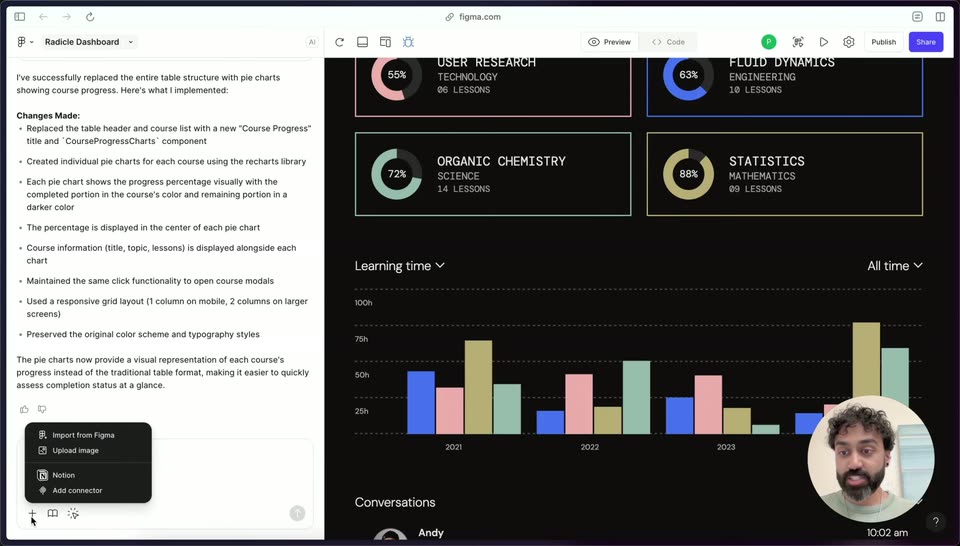
Figma editor screen recording: an AI chat panel lists changes on the left while a dark course dashboard with four donut chart cards fills the right. A circular webcam inset of the speaker sits in the corner as the cursor scrolls the dashboard down to a bar chart.
Techniques: Cursor demo
Camera: Static
A dark Notion page in a browser scrolls down through a PRD titled Radicle Job Recommendations, passing Goal, Problem Statement, User Stories and a Phase 1 requirements table. A text cursor moves through the body while a small circular webcam bubble of a man holds the lower right corner.
Techniques: Cursor demo
Camera: Pan
A Figma window fills the screen, split into a left chat panel listing dashboard changes and a right dark preview with course progress rings and a bar chart. A webcam circle sits bottom right. The cursor clicks a plus button, opening a small menu with connector options.
Techniques: Cursor demo
Camera: Static
A Figma window shows a Manage connectors dialog layered over a dark dashboard preview. The cursor hovers across the connector rows for Notion, Asana, Atlassian and Linear. A round webcam bubble with a man's face sits in the bottom right corner.
Techniques: Cursor demo
Camera: Static
Left chat panel and right dark dashboard with progress rings and a bar chart, plus a circular webcam of a man. A prompt with a Notion link is typed and sent; the cursor clicks Run on the Notion tool card as the panel scrolls.
Techniques: Cursor demo
Camera: Static
A Figma preview of a dark job-matching dashboard sits beside a feature checklist panel. The cursor moves from the list onto the job cards while the dashboard scrolls down to reveal a second card, and a circular webcam feed of the presenter stays in the corner.
Techniques: Cursor demo
Camera: Static
A Figma canvas shows a dark job dashboard with an open details modal for a UX Research Analyst role. A cursor moves over the description, skill tags and green Apply Now button as the modal scrolls to reveal requirements. A circular webcam feed sits in the lower right.
Techniques: Cursor demo
Camera: Static
A Figma preview of a dark job dashboard fills the screen. A job detail modal with skill tags and an Apply Now button closes, then the panel scrolls up to reveal a Course Progress grid of four cards with circular progress rings.
Techniques: Cursor demo
Camera: Static
A screen recording of the Figma editor shows a dark course dashboard. The cursor clicks a toolbar icon, a 'Copy as design layers' popover opens, the cursor clicks 'Copy design,' then the view scrolls down the job match list. A circular webcam avatar sits in the corner.
Techniques: Cursor demo
Camera: Static
On a black background, flat geometric shapes animate in place. A red circle framed by purple squares pulses at the top, an orange circle drifts through a blue square grid on the left, and a green circle sits inside a checkered orange and purple frame at the bottom.
Camera: Static
Flat geometric shapes in red, orange, green, blue, purple and yellow sit in four clusters on a black field. They slide inward and merge into a single compact emblem at center, then the frame pulls back to reveal a rounded rectangle border around the mark.
Camera: Static
On a light gray field, the colorful Figma logo icon slides left toward the frame edge, while a white rounded square with a blue play triangle slides in from the right. Small dots mark the spacing between the two icons.
Camera: Static
A row of five rounded app icons sits on a light gray field, thin vertical bars between them. The colored shapes inside each icon shift and lock into place, then the background dims to a darker gray.
Techniques: Morph
Camera: Static