1:11

Meet the New Fitbit App
Fitbit · Sep 2023
Feldy’s 2:01 launch film runs 54 scenes, about 2.3 s each. The product is on screen from the first frame and 3 features are revealed. The call to action lands at 1:56 (95% in), over a voiceover. A clean, white-field launch film built from alternating typographic title cards and floating 3D phone and UI mockups, each feature introduced by a one-line headline that scrolls or scales in before the demo plays. Pacing is steady at about five cuts per minute, with signature moves of word-by-word text reveals, slice-mask title cards, tilted photo cards drifting beside the device, and a recurring lavender pill that carries the key phrases before resolving into the purple F logo at the close.
Is this your launch? to your site or press kit.
Films whose music sounds like this one, voice left out
DeepPrinciple · Electronic
Anthropic · Electronic dance music, future house
Microsoft · Cinematic Orchestral / Electronic
On a plain white background, a small black stroke mark at center resolves into the bold headline “Meet Feldy”, with “Feldy” in purple. Below it, the tagline “Field-first AI for Home Service Pros” fades in word by word from left to right, settling to solid black.
On-screen text: “Meet Feldy”, “Field-first AI for Home Service Pros”
Techniques: Kinetic type
Camera: Static
A white title card: 'Meet Feldy' reveals through vertical slice masks, the M in black and the F in purple, with a gray tagline beneath. A lavender card then slides in from the left carrying the white word 'can'.
On-screen text: “Meet Feldy”, “Field-first AI for Home Service Pros”, “can now”
Techniques: Masking, Kinetic type
Camera: Static
Large black lowercase “can now” spans two purple blocks on white as 3D app cards with floor plans, photos, and a phone scan drift in on the right. A black “Home Service Pros” label with yellow underline pops on the left block, then a gray headline slides in on white.
On-screen text: “can now”, “Home Service Pros”, “Take photos and do video walkthroughs and have AI build them”
Techniques: 3D mockup, Kinetic type
Camera: Static
Three lines of black text scale in on a plain white background, then slide up as a lavender pill with blue “Into estimates” text appears beneath.
On-screen text: “Take photos and do”, “video walkthroughs”, “and have AI build them”, “Into estimates”
Techniques: Kinetic type
Camera: Static
A dark gray three-line headline scales up and fades out above a light lavender pill holding the blue words Into estimates, which stays centered on a near-white background.
On-screen text: “Take photos and do video walkthroughs and have AI build them”, “Into estimates”
Techniques: Kinetic type
Camera: Static
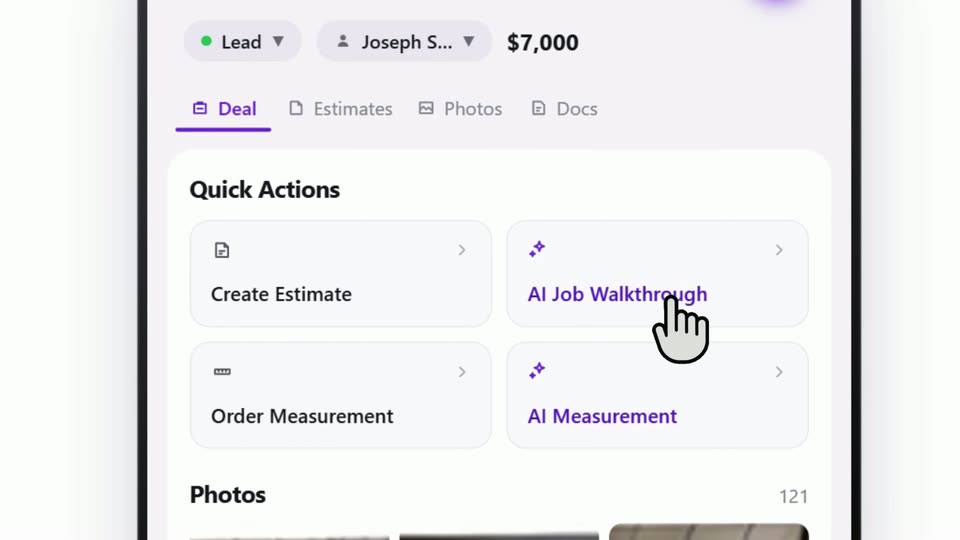
A front-facing smartphone mockup scales in on a light gray background, showing a House Remodel deal screen with Quick Actions cards. A hand cursor slides in, taps the purple camera button, and the screen switches to a camera viewfinder framing a house porch with a red column.
Techniques: Cursor demo
Camera: Static
A flat phone mockup on the left plays a vertical video of a person in red building wooden shelving inside a shed, with the camera record button at the bottom. A smaller tilted frame pops in on the right showing a wider angle of the same site.
Techniques: Split screen
Camera: Static
A front-facing phone mockup on the left shows a camera viewfinder of a wooden shed, its image sharpening from a blur. On the right, two tilted photo cards of the same scene float, and a third card fades in below them.
Techniques: 3D mockup
Camera: Static
A front-facing phone mockup on a light background shows a camera view of a house under renovation, with three tilted photo cards stacked to its right. The phone screen scrolls up to reveal a project detail screen with a Quick Actions panel.
Techniques: 3D mockup
Camera: Pan
A 3D phone mockup floats over a blurred dashboard, then scales up as the screen resolves into a full desktop Quick Actions view. A hand cursor taps the purple AI Job Walkthrough tile in the grid.
Techniques: 3D mockup, UI zoom, Cursor demo, Morph
Camera: Push in
On a plain off-white field, black sans-serif text slides in word by word from the left. A small gray tap icon blinks near the right edge at the start, then the closing word talk. lands in light purple.
On-screen text: “Walk through the job and talk.”
Techniques: Kinetic type
Camera: Static
A black headline with a purple accent word sits on a white field, then slides out to the left, leaving the black Feldy wordmark centered on the same plain background.
On-screen text: “Walk through the job and talk.”, “Feldy c”
Techniques: Kinetic type
Camera: Static
The line “Feldy captures what you see and say.” enters from the right on a white field, scrolling left and scaling up as it crosses; “see and say.” is set in purple, the rest in black.
On-screen text: “Feldy captures what you see and say.”
Techniques: Kinetic type
Camera: Static
A centered phone mockup fades in on a pale blue field, its screen showing a live camera view of a wooded job site with a person's shadow on the grass. A white card slides up at the bottom of the screen with a heading and a blue button.
On-screen text: “ou see and say.”
Camera: Static
Two flat iPhone mockups sit side by side on a light gray field. The left shows the camera app's wide view of a wooded cabin with a dog's shadow; the right fades in showing a close-up of the raw wooden overhang frame. A thumbnail strip and an 11-images count appear at the bottom of each screen.
Camera: Static
A phone mockup on a light gray background shows the camera app filming a raw wooden overhang. A dark pill banner with a purple waveform icon slides up across the screen, reading “AI Walkthrough recording” above “Video · Voice · Job details”.
On-screen text: “AI Walkthrough recording”, “Video · Voice · Job details”
Techniques: 3D mockup
Camera: Push in
A phone mockup tilts in 3D against a white background, its screen playing a handheld clip of a raw wooden overhang. A black pill banner with a purple waveform icon and the label AI Walkthrough recording overlays the lower half of the device.
On-screen text: “AI Walkthrough recording”, “Video · Voice · Job details”
Techniques: 3D mockup
Camera: Pull out
A phone screen transitions from a photo view to a project document titled House Remodel. The document scrolls down past Roofing, Finishing Work and Material Updates sections, each pairing bullet points with a three-column grid of house and deck photos.
Camera: Push in
A bold black sans headline scrolls from right to left across a plain white field. The phrase passes through the frame, words entering at the right edge and exiting at the left.
On-screen text: “Turn what you can”
Techniques: Kinetic type
Camera: Static
Black text reading hat you capture sits on a white field, blurs out, and the word Into scales up at center. A pale lavender pill grows behind it as the text swaps to An estimate in blue, scaling to final size.
On-screen text: “hat you capture”, “Into”, “An estimate”
Techniques: Kinetic type
Camera: Static
A chat interface on a pale background. A purple bubble reading An estimate settles at the top as a large gray bubble rises from below. A person icon with a YOU label appears, and the message Homeowner wants Behr premium coat paint in red, can you figure out types out behind a purple caret.
Camera: Static
A chat bubble types out a request about red Behr paint, then the frame pulls back to reveal the AI progress list filling in line by line with green dots, ending on a completed check, above a bottom input bar.
Techniques: UI zoom
Camera: Static
A light chat interface scrolls down through an AI estimator thread, revealing paint and labor line items and a draft total. The first item flips to an Added badge and the estimated total counts up to $600.00 above a purple add-all button.
Camera: Pull out
A quote table on the left populates row by row while an AI panel on the right lists quote changes and adds two line items. A cursor taps the send button, then the interface blurs as a voice memo bar with waveform and timer centers on screen.
Techniques: Cursor demo
Camera: Pan
A white audio-recorder pill floats over a blurred app table. Its purple waveform pulses and the timer ticks from 0:01 to 0:03. A hand cursor slides in, taps the black round send button, and the bar shrinks away into the interface.
Techniques: Cursor demo
Camera: Static
A phone in 3D perspective on a light background shows the app screen scrolling down through a construction proposal: a cover page with a house photo and orange shapes, an estimate sheet with line items and total, then a before-and-after photo pair.
Techniques: 3D mockup
Camera: Static
A vertical phone mockup on a light gray background shows a before and after report. Two side-by-side photos of a shed renovation sit under a bold heading, and the interface scrolls upward to reveal a dark row of four orange feature icons.
Techniques: 3D mockup
Camera: Static
A vertical report mockup in 3D perspective scrolls downward, revealing a Before and After shed renovation with two photos, captions, and a dark feature bar holding four icons.
Techniques: 3D mockup
Camera: Pan
A tall project-approval document scrolls downward on a pale gray backdrop. The orange corner and heading exit at the top while a five-step icon row and two phone app screens rise into view. A small caption slides in to label the current state.
On-screen text: “Before & After”, “After”
Camera: Pan
A phone mockup in 3D perspective displays a scrolling webpage with project steps and two app screens. The page scrolls up to a purple Send proposal button. A hand cursor clicks it, and the button morphs into a gray loading state with a spinner.
Techniques: 3D mockup, Cursor demo, Morph
Camera: Pan
A flat phone mockup on a light background shows a Send Proposal sheet. An email types into the Send to field, a New recipient tag pops in, a message fills in, and a hand cursor taps the purple Send proposal button as a black Proposal sent toast appears.
Techniques: UI zoom, Cursor demo
Camera: Pull out
On a plain off-white background, a single line of black text reads “Capture the home from a few angles” on the left. The line appears and holds still while the frame stays locked off.
On-screen text: “Capture the home from a few angles”
Camera: Static
Two lines of black text hold center on a plain white background while a thin purple line sketch of a roof outline fades in beneath them. The second line wipes in from left to right.
On-screen text: “Capture the home from a few angles”, “and get roof & exterior measurements”
Techniques: Kinetic type
Camera: Static
On a plain white background, two lines of dark gray text sit centered and still. A blurred indigo line slides up from below and settles into a light lavender rounded pill just under the headline.
On-screen text: “Capture the home from a few angles”, “and get roof & exterior measurements”, “Ready for estimates, take offs and material orders”
Techniques: Kinetic type
Camera: Static
Two lavender pill callouts carrying the tagline rest on a white field. A white Exterior capture card then slides up into the center, revealing a back arrow, the address field and a mapping instruction.
On-screen text: “Ready for estimates, take offs and material orders”
Techniques: Kinetic type
Camera: Static
A white mobile screen scrolls down, past a header and a 4 of 8 progress badge, to reveal a two by two grid of exterior photos with check marks, then two option rows and a dark Continue button.
Camera: Pan
A flat phone mockup fades in on a white background. The app screen's photo grid fills with six house thumbnails, and a white 3D house model with dashed measurement lines assembles at the bottom.
Camera: Pan
A white rounded card holds a row of landscape photo thumbnails above a low-poly house on a flat grid plane. The house builds from a white wireframe into a colored model with a deck and chimney as the thumbnails scroll.
Techniques: 3D mockup
Camera: Push in
A 3D model of an orange wooden house with a stilted deck and chimney sits on a white rounded card. The view orbits slowly around the model, shifting from the front corner toward the side.
Techniques: 3D mockup
Camera: Pull out
A 3D model of an orange wooden house with a black roof and a raised deck rotates on a white rounded card, turning from the front deck toward the side wall. A small gray YOU tag with a person icon fades in at the lower left.
Techniques: 3D mockup
Camera: Static
A chat screen shows a render of a wooden house. The prompt “Add picture windows on the third floor” types into the input bar, a purple Send button appears, a hand cursor taps it. The view reframes and a new render with picture windows on the top floor appears.
Techniques: Cursor demo, UI zoom
Camera: Static
A white report card on a light gray background loads a house measurement summary. A house render and four exterior photos appear, then the panel switches to a gutters and downspouts table beside a details sidebar.
Camera: Pan
A white measurement report card on a gray backdrop scales up from a small centered thumbnail to fill the frame. Its body scrolls upward, moving past the gutters table and eight house photos to settle on the executive summary tables.
Techniques: UI zoom
Camera: Pan
On a plain off-white background, a two-line headline reveals word by word, each word shifting from light gray to black, on a locked-off frame.
On-screen text: “Built for the people who make our homes”
Techniques: Kinetic type
Camera: Static
The purple word Better sits centered on white, then its letters drift apart as a white card printed with purple triangles, circles and dots rotates in 3D behind them.
On-screen text: “Better”
Techniques: Kinetic type, 3D mockup
Camera: Push in
A stack of translucent purple panels with line patterns rotates and shuffles on a white background. A centered dark gray italic label cycles through trades, swapping Siding Contractors for Window Installers and then Painters.
On-screen text: “Siding Contractors”, “Window Installers .”, “Painters.”
Techniques: Kinetic type
Camera: Static
A stack of tilted pastel cards with wavy blob and wireframe patterns shuffles in the center of a white field. A dark trade name updates from Tile Installers to Fence Contractors as the top card rotates over the others.
On-screen text: “Tile Installers.”, “Fence Contractors.”
Techniques: Kinetic type
Camera: Static
Stacked translucent pink and purple gradient planes sit on a white field, shifting in depth. Bold dark text swaps across them: “Deck Builders.” becomes “Carpenters.” then “And it do” as a plane slides in from the right. Diagonal light streaks cross the top card.
On-screen text: “Deck Builders.”, “Carpenters.”, “And it do”
Techniques: Kinetic type, Light sweep
Camera: Pan
Black headline text reveals left to right on a white field, a second line joins below, then a phone mockup with an interior-scan view slides in from the left and the text shifts right.
On-screen text: “And it doesn't stop there.”, “Capture more”
Techniques: Kinetic type, 3D mockup
Camera: Static
On a light background, tilted phone mockups and flat UI cards scale in around a centered black headline, then a purple Do more button pops in below it.
On-screen text: “And it doesn't stop there.”, “Capture more”, “Do more”
Techniques: 3D mockup, Kinetic type
Camera: Pull out
A grid of product UI cards (measurements, floor plan, walkthrough, photos) floats around a centered black headline, then the whole collage fades to white. The cards drift and settle as a blue 'Do more' pill sits below the text.
On-screen text: “And it doesn't stop there. Capture more”, “Do more”
Techniques: Parallax
Camera: Static
A light lavender pill holding the blue text Do more sits centered on white. Faint app mockups fade out of the background as the text resolves from a horizontal scan-line glitch to a clean state.
On-screen text: “Do more”
Camera: Static
On a white background, a light lavender pill behind bold blue “Do more” text shrinks until the text overflows and fades, then the pill morphs into a solid purple P-shaped logo mark.
On-screen text: “Do more”
Techniques: Morph
Camera: Static
A purple rounded F mark sits centered on a white grid background, then the wordmark FELDY fades in beside it. A bottom row with a globe icon, the URL and two store badges rises into place below. The lockup holds briefly, then fades out to white.
On-screen text: “FELDY”, “Visit us: Feldy.ai”, “Download on the App Store”, “GET IT ON Google Play”
Camera: Pull out