4:53

Introducing Modules
Retool · Developer tools · Jul 2021
Ekpa · Aug 2026 · 2:42 · Full motion · AI-annotated
Ekpa’s 2:42 launch film runs 13 scenes, about 13 s each. The product is on screen from the first frame and 4 features are revealed. There is no explicit call to action; a voiceover carries the film. The video is a single continuous screen recording of the ekpa interface, with the founder's facecam pinned to the lower-left corner as he walks through each tab in order. Pacing is slow and uncut, driven by live cursor movement and scrolling rather than edits or motion graphics, while serif headings and a muted blue-green palette give it a calm, editorial feel.
Is this your launch? to your site or press kit.
Retool · Developer tools · Jul 2021
Retool · Developer tools · Jun 2023
Films whose music sounds like this one, voice left out
Confident AI · Voiceover
cmux · Technical voiceover
Revyl · Corporate tech presentation with electronic background music
A presenter talks from a small video-call window at the bottom left over the ekpa dashboard. The page scrolls down from the portfolio value and allocation cards to the Stay updated and See actions lists, and the cursor hovers over the action rows.
Techniques: Cursor demo
Camera: Pan
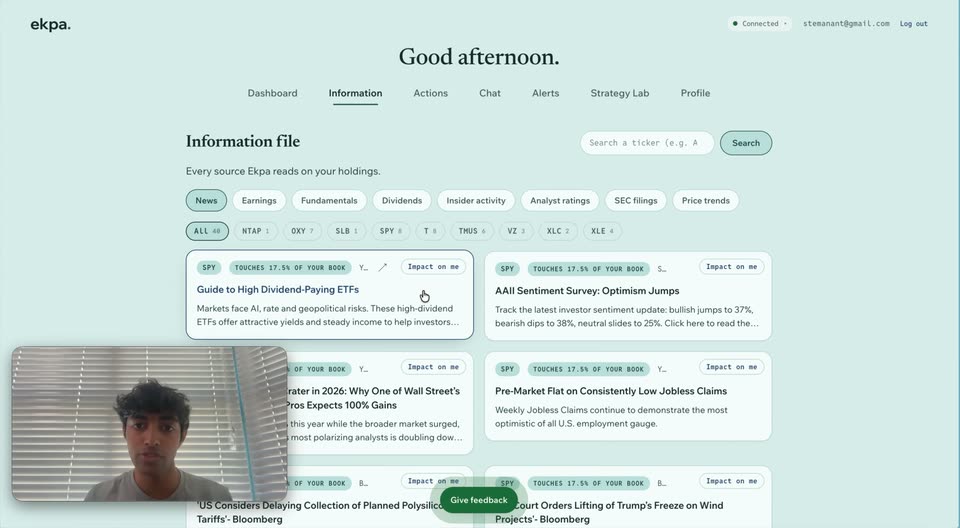
The Ekpa Information page sits static with a grid of news cards and filter pills; a cursor drifts up to the Impact on me button on the first card and hovers there. A small video-call window in the lower left shows a man talking and gesturing.
Techniques: Cursor demo
Camera: Static
A light-blue dashboard fills the screen as its two-column news feed scrolls down, past article cards tagged with ticker symbols. A small video-call window of a bearded man in a white shirt remains pinned to the lower-left corner beside a green feedback button.
Camera: Pan
A presenter's webcam sits in the lower-left corner over a news dashboard. The cursor clicks an Impact on me button on a card, a two-line summary card slides in below it and part of its text highlights, then the view scrolls up to the page header.
Techniques: Cursor demo
Camera: Static
The ekpa Actions page scrolls down through two columns of stock cards, holdings on the left and research ideas on the right, while a cursor hovers over the links. A small webcam window in the lower left shows a man talking and gesturing.
Techniques: Cursor demo
Camera: Pan
The product interface scrolls down through two columns of stock cards, left showing holdings with HOLD badges and right showing picks with risk labels, while a cursor hovers over the Show more ideas links. A small webcam inset of the presenter stays fixed in the lower-left corner.
Techniques: Cursor demo
Camera: Pan
A two-column dashboard of stock cards scrolls up to reveal the Actions heading and new cards with risk tags. A small video of a man in front of blinds stays in the bottom-left corner, and a cursor drifts across the right column.
Techniques: Cursor demo
Camera: Static
The ekpa Chat view sits on a pale blue background, a card of question chips above an empty input field. A small webcam video of a man talking plays in the lower-left corner. The cursor drifts down the page and back up to hover over the Alerts tab.
Techniques: Cursor demo
Camera: Static
The Strategy Lab page wipes in over the previous screen, with a small webcam inset of a man at bottom left. On the right, a dark panel adds rule chips one by one, then a light line chart draws across it.
Techniques: Masking
Camera: Static
A pale blue product screen with a backtest form and a demo banner scrolls down a few lines. A small webcam feed of a man in a striped shirt stays fixed in the lower-left corner.
Camera: Static
A light Strategy Lab dashboard fills the frame, a small webcam window of a man in the lower left. A cursor opens a dropdown, picks Price vs moving average, drags a slider to 55, then selects crosses above the average. The right panel shows a backtest chart and trade table.
Techniques: Cursor demo
Camera: Static
A screen recording of a strategy builder shows a cursor checking the take profit and stop loss boxes, then dragging their sliders. The right panel updates live, the chart and trade table shifting as the return percentage recalculates. A small webcam of a man sits in the lower left.
Techniques: Cursor demo
Camera: Static
The Strategy Lab backtest screen: a form with sliders on the left, a line chart and trade table on the right. A presenter's webcam fills a rounded inset in the lower left. The page scrolls up to the header and demo banner while the cursor drifts over the chart.
Techniques: Cursor demo
Camera: Static