
2:03
Explore
Introducing Modules
Retool · Jul 2021 · 4:53 · Full motion · AI-annotated
- Length
- 4:53
- Scenes
- 11 · 26.6 s avg
- Product on screen
- 0:00
- Features shown
- 1
- Voiceover
- Yes
- Views
- 7.9K on YouTube
as of November 27, 2026
00:00:00 / 04:53:03
- Length
- 4:53
- Scenes
- 11 · 26.6 s avg
- Product on screen
- 0:00
- Features shown
- 1
- Voiceover
- Yes
- Views
- 7.9K on YouTube
as of November 27, 2026
Retool’s 4:53 launch film runs 11 scenes, about 27 s each. The product is on screen from the first frame and 1 feature is revealed. There is no explicit call to action; a voiceover carries the film. A single locked-off screen recording of the Retool editor, cut only at step changes, with the cursor as the sole moving element and long static holds on each UI state. Pacing is slow and steady, so motion should stay minimal: let panels settle, highlight the active region, and avoid fast cuts.
No filming indicatedEstimated needs: 2 capture groups — your screens or recordings
Is this your launch? to your site or press kit.



Introducing Modules, scene by scene
· 11 scenes as text
01 · Product intro · 0:00–0:23
A full-screen browser view of the Retool app shows the Apps library with a sidebar and a two-row list, Customers and User Editor. The cursor drifts over the empty canvas, then clicks the blue Create new button, opening a dropdown of options.
Techniques: Cursor demo
Camera: Static
02 · Feature reveal · 0:23–0:25
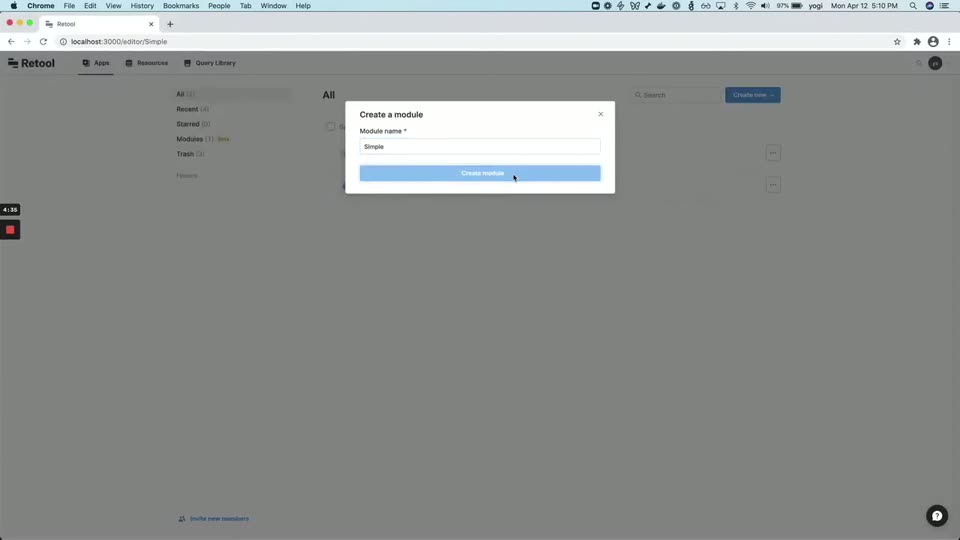
A dimmed dashboard sits behind a centered Create a module dialog, with a dropdown menu open at first. The cursor types a name into the field, the create button turns blue, then the cursor clicks it. The locked-off frame holds on the dialog.
On-screen text: “4:37”
Techniques: Cursor demo
Camera: Static
03 · Feature reveal · 0:25–1:13
A locked-off screen recording of the Retool module editor. A cursor drags a Text component onto the empty canvas, then adds two inputs in the left panel, opens an edit popup, inserts a property token, and types a test value into the text field.
Techniques: Cursor demo
Camera: Static
04 · Feature reveal · 1:13–1:14
A browser window shows the Retool builder: a user table in the center, a state tree on the left, a component palette on the right, and a query editor below. A hand cursor glides up the rows and clicks the first, which highlights blue.
Techniques: Cursor demo
Camera: Static
05 · Feature reveal · 1:14–2:31
A screen capture of the Retool editor. A cursor clicks through query and inspect panels, types customer_id into an input dialog, and runs a query, updating the preview card to John LastName. The view switches to a Users table, where a user card modal is dragged over the list.
On-screen text: “retoolin.tryretool.com/editor/Modules%20GA%20Training/Users”
Techniques: Cursor demo
Camera: Static
06 · Feature reveal · 2:31–2:32
A Retool module editor fills a browser window. A user card preview sits center, the inspector panel on the right highlights the customer_id input, and a cursor hovers over the inputs list on the left. The frame holds static as the voiceover points to the right panel.
Camera: Static
07 · Feature reveal · 2:32–3:31
A Retool editor screen in Chrome shows a Users table on the left and a detail card on the right. The cursor clicks table rows, the card updates with each user's name and email, then opens an edit form where a last name is changed and saved.
Techniques: Cursor demo
Camera: Static
08 · Feature reveal · 3:31–3:52
A screen recording of the Retool editor shows a cursor clicking Add input, typing on_submit into a dialog, and setting its type to Query. The cursor then links the updateCustomer query to fire on_submit and hovers the Run button.
Techniques: Cursor demo
Camera: Static
09 · Feature reveal · 3:52–3:54
A browser window shows the Retool editor with a customer form in the center and module, component, and query panels around it. A cursor drifts across the form panel while the layout stays static.
Techniques: Cursor demo
Camera: Static
10 · Feature reveal · 3:54–4:31
A locked-off screen recording of the Retool editor. The cursor clicks rows in a Users table, the detail card beside it swaps names and emails, then the cursor opens the module's output field and types a formula while the query panel below updates.
Techniques: Cursor demo
Camera: Static
11 · Feature reveal · 4:31–4:53
A static screen recording of the Retool editor shows a users table and a user detail card. A cursor clicks a row, selects both components, and the right panel shows a Duplicate to module button.
Techniques: Cursor demo
Camera: Static