1:27

Articulate: The Construction & Solar Painkiller
Helonic · Real Estate and Construction · Oct 2025
Aspect’s 1:30 launch film runs 28 scenes, about 3.2 s each. The product is on screen from the first frame and 4 features are revealed. The call to action lands at 1:14 (82% in), over a voiceover. A 90-second launch video that opens on a walking title card, cuts to three hosts on a rooftop terrace delivering the pitch, then runs a rapid retro-industrial montage before moving through four UI feature demos (library search, rough-cut export, video review, workflow automation) built from a recurring coffee-roaster sample clip. It closes by restating the unchanged ingest-to-delivery process as the problem, landing on a spoken CTA with the aspect.inc wordmark and a black logo card. The style is
Is this your launch? to your site or press kit.
Helonic · Real Estate and Construction · Oct 2025
Judgment Labs
Films whose music sounds like this one, voice left out
VibeFlow · Upbeat electronic
Resend · Upbeat electronic
Manufact · Upbeat electronic
Three men in dark jackets walk toward the camera along a paved garden path, a white building and metal tower behind them. The centered white word aspect holds the frame, its fill shifting from thin horizontal stripes to solid, then fading as the men pass. Locked-off camera.
On-screen text: “aspect”
Techniques: Kinetic type
Camera: Static
Three men sit at a slatted wooden table on a rooftop terrace, the bay and a bridge behind them. The middle man talks and gestures while the camera stays locked off, as large white text phrases appear in sequence at the top and bottom of the frame.
On-screen text: “OUR AGENTS”, “UNDERSTAND VIDEO”, “JUST LIKE YOU DO”, “AND CAN TAKE ACTION ACROSS A”, “VARIETY OF DIFFERENT TOOLS”
Techniques: Kinetic type
Camera: Static
Close-up of a vintage radio's amber flip-digit counter; the final digit flips from 4 to 3 while a labeled control knob and a blurred warm background remain static.
Camera: Static
A dark orange gradient holds a glowing orb at the bottom and a curved shadow above. A bright white flash erupts from the center, expanding to fill the frame with orange edges and drifting sparks.
Techniques: Particles
Camera: Push in
A man in profile, wearing dark goggles, looks toward a wall with two round portholes in a hazy, overexposed workshop. A text overlay reading CHO spans the full frame height and stays still on a locked-off shot.
On-screen text: “CHO”
Camera: Static
A white flash fills the frame, then bursts into a fireball of orange flame and smoke against a dark background, sending sparks outward. The camera is locked off.
On-screen text: “CHO”
Techniques: Particles
Camera: Pull out
A bright orange light bloom fills the frame, then fades to reveal a vintage black radio. A row of glowing amber digits reads 000006 above a tuning knob and dial, set against a warm, blurred background with hanging cables.
Techniques: Light sweep
Camera: Static
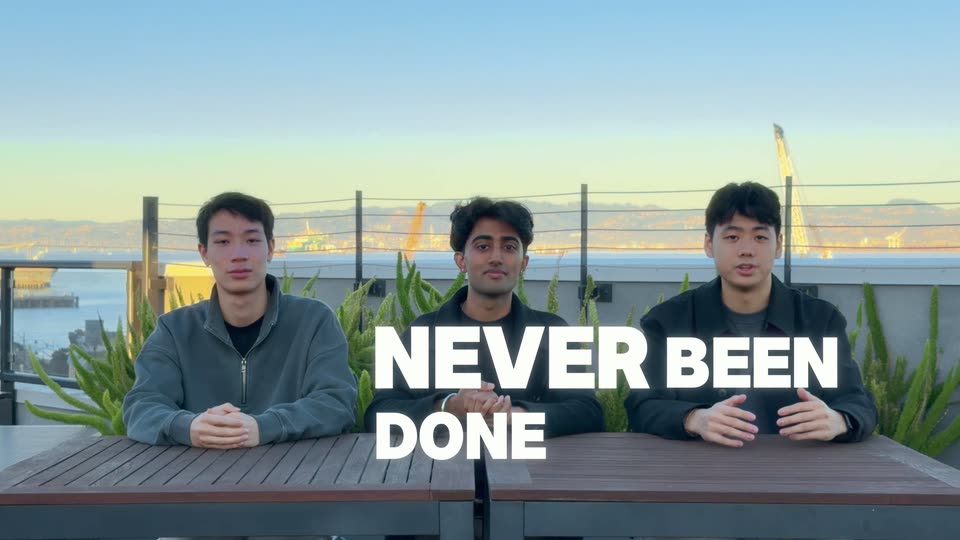
Three men sit at a rooftop table against a sunset harbor, white bold words stack at upper left then a large line slams across the lower frame, then a hard cut to a flat file manager grid of colored folder icons.
On-screen text: “WE ARE UNLOCKING SOMETHING”, “NEVER BEEN”
Techniques: Kinetic type
Camera: Static
A light file library UI: app icons on the left light up with green outlines as a grid of skeleton cards populates the canvas. Green scan lines sweep across each card, and a dark popover at the bottom ticks through Actions, Faces, Objects, Moments.
On-screen text: “NEVER BEEN”
Techniques: UI zoom, Light sweep
Camera: Push in
The rooftop shot of three hosts at a table is masked into a rounded card on the left as a file-list panel slides in from the right on a pale gray background. The panel shows video thumbnails with dates and resolutions, and the left card settles while the panel finishes its slide.
Techniques: Masking, Split screen
Camera: Static
A man in a gray zip-up jacket sits at an outdoor table on the left, talking, while a rounded file-list panel on the right scrolls upward through rows of video file names, dates, and resolutions.
Techniques: Split screen
Camera: Static
A vertical clip of a man in a gray zip-up at a wooden table by the water at sunset holds the left. On the right, a file list with one highlighted row and a send icon gives way to a search box where a query types in, the box collapses.
Techniques: Split screen, Kinetic type
Camera: Static
A man in a gray zip sweater sits at a wooden table outdoors, talking and gesturing. On the right, a rounded prompt box slides in with a search query, then two video thumbnails labeled CAM A and CAM B pop in side by side.
On-screen text: “Find clips of Jimmy walking down the line between two teams”
Techniques: Split screen
Camera: Static
A man sits at a rooftop table on the left while a prompt box slides in on the right above two golf-game video clips with player bars. The second clip then shrinks and dissolves into small fragments.
On-screen text: “Find clips of Jimmy walking down the line between two teams”
Techniques: Split screen, Kinetic type, Particles
Camera: Push in
A project interface fades in from a washed-out state to full opacity. The right chat panel reveals a speech bubble icon and a prompt line, and the PDF file chip scales into a larger card at the bottom as a cursor moves in.
Techniques: Cursor demo
Camera: Push in
A close-up of a white file library interface with three folder cards. A cursor sits in the chat input as the prompt types out word by word. The frame zooms out to the full app window, and the agent's reply types out in the right chat panel.
Techniques: Cursor demo, UI zoom
Camera: Pull out
A white interface card shows a grid of coffee video thumbnails with file names and a chat panel on the right. The view zooms in on the grid, then a cursor slides in and hovers the Export XML button.
Techniques: UI zoom, Cursor demo
Camera: Push in
A video review window fades in: a coffee-roaster clip on the left, a comments panel on the right. A comment types out and posts to the feed, followed by two Aspect Agent replies with timestamp chips. Matching markers then drop onto the video timeline.
Camera: Static
A video review app fills the frame: a coffee roaster clip with a play button sits left, a comments panel right. Timestamped agent comments load in one by one down the thread as the scene holds.
Camera: Static
Three men sit at a wooden table on a rooftop terrace at dusk, facing the camera and gesturing. White rounded-square app icons pop up one by one along the bottom edge of the frame.
Camera: Static
Three men sit at a rooftop table behind six white app-logo tiles, then a vertical white wipe rises from the bottom to reveal a UI board of three workflow cards.
Camera: Pan
A workflow builder diagram sits on a pale background, two green cards in the top row lit while the rest stay dimmed. The arrow between them draws in, then the Extract data card fills with chips: a project type, two assignee names and two client emails.
Camera: Static
A white workflow diagram of connected cards. The top row cards light up with green borders, filling in their fields, then a green line draws down to the Create links card, which activates and populates with two share URLs.
Camera: Static
A white automation canvas shows six green-outlined step cards linked by arrows. The rightmost Watch Folder card fades from gray to solid green, then its three outgoing connector lines draw in, completing the workflow.
Camera: Static
Three men sit at a slatted wooden table on a rooftop terrace, facing the camera against a bay and crane backdrop. Large white uppercase text lines appear in sequence at the top, center, and bottom as the right man gestures while speaking.
On-screen text: “PRODUCING VIDEO”, “HAS GOTTEN”, “MORE AND MORE ACCESSIBLE”, “BUT THE PROCESS”, “OF MANAGING YOUR”, “CONTENT”, “AND GOING FROM”
Techniques: Kinetic type
Camera: Static
On a textured off-white paper background, four rounded pill labels line up left to right: ingest, rough cut, review, delivery. A small dark dot travels above them from left to right, and each pill flips from gray or black to green as the dot passes; the review and delivery pills slide into place.
On-screen text: “AND GOING FROM”, “ingest”, “rough cut”, “review”, “delivery”
Techniques: Kinetic type
Camera: Static
Three men sit at a wooden rooftop table with a bay and cranes behind them; the center speaker gestures while large white words pop in over the shot. The line builds to aspect.inc, which types out center frame as the scene dims.
On-screen text: “IF YOUVE BEEN”, “LOOKING FOR”, “ANOTHER ASSISTANT VIDEO EDITOR”, “ANOTHER VIDEO REVIEWER”, “OR JUST WANT”, “YOUR POST PRODUCTION TEAM FASTER”, “CHANCES ARE WE CAN HELP”, “ingest”, “rough cut”, “review delivery”
Techniques: Kinetic type
Camera: Static
The white wordmark aspect.inc glows at center on a black field, then dims to near-black while scaling slightly on a locked-off frame.
On-screen text: “aspect.inc”
Techniques: Kinetic type
Camera: Static