
0:17
Explore
Dili: The Most Reliable LLM for High-Stakes Deals
dili · Aug 2024 · 0:54 · Full motion · AI-annotated
- Length
- 0:54
- Scenes
- 6 · 9.1 s avg
- Product on screen
- 0:00
- Features shown
- 4
- Voiceover
- No
- Views
- 433 on YouTube
as of November 26, 2026
00:00:00 / 00:54:18
- Length
- 0:54
- Scenes
- 6 · 9.1 s avg
- Product on screen
- 0:00
- Features shown
- 4
- Voiceover
- No
- Views
- 433 on YouTube
as of November 26, 2026
dili’s 0:54 launch film runs 6 scenes, about 9.1 s each. The product is on screen from the first frame and 4 features are revealed. There is no explicit call to action. The video is built as a back to back feature tour, with each feature shown as a floating white interface window over a soft color gradient while the cursor drives every click and zoom. The signature move is a smooth push into a modal or tooltip to isolate one action, then a pull back to the full data table, keeping the pacing steady and the focus on the form fields.
No filming indicatedEstimated needs: 4 capture groups — your screens or recordings
Is this your launch? to your site or press kit.

Dili: The Most Reliable LLM for High-Stakes Deals, scene by scene
· 6 scenes as text
01 · Feature reveal · 0:00–0:03
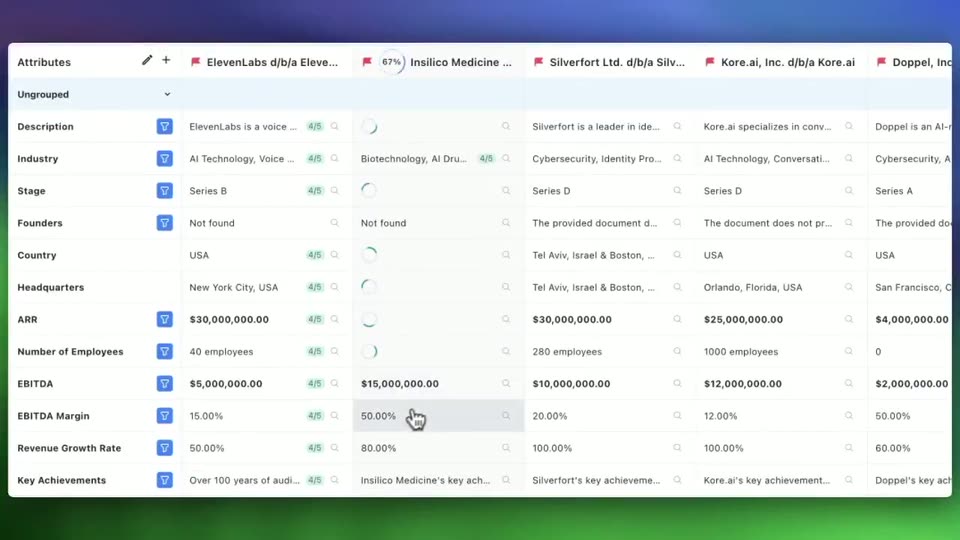
A white attribute table floats over a blue-to-green gradient. A cursor hovers the Insilico Medicine column and triggers a Regenerate Attribute tooltip, while that column's values and progress rings reload and the header percentage ticks.
Techniques: Cursor demo
Camera: Static
02 · Feature reveal · 0:03–0:04
A cursor glides down the right edge of a CRM document, hovers over the Add a New Section link and clicks it. A new section field with title and preview placeholders slides in above the Product heading. The interface sits on a blue and orange gradient backdrop.
Techniques: Cursor demo
Camera: Static
03 · Feature reveal · 0:04–0:34
A screen recording zooms into an Add a New Section modal in the dili app. A cursor picks a dropdown option, types a title and question, then the view zooms out and clicks Create. A new Financial Risks section loads with rows of flagged items.
Techniques: UI zoom, Cursor demo
Camera: Pan
04 · Feature reveal · 0:34–0:36
A product screen shows a document attributes table for a solar project. A hand cursor moves to a gear icon in the actions column, then the view zooms into a configuration popup with a percentage field and a save button.
Techniques: Cursor demo, UI zoom
Camera: Push in
05 · Feature reveal · 0:36–0:45
A close-up of a settings modal over a data table. Text is typed into the Instructions field, then a hand cursor clicks Save and Rerun, which switches to a loading spinner. The camera pulls back to reveal the full project document screen on a green gradient.
Techniques: Cursor demo, UI zoom
Camera: Pull out
06 · Feature reveal · 0:45–0:54
A white attributes table fills the frame over a blurred blue-green gradient. The cursor hovers a confidence cell and a dark tooltip with two green checkmarks appears. The view zooms into the confidence column, then pulls back to the full table.
Techniques: UI zoom, Cursor demo
Camera: Push in