1:58

Introducing Marker Manager
Marker · B2B · Nov 2026
Openmart’s 0:44 clip runs 7 scenes, about 6.3 s each. The product is on screen from the first frame and 1 feature is revealed. A single continuous screen recording of the Openmart app, cut into short beats that follow one workflow from search form to filtered list. Pacing is steady at about 124 bpm with a cut every 20 seconds, driven by cursor typing, a modal zoom, sliding panels, and a list collapsing from 100 rows to 10.
Is this your launch? to your site or press kit.
Marker · B2B · Nov 2026
Alara · B2B · Aug 2025
PARES AI · Real Estate and Construction · Jul 2025
A modal form over a dimmed dashboard is zoomed into as a hand cursor types “local clothing brand” and “Tuscaloosa” into the fields. The view pulls back, the cursor clicks Submit, and the screen fades to white.
Techniques: UI zoom, Cursor demo
Camera: Static
A database table of business rows scrolls downward through the screen. A cursor travels down the list, hovers over a row, then a cell-details panel slides in from the right showing the selected row's fields.
Techniques: Cursor demo
Camera: Push in
A spreadsheet lists boutique businesses on the left while a Cell details panel shows JSON fields on the right. A cursor clicks Business Info to expand it, then scrolls down to Product Services Offered as the table scrolls.
Techniques: UI zoom, Cursor demo
Camera: Push in
A spreadsheet lists boutique businesses beside a right-hand details panel. The cursor moves to the Product Services Offered field and clicks the Take action on list button, opening a small menu with filter and AI options. The left table scrolls up slightly.
Techniques: Cursor demo, UI zoom
Camera: Pull out
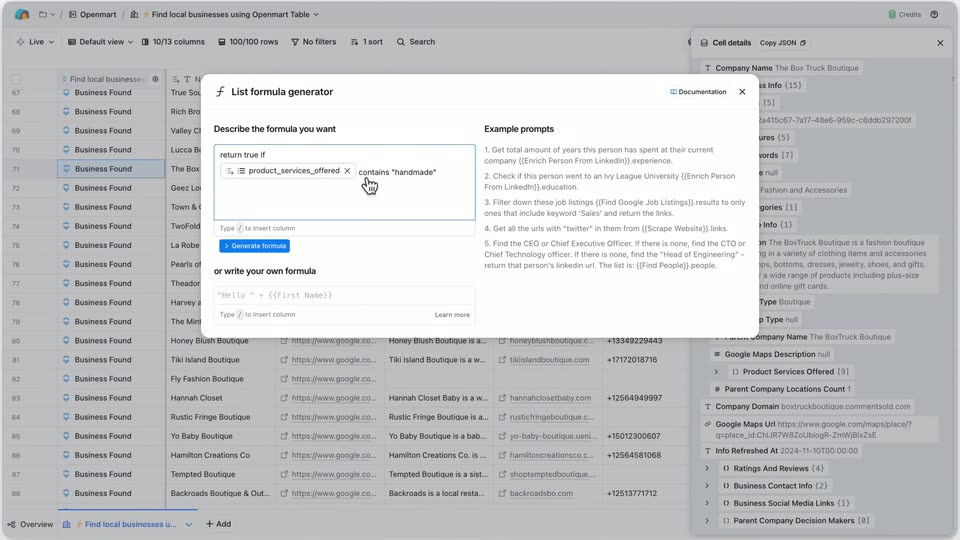
A screen capture of a table app with a List formula generator dialog open over a list of local businesses. A cursor types a condition into the formula field, clicks Generate formula, then Save formula, and a new Is Handmade column appears in the grid.
Techniques: Cursor demo
Camera: Static
A database table of local businesses fills the left, a cell-details panel for The Box Truck Boutique sits on the right. A blue checkmark pops into the Offers Handmade Products column, then a hand cursor clicks the panel's close button, sliding it away to widen the table.
Techniques: Cursor demo
Camera: Static
Flat screen recording of a data table interface. A cursor moves to the filter button, opens a dropdown, and picks a checked-field condition. The list collapses from a hundred rows to ten, each with a blue check, while the header count updates to one filter.
Techniques: Cursor demo
Camera: Static