1:03


Launch Video for LandAtlas
LandAtlas · Nov 2026
Wildcard · Oct 2026 · 0:54 · AI-annotated
studio Unveil Studio
The video alternates a single live-action founder talking to camera with clean UI and 3D motion-graphics demos, each demo anchored by the same blue sparkle logo and floating white product cards. Pacing is brisk at 136 BPM with short cuts, kinetic white type over the founder, and rounded cream-and-blue interface cards that rotate flat into frame.
LandAtlas · Nov 2026
Assuryn · Jul 2026
Meridian · Oct 2026
A man in a beige sweater walks toward the camera down a hallway with a wood wall and glass partitions. Large white words pop in around his head, a small card with a blue sunscreen tube appears at right, then a name badge slides in at bottom left.
On-screen text: “Someone just”, “asked ChatGPT”, “for”, “the best sunscreen”, “your product”, “wasn't there”, “Kaushik Mahorker”, “Founder, Wildcard”
Techniques: Kinetic type
Camera: Pull out
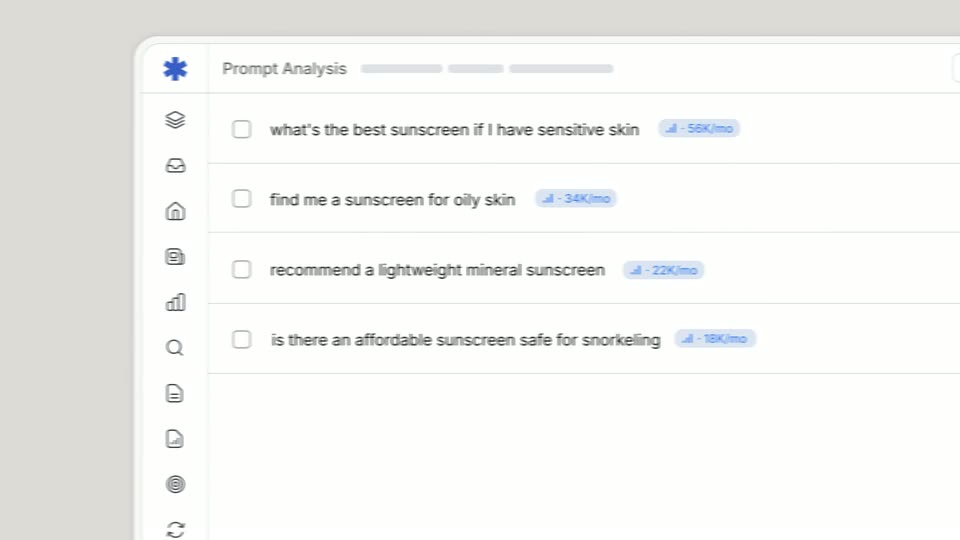
A tilted white analytics card with an icon sidebar rotates flat toward the camera. Four prompt rows slide in with motion blur, each ending in a light-blue monthly-volume badge on the right.
Techniques: 3D mockup
Camera: Pan
A close-up of a prompt-analysis panel pulls back to reveal the full Wildcard dashboard with its left sidebar. A cursor clicks Gemini, and the right panel swaps to a losing response with new competitor tags.
Techniques: UI zoom, Cursor demo
Camera: Pull out
A washed-out prompt-analysis dashboard, its sidebar and prompt list barely legible, gives way to a tight grid of white rounded tiles, each holding a partner logo like Shopify, Salesforce, Amazon or Webflow. The tiles fill the frame on a light background.
Camera: Static
A grid of white rounded-square app icons on a light gray background drifts sideways while blurring, the center icons staying sharp and the outer ones falling out of focus as the view pushes through the field.
Techniques: Parallax
Camera: Pull out
A grid of gray storefront icons recedes in 3D perspective behind three floating product cards for sunscreens. Attribute pills for Plant-based, Sensitive skin and Cooling pop in beside the cards as the scene fades in from white.
Techniques: 3D mockup
Camera: Pull out
Product cards with sunscreen images float in a 3D space, blurring as they move past a background grid of store icons.
Techniques: 3D mockup, Parallax
Camera: Static
A centered sunscreen product card sits between two columns: the left 'without wildcard' column keeps a few gray attribute pills, the right 'wildcard' column fills with blue and orange pills that pop in one by one.
On-screen text: “without wildcard”, “wildcard”
Techniques: Split screen
Camera: Pull out
A man in a white shirt stands in a pharmacy sunscreen aisle, turns to face the camera and speaks, then lifts a yellow sunscreen tube. A light gray rounded “Purchase” button with a white cursor arrow pops in over the shelf behind him.
On-screen text: “Purchase”
Techniques: Cursor demo
Camera: Push in
On a cream background, a 'Your Roadmap' list of six white task cards, each with a colored icon, label and progress bar, fades in row by row, holds, then the whole list fades out to clear the frame.
On-screen text: “The Worlds Best-Smelling Sunscreen”
Techniques: Kinetic type
Camera: Static
A close-up of a light product interface scrolls down past skeleton text lines. The status line switches from a spinner to a checkmark, and the product data and brand guidelines cards fill with small colored tags.
Techniques: UI zoom
Camera: Push in
A draft page card with gray skeleton lines zooms forward from a small tilted spot to fill the frame, blurred cards drifting behind it. As it lands, one line turns blue and gains a dashed selection box.
Techniques: 3D mockup, Parallax, UI zoom
Camera: Push in
A white interface card holds a row of three buttons, Edit, Copy Full HTML and a green Approve & Publish, on a pale background. The shot starts blurred and resolves into focus while a cursor rests on the green button.
Techniques: Cursor demo
Camera: Push in
A man in a beige shirt talks to camera in an office. A frosted Shopify brand tag pops in at right, a blue line chart draws across the frame, then a tan card with 5x incremental revenue and a 6 weeks pill appears at left, all fading out.
On-screen text: “SHOPIFY BRAND”, “5x”, “INCREMENTAL REVENUE”, “6 weeks”
Camera: Pull out
A man in a cream shirt stands in a wood-paneled office and speaks to camera. Large white text AGENTIC COMMERCE builds over him, letters sliding and scaling in staggered, then clears as he keeps talking.
On-screen text: “AGENTIC COMMERCE”
Techniques: Kinetic type
Camera: Push in
On a cream background, the static wildcard logo lockup sits centered at the top. A black serif line, “sign up for free today”, fades in below it, then a blue pill expands from a dot to reveal the white URL “wild-card.ai”.
On-screen text: “sign up for free today”, “wild-card.ai”
Techniques: Masking
Camera: Static