1:35

Notion - Introducing Agent Orchestration in Notion 🎼 Imagine a Decagon ticket
Notion · Productivity · May 2026
HeyBrain’s 0:25 launch film runs 12 scenes, about 2.1 s each. The product is on screen from the first frame and 4 features are revealed. The call to action lands at 0:23 (91% in). A straight feature tour: each block opens on a locked-off app window, then the camera scrolls or zooms through dense tables, and a single centered one-line caption on cream lands the point. Pacing is steady at about twelve cuts per minute, with the signature moves being slow vertical table scrolls, a zoom-in on rows, and pull-backs from close-ups to the full window on a blue gradient.
Is this your launch? to your site or press kit.
Notion · Productivity · May 2026
OpenAI Developers · Oct 2026
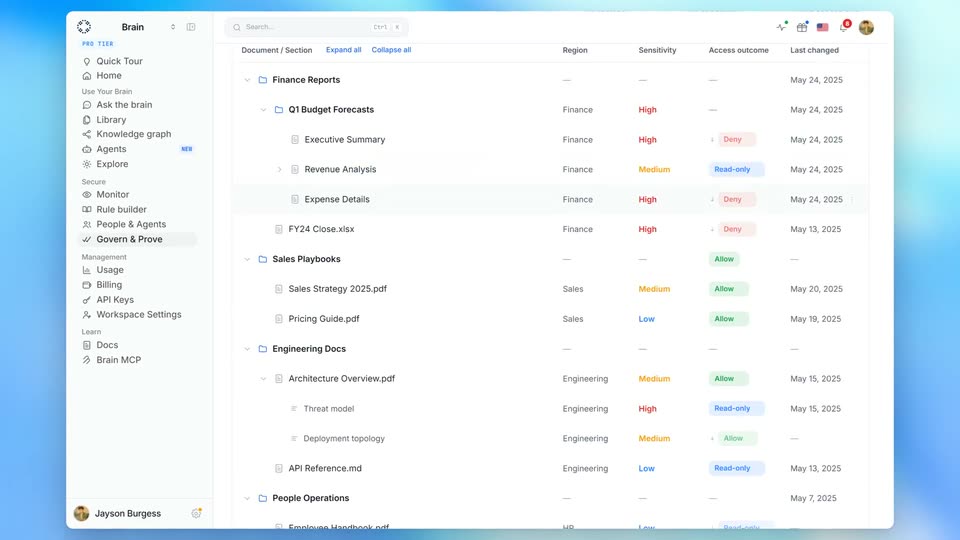
A light admin screen titled Access ACL lists documents in a tree with columns for region, sensitivity and access outcome. Colored pills mark each row as High, Medium or Low and Deny, Read-only or Allow. The table scrolls vertically through the rows, the header sliding out of frame.
Camera: Static
A light gray document list scrolls upward through grouped folders. Each row pairs a file name with a team tag and a color-coded priority label in red, orange or blue. The scroll is steady and continuous.
Camera: Pan
A white access-control table scrolls upward at a steady pace. Each row pairs a department name with a colored risk label in red, orange or blue, and a rounded permission pill reading Allow, Read-only or Deny on the right. Small down arrows sit beside some pills.
Camera: Pan
A centered dark gray caption sits on a cream field, then a soft-focus database table with rows of user profiles fades in behind it, the text staying locked.
On-screen text: “Permissions are checked before context is returned”
Camera: Static
A static full-screen view of a people and agents dashboard, with a left sidebar and a paginated table of members, roles, and access levels. The frame stays locked off, holding the layout without motion or zoom.
On-screen text: “Permissions are checked before context is returned”
Camera: Static
A light user directory table scrolls upward through member rows, then the view zooms in, enlarging the middle rows with role badges and department labels.
Techniques: UI zoom
Camera: Pan
A close-up of a member table pulls back to reveal the full application window on a blue gradient. The left shows the Brain MCP onboarding steps, the right a connections panel, and a terminal bar sits at the bottom.
Techniques: UI zoom
Camera: Pull out
A product interface window sits on a soft blue gradient. The page shows a left navigation sidebar, a central Brain MCP setup panel with tool cards and a terminal command, and a right column of connected tools. The view holds steady with no visible motion.
Camera: Static
A light onboarding screen shows a heading above a row of tool cards, the first outlined in blue. The row scrolls right to reveal Cursor, Codex, Hermes and OpenClaw as the heading exits the top.
Camera: Pan
A close-up of a white settings card titled Access scope, listing colored pill tags for Sales, BD, Engineering and General plus a +5 more chip. The card holds in a tight frame with a faint vertical drift against a plain background.
Camera: Static
A cream background holds a centered dark gray tagline, 'Every agent gets its own scope', which stays locked off. The brain wordmark, a dotted-circle icon beside light gray text, appears above the line.
On-screen text: “Every agent gets its own scope”, “brain”
Camera: Static
A centered brand lockup, a dotted circular mark beside the dark word brain, holds on a plain cream background while the small gray URL heybrain.io fades in beneath it.
On-screen text: “heybrain.io”
Camera: Static