1:13
Explore
Zed - Zed 1.0: Your last next editor.
Zed · Apr 2026 · 2:12 · AI-annotated
- Length
- 2:12
- Scenes
- 47 · 2.8 s avg
- Product on screen
- 0:00
- Features shown
- 7
- Call to action
- 2:05 · 95%
- Voiceover
- Yes
00:00:00 / 02:12:04
Zed’s 2:12 launch film runs 47 scenes, about 2.8 s each. The product is on screen from the first frame and 7 features are revealed, with social proof. The call to action lands at 2:05 (95% in), over a voiceover. A launch montage that chains single-feature demos, each opened by one voiceover line and shown through fast zooms, 3D perspective tilts of editor windows, and motion-blur whips over a dark grid backdrop. Signature moves are the ghosting and stacked-text UI effects, the rotating stacks of translucent windows, and the bookend logo flip from Chrome to Zed.
Footage neededEstimated needs: 10 capture groups — your screens or recordings · 1 official logo — reused across the film · 3 filmed passages — shoot, supply or replace · 5 3D passages — build or supply
Is this your launch? to your site or press kit.
More like this

0:44
Doruk - Introducing: 0 - the open-source AI security harness by @0securitylab
0.security · Nov 2026
2:24
Applied Compute - Today, we're introducing AC2, the Applied Compute Agent Cloud, to ena
Applied Compute · Aug 2026
Zed - Zed 1.0: Your last next editor., scene by scene
· 47 scenes as text
01 · Product intro · 0:00–0:05
On a dark grid background, the Chrome app icon scales up in the center as a white waveform line draws itself in a small pill below. The icon then tilts and flips into the black Zed editor logo, which settles centered as the waveform fades out.
Techniques: Morph
Camera: Static
02 · Feature reveal · 0:05–0:06
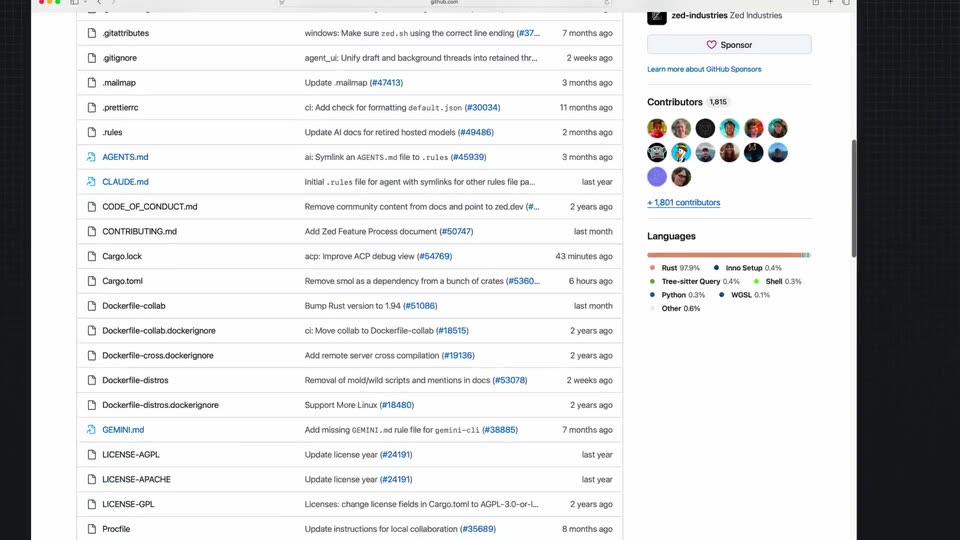
A flat browser window of the Zed GitHub repository scrolls down the page, the file list and commit feed sliding up until the right sidebar's Languages bar reveals Rust at 97 percent.
Camera: Push in
03 · Feature reveal · 0:06–0:08
A wide GitHub repository page is panned right, starting on the contributor avatars and the language bar showing Rust 97.9%, then sliding to reveal a dark folder tree on the right edge. The frame moves steadily across the static page.
Camera: Push in
04 · Feature reveal · 0:08–0:11
A light file-explorer window sits on a dark background. The camera pans right across a contributors and languages sidebar, then zooms into the source tree and settles on a two-column list of Rust files paired with their commit messages.
Techniques: UI zoom
Camera: Pull out
05 · Feature reveal · 0:11–0:12
A dark code editor fills the frame, showing Rust source code with syntax highlighting. At the start a macOS Finder window and a pull-request list panel overlay the left side, then both fade away, leaving the editor full screen. A mouse cursor hovers over the code.
Camera: Pan
06 · Feature reveal · 0:12–0:13
A dark code editor fills the frame with a row of file tabs across the top. The active tab changes and the code lines shift between two views while a mouse cursor hovers in the blank right margin.
Camera: Pull out
07 · Feature reveal · 0:13–0:14
A dark three-pane code editor fills the frame. The left task list, the center chat feed and the right CSS pane all scroll and reflow at once, the text ghosting and overlapping mid-motion before settling into a clean layout.
Camera: Pull out
08 · Feature reveal · 0:14–0:15
A dark IDE window fills the frame with a file tree, a markdown document, and a code panel. The document lines overlap in a stacked ghosting effect while the view zooms in on the interface.
Techniques: UI zoom
Camera: Pull out
09 · Feature reveal · 0:15–0:17
A soft, out-of-focus close-up of a version list zooms out and sharpens into a full releases page. The left sidebar lists channels and versions, while the right panel shows the April 2026 release 0.230.2 with macOS and Windows download buttons.
Techniques: UI zoom
Camera: Pull out
10 · Feature reveal · 0:17–0:20
A tight close-up of a GitHub repo page, the green Code button and commit count, zooms out fast with motion blur to reveal the full pull requests list of the zed repository. The page then defocuses and tilts as a transition.
Techniques: UI zoom
Camera: Pull out
11 · Feature reveal · 0:20–0:22
A dark code editor, split into a node graph on the left and a commit list on the right, floats in 3D perspective against a black gradient. The frame eases from an angled side view to a near-frontal view, a cursor resting at the bottom edge.
Techniques: 3D mockup
Camera: Pan
12 · Feature reveal · 0:22–0:24
A dark code editor window is shown with a cursor hovering over the text. The camera zooms in slightly, bringing the code and the bottom terminal panel into a tighter frame.
Techniques: UI zoom
Camera: Static
13 · Feature reveal · 0:24–0:25
A dark code editor window fills the frame, showing a file tree on the left and a diagnostic review document with code blocks on the right. The frame stays locked as the document scrolls upward and a cursor hovers near the bottom input bar.
On-screen text: “zed.dev”
Camera: Static
14 · Feature reveal · 0:25–0:27
A dark three-pane code editor fills the frame flat, showing bullet notes and TypeScript code, then the whole window tilts into 3D perspective, receding into the black background.
Techniques: 3D mockup
Camera: Pull out
15 · Feature reveal · 0:27–0:35
A stack of translucent code editor windows rotates in 3D above a dark grid floor. The camera then dives into the front window and settles on a flat close-up as the letters material are typed into the search bar, highlighting XML results.
Techniques: 3D mockup, UI zoom, Cursor demo
Camera: Pull out
16 · Feature reveal · 0:35–0:35
A dark code editor fills the frame, a file tree pinned to the right. A search results panel on the left slides shut, exposing the code view with the material search results. A cursor arrow rests in the lower center.
Camera: Pull out
17 · Feature reveal · 0:35–0:41
A code editor crossfades into a git diff view, then the frame zooms onto the highlighted code lines. A cursor glides across the diff, hovering over Stage and Unstage buttons as green and red lines scroll.
Techniques: UI zoom, Cursor demo
Camera: Push in
18 · Feature reveal · 0:41–0:43
A code editor window shows Rust source on the left and a Git panel on the right. A cursor types a commit message, then the panel switches to a tracked-commit view as the cursor moves to the bottom controls.
Techniques: Cursor demo
Camera: Static
19 · Feature reveal · 0:43–0:44
A dark Git commit log scrolls upward past rows of commit messages, dates and authors, with a multicolored branch graph on the left and a white cursor held at the center.
Camera: Pan
20 · Feature reveal · 0:44–0:45
A dark code editor showing a git commit graph and a list of commit messages fills the frame flat, then tilts into 3D perspective, receding rightward against a dark background streaked with thin light trails.
Techniques: 3D mockup
Camera: Static
21 · Feature reveal · 0:45–0:48
A dark code editor fills the frame, showing Rust source with syntax colors and a file tree on the right. The view zooms into a block of code as a text cursor types the word message on a highlighted line.
Techniques: UI zoom, Cursor demo
Camera: Static
22 · Feature reveal · 0:48–0:52
A dark code editor shows a diff stat label updating from small numbers to larger ones. A cursor then opens a top menu, hovers over Open Remote Folder, and a submenu of remote connections appears.
Techniques: Cursor demo
Camera: Push in
23 · Feature reveal · 0:52–0:53
A dark code editor displays a remote-connection menu with a hand cursor hovering over it. The frame then zooms fast with radial blur into a 3D perspective of a laptop screen showing a Meet Zed's Users webpage.
Techniques: Cursor demo, UI zoom, Speed ramp, 3D mockup
Camera: Push in
24 · Social proof · 0:53–0:55
A Zed marketing webpage scrolls downward at a steady pace. The indigo serif heading “Meet Zed's Users” and a row of testimonial cards, including a Vercel quote beside a code-editor video still, drift up and out of frame.
On-screen text: “Meet Zed's Users”
Camera: Pan
25 · Social proof · 0:55–0:58
A light gray testimonials page scrolls upward in two columns. Company logos (Vercel, Mercury, Amazon) sit above quotes from named engineers, each paired with a headshot and a dark code editor screenshot. The scroll is steady and even across the full frame.
Camera: Pan
26 · Social proof · 0:58–1:06
A grid of testimonial cards fills the frame: a code-editor screenshot with a headshot at top, a Mercury quote beside a talking-head video of a man in glasses in the middle, and an Amazon quote at the bottom. The grid slowly pushes in, then blurs out.
On-screen text: “Before Zed, I was using the pretty classic VS Code, but I was a little annoyed that it was getting slow. So I had played around with neovim and enjoyed the Vim ”, “bindings a lot. Then a colleague showed me Zed, and I was very excited by its speed; everything was fast and snappy. And then the multibuffer and multi-cursors,”, “that's my favorite part of the editor.”
Techniques: Speed ramp
Camera: Pan
27 · Feature reveal · 1:06–1:12
A hand cursor taps a plus icon in a dark chat input, opening a menu of AI agents, then the frame pulls back with a light streak to the full editor, showing chat and code panels side by side.
Techniques: Cursor demo, UI zoom, Light sweep
Camera: Pull out
28 · Feature reveal · 1:12–1:15
A dark three-column editor fills the frame, a task list on the left and repeated file-reading commands in the center. The view zooms in on the list, sharpening the text, then the whole screen blurs out.
Techniques: UI zoom
Camera: Push in
29 · Feature reveal · 1:15–1:18
A dark three-pane editor scrolls upward as an agent streams analysis text in the center column, flanked by a task list on the left and Rust source code on the right. A cursor hovers near the input line at the bottom.
Techniques: Cursor demo
Camera: Static
30 · Feature reveal · 1:18–1:22
A dark Rust code editor rushes in from horizontal motion blur and settles into a sharp view, then scrolls down to reveal inline red error notes. A mouse cursor rests at the lower right.
Techniques: Speed ramp
Camera: Push in
31 · Feature reveal · 1:22–1:23
A dark Rust editor with a red error line and a Tab: Accept chip cuts through motion blur into a three-column agent view: titles and descriptions on the left, Install buttons in the middle, a file tree on the right.
Camera: Push in
32 · Feature reveal · 1:23–1:26
A dark list of AI coding agents scrolls upward past names such as Cline, Cursor and Gemini CLI. The view then crossfades into a project sidebar of task entries, where a hand cursor hovers over the top item.
Techniques: Cursor demo
Camera: Pan
33 · Feature reveal · 1:26–1:27
A dark code-review screen shows a pull-request list beside a diff view, then cross-dissolves into a model-provider settings panel with API key fields. A hand cursor moves from one list item to another as the two views blend.
Techniques: Cursor demo
Camera: Static
34 · Feature reveal · 1:27–1:29
A dark settings panel inside a code editor scrolls down past API key fields and model provider sections, while a white arrow cursor drifts down and hovers near the Ollama context window row. The syntax-highlighted code pane on the right stays still.
Techniques: Cursor demo
Camera: Pan
35 · Feature reveal · 1:29–1:34
A light pricing page with three plan cards is shown as a cursor moves to and clicks the blue Get Started button. The scene cuts to a dark code editor, where the cursor scrolls through a model-selection dropdown.
Techniques: Cursor demo
Camera: Push in
36 · Feature reveal · 1:34–1:35
A dark code editor fills the frame with a model-selection dropdown open at center. The list of AI model names scrolls upward while a cursor hovers over the entries; code and a chat panel occupy the left and right edges.
Techniques: Cursor demo
Camera: Pan
37 · Social proof · 1:35–1:46
A light website section titled “Meet Zed's Users” shows a testimonial card: a code editor screenshot on the left gives way to a video of a bespectacled man, with the Vercel logo and a quote on the right. The page slowly pushes in as he speaks, ending in a blur.
On-screen text: “Meet Zed's Users”, “We're proud to have users from the most demanding product teams & companies daily driving Zed.”
Techniques: UI zoom
Camera: Push in
38 · Social proof · 1:46–1:49
A light community webpage scrolls down at a steady pace, from a wall of contributor avatars with gold badges, past three testimonial cards, to an Upcoming Events row of three photo cards, ending on the Zed logo in the footer.
Camera: Push in
39 · Social proof · 1:49–1:49
A light webpage lists upcoming events with three tilted polaroid cards. The right card, an Amsterdam meetup, lifts with a white frame and zooms to fill the screen, revealing a live audience watching a talk.
Techniques: UI zoom
Camera: Push in
40 · Social proof · 1:49–1:53
Audience B-roll from a tech talk: a wide shot of a seated crowd faces a screen reading 'Rust, Robots, and IDEa', then rows of attendees are seen from the side. A fast horizontal blur whip-pans to a second room where a presenter stands before a gray screen.
Camera: Push in
41 · Social proof · 1:53–1:54
A woman in a black t-shirt and glasses stands at the front of a lecture hall, gesturing with both hands as she addresses a seated audience. The crowd's backs fill the foreground, facing the speaker. A small circular logo badge sits in the top-left corner.
Camera: Pan
42 · Social proof · 1:54–1:55
A split screen holds two live shots of an audience. Left, a woman in a blue shirt and glasses smiles upward. Right, three men sit in a row, one gesturing with an open palm as he talks while the others listen.
Techniques: Split screen
Camera: Static
43 · Social proof · 1:55–1:59
A dark kanban board with four columns of issue cards fills the frame. The view zooms into the middle column, then reframes to a light Contributor Board with three columns, as a merged pull request panel appears on the right.
Techniques: UI zoom
Camera: Pull out
44 · Social proof · 1:59–2:05
A GitHub pull request page scrolls down past comments to the merge confirmation, cuts to a second merged pull request that scrolls, then cuts to a dark code editor window on a faint grid, showing a file with a text caret on line 149.
Camera: Push in
45 · CTA · 2:05–2:07
A dark code editor window rests on a faint grid background. On line 149 a comment types out character by character, reading // Your last next editor, with a blinking caret at the end.
Techniques: Kinetic type
Camera: Static
46 · CTA · 2:07–2:07
A dark code editor window showing the zed.rs file blurs and dims, a small blue square pops in at the center, then a large blue diagonal panel wipes across the frame from the right.
Camera: Pull out
47 · Outro · 2:07–2:12
A blue square logo mark with a diagonal stroke starts oversized, filling the frame on a dark grid, then scales down to the center. The white wordmark Zed appears to its right, locking into a centered sign-off.
On-screen text: “Zed”
Camera: Pull out