0:46

Responsive Layouts have landed
Rive · Design · Oct 2024
Applied Compute · Aug 2026 · 2:24 · AI-annotated
Applied Compute’s 2:24 launch film runs 26 scenes, about 5.5 s each. The product is on screen from the first frame and 6 features are revealed, with social proof. There is no explicit call to action; a voiceover carries the film. A host-led product walkthrough that alternates a single-camera talking head in a warm office with flat cream-background UI cards and dark terminal windows, cutting at a steady mid-tempo of about three cuts per minute. Signature moves include line-by-line code typing, the presenter's video tile framed in a rounded card beside the app windows, and frosted-glass chips that fill with orange.
Is this your launch? to your site or press kit.
Rive · Design · Oct 2024
Rive · Design · Mar 2025
Zed · Apr 2026
A man in a light grey tee sits at a table behind a laptop, holding a small mic, talking and gesturing to camera in an office with a red couch and whiteboard. A lower-third caption with an orange logo names him. The shot ends inside a white rounded border.
On-screen text: “CEO and Co-founder”, “Yash Patil”
Camera: Static
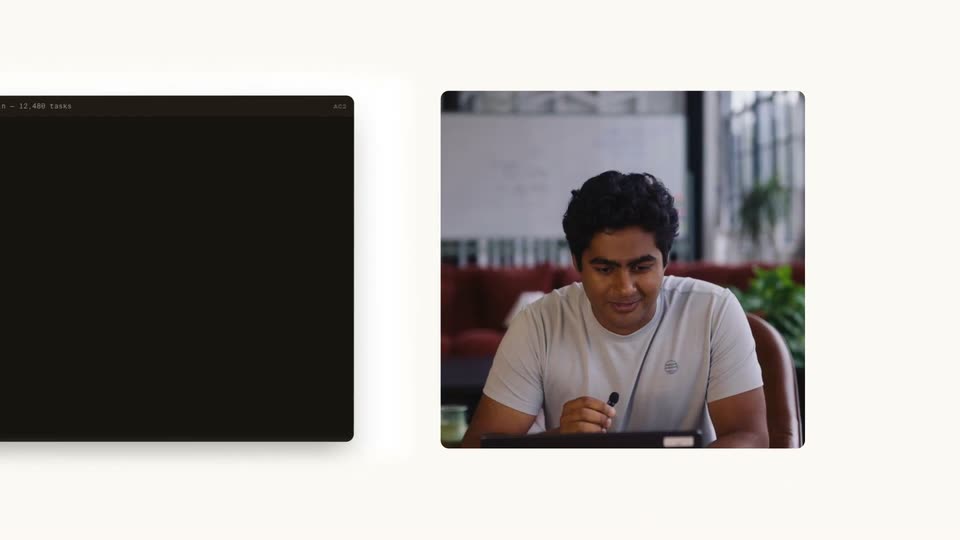
On a plain off-white background, a rounded card holds a filmed man in a white tee looking down at a tablet with a stylus. A dark app card slides in from the left edge, settling beside the video card.
Techniques: Split screen
Camera: Pull out
On a cream background, three flat panels sit side by side: a dark terminal fills with GitHub repo rows, a wider terminal types a JSON task line by line, and a man in a white T-shirt speaks into a small mic.
Techniques: Split screen, Kinetic type
Camera: Static
A dark code editor window on the left displays a JSON task definition with line numbers, while a man in a white t-shirt looks down at a tablet in a video-call tile on the right. The code window slides upward as the lines scroll.
Techniques: Split screen
Camera: Push in
On a plain white background, a split screen pairs a dark OpenCode terminal on the left, where tool calls and file reads type in line by line, with a man on the right in a white t-shirt holding a small microphone and looking down at a tablet.
Techniques: Split screen
Camera: Static
A locked-off split screen pairs a wide dark terminal on the left, its log lines scrolling upward, with a live-action clip of a man at a table looking down at a tablet on the right.
Techniques: Split screen
Camera: Static
A dark terminal window with traffic-light buttons sits on a cream field. A red prompt types the init command, then output lines print in, building a file tree and numbered next steps; the log scrolls up and an orange block cursor blinks at the new prompt.
Techniques: Kinetic type
Camera: Static
A dark code editor on the left types out Python code line by line, then swaps to a second file as three lines highlight in red. On the right, a man in a white tee at a desk gestures with a pen while explaining.
Techniques: Split screen
Camera: Static
A dark editor window with three colored dots sits on a cream background. Python code fades in line by line with red and orange syntax highlighting. An orange bar highlights two lines, then the window scales down and becomes an empty CLI terminal.
Techniques: Kinetic type, Morph
Camera: Static
A flat macOS terminal window on a light gray background, titled codeqa - ac2. The dark pane shows a multi-line ac2 train run command, then green and gray output lines stream in one after another, simulating a live CLI session.
Camera: Static
A man in a white t-shirt sits at a table with a laptop, talking and gesturing toward the camera. Two rows of translucent white cards, each bearing a model name and a spec line, drift slowly leftward across the frame around him.
Camera: Static
A man in a light gray t-shirt sits at a desk with a laptop, gesturing while he talks. Semi-transparent model cards with names and specs float in 3D space around him, drifting slowly over a blurred living-room set.
Techniques: Parallax
Camera: Static
A light dashboard page for a training run stays in frame. A cursor glides across the CodeQA line chart, popping up step tooltips, then clicks the Advanced metrics tab and the page swaps to a grid of six smaller charts.
Techniques: Cursor demo
Camera: Static
A cream background holds three soft gradient circles labeled GRPO, SFT and OPSD, each with a short caption. The middle SFT circle scales up to dominate the center while the side circles shrink and fade toward the edges.
On-screen text: “GRPO”, “A grader can score sampled behavior”, “SFT”, “Tasks already contain target conversations”, “OPSD”, “A teacher hint or distribution supervises the policy”
Camera: Static
Three gray circles labeled GRPO, SFT and OPSD sit on a horizontal dotted line, each with a small caption; they fill with an orange gradient from left to right. The scene then cuts to a man at a desk with a laptop, a whiteboard and red couch behind him, speaking to camera.
On-screen text: “GRPO”, “A grader can score sampled behavior”, “SFT”, “Tasks already contain target conversations”, “OPSD”, “A teacher hint or distribution supervises the policy”
Camera: Static
A man in a white t-shirt sits at a desk with a laptop, eyes wide, in a lounge with red couches. A white Slack alert card slides in at the top right. The shot cuts to a blank white frame as the Applied Compute window rises from the bottom.
Camera: Static
A dark purple chat app window scales up from center on a white background. The #askcode-runs channel shows two bot messages from Ari appearing in sequence, a green Status: Healthy report followed by a red Alert: Stalled report with an agent explanation.
Camera: Pan
A grid of training charts zooms into the error-rate panel, where the cursor hovers the step-41 spike to reveal a 0.68 tooltip. The view cuts to a report screen, and the cursor hovers a link that opens a trace table.
Techniques: UI zoom, Cursor demo
Camera: Push in
A light dashboard UI fills the frame, a training report with bullet points and a data table on the left, a runs panel on the right. A cursor drifts down the page, pointing at the table header then the artifact box below.
Techniques: Cursor demo
Camera: Static
A product dashboard fills the screen, split between a training-insights document on the left and a metrics report panel on the right with stat cards, a line chart and a table. A cursor glides from the document onto the chart and table as the right panel scrolls.
Techniques: Cursor demo
Camera: Static
A full application window shows a training insights report at center and a results dashboard on the right. The right panel scrolls down past a line chart and a metrics table as a cursor hovers, while the left nav and center text dim to spotlight the dashboard.
Techniques: Cursor demo
Camera: Static
Split screen: a deploy-model form on the left, a presenter in a white tee gesturing on the right. The cursor clicks the orange Deploy button, the form cuts to a running metrics dashboard, then reframes into a requests table with a left sidebar.
Techniques: Split screen, Cursor demo
Camera: Static
A light-themed analytics dashboard for Applied Compute fills the frame, a three-line latency chart above a long requests table. A cursor glides down the rows as the list scrolls, the view drifting from the chart header toward the table body.
Techniques: Cursor demo
Camera: Pan
A wide-eyed man in a gray tee sits at a laptop in a lounge, holding a mic to his chin. Frosted glass chips with company logos fade in on either side of him, fill solid orange, then fade out. Background shows red couches, plants and a chess set.
On-screen text: “Microsoft”, “NVIDIA”, “Cognition”, “Harvey”, “MERCOR”, “DOORDASH”
Camera: Static
A thin red line draws across a black field, then symmetric gray arcs and concentric circles bloom outward from the center, with a small red curve at the midpoint. The lines extend and settle into a balanced geometric pattern.
Camera: Static
The red Applied Compute logo and white serif wordmark fade in on a black background, ringed by faint concentric circles that dissolve as the lockup brightens, then the whole mark fades back to black.
On-screen text: “Applied Compute”
Camera: Static