
1:00
Explore
00:00:00 / 00:53:11
- Length
- 0:53
- Scenes
- 32 · 1.7 s avg
- Product on screen
- 0:00
- Features shown
- 3
- Voiceover
- Yes
- Views
- 682K on YouTube
as of November 22, 2026
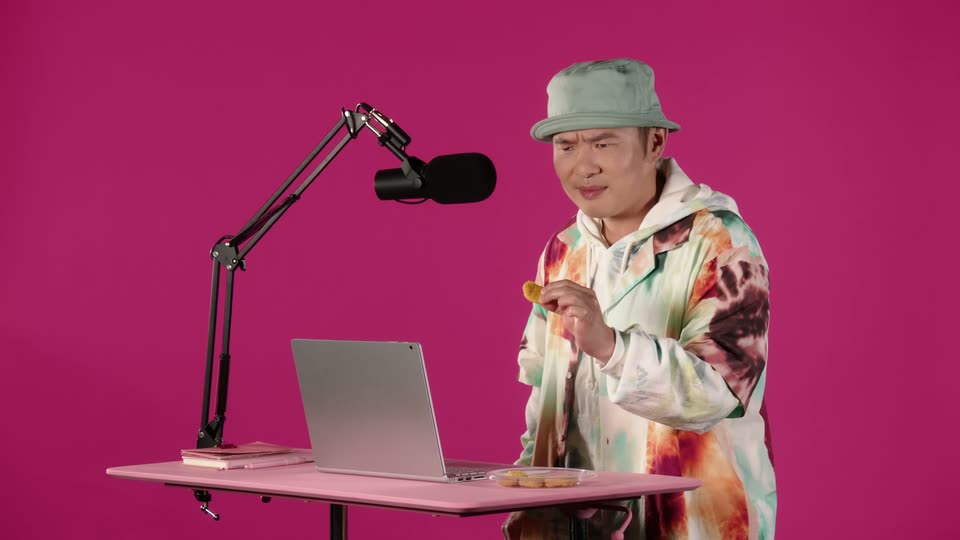
Descript’s 0:53 launch film runs 32 scenes, about 1.7 s each. The product is on screen from the first frame and 3 features are revealed. There is no explicit call to action; a voiceover carries the film. The video alternates between live-action pink-set shots of a host and clean white UI close-ups, with magenta title cards naming each feature in turn. Pacing follows a 112 bpm cut rate, using word-by-word transcript highlights and sliding blue highlight chips as the signature motion.
Footage neededEstimated needs: 5 capture groups — your screens or recordings · 1 official logo — reused across the film · 15 filmed passages — shoot, supply or replace
Is this your launch? to your site or press kit.
More like this

0:29

0:48
HyperFrames - the AI slop launch video killer is here Computer use is live in Hype
HyperFrames Studio · Oct 2026
Similar soundtrack
Films whose music sounds like this one, voice left out
1:14

Introducing Stripe Reader S700
Stripe · Upbeat electronic
1:45
Versine: Send money with AI
Versine · Electronic, Hip-Hop, Rock
1:17
Dia - Meet Dia. Now available for Arc members.
Dia · Jazz, Funk, Electronic
The new Descript – made for podcasters, scene by scene
· 32 scenes as text
01 · Demo · 0:00–0:00
A white Record dialog sits centered on a pale gray background. A black cursor slides left from the Camera tile to the Audio only tile, which lights up with a blue selection border.
Techniques: Cursor demo
Camera: Static
02 · Demo · 0:00–0:01
A close-up of a recording settings panel with three tabs and two device dropdowns. A black cursor slides from the selected Audio only tab down to the blue Record to script button and presses it, darkening the button.
Techniques: Cursor demo
Camera: Static
03 · Demo · 0:01–0:04
A man in a bucket hat and patterned shirt stands at a pink standing desk with a laptop and microphone arm, pointing at the camera. The shot opens in near-darkness and the lighting ramps up to full brightness.
Camera: Static
04 · Demo · 0:04–0:06
A man in a mint bucket hat and tie-dye shirt stands at a pink desk against a pink backdrop, holding a yellow nugget up to a studio microphone. A laptop, stacked books, and a plate of snacks sit on the desk as he speaks.
Camera: Static
05 · Demo · 0:06–0:07
A man in a mint bucket hat and tie-dye hoodie stands in profile at a desk, holding a small food item near a studio microphone. A laptop sits open on the desk. He speaks against a flat magenta backdrop.
Camera: Static
06 · Demo · 0:07–0:07
A man in a green bucket hat and tie-dye shirt sits at a desk with a laptop and boom microphone against a pink backdrop, raising an orange nugget to his mouth while talking to camera.
Camera: Static
07 · Demo · 0:07–0:10
A black sentence scrolls left across a white background while a blue rounded rectangle slides in behind the newest word at the right edge, highlighting it. The line reads as the voiceover phrase about emulating the taste of non-chicken nuggets.
On-screen text: “emulate the taste of like like non-chicken nuggets”
Techniques: Kinetic type
Camera: Static
08 · Feature reveal · 0:10–0:11
A man in a mint bucket hat and a multicolor tie-dye jacket sits at a pink desk against a magenta backdrop, holding a nugget above a plate. An open laptop and a boom microphone face him; he glances at the screen with a small smile. Locked-off frame.
On-screen text: “e of like like non-chicken nuggets”, “Remove tm”, “Filler Words”
Camera: Static
09 · Feature reveal · 0:11–0:12
On a magenta gradient, a bold white headline reads Remove um Filler Words. The word um turns orange as a horizontal line strikes through it, while the frame stays locked off.
On-screen text: “Remove um”, “Filler Words”
Camera: Static
10 · Feature reveal · 0:12–0:13
A locked-off close-up of a hand resting on a silver laptop trackpad, fingers tapping lightly, with a pink surface below the device. A large static caption sits over the frame.
On-screen text: “Remove tm”, “Filler Words”
Camera: Static
11 · Feature reveal · 0:13–0:18
On a white transcript page, a cursor picks an option from a dropdown menu; filler words turn orange and get struck through, a repeated phrase is struck in purple, then a blue highlight steps word by word across the paragraph.
Techniques: Cursor demo
Camera: Static
12 · Feature reveal · 0:18–0:20
In a static wide shot, a smiling man in a bucket hat and tie-dye hoodie stands at a pink standing desk against a pink backdrop, raising one hand toward a silver laptop under a black boom microphone.
Camera: Static
13 · Feature reveal · 0:20–0:21
A solid pink frame holds the white title Studio Sound centered and locked. A lighter pink pixelated waveform shape slides left to right behind the letters, moving from the first word to the last.
On-screen text: “Studio Sound”
Camera: Static
14 · Feature reveal · 0:21–0:23
A person in a tie-dye hoodie and green bucket hat sits at a pink desk with a boom microphone and laptop against a magenta backdrop, holding a small orange object. The shot cuts to a white card where the word emulate appears in black serif type.
On-screen text: “emulate”
Camera: Static
15 · Feature reveal · 0:23–0:24
A blue rounded chip holding the white word emulate sits left of center on a white field. The chip slides right and shrinks to hold of as the and taste appear in black and gray, assembling the phrase emulate the taste of.
On-screen text: “emulate the taste of”
Techniques: Kinetic type
Camera: Static
16 · Feature reveal · 0:24–0:25
A close-up of golden fried nuggets in a white tray fills the left half beside a white settings panel listing Animation, Volume and Audio effects. A black cursor moves to the plus button next to Audio effects as a dropdown of effect options expands below.
Techniques: Cursor demo
Camera: Static
17 · Feature reveal · 0:25–0:26
A white dropdown menu lists audio effects over a preview of fried food. The cursor clicks the blue plus button, then checks Studio Sound, and the preview cuts to a hand holding a paper bag on a table.
Techniques: Cursor demo
Camera: Static
18 · Feature reveal · 0:26–0:26
A white interface panel holds a timecode and a filmstrip of repeated chicken nugget frames above a light blue status bar. A blue spinner left of the bar turns into a checkmark while the status text remains still. A purple gradient fills the lower third.
Techniques: Morph
Camera: Static
19 · Feature reveal · 0:26–0:29
On a magenta set, a man in a bucket hat and colorful shirt stands behind a pink table with a laptop and boom microphone, looking down at the screen and gesturing. A pencil and phone rest on the tabletop. The frame is locked off.
Camera: Static
20 · Feature reveal · 0:29–0:30
Close-up of a silver laptop keyboard and trackpad. A hand enters from the right, fingers resting on the trackpad, then lifts off and blurs out of frame. A pink edge lines the bottom of the shot.
Camera: Static
21 · Feature reveal · 0:30–0:31
A cropped line of black lowercase text on white, cut off at both edges. A blue rounded rectangle pops in behind the word “non-chicken,” which turns white.
On-screen text: “ste of non-chicken nugg”
Camera: Static
22 · Feature reveal · 0:31–0:32
Tight locked-off crop of a black sans sentence on white, the middle word wrapped in a blue rounded highlight box that settles from a soft outer glow. Edges of the line bleed off frame.
On-screen text: “ste of non-chicken nugg”
Camera: Static
23 · Feature reveal · 0:32–0:33
A man in a tie-dye hoodie and green bucket hat stands at a pink table against a magenta backdrop, holding a nugget and glancing at a laptop. A boom microphone and stack of pink books sit on the table while a large still headline overlays the frame.
On-screen text: “ste of non-chicken nugg”
Camera: Static
24 · Feature reveal · 0:33–0:36
A magenta card holds the white headline 'Alter Words / In Your Own Voice' with a soft box behind the first word. The top line swaps and scales to 'Replace Words', then the shot cuts to a close-up of a hand resting on a laptop trackpad.
On-screen text: “Alter Words”, “In Your Own Voice”, “Replace Words”
Techniques: Kinetic type
Camera: Static
25 · Feature reveal · 0:36–0:36
Close-up of a silver laptop keyboard and trackpad. A hand rests on the pad, fingers tap the surface, then blur as the hand lifts and moves away.
Camera: Static
26 · Feature reveal · 0:36–0:39
A close-up of a white text editor shows a line of black sans text with the word non-chicken highlighted in blue and bracketed. A floating toolbar with Correct and Overdub buttons sits above. A black cursor clicks Overdub, and the highlighted word swaps to vegan.
Techniques: Cursor demo
Camera: Static
27 · Feature reveal · 0:39–0:42
A laptop on a pink set displays a document titled The Nuances of Nuggets. A hand points at the screen as blue highlights step word by word through the sentence, tracking the voiceover.
Camera: Static
28 · Feature reveal · 0:42–0:44
A man in a bucket hat and patterned jacket stands at a pink standing desk against a magenta backdrop, smiling at a laptop while a boom mic hovers over him. Subtitles and a title card sit at the bottom of the locked-off frame.
On-screen text: “The Nuances of Nuggets”, “Javi”, “So these nuggets are made from chicken,”, “but they're made to emulate the taste”, “of vegan nuggets.”
Camera: Static
29 · Demo · 0:44–0:46
A cursor clicks the black Publish button in the top right of a light editor window, opening a centered modal with a video file, a YouTube dropdown and a blue Publish bar. The background dims as the modal scales in.
Techniques: Cursor demo
Camera: Push in
30 · Demo · 0:46–0:50
A man in a tie-dye hoodie and pale green bucket hat sits behind a laptop, bringing a small orange snack to his mouth. He chews, then glances at the screen with a scrunched, skeptical face. A boom microphone hangs at left against a flat magenta backdrop.
Camera: Static
31 · Outro · 0:50–0:52
On a white field, a blue mark builds from horizontal bars into a stylized B at center, then the lowercase word bles types in beside it, finished by a thin vertical cursor.
On-screen text: “bles”
Camera: Static
32 · Outro · 0:52–0:53
On a plain white background, the blue descript wordmark types itself out letter by letter beside its stacked-bar icon, a thin vertical cursor trailing the last letter. The cursor then drops and the full lockup holds still, centered.
On-screen text: “descript”
Techniques: Kinetic type
Camera: Static