0:43
Explore
HyperFrames - the AI slop launch video killer is here Computer use is live in Hype
HyperFrames Studio · Oct 2026 · 0:48 · AI-annotated
- Length
- 0:48
- Scenes
- 32 · 1.5 s avg
- Product on screen
- 0:03
- Features shown
- 2
- Voiceover
- Yes
- Views
- 45K on X
as of November 22, 2026
00:00:00 / 00:48:06
- Length
- 0:48
- Scenes
- 32 · 1.5 s avg
- Product on screen
- 0:03
- Features shown
- 2
- Voiceover
- Yes
- Views
- 45K on X
as of November 22, 2026
HyperFrames Studio’s 0:48 launch film runs 32 scenes, about 1.5 s each. The product shows up at 0:03 and 2 features are revealed. There is no explicit call to action; a voiceover carries the film. The video opens on a moody live-action shot that dives into a flat cream interface, then runs a chain of tight agent demos where a typed prompt sends a green mascot to click, drag and scroll through real apps, each beat capped by a bold headline reveal. The style is built on flat pale backgrounds, soft blurred green-yellow-teal gradients behind floating 3D windows, crisp white cards with pill captions, and a recurring green mascot that personifies the agent, all cut at a steady mid-tempo.
Footage neededEstimated needs: 5 capture groups — your screens or recordings · 1 official logo — reused across the film · 4 filmed passages — shoot, supply or replace · 3 graphic passages — draw or supply · 2 3D passages — build or supply
Is this your launch? to your site or press kit.
More like this

1:09
Slack - Slack CRM is here for small businesses. 👋 Manage every customer re
Slack CRM · Apr 2026
0:30

Introducing Duolingo Math
Duolingo · Consumer · Oct 2022
HyperFrames - the AI slop launch video killer is here Computer use is live in Hype, scene by scene
· 32 scenes as text
01 · Hook · 0:00–0:02
A person in a dark cap and cream sweater sits with their back to camera, facing a bright white monitor in a dim office. A green glass bottle stands on the desk to the right. The camera slowly pushes in on the figure.
Camera: Push in
02 · Hook · 0:02–0:03
A blurred office desk holds a monitor showing a white Hyperframes window; the camera zooms into the screen until the interface fills the frame, the small '# Tools' label centered.
Techniques: UI zoom
Camera: Push in
03 · Feature reveal · 0:03–0:05
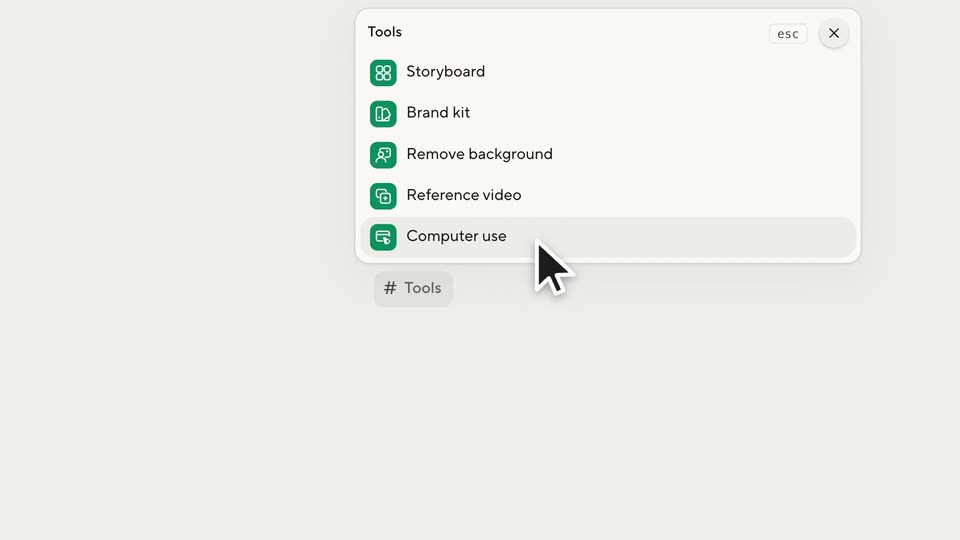
A black cursor clicks a small gray '# Tools' label on a cream background. A white panel slides in listing five tools with green icons. The cursor drops down and selects 'Computer use', and the panel collapses to that single highlighted row.
Techniques: Cursor demo
Camera: Static
04 · Feature reveal · 0:05–0:08
A rounded input card on a pale gray field types out a sentence letter by letter with a blinking caret, while a Computer use chip and a circular send button hold the bottom corners.
Techniques: Kinetic type
Camera: Static
05 · Feature reveal · 0:08–0:09
A light chat input box holds the typed prompt about recording a podcast edit flow, with a text cursor at the end. A mouse pointer moves onto the black round send button at the right, then the whole box blurs and fades as if the prompt is submitted.
Techniques: Cursor demo
Camera: Static
06 · Feature reveal · 0:09–0:11
On a plain light gray background, the headline builds word by word with Framey in green. Below it, a green location pin with a face scales up, then a green car slides in beneath it with small motion lines.
On-screen text: “You ask, Framey drives.”
Techniques: Kinetic type
Camera: Static
07 · Feature reveal · 0:11–0:12
On a cream background, the gray headline with a teal word sits above a small white app icon and a teal car illustration with speed lines. The text and car fade out, the icon stays centered, then the gray word Working fades in beside it.
On-screen text: “You ask, Framey drives.”, “Working”
Camera: Static
08 · Demo · 0:12–0:12
A dark Working status pill with a counting timer sits centered on a beige field, an up-down icon fading in at its left. The pill shrinks and slides up-left as a thin vertical line draws down and green transcript text types in below it.
Techniques: Kinetic type
Camera: Static
09 · Demo · 0:12–0:13
A light gray chat interface builds a status line and a growing task list under a short paragraph. A 3D perspective window with a soft green and yellow blurred backdrop and a white panel labeled Make something. rises into frame at the bottom.
Techniques: 3D mockup
Camera: Static
10 · Demo · 0:13–0:14
A light gray screen shows a vertical activity log scrolling upward on the left, listing agent steps, while on the right two white HyperFrames windows titled Make something. sit stacked over a rounded panel of blurred green and yellow circles.
Camera: Push in
11 · Demo · 0:14–0:16
A flat browser window of the HyperFrames app sits on a yellow-green blob background. A green cursor drags a folder in, the view zooms into the left panel, and the cursor clicks a green button as pill labels read 'Dragging' then 'Clicking Start a podcast edit'.
On-screen text: “Dragging”, “Clicking Start a podcast edit”
Techniques: Cursor demo, UI zoom
Camera: Push in
12 · Demo · 0:16–0:17
A light podcast editing interface fills the locked-off frame, with three speaker tiles in a dark preview and a multi-track timeline below. A green click indicator and caption sit at lower left.
On-screen text: “Clicking Start a podcast edit”
Techniques: Cursor demo
Camera: Static
13 · Demo · 0:17–0:19
A video editor window on a blurred green background. A teal cursor glides over the left chat panel and clicks a green button, while the center preview zooms from three speaker thumbnails to one speaker. White pill captions name each click.
On-screen text: “Clicking Use the close-ups”, “Clicking Make the episode”
Techniques: Cursor demo, UI zoom
Camera: Static
14 · Demo · 0:19–0:20
A browser window of the HyperFrames editor sits on a yellow-to-teal gradient. A white card reading “Started recording the screen” with a red dot slides in from the left as the editor scales down and shifts right, a black cursor arrow resting at its top-left corner.
Techniques: Cursor demo
Camera: Pull out
15 · Demo · 0:20–0:24
A light-gray feed scrolls down past a vertical list of workflow steps, each with an icon and a soft-shadowed card mockup: a video editor, a screen-recording file, a row of extracted frames, an HTML code block, and a green motion-graphics card.
Camera: Pull out
16 · Demo · 0:24–0:25
A dark gray headline slides in over a beige background. A teal rounded card slides down, its white panel turning into a laptop video-player mockup with a play button and timeline, while a red numeral and gray text scale in and a small white filename slides in.
On-screen text: “Here's your launch video.”, “182 ums and repeats.”, “podcast-edit-launch.mp4”
Techniques: Kinetic type, Morph
Camera: Pan
17 · Demo · 0:25–0:26
A flat mockup of the podcast editor, three speaker clips above a thumbnail timeline, shrinks on a shifting teal-to-green gradient while the bold headline “182-ums and repeats.” scales up in front of it, the “182” in red. The top line “Here's your launch video.” slides out.
On-screen text: “Here's your launch video.”, “182-ums and repeats.”, “podcast-edit-launch.mp4”
Techniques: Kinetic type
Camera: Push in
18 · Feature reveal · 0:26–0:27
A blurred 3D video-call window on a teal background shrinks and morphs into a yellow folder icon, while a teal rounded-triangle logo with a headphone face slides in from the right.
Techniques: 3D mockup, Morph
Camera: Pull out
19 · Feature reveal · 0:27–0:29
A pale product screen with a left tab panel and a green dashed drop zone. A folder-and-files illustration in the zone disappears as the huge black words One drop. pop across the center, while a small headphones badge drifts to the top corner.
On-screen text: “One drop.”
Techniques: Kinetic type
Camera: Static
20 · Feature reveal · 0:29–0:30
The product UI zooms from a full Make workspace onto a podcast detection card showing four speaker thumbnails. A teal robot head with headphones slides from the right edge down to the card's footer, overlapping the action buttons.
Techniques: UI zoom
Camera: Static
21 · Demo · 0:30–0:32
A white rounded prompt bar on a pale beige background fades from a soft blur into focus. The text types out left to right, a 'Computer use' chip sits below the line, and a black up-arrow button appears at the right edge.
Camera: Static
22 · Demo · 0:32–0:32
A browser window shows the Internet Archive Prelinger Archives page with a search for classroom discipline and five film results. A green cursor moves across the thumbnails and clicks one, while explanatory captions appear beside it and the page scrolls up slightly.
On-screen text: “Opening a page”, “Clicking 'Maintaining Classroom Discipline'”
Techniques: Cursor demo
Camera: Static
23 · Demo · 0:32–0:33
A screen recording of an Internet Archive page zooms in on the download options list. A green pointer cursor moves over the page with white caption chips reading Scrolling, then Downloading a file.
On-screen text: “Scrolling”, “Downloading a file”
Techniques: Cursor demo, UI zoom
Camera: Push in
24 · Demo · 0:33–0:34
Black and white archival classroom shot from the back of the room. A teacher stands at the chalkboard, back to camera, while students sit in rows at desks. The frame holds steady with no camera movement.
Camera: Static
25 · Demo · 0:34–0:35
A white rounded input field on a cream background. A prompt types out letter by letter with a blinking caret, above a 'Computer use' chip and a dark circular send button at the right.
Camera: Static
26 · Demo · 0:35–0:37
A dark code editor shows an HTML file with a block of lines highlighted in blue. A small cursor tooltip with a green icon reads Dragging, then changes to Copying to the clipboard. The frame stays locked off.
On-screen text: “Add the lower third from our repol”
Camera: Static
27 · Demo · 0:37–0:38
A man with glasses smiles in front of a wooden slat wall. A lower-third graphic appears on the left, revealing his name and studio with a green underline.
On-screen text: “Jake's Studio”, “Bin Liu”
Techniques: Kinetic type
Camera: Static
28 · Demo · 0:38–0:39
A white rounded prompt bar sits on a plain beige background. The phrase Record our site for the B-roll types out character by character, above a Computer use chip and a black round send button on the right.
Techniques: Kinetic type
Camera: Static
29 · Demo · 0:39–0:41
A browser window on the HyperFrames homepage zooms in and scrolls down, passing the 'The video editor built for agents' headline, a download table and open-source stats, while a green cursor tagged 'Scrolling' hovers at center-right.
Techniques: UI zoom, Cursor demo
Camera: Pan
30 · Outro · 0:41–0:42
A green rounded-triangle mascot with a white face and two black eyes floats centered, its blue triangular wings flapping up and down. It sits in front of a blurred website page showing an open source section and large stat numbers.
Techniques: 3D mockup
Camera: Pull out
31 · Outro · 0:42–0:42
A green teardrop icon with a white face circle and two cyan triangles rests on a white-to-teal gradient. The frame tilts up to settle into the brand lockup as the four-triangle mark and the wordmark HyperFrames appear beside it.
On-screen text: “HyperFrames”
Camera: Static
32 · Outro · 0:42–0:48
On a white-to-teal gradient, the HyperFrames logo settles center as a large white shape slides off the top. Two green mascot icons pop in at right, a thin input box flashes, then Studio in green and a Computer use pill lock in beneath the wordmark.
On-screen text: “HyperFrames”, “Computer use”
Techniques: Kinetic type
Camera: Static