1:33

Lovable - Introducing a smarter Lovable that is 71% better at solving complex t
Lovable · Developer tools · Jan 2026
Slack CRM · Apr 2026 · 1:09 · AI-annotated
Slack CRM’s 1:09 launch film runs 29 scenes, about 2.4 s each. The product shows up at 0:03 and 3 features are revealed. There is no explicit call to action; a voiceover carries the film. The video opens with a question, names the product, surveys Slackbot's capabilities, then walks through two feature stories (lead follow-up and meeting prep) before closing on the logo. It runs at a fast, rhythmic pace with 3D-tilted app mockups, scrolling text bands, and two-tone purple-magenta title cards as its signature moves.
Is this your launch? to your site or press kit.
Lovable · Developer tools · Jan 2026
On a pale lavender field, the headline Your CRM In Slack assembles in heavy purple type, framed by a green circle, a blue rounded bar, a yellow circle and two small purple marks. The type then fades out, leaving the shapes clustered, as a bottom caption completes the question.
On-screen text: “Your”, “What if your CRM lived”, “CRM”, “In Slack”, “where your team already works?”
Techniques: Kinetic type
Camera: Static
Colorful rounded shapes arranged in a ring on white morph into a blue starburst, then into a solid light blue circle. The black caption below scales out as the shapes collapse inward toward the center.
On-screen text: “where your team already works?”
Techniques: Morph
Camera: Static
The Slack logo lockup sits centered on white with a small 'Slack CRM' caption below. The lockup scales up as a filmed desk shot with an open laptop slides in across the top, and the caption changes to 'is a native conversational CRM'.
On-screen text: “Slack CRM”, “is a native conversational CRM”
Camera: Pan
A laptop on a wooden desk shows a split app view: an agenda calendar on the left and a Slackbot chat on the right. The screen zooms into the chat panel, and the frame splits so the right half enlarges the greeting while the left keeps the desk shot.
On-screen text: “is a native conversational CRM,”, “so managing customers feels”
Techniques: UI zoom, Split screen
Camera: Pan
A lavender Slackbot chat screen fills the frame as a dark desk shot on the right slides out. The icon and message field center, the greeting 'Good afternoon, Alana!' scales in, then 'How can I help?' appears, with a static black caption below.
On-screen text: “as natural as sending a message.”
Techniques: Split screen, Kinetic type
Camera: Pan
A chat interface shows a Slackbot avatar and greeting above an input field on a pale lavender background. Text types into the field as the camera reframes onto it and the greeting fades out.
On-screen text: “as natural as sending a message.”, “With Slackbot as your AI agent for work,”
Techniques: UI zoom
Camera: Push in
A tilted 3D mockup of the Slack app, an agenda list beside a Slackbot chat panel, zooms in slowly on a pale gray field. A black caption line sits centered at the bottom throughout.
On-screen text: “With Slackbot as your AI agent for work,”
Techniques: 3D mockup, UI zoom
Camera: Push in
A flat Slack-style screen shows an agenda list beside a chat greeting. The frame zooms into the agenda as a cursor clicks Prep with Slackbot and a 1 reply chip pops in, then cuts to a reply composer with the cursor in the field. Bottom captions track the voiceover.
On-screen text: “With Slackbot as your AI agent for work,”, “you can manage contacts,”, “capture leads,”
Techniques: UI zoom, Cursor demo
Camera: Push in
A Slack thread in a rounded card on a lavender background. The Slackbot reply builds under the user message, its Thinking state giving way to a skill-loaded chip and a query status line as the thread scrolls. Bottom captions cycle through short phrases.
On-screen text: “capture leads,”, “prep for meetings,”, “or update records,”, “all without leaving the conversation.”
Camera: Static
A close-up of the Slackbot chat panel pulls back to reveal the full Slack window, an agenda list on the left and the bot conversation on the right. The window then tilts into 3D perspective against a white background.
On-screen text: “all without leaving the conversation.”, “No contact switching”, “and no digging.”
Techniques: UI zoom, 3D mockup
Camera: Push in
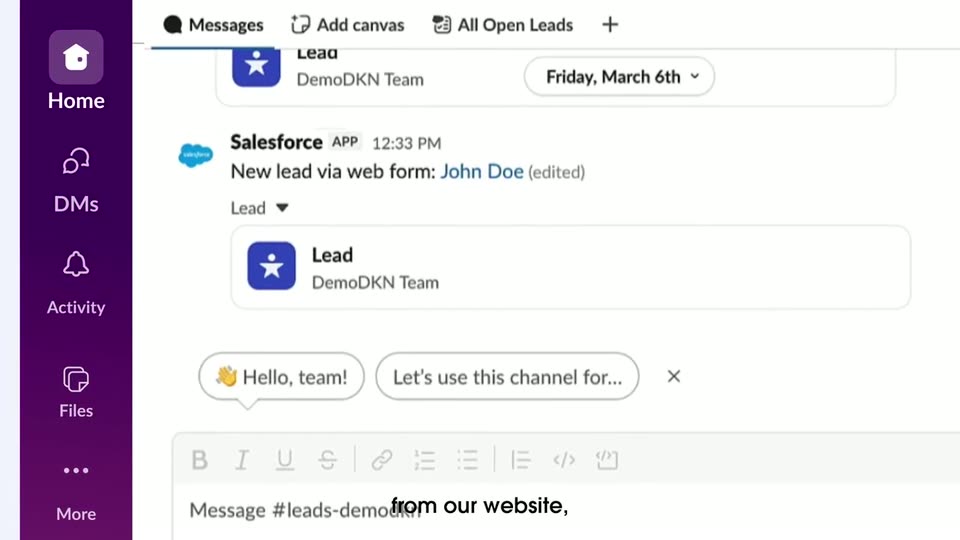
A purple-sidebar workspace shows a Salesforce post for a new lead, John Doe. The frame opens tight on the message with a cursor on the lead card, pulls back to the full interface, then the card opens into a right-hand details panel.
On-screen text: “A lead just came in”, “from our website,”, “I click into the lead,”
Techniques: UI zoom, Cursor demo
Camera: Pull out
A white lead record card for John Doe stays centered and in focus over two blurred app windows. A cursor hovers at the card's right edge while the panel scrolls slightly upward. A caption sits along the bottom.
On-screen text: “I click into the lead,”
Techniques: Cursor demo
Camera: Pull out
A lead detail card for John Doe floats in sharp focus over a blurred app window with a purple sidebar. An action menu fades in over the lower fields while the cursor moves to hover Send Email.
On-screen text: “I click into the lead,”, “ask Slackbot to draft an intro email,”
Techniques: Cursor demo
Camera: Static
A Slack window displays an email draft modal with a cursor in the body. The frame then zooms into the purple sidebar and the Slackbot prompt field at the bottom, where a cursor rests. A black caption line sits below the interface.
On-screen text: “ask Slackbot to draft an intro email,”
Techniques: UI zoom, Cursor demo
Camera: Push in
A white rounded command bar with the Slack logo scrolls left across a pale lavender background. The typed prompt tracks right to left in a steady pan, revealing the full line word by word.
Techniques: Kinetic type
Camera: Static
A white horizontal band with thin purple edges holds a large black sans-serif line that scrolls left across the frame, while a smaller caption scales in at the bottom.
On-screen text: “John asking for a meeting to learn more about his business”, “and without opening a single browser tab,”
Techniques: Kinetic type
Camera: Static
A purple Slack workspace shows a modal where an AI drafts an email to John Doe, the body typing out beneath a Working on it bar. The view then zooms in on the finished email and its green Send Email button. White captions sit at the bottom.
On-screen text: “and without opening a single browser tab,”, “it's sent and we land that meeting.”
Techniques: UI zoom
Camera: Push in
A close-up of an email draft in a desktop app with a purple sidebar. The cursor moves to the green Send Email button and clicks it, the button grays out, and the email body scrolls up slightly. A white caption sits at the bottom.
On-screen text: “it's sent and we land that meeting.”
Techniques: Cursor demo
Camera: Static
A tablet mockup in 3D perspective displays an email app with a purple sidebar and an open message from Alana Cutler. The device rotates from an angled view toward the camera while a black caption sits centered at the bottom.
On-screen text: “That's the speed we're talking about.”
Techniques: 3D mockup
Camera: Push in
On a pale background, the headline 'Prep smarter for meetings' and a four-color smiling-face icon scale in, then a 3D-tilted browser mockup of the Agenda screen appears with a cursor on the Prep with Slackbot button.
On-screen text: “Prep smarter for meetings”, “Now, the meeting's coming up”, “and I need to walk in prepared.”
Techniques: Kinetic type, 3D mockup, Cursor demo
Camera: Push in
A flat browser mockup of a Slack workspace shows an agenda panel beside a Slackbot chat. The view zooms into the chat as a cursor clicks the Prep with Slackbot button, Slackbot's reply stacks up action lines, and a Meeting Prep canvas card pops up centered over the chat.
On-screen text: “and I need to walk in prepared.”, “I just ask Slackbot”, “and it goes to work.”
Techniques: Cursor demo, UI zoom
Camera: Push in
A white Meeting Prep canvas scrolls up inside a dark purple app window, passing through detail tables and embedded Salesforce account and contact cards. A cursor hovers at the right edge as a white caption builds phrase by phrase along the bottom.
On-screen text: “The output is a canvas with customer history and records embedded directly inside it.”
Techniques: Cursor demo
Camera: Static
On a pale lavender background, the centered headline “Updated in” in deep purple and “Slack” in magenta appears. A small black caption “Updated in slack,” sits at the bottom. The headline slides out with motion blur as the scene ends.
On-screen text: “Updated in”, “Slack”, “Updated in slack,”
Techniques: Kinetic type
Camera: Static
A Slack share dialog in 3D perspective scales up over a blurred document, the green Share button highlighted as a cursor clicks it. A black caption slides in at the bottom.
On-screen text: “Updated in slack,”, “Written back to Salesforce.”
Techniques: 3D mockup, Cursor demo
Camera: Pull out
A pale lavender field holds a centered two-line headline in bold sans, the first line in dark plum and the second in magenta, sliding into place from a slight offset. A small black caption repeats the same line near the bottom edge, static throughout.
On-screen text: “Written back to Salesforce”, “Written back to Salesforce.”
Techniques: Kinetic type
Camera: Static
A Slack window in 3D perspective shows a support channel with Salesforce case messages. A large purple headline slides in across the screen, then a small bottom caption appears and is replaced by a second caption.
On-screen text: “Written back”, “to Salesforce”, “Written back to Salesforce.”, “That's what it means to work conversationally.”
Techniques: 3D mockup, Kinetic type
Camera: Pull out
A Slack workspace tilted in 3D perspective fills the frame. The support channel's message list scrolls down past repeated Salesforce case cards while the purple sidebar holds its place. A white caption runs along the bottom edge throughout the shot.
On-screen text: “That's what it means to work conversationally.”
Techniques: 3D mockup
Camera: Pull out
A blurred panel exits the top as a blue cloud and a ring of colored dots shrink and rearrange on white, the dots forming a plus-shaped icon beside the wordmark and a smaller cloud. A tagline holds at the bottom.
On-screen text: “Right where work already happens.”
Techniques: Morph
Camera: Static
The Slack logo, colorful mark beside the black wordmark, sits centered on a white background with the tagline Right where work already happens below. The tagline fades out, then the frame cuts to black.
On-screen text: “Right where work already happens.”
Camera: Static