0:33
Best SaaS Product Launch Ad Video | LangEase
LangEase · Jun 2025
Krea · Sep 2026 · 0:43 · AI-annotated
Krea’s 0:43 launch film runs 23 scenes, about 1.9 s each. The product shows up at 0:02 and 3 features are revealed. There is no explicit call to action. The video chains morphing white cards, icon rings, and 3D breakouts to show a prompt to image workflow. It cuts quickly between stylized renders, live action, and UI screens, ending on a centered logo.
Is this your launch? to your site or press kit.
LangEase · Jun 2025
Figma · Design · Jul 2025
Over a blurred sky-and-sea backdrop, a small white pill holding a gray four-leaf mark scales up into a wide rounded command bar. The line Let's Design something appears in dark gray with Design in blue, flanked by a plus sign and a dark circular up-arrow, then fades out.
On-screen text: “Let's Design something”
Techniques: Morph
Camera: Pull out
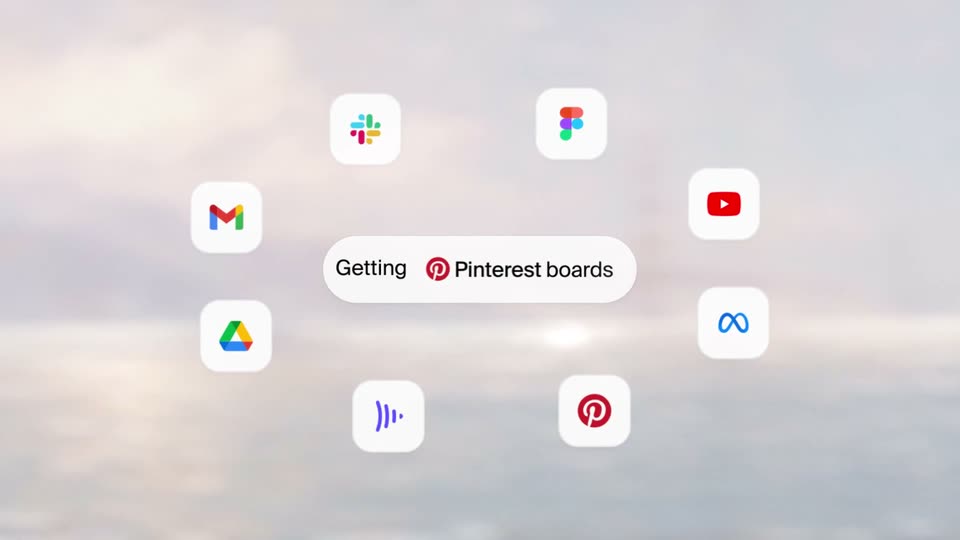
A blurred sunset over water sits behind a slowly drifting ring of white rounded app icons (Slack, YouTube, Gmail, Drive, Figma, Pinterest). A central white pill swaps its caption between three phrases in place.
On-screen text: “Getting Slack context”, “Getting Pinterest boards”, “Getting Figma designs”
Camera: Pan
A white pill reading Getting Figma designs floats in a soft pastel sky, ringed by small app icons in 3D depth. The pill and its card then morph into a larger white card holding a 3D render of a white bucket hat with a black band.
On-screen text: “Getting”, “Figma designs”
Techniques: Morph, 3D mockup
Camera: Static
A white rounded card on a soft gradient holds a silver 3D-printed guitar; the frame zooms into its black control knobs, then the image cross-fades to a woman in black playing the guitar inside an arch of black plant tendrils as a prompt line types out and swaps.
On-screen text: “Add a woman and surreal plants”, “Make it a 3D scene”
Techniques: UI zoom, Kinetic type
Camera: Push in
A rounded card holds a faded photo of a woman with a guitar and a white pill button reading 'Make it a 3D scene'. The card shrinks to the pill as eight small app-icon squares fade into a ring around it over a soft sunset sky.
Camera: Static
A translucent rounded panel expands behind a loose ring of white icon tiles over a blurred sunset sea. The central pill, Using GPT-6 Astra, scales in as the black logos settle into place.
On-screen text: “Using GPT-6 Astra”
Camera: Push in
A stylized low-poly woman in black sits on a bench holding a phone, framed in a white rounded card over a pastel gradient. The camera orbits her past line-drawn trees, then the card flips in 3D to reveal a light interface screen with a prompt field.
Techniques: Masking, 3D mockup
Camera: Push in
A close-up of a white rounded card on a soft blurred background. Its image area shows black and white 3D figures rotating, while the label below types in next to a plus icon.
Techniques: Kinetic type
Camera: Static
A white rounded card frames a 3D render of a woman in a black dress posed among black line-art plants. The card scales in with a caption at lower left, the view pushes into the figure, then the card shrinks and the scene breaks out to fill the frame.
On-screen text: “+ Make it look real”
Techniques: Masking, Parallax
Camera: Pull out
High-angle shot of a woman in black seated on a white floor, holding a silver electric guitar. Black curved stems with oval tips radiate across the foreground, some out of focus, partially crossing her body and swaying.
Camera: Push in
A high-angle shot follows a performer in black strumming a silver, angular guitar with a built-in keyboard. Black stem-and-leaf props stand on the white set, and blurred stems in the left foreground drift past, adding depth as the camera pans.
Techniques: Parallax
Camera: Push in
A performer in black lunges forward playing a silver angular electric guitar in a white void. A bundle of black cables with oval plugs fills the left edge while floating black stem shapes drift on the right. The camera orbits slowly around the figure.
Techniques: Parallax
Camera: Static
A performer in a black long-sleeve top, skirt and knee-high boots strums a transparent-body guitar with a white frame in a wide stance in a white studio, surrounded by black cable stems with oval leaf tips.
Camera: Static
A woman in a black dress and knee-high boots lunges low while playing a white electric guitar with a chrome frame. Black wire rod sculptures shaped like leafy branches fill the left and right edges of a white studio set, and the frame drifts slightly up and down.
Camera: Pull out
A woman in a black dress and boots strums a white guitar inside an arch of black cables tipped with leaf-shaped plugs. The shot blurs and pulls back, shrinking into a small framed card on white, with a hand cursor icon above it.
Techniques: Cursor demo
Camera: Pull out
A close-up of a grid of generated model images pulls back to reveal the full app: a chat panel with prompt text and character sheets on the left, a large gallery of black-and-white campaign images on the right. A hand cursor hovers over the tab.
Techniques: UI zoom, Cursor demo
Camera: Pull out
A web app interface for a 3D camera studio fills the frame, a stylized robot and abstract cable plants in the central viewport. A cursor hovers the top toggle, then the view zooms into the viewport as the 3D angle shifts between wide and close shots.
Techniques: Cursor demo, UI zoom
Camera: Static
A two-panel app screen fills the frame. The left chat column scrolls down through prompt text and rows of generated images, while the right Generations grid of black-and-white guitar shots stays fixed. A cursor drifts across the panels. The view is a locked-off screen capture.
Techniques: Cursor demo
Camera: Pull out
A two-pane interface sits locked on a white background. The left pane holds a chat of text prompts above a two-by-two grid of generated images, while the right pane shows a large preview: a woman in sunglasses holding a transparent guitar against black cable plants.
Camera: Static
A two-panel interface shows a prompt chat on the left and a generated image of a crouching guitarist on the right. A cursor clicks the Annotate button, then the view zooms into the image as labels tag the person, guitar, and lamp installation.
Techniques: Cursor demo, UI zoom
Camera: Push in
A close-up of an editor canvas shows a crouching person holding a silver guitar among cable-leaf lamps. Blue selection boxes labeled Person and Decorative lamp installation appear, a hand cursor hovers, then the view pulls back to the full app window with prompt panel and toolbar.
Techniques: Cursor demo, UI zoom
Camera: Pull out
A plain white field holds a small dark gray logo centered in the frame. The two-part rounded mark fades in and scales up slightly, settling at the center of the empty canvas.
Camera: Static
A small black rounded logo mark sits centered on a plain white background. It scales gently into place and holds still for the short clip, with no other elements present.
Camera: Static