1:33


Lovable - Introducing a smarter Lovable that is 71% better at solving complex t
Lovable · Developer tools · Jan 2026
Butterfly · Oct 2026 · 0:34 · AI-annotated
Butterfly’s 0:34 launch film runs 30 scenes, about 1.2 s each. The product shows up at 0:01 and 8 features are revealed. There is no explicit call to action. A rapid montage of single-feature cards, each pairing a serif headline on a flat color field with a matching isometric, 3D, or live UI demo, cut at roughly 129 bpm. Signature moves are split-screen reveals, color-field flips, and a recurring cross grid that morphs between the abstract intro and the desktop, ending on a scrambled Now Available to Early Preview title.
Is this your launch? to your site or press kit.
Lovable · Developer tools · Jan 2026
HyperFrames · Oct 2026
A cross-shaped grid of white outlined squares sits on a dark gradient background. Small dots in cells trigger colored square fills, and the dots morph into maroon icons: a hexagon, a notched circle, and a leaf at center.
Techniques: Morph
Camera: Static
A dark space desktop with a cratered moon at the bottom frames a central grid of outlined squares. Purple icon tiles inside the grid flash to lime green while a widget panel with a clock, icons and a search bar slides in from the left edge.
On-screen text: “Pre-release version”
Camera: Static
A desktop search panel with three app tiles sits centered over a sunset mountain wallpaper. A bright vertical scan bar and thin grid lines flash over the panel, then fade to reveal the full screen.
Techniques: Masking, Light sweep
Camera: Static
A desktop UI fills the left half: a clock, app icons and a search box with two result tiles over a sunset wallpaper. A flat lavender panel occupies the right half. The shot is locked off, with only a small mouse pointer and a text caret visible.
Camera: Static
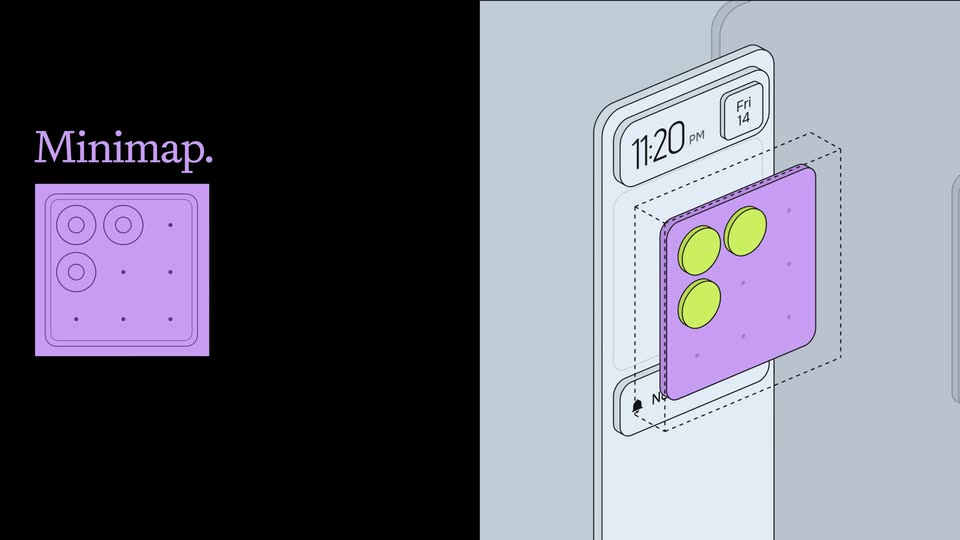
Split screen: left half is a black panel where a dashed square fills with purple and four app icons pop in under the word Minimap; right half shows the same square as a 3D isometric panel on a phone, its color deepening.
On-screen text: “Minimap.”
Techniques: Split screen, 3D mockup
Camera: Static
Left, white serif “Minimap.” sits above a blue app-grid widget with a hand cursor. Right, a desktop of stacked windows over a sunset wallpaper scales down to a small thumbnail, leaving the wallpaper visible around it.
On-screen text: “Minimap.”
Techniques: Cursor demo, UI zoom
Camera: Pull out
A white serif headline sits left of a blue minimap panel with numbered app icons. A cursor taps icons on the panel while four app windows on a sunset desktop slide and swap into a new two-by-two arrangement.
On-screen text: “Minimap.”
Techniques: Cursor demo
Camera: Static
On a dark background, a colored square on the left carries the word Linux in black serif, its fill cycling from lime to purple and back. A second gray square appears at right, holding a black penguin icon.
On-screen text: “Linux”
Camera: Static
Three flat panels sit side by side on a dark gray field: a purple square with the serif word Linux, a green square with a black penguin, and a right square whose background flips from purple to yellow behind the striped ARCH wordmark. The Linux text scales gently in place.
On-screen text: “Linux”, “ARCH”
Techniques: Kinetic type
Camera: Static
Two flat cards sit on a dark background: a lime square with a black penguin and a yellow square with a striped ARCH wordmark. The left card becomes a dark red panel with the yellow serif headline Kernel Optimizations as the yellow card shrinks right.
On-screen text: “ARCH”, “Linux”, “Kernel Optimizations”
Camera: Static
Split screen: a dark brown left panel holds the yellow serif headline Kernel Optimizations, while a yellow right panel shows an isometric cluster of brown cylinders and cubes outlined in yellow. A lavender highlight pulses across different shapes of the cluster.
On-screen text: “ARCH”, “Kernel”, “Optimizations”
Techniques: Split screen
Camera: Static
A split frame: a dark purple panel holds the serif headline on the left, while a lavender panel on the right shows an isometric illustration. A yellow fill sweeps through the block and curved tube as the small cylinders switch from yellow to dark purple.
On-screen text: “Disk activity optimizations”
Techniques: Split screen
Camera: Static
A split background, dark green left and lime right, holds the static title “Compressed Swap” at lower left. On the right, four isometric panels animate: the yellow panel slides to the front-right while the dark green stack shifts to the front-left.
On-screen text: “Compressed Swap”
Camera: Static
A dark settings grid of rounded tiles sits over a sunset mountain backdrop. The panel brightens from a dimmed state, the lock and sleep tiles highlight in yellow and purple, their labels appear to the right, and a cursor rests between them.
Techniques: Cursor demo
Camera: Static
A dark quick-settings grid floats over a dusk mountain backdrop. The cursor leaves the highlighted pink Sleep tile and moves down; the Restart tile glows lime with a colored caption while the power tile below turns red.
On-screen text: “Sleep”, “Restart”
Techniques: Cursor demo
Camera: Static
A dimmed control-panel interface fades out to a pale green field, leaving a yellow isometric illustration of a four-pronged USB drive centered, with the labels 1.3 GiB and Installer set in serif type on either side.
On-screen text: “1.3 GiB”, “Installer”
Camera: Static
A yellow isometric illustration of a disc ringed by four blocks sits centered on a dark brown field. The serif captions 1.3 GiB and Installer sit at left and right. The frame stays locked and static throughout.
On-screen text: “1.3 GiB”, “Installer”
Camera: Static
A flat purple clipboard window titled “Search clipboard” sits centered on a dark brown background, with a highlighted file row and an empty preview pane. Yellow serif labels read “1.3 GiB” on the left and “Installer” on the right. The frame holds still with no motion.
On-screen text: “1.3 GiB”, “Installer”
Camera: Static
A dark rounded clipboard panel floats centered over a sunset mountain backdrop. The left column lists a highlighted image file, links and text snippets under Today and Yesterday headers, while the right shows a butterfly preview with its filename and date. The frame stays static.
Camera: Static
A purple window card over a blurred sunset desktop collapses into a flat black icon on a gray field, its brown cross spinning into a star, as the serif labels (Windows) and Installer appear on either side.
On-screen text: “(Windows)”, “Installer”
Techniques: Morph
Camera: Static
A flat window illustration sits centered on a dark gray field, its thin white frame holding several colored squares that slide to new spots. The serif labels (Windows) and Installer rest in light gray on the left and right, locked in place.
On-screen text: “(Windows)”, “Installer”
Camera: Static
A flat desktop widget panel sits left of a line-art phone mockup in 3D perspective. A purple music widget and a green notification card pop into a dashed slot on the phone while the same notification slides into the desktop stack.
On-screen text: “(Windows)”
Techniques: 3D mockup, Split screen
Camera: Static
A split frame: a maroon field on the left holds the yellow serif word 'Upcoming', while a line-art phone in 3D perspective on the right shows a lock screen with music and notification widgets over a faded search interface.
On-screen text: “Upcoming”
Techniques: 3D mockup
Camera: Static
A split screen shows a dark brown left panel with the yellow serif word Upcoming beside a yellow right panel with the brown serif word Themes. The left panel then resolves into a desktop interface with a mountain painting wallpaper, a search bar and a wifi panel.
On-screen text: “Upcoming”, “Themes”
Techniques: Split screen
Camera: Static
A locked-off desktop screen over a painted autumn landscape. A dark search panel with three app tiles sits at center, a vertical dock and clock on the left, and an open Wifi list at the bottom left. The frame holds still with no motion.
On-screen text: “Themes”
Camera: Static
A dusk mountain wallpaper hosts three floating desktop panels: a centered search bar with three app tiles, a left dock showing a clock and icons, and a bottom-left wifi list. All panels stay static across the clip.
Camera: Static
A dark desktop interface holds still over a misty mountain wallpaper. A centered search panel shows a placeholder line and three app cards for Install, Chrome, and Figma. A wifi panel lists networks at the lower left, while clock, app, and music widgets sit at the top left.
Camera: Static
On a near-black field, thin white outline shapes, several small circles and one square, pop in at scattered positions. A tiny boxed counter reading 0 sits in the bottom-right corner. The shapes hold static as the clip ends.
Camera: Static
A light blue plus sign with four dark purple dots at its corners sits on the left of a plain lavender field, while faint small circles drift slowly across the background.
Camera: Static
On a dark field of flickering geometric icons and a butterfly line drawing, a black serif headline on colored blocks reads Now Available, then scrambles and recolors into Early Preview as a Pond tile appears at left.
On-screen text: “Now Available”, “Pond”, “Early Preview”
Techniques: Kinetic type
Camera: Static