0:50

Announcing Lovable Growth Tools!
Lovable · Developer tools · Oct 2026
Superapp · Oct 2026 · 0:50 · AI-annotated
Superapp’s 0:50 launch film runs 23 scenes, about 2.2 s each. The product is on screen from the first frame and 6 features are revealed. There is no explicit call to action; a voiceover carries the film. Built as a logo-and-promise open, a long overnight onboarding demo, then a tight feature montage where each 'It does X' headline is paired with a single phone or browser mockup, and a final role summary into the logo lockup. Signature moves are blur-to-focus headline reveals, scale-up card transitions, device mockups that morph from phone to browser, frosted-glass notifications and counting-up metrics, all held on a near-black field with a recurring blue app icon.
Is this your launch? to your site or press kit.
Lovable · Developer tools · Oct 2026
Runway · AI · Oct 2026
Lovable · Developer tools · Jan 2026
A glowing blue app icon sits beside the white and gray wordmark on a black background. The icon scales up to fill the frame while the wordmark fades out, leaving the full-bleed icon.
On-screen text: “Superapp Selfdrive”
Techniques: Morph
Camera: Static
A blue rounded-square card sits on a dark background with the white words This agent centered on it. The word agent fades in, then the whole card and text scale up until they fill the frame.
On-screen text: “This agent”
Techniques: Kinetic type
Camera: Static
On a black background, the line will get users for your app appears in white sans, word by word. Dark pill labels for Apple Ads, App Store search, Your website, Google and Creators appear above, then the line dims and a large grey while enters lower left.
On-screen text: “will get users for your app”, “Apple Ads”, “App Store search”, “Your website”, “Google”, “Creators”, “while”
Techniques: Kinetic type
Camera: Static
On a black background, a row of gray chips (App Store search, Your website, Google, Creators) collapses into a single Selfdrive chip with a blue icon. The gray line stays put while the large white headline blurs and scales into place, then a soft glow flares around the chip.
On-screen text: “will get users for your app”, “while you sleep.”
Techniques: Kinetic type, Light sweep
Camera: Static
A dark product screen displays a headline and a URL input field. A hand cursor types a link into the field and clicks the arrow button, then the view zooms into the input area.
Techniques: Cursor demo, UI zoom
Camera: Push in
On a black field, a gray clock reads 23:41 above the white headline Go to sleep, human., which sharpens into focus. Below, four task lines with circular bullets and a working status on the right fade in one after another, top to bottom.
On-screen text: “23:41”, “Go to sleep, human.”, “Running Apple Ads”, “working”, “Optimizing App Store keywords”, “working”, “Writing an SEO article”, “working”, “Reviewing UGC creator applications”, “working”
Techniques: Kinetic type
Camera: Static
A phone mockup fades in from black on a dark background. Its lock screen shows a coastal road with a red car, the time 7:02, and a Superapp notification reading that 50 new downloads arrived overnight.
Techniques: 3D mockup
Camera: Push in
A phone mockup in 3D perspective on a black background shows a lock screen with a coastal road and a red car. A frosted notification banner labeled Superapp slides in, then expands into a panel listing download sources as the view zooms onto it.
Techniques: 3D mockup, Morph, UI zoom
Camera: Pan
A vertical phone on a dark backdrop shows a frosted-glass notification card over a red car on a coastal road. The card lists download stats and a budget question. A cursor taps the blue Approve button, which turns green to read Approved as the card blurs out.
Techniques: Cursor demo
Camera: Push in
A dark analytics dashboard scrolls through a blue notification bubble, counting-up metric cards and a task list. The view then blurs and pulls back as two white lines of text scale in over it: “You're still the boss.” then “It just does the work.”
On-screen text: “You're still the boss.”, “It just does the work.”
Techniques: UI zoom, Kinetic type
Camera: Pull out
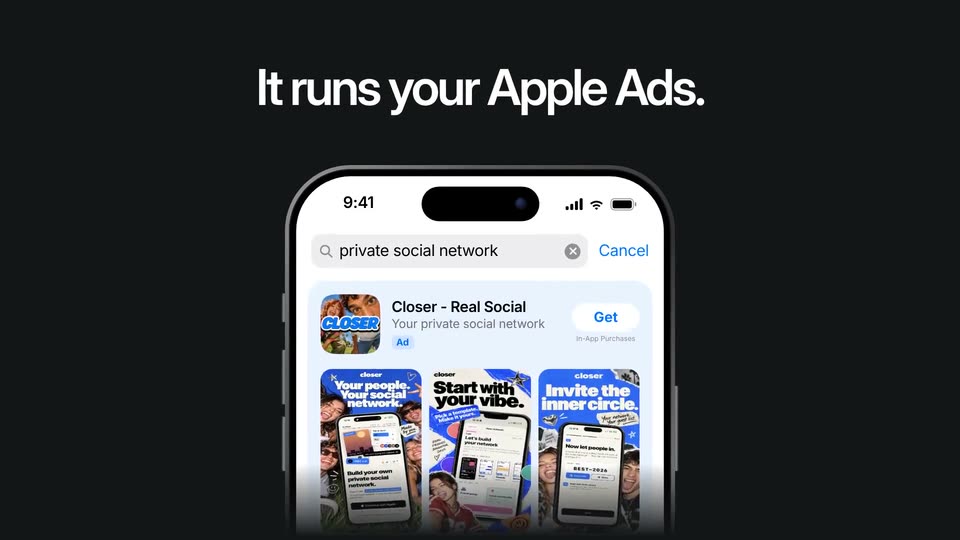
A black frame holds a centered iPhone beneath the white headline about Apple Ads. On the screen, an App Store search for a private social network is loaded, and a result card for the Closer app, with three blue promo shots, slides up and fades in.
On-screen text: “It runs your Apple Ads.”
Camera: Static
On a dark background, a small line sits above a large headline that blurs into focus. Below, a three-row list pairs ad names with per-install costs. The third row's orange price fades out and is replaced by a gray Paused pill as the row dims.
On-screen text: “It runs your Apple Ads.”, “And pauses what wastes money.”
Techniques: Kinetic type
Camera: Static
Under a white headline, a front-on iPhone mockup on a dark background shows an App Store page; its subtitle types out to “Your private social network,” a toast pill slides up, a hand cursor taps Approve, it turns green, and the page scrolls to the metadata row.
On-screen text: “It rewrites your App Store page.”, “You tap Approve.”
Techniques: Cursor demo
Camera: Pull out
A dark screen shows a phone mockup of an App Store page under the headline You tap Approve. The phone morphs into a desktop browser window displaying the closer website as the headline changes to It builds your website.
On-screen text: “It rewrites your App Store page.”, “You tap Approve.”, “It builds your website”
Techniques: Morph
Camera: Static
A white headline sits above a browser window that tilts into 3D perspective on a black background. The window shows a cream website with bold black type and three phone mockups.
On-screen text: “It builds your website.”
Techniques: 3D mockup
Camera: Static
A front-facing phone mockup sits centered over a dimmed website mockup. Inside the phone, a ChatGPT answer types in and a Closer card slides up, while the white headline above brightens from gray.
On-screen text: “It builds your website.”, “And gets you into ChatGPT answers.”
Camera: Static
A dark screen holds a two-row grid of vertical creator video tiles with ticking like counters. A white headline fades in, then a second line enters below it as the first line shrinks and rises.
On-screen text: “It manages real human creators.”, “You never send a single DM.”
Techniques: Kinetic type
Camera: Static
A dark screen holds a two-line headline above a six-by-two grid of vertical creator videos, each a person talking to camera with social feed overlays. The clips play in place while the text stays fixed.
On-screen text: “It manages real human creators.”, “You never send a single DM.”
Camera: Static
A white headline sits above a front-facing iPhone showing a ratings list, where the phrase 'dark mode' in a review highlights yellow. The screen then switches to a what's-new panel as the headline swaps to a second line.
On-screen text: “It reads your reviews.”, “And ships what users ask for.”
Techniques: Kinetic type
Camera: Static
A centered phone mockup on a black background shows a What's New screen with a dark-mode note and an app card. A bottom pill with a green Shipped badge fades in over the clip. A two-line headline sits above the phone.
On-screen text: “It reads your reviews.”, “And ships what users ask for.”
Camera: Static
On a near-black field, three white rounded-square app icons fade in from left to right, each carrying a white caption beneath. The first tile holds a hammer and wrench, the second a megaphone, the third a compass. They appear in sequence and hold steady.
On-screen text: “An app builder.”, “A marketing team.”, “A product manager.”
Camera: Pull out
On a near-black background, a blue rounded-square icon and the white Superapp wordmark reveal from a blue highlight wipe, then the gray tagline The self-driving app company. fades in below, word by word. Locked-off frame.
On-screen text: “The self-driving app company.”
Techniques: Masking
Camera: Static
A blue rounded-square icon with a radial gradient sits left of the white wordmark Superapp, with a gray tagline below, all centered on a near-black field; the lockup holds still, then the frame fades to black.
On-screen text: “Superapp”, “The self-driving app company.”
Camera: Static