0:48
HyperFrames - the AI slop launch video killer is here Computer use is live in Hype
HyperFrames Studio · Oct 2026
Claude’s 1:00 launch film runs 24 scenes, about 2.5 s each. The product is on screen from the first frame and 1 feature is revealed. There is no explicit call to action. Built as a cold open that turns a raw terminal session into a shareable visual: code streams, dissolves into a pixel mascot, and reassembles into a live dashboard, then a link is copied and opened on a phone. The signature move is text-to-object transformation (characters scattering and reforming) on a calm lavender field, closed by a serif tagline card and a centered logo lockup.
Is this your launch? to your site or press kit.
HyperFrames Studio · Oct 2026
Descript · Design · Nov 2022
A dark terminal window with an orange pixel icon sits on a pale lavender background. The camera zooms into the prompt line as a command types out, then pulls back as the response fills with status lines and a green Bash entry.
Techniques: UI zoom
Camera: Push in
A dark terminal window with red, yellow and green dots scrolls its agent log upward. The window then shifts left and shrinks as a white JSON editor window opens to its right, both resting on a pale lavender background with faint wavy lines.
Techniques: Split screen
Camera: Pull out
A dark terminal panel and a light JSON viewer titled acme-funnel-fix.json float side by side on a gray background, overlapping at the center. Monospaced log lines and JSON entries stream in line by line across both panels while the right sheet sits on top.
Camera: Static
A dark terminal window and a light JSON file window overlap on a gray field. Both scroll horizontally to the left, code streaming past, until the dark panel slides off and the JSON body clears to empty.
Camera: Pan
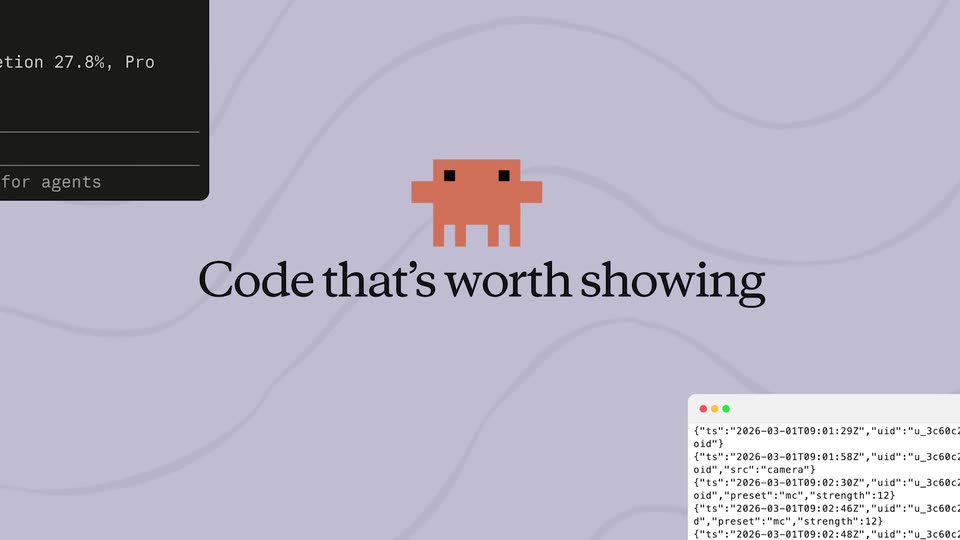
On a pale lavender background, a dark terminal panel slides in from the top-left and a light JSON window from the bottom-right, framing a light card that scales in behind the serif headline. Above it, a small orange pixel mascot tilts and grows pink pixel wings.
On-screen text: “Code that's worth showing”
Techniques: Morph
Camera: Pan
A dark terminal log scrolls new lines on the left while, in the light code editor on the right, the JSON text dissolves into a swarm of characters that reassembles into a small pixel figure with an orange head, blue body and pink base.
Techniques: Particles, Morph
Camera: Pan
A dark terminal log updates line by line on the left beside a browser window on the right. Inside, a line chart resolves from a scrambled field of digits into a clean curve with a sharp drop, then the window scales up to reveal a row of stat cards.
Techniques: Morph, UI zoom
Camera: Push in
A dark terminal window overlaps a light analytics dashboard. In the terminal, a monospace prompt line types out a UX fix request, the caret advancing character by character, while stat cards and a bar chart stay static behind it.
Techniques: Cursor demo
Camera: Static
A dark terminal panel on the left scrolls upward through monospaced session log lines, revealing a new prompt and an auto mode on footer, while a light analytics dashboard with stat cards and a line chart stays static behind it on the right.
Techniques: Split screen
Camera: Static
A dark code editor window holds the left side while a light browser dashboard slides in from the right and settles over it, exposing a dropoff chart and a row of metric cards. A mouse cursor appears over the metrics near the end.
Techniques: Cursor demo
Camera: Push in
A browser window shows a dashboard with two phone mockups and analysis cards; the view reframes to the top bar as the cursor clicks the Share button, opening a dropdown, then moves to Copy link before the menu closes.
Techniques: UI zoom, Cursor demo
Camera: Push in
A dark rounded message card on a lavender wavy background types out a note to Casey ending in a long artifact URL, while a white cursor drifts down and hovers on the card's send button.
Techniques: Kinetic type, Cursor demo
Camera: Push in
A blurred, grainy email screen fills the frame as the tagline “Links made for sharing” fades from light gray to solid black at center. In the defocused background, the recipient line “To: Casey” slides into place.
On-screen text: “Links made for sharing”
Camera: Static
A blurred desk set sits behind the centered black serif line, which holds still. The line clears and a dark phone lock screen mockup scales into the center, showing the date and time in white.
On-screen text: “Links made for sharing”
Camera: Static
A dark phone lock screen mockup sits centered over a blurred background, angled in 3D. It shows the date, a large white 2:20, and a notification card from Elliot with a green icon and a message about an exports dip. The phone eases up to settle into frame.
Techniques: 3D mockup
Camera: Static
A phone mockup in 3D perspective sits against a blurred background. Its dark lock screen shows a time and a notification card, then the display switches to a flat peach panel with a black top bar.
Techniques: 3D mockup
Camera: Static
A centered phone mockup on a soft blurred background scrolls down through an app interface. The view moves past a headline card into two side-by-side export sheets, then a line chart showing a sharp drop.
Camera: Pull out
A 3D phone mockup of an analytics report tilts from an angled view to face-on. A white headline with a dark outline fades out, then the frame zooms onto the Share button while the Editor opened row keeps a rounded outline.
On-screen text: “More than half of exports never complete”, “The funnel dropped — it snapped”
Techniques: 3D mockup, Kinetic type, UI zoom
Camera: Static
A white rounded Share button sits on a black background. A circular finger taps it, the button depresses, then it morphs into a dark outlined Create link button with a link icon.
Techniques: Morph
Camera: Static
A black pill button with a thin white outline is centered on a near-black field. A glossy circle hovers over the link icon and the words Copy link, then slides down and dissolves as the button content switches to a checkmark and the word Copied.
Camera: Static
A white “Copied” toast with a checkmark holds center on black, then fades out as four flat interface panels scale into a two-by-two grid behind it: a metrics dashboard, a phone playground, a pull-request card and a workflow browser.
Techniques: Split screen
Camera: Static
Four product interface cards fill a 2x2 grid on a black background. The cards slide outward toward the frame edges, opening the center to a small orange pixelated creature and the white serif headline centered below it.
On-screen text: “Artifacts, now available”
Techniques: Split screen
Camera: Push in
A pixel-orange invader mark hovers above a white serif tagline on a near-black field. Two product cards exit the right edge while the mark flips to its final form, gaining a small TM.
On-screen text: “Artifacts, now available”
Techniques: Morph
Camera: Static
On a near-black background, a coral starburst mark scales up from a tiny scribble at center, then the white serif wordmark Claude Code appears word by word to its right, settling into a centered lockup that holds for the rest of the clip.
On-screen text: “Claude Code”
Techniques: Kinetic type
Camera: Static