1:46
Explore
Introducing Coda AI: Your new favorite work assistant
Coda · Jun 2023 · 1:30 · Full motion · AI-annotated
- Length
- 1:30
- Scenes
- 20 · 4.5 s avg
- Product on screen
- 0:06
- Features shown
- 4
- Call to action
- 1:24 · 94%
- Voiceover
- Yes
- Views
- 1.7M on YouTube
as of November 27, 2026
00:00:00 / 01:30:01
- Length
- 1:30
- Scenes
- 20 · 4.5 s avg
- Product on screen
- 0:06
- Features shown
- 4
- Call to action
- 1:24 · 94%
- Voiceover
- Yes
- Views
- 1.7M on YouTube
as of November 27, 2026
Coda’s 1:30 launch film runs 20 scenes, about 4.5 s each. The product shows up at 0:06 and 4 features are revealed. The call to action lands at 1:24 (94% in), over a voiceover. The video opens on a notification-overloaded clock, cuts to the Coda AI logo, then walks through four team workflows (support, product, marketing, sales) in fast UI demos before closing on the URL. Its signature moves are zoom-and-scroll interface tours on flat halftone grids, with star and envelope wipes marking each segment change.
No filming indicatedEstimated needs: 5 capture groups — your screens or recordings · 1 official logo — reused across the film · 2 graphic passages — draw or supply · 1 3D passage — build or supply
Is this your launch? to your site or press kit.
More like this


Similar soundtrack
Films whose music sounds like this one, voice left out
1:21

Introducing Claude Dashboards and Claude Motion
Anthropic · Upbeat electronic
1:37

RamAIn (YC W26) Launch Video
RamAIn · Upbeat corporate electronic
0:46

Introducing Coda AI: Your new favorite work assistant, scene by scene
· 20 scenes as text
01 · Hook · 0:00–0:06
A halftone clock sits on a split blue and orange grid as Slack, Jira and iMessage notification cards pop in across the frame, piling up while the hands spin. The flat layout then tilts into a curved 3D wall.
Techniques: 3D mockup
Camera: Pull out
02 · Product intro · 0:06–0:07
A dark textured circle holds a white four-pointed star at the center of a black frame. A thin white line runs edge to edge, then contracts inward to a short dash crossing the star's middle.
Camera: Pull out
03 · Product intro · 0:07–0:12
On a near-black background, a thin orange vertical line splits into two bars as the white word coda appears between them. The left bar fades, and an orange badge with twinkling sparkles and the text AI pops in at the upper right of the word.
On-screen text: “coda”, “AI”
Techniques: Kinetic type
Camera: Static
04 · Feature reveal · 0:12–0:15
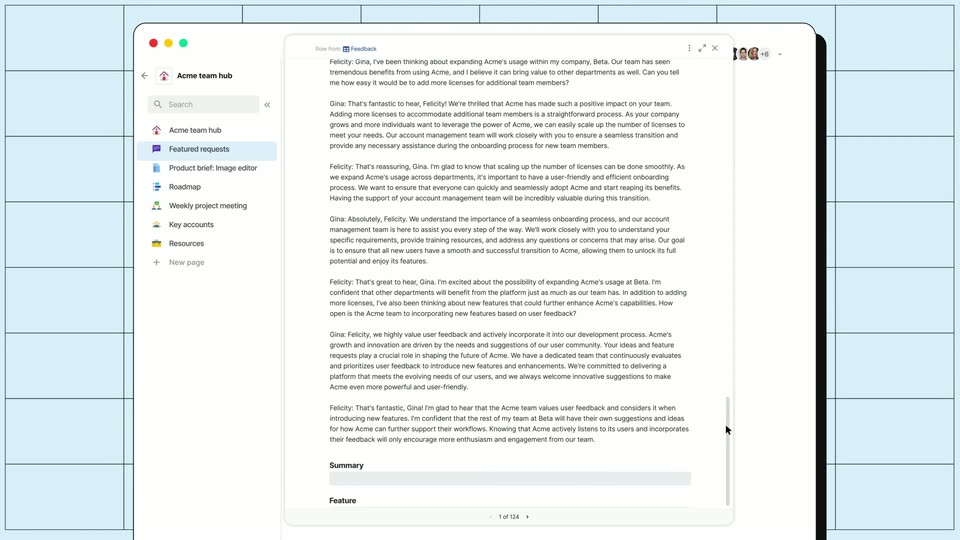
A browser window of the Acme team hub sits on a pale background. The view zooms in and scrolls down a long call transcript, tightening on the body copy until it rests on a Summary field where a cursor hovers over an expand icon.
Techniques: UI zoom, Cursor demo
Camera: Push in
05 · Feature reveal · 0:15–0:22
A Coda document shows a meeting transcript above two empty fields. A cursor opens an AI menu, types a summarize prompt and clicks Fill, so the Summary field types a sentence. The cursor then fills the Feature field with three colored tags.
Techniques: Cursor demo
Camera: Push in
06 · Feature reveal · 0:22–0:26
A close-up of a feature-requests table zooms out to reveal the full app window with its sidebar and bar chart. The cursor moves to the sidebar and clicks Product brief: Image editor, and the content pane clears.
Techniques: UI zoom, Cursor demo
Camera: Pull out
07 · Feature reveal · 0:26–0:40
A cursor opens the slash menu on a blank workspace page and types a prompt to create a brief; the page fills with generated sections as the view zooms in, then scrolls to the press release, where a highlighted sentence is selected and a second prompt expands the paragraph.
Techniques: Cursor demo, UI zoom
Camera: Pull out
08 · Feature reveal · 0:40–0:41
On a pale blue grid, a flat app window cross-dissolves between two pages: a product brief with an image editor panel gives way to a weekly meeting page with a topics table, as a cursor selects the sidebar item.
Techniques: Cursor demo
Camera: Pull out
09 · Feature reveal · 0:41–0:45
A product window on a light blue grid shows a meeting topics table. The cursor clicks the upvote pill on the third row, avatars stack up, the row slides to the top of the list, then the table gives way to a blurred document page.
Techniques: Cursor demo
Camera: Static
10 · Feature reveal · 0:45–0:52
A document window resolves from a stacked duplicate into one centered view, then scrolls down. A cursor hovers an empty block, a tooltip reads Generate check boxes of next steps from Notes, and an AI badge fills it with three typed checkboxes. The view zooms out to the full window.
Techniques: Cursor demo, UI zoom
Camera: Static
11 · Feature reveal · 0:52–1:02
A front-facing app window on a light blue grid shows a meeting notes page. The cursor types /sum, selects Summarize @Topic, clicks the AI button, and a Summary panel fills with generated bullets above the topics table.
Techniques: Cursor demo
Camera: Static
12 · Feature reveal · 1:02–1:03
A weekly-meeting document interface with sidebar, summary and topics table fills the frame, then a white card with a black curve wipes across in a blur. The screen clears to a light blue field where a black-outlined white star scales in and settles centered.
Techniques: Masking, Morph
Camera: Push in
13 · Feature reveal · 1:03–1:04
A hand-drawn white envelope icon with a black outline sits on a light blue background. It begins large and tilted, then scales down and straightens toward the center.
Camera: Static
14 · Feature reveal · 1:04–1:04
A flat product window sits on a light blue grid, showing a contacts table with a sidebar and Send buttons. A white envelope icon with a dark outline scales down from the center onto a row, and a cursor hovers near the column headers.
Camera: Static
15 · Feature reveal · 1:04–1:05
A product screen shows a Key accounts table with a contacts list and a context menu open over a column header, a cursor hovering on it. The camera zooms in to crop the surrounding grid and fill the frame with the table.
Techniques: Cursor demo, UI zoom
Camera: Push in
16 · Feature reveal · 1:05–1:12
A contacts table with a Fill menu open; the cursor clicks Fill and the view pulls back to the full app window, drafts now filled with individual emails. The cursor clicks Send all emails, which becomes Emails sent!, then a fast zoom-out blur ends the scene.
Techniques: Cursor demo, UI zoom
Camera: Pull out
17 · Demo · 1:12–1:13
White envelope icons fly toward the camera through a blue 3D space, then the view pulls back to reveal a tilted dashboard interface floating behind them.
Techniques: 3D mockup, Parallax
Camera: Pull out
18 · Demo · 1:13–1:24
A browser window of the Acme team hub sits centered over columns of notification cards on a blue and orange grid. The window sharpens and slowly zooms in as a cursor hovers the Create button while prompts are typed into the command bar, and the side cards fade away.
Techniques: Cursor demo, UI zoom
Camera: Static
19 · CTA · 1:24–1:28
A black screen shows an orange caret, then the white coda wordmark and an orange AI badge with sparkles pop in. The gray tagline fades in below, and the lockup switches to the orange URL coda.io/ai.
On-screen text: “Less busywork, more impact.”, “coda.io/ai”
Techniques: Kinetic type
Camera: Static
20 · Outro · 1:28–1:30
A near-black frame holds the centered wordmark coda.io/ai, with coda.io in orange and /ai in white. The text stays static and locked off for the entire shot.
On-screen text: “coda.io/ai”
Camera: Static