4:28
Explore
00:00:00 / 04:28:14
- Length
- 4:28
- Scenes
- 114 · 2.4 s avg
- Product on screen
- 0:00
- Features shown
- 2
- Call to action
- 4:19 · 97%
- Voiceover
- Yes
- Views
- 996K on YouTube
as of November 23, 2026
Augmental’s 4:28 launch film runs 114 scenes, about 2.4 s each. The product is on screen from the first frame and 2 features are revealed, with social proof. The call to action lands at 4:19 (97% in), over a voiceover. The video alternates black-background 3D renders of the device, screen-capture UI demos and candid live-action user stories, cut at roughly 27 cuts per minute. Its signature moves are locked-off macro shots of the MouthPad, split-screen phone recordings and pixel timecode overlays that frame every demo as a live test.
Footage neededEstimated needs: 12 capture groups — your screens or recordings · 1 official logo — reused across the film · 69 filmed passages — shoot, supply or replace · 3 graphic passages — draw or supply · 10 3D passages — build or supply
Is this your launch? to your site or press kit.
More like this
1:15

Y Combinator - Every company is racing to adopt AI, but many don't know where to sta
Hessian · B2B · May 2026
1:16

See Odin Robotics (YC F26)’s activity on LinkedIn
Odin Robotics · Industrials
Similar soundtrack
Films whose music sounds like this one, voice left out
0:57
Smart Commerce - Meet Stord AI
Stord · Electronic dance-pop
1:54

0:40

Introducing the first creative agent for Commerce
Pletor · Modern funk and Latin-infused electronic dance music
MouthPad is now available, scene by scene
· 114 scenes as text
01 · Product intro · 0:00–0:01
A clear, tooth-shaped mouthpiece with a gold grid and a copper wire loop sits in 3D perspective on a black background, rotating slowly. A white caption sits below it.
On-screen text: “The MouthPad is a trackpad”, “for your tongue.”
Techniques: 3D mockup
Camera: Static
02 · Product intro · 0:01–0:02
A transparent mouthpiece device turns slowly on a black background, revealing a copper wire loop, a brown grid panel and a small red module inside. The caption holds at the bottom of the frame.
On-screen text: “The MouthPad is a trackpad for your tongue.”
Techniques: 3D mockup
Camera: Static
03 · Product intro · 0:02–0:05
A man in a dark office holds a clear mouthpiece with a small gold square toward the camera, then the focus pulls to his face as he slides it into his mouth and smiles. A two-line caption stays locked at the bottom while a tagline appears.
On-screen text: “The user uses their tongue”, “on the trackpad on the palate”, “The MouthPad is a trackpad”, “for your tongue.”
Camera: Static
04 · Product intro · 0:05–0:07
Low-angle shot of a bearded man lying back with his mouth open, gazing upward, while a hand holds a smartphone in the left foreground showing a calibration app with a touchpad grid and force dial. A white caption at the bottom explains the tongue trackpad.
On-screen text: “The user uses their tongue”, “on the trackpad on the palate”, “to move the cursor on the monitor”
Camera: Static
05 · Product intro · 0:07–0:08
A transparent bubble-textured jaw model with an amber core and copper coils rests on a white surface. A hand enters from the right and presses the right contact.
Camera: Static
06 · Product intro · 0:08–0:10
A clear dental aligner with an orange circuit board and copper coils sits on a white surface, rotating slowly on a turntable. The static tagline fragment holds fixed in the lower frame.
On-screen text: “all limitations.”
Camera: Static
07 · Product intro · 0:10–0:11
A macro shot of a blue-gloved hand setting a small chip on a dark circuit board cuts to a green chip mounted on a tan board with round cutouts. The white caption stays fixed at the bottom.
On-screen text: “all limitations.”
Camera: Static
08 · Product intro · 0:11–0:15
In a dim lab, a person stands with their back to the camera in front of glowing monitors. The camera pans to a man and a woman in profile, then cuts to a black-and-white MRI of a head showing the tongue. Subtitles run along the bottom.
On-screen text: “At Augmental we've always considered the tongue”, “to be this very expressive and capable”, “all limitations.”
Camera: Pan
09 · Product intro · 0:15–0:17
Two grayscale MRI scans of a human head in profile hold side by side on a black background. The larger left scan is softly blurred, the smaller right scan is sharp. A source credit line stays fixed at the top left. The frame is locked off with no motion.
On-screen text: “Source: Dr. Jens Frahm of the Max Planck Society”
Camera: Static
10 · Demo · 0:17–0:18
A hand slides across a glass table and lifts a black Augmental box, the camera tracking it as it blurs away. The shot dissolves to a person in a white shirt behind the glass, with a dialogue subtitle at the bottom.
On-screen text: “Source: Dr. Jens Frahm of the Max Planck Society”, “Ooh, thank you.”
Camera: Static
11 · Demo · 0:18–0:20
A hand passes a small black box with a blue interior to a seated man in a gray graphic tee. He smiles and looks down at the box as the camera tilts up to his face. A subtitle reads “Ooh, thank you.”
On-screen text: “Ooh, thank you.”
Camera: Pan
12 · Demo · 0:20–0:22
A hand holds an open navy box with a white lid, tilting it to show white tissue paper and a small coral item inside. The background is a bed with grey bedding and a patterned pillow. A white subtitle sits at the bottom of the frame.
On-screen text: “Ooh, thank you.”
Camera: Pull out
13 · Demo · 0:22–0:22
A close-up of a bearded man with curly hair, head tilted back and mouth open in a laugh, as a hand in a black sleeve reaches into his mouth. The background is a soft, blurred interior with daylight from a window.
Camera: Static
14 · Demo · 0:22–0:24
A woman with red curly hair smiles in close-up, then opens her mouth and presses a clear dental aligner onto her teeth with her fingers, a ring and beaded bracelet visible on her hand.
Camera: Pull out
15 · Demo · 0:24–0:25
A close-up of gloved hands holding a clear dental model, placing an orange mesh pad against the teeth. A white caption appears at the bottom.
On-screen text: “The MouthPad^ is an intraoral interface”
Camera: Static
16 · Demo · 0:25–0:26
A black-gloved hand holds a clear dental aligner with a small orange mesh pad seated inside, against a soft blue background. The frame stays locked off and steady.
On-screen text: “The MouthPad^ is an intraoral interface”
Camera: Static
17 · Demo · 0:26–0:27
A hand holds a small clear device with an orange center in the lower left, in front of a dark screen showing a blurred grid of glowing yellow squares. A white caption sits at the bottom. The frame is locked off and still.
On-screen text: “The MouthPad^ is an intraoral interface”
Camera: Static
18 · Demo · 0:27–0:29
A hand holds a small clear, grid-textured mouthpiece in front of a laptop screen showing a yellow heatmap grid. The device drops out of frame as the screen sharpens, then a cut reveals a man's open mouth as he brings the mouthpiece to his lips.
On-screen text: “The MouthPad^ is an intraoral interface”, “that lets you interact with computers without hands.”, “It rests on the top of your mouth.”
Camera: Static
19 · Demo · 0:29–0:31
Extreme close-up of a man's mouth in dim blue light, locked-off frame. He sets a small clear mouthpiece on his teeth, then closes his lips. A subtitle line sits at the bottom of the frame.
On-screen text: “that lets you interact with computers without hands.”, “It rests on the top of your mouth.”
Camera: Static
20 · Demo · 0:31–0:33
A tilted close-up of a Windows Add a device dialog over a blurred settings panel. The cursor hovers the AUGMENTAL row, which flips to a Connecting status with a small progress bar. The dialog tilts slightly as the list stays still.
On-screen text: “So this essentially enables you to use your tongue”
Techniques: Cursor demo, UI zoom
Camera: Static
21 · Demo · 0:33–0:34
A hand holds a white tablet at a steep angle in a dark room, its screen showing a short list and a virtual keyboard. The camera drifts slowly across the glass, the background a blurred pink shape. A small disclaimer line sits at the top.
On-screen text: “All demos were recorded live and no effects were added.”, “So this essentially enables you to use your tongue”, “in the same way you would use your finger”
Camera: Static
22 · Demo · 0:34–0:37
A vertical game settings list scrolls upward past rows of toggle options, set over a blurred teal backdrop. A white subtitle bar at the bottom carries the narration, and a small disclaimer line sits at the top.
On-screen text: “All demos were recorded live and no effects were added.”, “in the same way you would use your finger”, “to interact with a trackpad, control your cursor, activate clicks,”
Camera: Pan
23 · Demo · 0:37–0:39
Close-up of a bearded man speaking, his face filling the left half, holding a tablet on the right that shows a video editor with a game-footage preview and a timeline. The shot is steady and dimly lit, the screen glowing against the dark background.
On-screen text: “All demos were recorded live and no effects were added.”, “to interact with a trackpad, control your cursor, activate clicks,”
Camera: Static
24 · Demo · 0:39–0:40
A hand holds a tablet at an angle, its screen showing a diagram where a red dot drifts upward. The shot cuts to a man in a gray shirt looking down and speaking.
On-screen text: “to interact with a trackpad, control your cursor, activate clicks,”, “what have you to control your computer.”
Camera: Static
25 · Social proof · 0:40–0:42
A man with a goatee in a gray t-shirt sits in a wheelchair, mid-sentence, facing a person whose brown shoulder fills the left edge. The room behind is soft-focus with a window and warm bokeh. The shot is locked-off and slow.
On-screen text: “All demos were recorded live and no effects were added.”, “what have you to control your computer.”
Camera: Static
26 · Social proof · 0:42–0:44
A tight close-up holds on a red-haired woman in profile as she speaks, her face sharp while a second woman sits blurred behind her on a couch. White subtitles caption her line along the bottom edge.
On-screen text: “All demos were recorded live and no effects were added.”, “Like, oh my goodness, like this is how it should be”
Camera: Static
27 · Social proof · 0:44–0:46
Locked-off close shot: a red-haired woman reclines beside a tattooed person in a black graphic tee. A gloved hand holds a blue-cased phone whose feed scrolls through photo posts. Subtitles caption the dialogue at the bottom.
On-screen text: “Like, oh my goodness, like this is how it should be”, “It's very seamless.”, “It's very easy to use. It's very intuitive.”
Camera: Static
28 · Social proof · 0:46–0:48
Two women relax on a couch, one holding a tablet, laughing and talking. The shot cuts to a man in a wheelchair in a home office, flanked by a standing woman and a seated man at a desk. Subtitles caption the speech.
On-screen text: “It's very easy to use. It's very intuitive.”, “like a mouse.”
Camera: Static
29 · Social proof · 0:48–0:51
Seen through open French doors, a home office with a person at a two-monitor desk, a humanoid robot standing center, and a woman in black at the right. The camera slowly pushes in toward the desk as subtitles read at the bottom.
On-screen text: “like a mouse.”, “We'd love to see what kind of projects”, “you're looking into now.”
Camera: Push in
30 · Demo · 0:51–0:53
Locked-off close-up of two physical monitors on a desk, shallow depth of field. The right screen, in focus, shows a dark interface titled MultiPad Sensors with a receding 3D grid of pink and purple tiles and a small yellow dot at its center; the left screen is blurred. A white subtitle reads at the bottom.
On-screen text: “Can you show me”, “how you copy a variable?”
Techniques: 3D mockup
Camera: Static
31 · Demo · 0:53–0:55
A code editor with a context menu open over Python code; a hand cursor moves down the list, the menu expands, and the cursor clicks Cut, then Copy. A terminal window runs below the editor.
On-screen text: “Can you show me how you copy a variable?”
Techniques: Cursor demo
Camera: Static
32 · Demo · 0:55–0:57
A woman in profile, wearing a black beanie and a white neck brace, speaks as a small black control rests at her chin. A bearded man stays out of focus behind her in a bright room. The shot holds still.
On-screen text: “Cool. As easy as that.”
Camera: Static
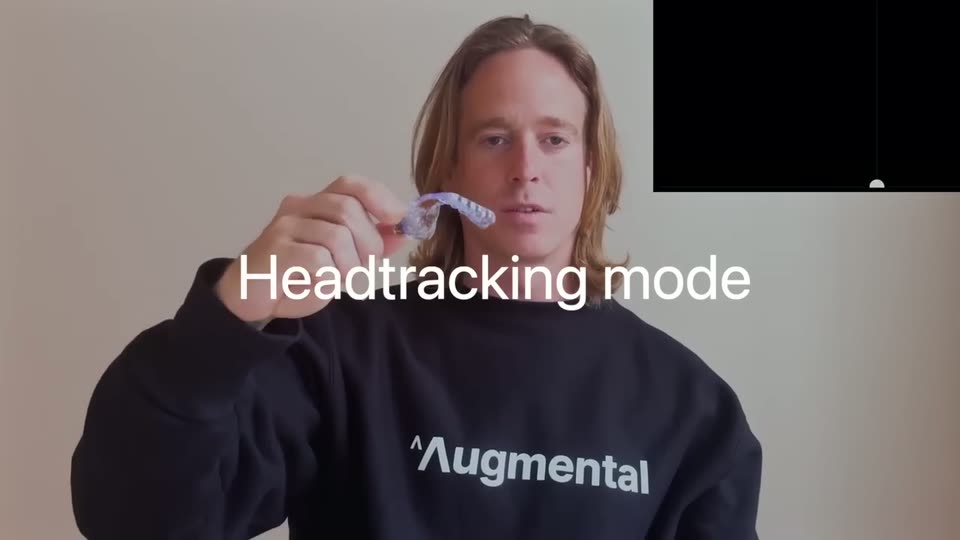
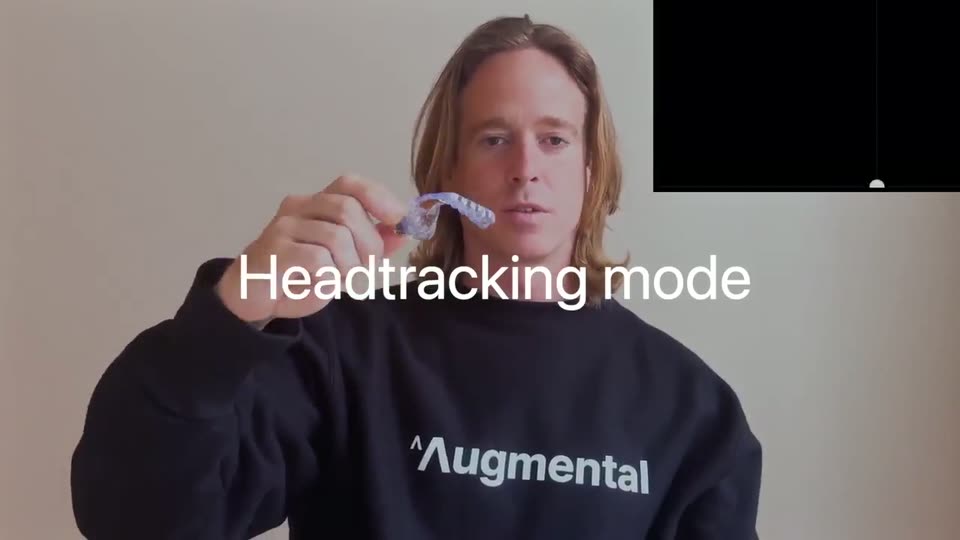
33 · Feature reveal · 0:57–1:01
A man in a black sweatshirt holds a small 3D-printed model up to the camera and moves it, while a white dot in a black box at top right follows his head. It cuts to a laptop showing a teal interface where a hand sets the model down.
On-screen text: “Headtracking mode”
Techniques: Split screen, Cursor demo
Camera: Static
34 · Feature reveal · 1:01–1:05
A hand holds a transparent 3D-printed controller with copper wiring in front of a MacBook showing a teal interface with a row of seated cat silhouettes; the on-screen cursor follows the hand's small tilts.
On-screen text: “Headtracking mode”, “^Augmental”
Techniques: Cursor demo
Camera: Static
35 · Other · 1:05–1:06
A clinician in blue nitrile gloves holds a white handheld probe and points it at a patient's head, the Audra patch on their black jacket visible. A monitor behind shows an animated illustration. The frame stays locked off while the hands make small movements.
On-screen text: “We believe not only can we, you know, assist with humans,”
Camera: Static
36 · Other · 1:06–1:07
A tablet screen fills the frame, showing a 3D dental arch on a blue background beside a tooth diagram. A gloved hand touches the display and rotates the tooth model as it turns. The camera holds a tight, slightly handheld close-up on the screen.
On-screen text: “We believe not only can we, you know, assist with humans,”
Camera: Push in
37 · Other · 1:07–1:09
Over-the-shoulder view of a person typing at a desk with two monitors. The left screen shows a slowly rotating 3D dental jaw model in teal and white, the right a pink and teal 3D model. White subtitles run along the bottom.
On-screen text: “We believe not only can we, you know, assist with humans,”, “but we can really change the way that we evolve with our technology.”
Camera: Static
38 · Other · 1:09–1:10
A locked-off close-up shows a 3D printer's build chamber, where two translucent blue, bubbly structures with a cellular texture form beneath a flat metal platform. A metallic base with a small knob sits below. A white subtitle line runs along the bottom edge.
On-screen text: “but we can really change the way that we evolve with our technology.”
Camera: Static
39 · Other · 1:10–1:11
In a dim lab, a bearded man and a woman behind him smile and look down, while a blurred man's face fills the left foreground. A microscope with a mounted camera stands at right beside orange-lit equipment. The frame is locked off; a subtitle line sits at the bottom.
On-screen text: “but we can really change the way that we evolve with our technology.”
Camera: Static
40 · Other · 1:11–1:13
A close-up shows a finger pressing a button on a clear-cased device with a copper board and an amber hexagonal grid, resting on wood. The camera is locked off while white subtitles run along the bottom edge.
On-screen text: “but we can really change the way that we evolve with our technology.”, “CAST”, “So it's not this question of, oh, I'm losing my humanity,”
Camera: Static
41 · Other · 1:13–1:13
A woman with curly hair peers into a microscope while a bearded man in profile watches from the left. The dim lab is backlit, with a pegboard wall behind the instrument. The frame stays locked as a subtitle line sits at the bottom.
On-screen text: “So it's not this question of, oh, I'm losing my humanity,”
Camera: Static
42 · Social proof · 1:13–1:14
A man and a man in a motorized wheelchair walk away down a sunlit residential street, filmed from behind. White subtitles appear at the bottom of the frame.
On-screen text: “while I'm doing something else,”, “helps me really come back to life.”
Camera: Static
43 · Social proof · 1:14–1:16
A man in a wheelchair moves forward in a driveway while a woman walks beside him. The camera remains static as they move across the frame.
On-screen text: “helps me really come back to life.”
Camera: Static
44 · Demo · 1:16–1:18
Split screen: a phone Bluetooth settings panel sits on the left while a man in a dark t-shirt holds a clear blister pack with a tan rectangular pad toward the camera on the right. He tilts the pack as a white subtitle line stays locked at the bottom.
On-screen text: “helps me really come back to life.”
Techniques: Split screen
Camera: Static
45 · Demo · 1:18–1:19
A bearded man in a black sweatshirt holds both hands up, palms facing each other, in a shelved room, while a vertical iPhone home screen recording on the left swipes horizontally through pages of app icons.
Techniques: Split screen
Camera: Static
46 · Demo · 1:19–1:19
A dark Google Maps phone screen fills the left third while a curly-haired man in a black shirt holds both palms up in a startled gesture on the right, in a room with shelves and a phone on a stand. The background phone's screen goes black.
Techniques: Split screen
Camera: Static
47 · Demo · 1:19–1:21
A bearded man with long hair raises both hands in front of his face on the right, gesturing, while a Google Maps search screen with keyboard sits as a left panel; a phone on a stand in the room mirrors the interface.
Techniques: Split screen
Camera: Static
48 · Demo · 1:21–1:25
A curly-haired man in a black sweatshirt raises both palms toward a phone on a stand in a home office. A dark grocery search panel scrolls along the left edge, a yellow ring tapping through its buttons.
Techniques: Cursor demo
Camera: Static
49 · Demo · 1:25–1:27
A man with curly hair and a beard holds both palms up, gesturing, while a dark Google Maps panel on the left draws a walking route to Whole Foods Market, its line and minute labels animating in.
Techniques: Split screen
Camera: Static
50 · Feature reveal · 1:27–1:29
A man with long hair and a black beanie sits at a desk in a cluttered home studio, watching a laptop that shows a dark 3D viewport. A microphone boom arm crosses the foreground. A pixel-style label and a running timecode are overlaid on the locked-off shot.
On-screen text: “Click+drag”, “00:18:50:27”
Camera: Static
51 · Feature reveal · 1:29–1:31
A bearded man in a black beanie sits in a cluttered home room, facing a laptop on a wooden table whose dark screen shows a small moving dot; a camera boom arm crosses the foreground. He turns his head slightly in the locked-off frame.
Camera: Static
52 · Feature reveal · 1:31–1:33
A black screen holds a white monospace list of training moves, M1 to M14, under a welcome header and a row of asterisks. A full-width white highlight bar jumps down the list, marking each row in turn.
Techniques: Cursor demo
Camera: Static
53 · Feature reveal · 1:33–1:34
A man in a black beanie and sweatshirt sits at a table in a cluttered living room, watching a laptop that shows a dark interface with a ring of gray dots and one white dot. A microphone boom arm crosses the foreground. A timecode caption sits at the bottom.
On-screen text: “00:08:54:27”
Camera: Static
54 · Feature reveal · 1:34–1:36
A white circle with four dark gray circles drifts slowly to the upper right across a black screen, while a small product UI panel with a yellow dot grid, waveform and a mouse icon stays fixed in the top-right corner. A small cursor arrow moves near the bottom edge.
Camera: Static
55 · Feature reveal · 1:36–1:39
A black field tiled with repeating motifs: a small UI window with a yellow pad grid and waveform, beside a cluster of five circles with one white. The camera pulls back, the motifs shrink and extra rows slide into view, the circles scattering into smaller sizes mid-way.
Techniques: Parallax
Camera: Static
56 · Feature reveal · 1:39–1:43
A dark grid fills the center as a white cursor darts to purple square targets and clicks them. A webcam feed of a man sits lower left, a live stats panel upper left, and a control panel with a mouse icon and force graph on the right.
Techniques: Cursor demo
Camera: Static
57 · Feature reveal · 1:43–1:46
A screen capture of a clicker test: a cursor taps a pink square on a dark grid, a pixel countdown drops in the left stats panel, and a webcam shows a presenter. The grid is replaced by a big 8.51 score with two outlined buttons.
Techniques: Cursor demo
Camera: Static
58 · Demo · 1:46–1:50
A man in a black sweatshirt holds a handheld console in landscape mode, its screen playing a fiery game, in a busy airport lounge. The shot cuts to a stage where a presenter stands beside a large screen showing a 3D cutaway of the device's internals.
On-screen text: “Recalibrate”, “Click-and-Drag”, “Tomás Baptista”
Techniques: 3D mockup
Camera: Static
59 · Demo · 1:50–1:52
A speaker stands on a dark conference stage beside a large screen showing a rotating 3D mechanical arm model with red and orange parts. A white podium and a pink panel with teal stripes sit to the right, the blue-lit audience fills the foreground.
Techniques: 3D mockup
Camera: Static
60 · Demo · 1:52–1:55
A high-angle view looks down on a large blue-lit audience filling tiered seats. On the dark stage below, a presenter in a plaid shirt stands near a white cube and a small round table, with three screens at the front.
Camera: Static
61 · Demo · 1:55–1:58
A wide stage shot shows a large monitor displaying a Figma wireframe canvas that zooms into its layout. A person in a wheelchair sits center stage beneath the screen while a presenter in a checkered shirt walks in from the right.
Techniques: UI zoom
Camera: Static
62 · Demo · 1:58–1:58
A man with shoulder-length hair and a headset mic stands in profile on a dark stage, wearing a black and white plaid shirt over a white tee, hands in pockets. A blurred presentation screen with a grid of rounded shapes and colored lines sits behind him.
Camera: Static
63 · Demo · 1:58–2:00
A wide stage shot frames a large screen running a dark editing interface, with a seated presenter in a wheelchair and a standing host at either end. The timeline on the screen updates, replacing block markers with two rows of phone screen thumbnails.
Camera: Static
64 · Demo · 2:00–2:01
Wide stage shot with a giant screen showing a Figma file of phone mockups in two rows. A person in a wheelchair sits at a small table in front of the screen, a man in a plaid shirt stands to the right. A circular video feed of a person sits in the lower left corner of the display.
Camera: Static
65 · Demo · 2:01–2:03
On a pink backdrop, a vertical clip of a person in a wheelchair sits left of a Figma window. Inside, a mobile real-estate app mockup assembles: listing cards with photos and prices slide in, a cursor moves, and a small tooltip pops near the right panel.
Techniques: Split screen, Cursor demo
Camera: Static
66 · Demo · 2:03–2:09
A dark MouthPad settings window slides in from the left over an aerial forest view, then a hand cursor hovers over and drags the left-click strength slider. A small webcam overlay of a man sits in the bottom-right corner.
Techniques: Cursor demo
Camera: Pan
67 · Demo · 2:09–2:09
A dark MouthPad settings panel fills the frame. A cursor drags the Left-Click strength slider from 3 to 6, the blue fill extends, the value updates, and a small orange dot appears beside the label while a second cursor hovers nearby.
Techniques: Cursor demo
Camera: Static
68 · Demo · 2:09–2:11
A person in a wheelchair holds a clear plastic mouthpiece with an amber insert close to the lens, turning it slightly. Small white labels slide and scale in beside the object against the office background.
On-screen text: “MouthPad^”, “Right-Click strength ①”, “Touch sensitivity ①”
Camera: Pull out
69 · Demo · 2:11–2:12
A man in a grey t-shirt sits in an office chair with a small controller rig on his lap and lifts both arms overhead in a wide gesture. The camera holds a side view across a beige sofa, plants and parked bikes in the background.
Camera: Static
70 · Demo · 2:12–2:18
A person in a motorized wheelchair drives from the foreground left across a wood-floored room past two white sofas, then turns and returns to the right side. The camera stays locked off while the 3x caption sits in the lower right, marking the sped-up motion.
On-screen text: “3x”
Techniques: Speed ramp
Camera: Static
71 · Demo · 2:18–2:23
A person in a motorized wheelchair crosses a bright office with beige sofas at 3x speed, flagged by a corner label. The scene ends on a split screen: Mario Kart gameplay above, the person with both hands raised below.
On-screen text: “3x”
Techniques: Speed ramp, Split screen
Camera: Static
72 · Demo · 2:23–2:24
A 3D Mario Kart track fills the frame as a yellow GO! scales in at the start line, while a small window in the bottom right shows a bearded man in a red hoodie raising both hands toward the camera.
Techniques: Split screen
Camera: Static
73 · Demo · 2:24–2:26
A neon city kart track scrolls past a glowing MARIOKART sign as a green-hatted character's kart chases rivals down the road. A picture-in-picture window in the lower right shows a bearded man in a red hoodie raising both open hands.
Techniques: Split screen
Camera: Push in
74 · Demo · 2:26–2:28
A third-person view follows a kart racer on a neon-lit city track while a bearded streamer in a red hoodie raises both hands in a bottom-right webcam inset.
Techniques: Split screen
Camera: Push in
75 · Demo · 2:28–2:28
A 3D racing game fills the frame as a kart with a green character drives along a neon track, while a small webcam inset in the corner shows a bearded man in a red hoodie raising both hands and looking up.
Techniques: Split screen
Camera: Static
76 · Demo · 2:28–2:29
A 3D kart with a green character drives through a rainy futuristic city as a man in a red hoodie appears in a bottom-right webcam, raising both hands and looking upward.
Camera: Static
77 · Demo · 2:29–2:29
A 3D kart-racing track with a green driver in a teal kart advances forward under a rainy neon city. A small webcam inset in the bottom right corner shows a bearded man in a red hoodie raising both hands toward the ceiling.
Techniques: Split screen
Camera: Static
78 · Demo · 2:29–2:38
A 3D racing game fills most of the frame, the camera following a green dinosaur driving a kart through a rainy neon city. In a small window at the bottom right, a bearded man in a red hoodie holds both hands up.
Techniques: Split screen
Camera: Static
79 · Demo · 2:38–2:40
A browser window plays a blocky first-person shooter, the rifle view pushing forward through a low-poly suburban map. A small webcam inset at the right shows a man reacting to the gameplay.
Techniques: Split screen
Camera: Static
80 · Demo · 2:40–2:48
A browser window plays a low-poly first-person shooter, the rifle pointed at a billboard sign before the view pans to a blue building. A video call inset on the right swaps from a man with glasses to a man lying in bed.
Techniques: Split screen
Camera: Static
81 · Demo · 2:48–2:51
Three people in a cluttered home office celebrate as multicolored confetti rains down. The foreground figure wears a head-mounted camera rig; the other two laugh and toss confetti toward a glowing monitor. The camera holds a locked-off wide shot.
Techniques: Particles
Camera: Static
82 · Demo · 2:51–2:55
A baby crawls toward the camera on a wooden floor between two stacks of colorful alphabet blocks, with two people in the background.
Camera: Static
83 · Demo · 2:55–2:56
A close-up of a baby's face comes into focus as a tracking interface appears: a control panel and two video-call tiles on the left, small circle markers on the face, and a timecode at the bottom.
Camera: Push in
84 · Demo · 2:56–2:58
A black screen holds a left column of two webcam feeds and a control panel, while a few white dots drift on the right. A white caption appears at the bottom as a timecode ticks.
On-screen text: “what might get a little bit more towards”
Camera: Static
85 · Demo · 2:58–3:03
A screen recording of a control demo: a left strip holds the app panel with a tan dot grid and two webcam tiles, while a white dot and mouse cursor move across a black canvas marked with small circle targets. Subtitles and a running timecode sit at the bottom.
On-screen text: “what might get a little bit more towards”, “00:22:05:05”, “the fine control input sometimes.”, “And I gotta say, remarkable stuff with your control. That was good.”
Techniques: Cursor demo
Camera: Static
86 · Demo · 3:03–3:09
A dark Notes window floats over an aerial forest wallpaper; a cursor types a note, selects the line, and a radial menu of action icons blooms around the pointer. A rounded face-cam of the presenter sits in the bottom-right corner.
On-screen text: “Burkhardt”, “Augmental”
Techniques: Cursor demo
Camera: Static
87 · Social proof · 3:09–3:09
A locked-off isometric view of a dark game arena with a small character at center, ornate gauge and gear icons framing the bottom corners. A white caption sits mid-frame while the scene flashes red and the score counter jumps between frames.
On-screen text: “Made with the MouthPad”
Techniques: 3D mockup
Camera: Static
88 · Social proof · 3:09–3:13
A dark isometric game arena where a character fires at enemies, framed by steampunk gear HUD elements. A white caption sits centered over the action while the score counter ticks up.
On-screen text: “Made with the MouthPad”
Camera: Static
89 · Social proof · 3:13–3:14
A dark isometric 2D game plays out, a pink character firing a yellow beam while red damage numbers pop and ornate gold UI frames the edges. A white centered headline reads 'Made with the MouthPad' over the action, then cuts away.
On-screen text: “Made with the MouthPad”
Camera: Static
90 · Demo · 3:14–3:24
A CAD workspace fills the screen as a cursor sketches a square, extrudes it into a box, then rounds its edges with a fillet. A touchpad panel with a button grid sits left and an on-screen keyboard below; the view orbits and a radial menu overlay appears.
On-screen text: “75012”, “Picked up the Elemental Affinity Gear!”
Techniques: 3D mockup, Cursor demo
Camera: Static
91 · Demo · 3:24–3:26
A CAD workspace shows a rounded grey block on a grid; the block drifts left as the touchpad grid on the left lights up in purple and pink and a radial menu legend pops in on the right, with a small webcam inset at bottom left.
Camera: Static
92 · Social proof · 3:26–3:26
A vertical selfie of a woman with glasses and a floral top, with a smiling long-haired man leaning in behind her, sits in a soft dark vignette. A white caption runs across the center of the still frame.
On-screen text: “Esther's takes her first ever selfie”
Camera: Static
93 · Social proof · 3:26–3:27
A vertical selfie clip shows a woman with glasses in the foreground and a long-haired man behind her, both grinning at the camera. A white caption sits centered across the frame, static.
On-screen text: “Esther's takes her first ever selfie”
Camera: Static
94 · Social proof · 3:27–3:27
A tilted selfie framing a woman with glasses and a long-haired man who lean in and smile at the camera, the man holding a phone at the right edge. A white caption sits across the middle of the frame.
On-screen text: “Esther's takes her first ever selfie”
Camera: Static
95 · Social proof · 3:27–3:29
A close selfie of a woman with glasses and a smiling man holds under a white caption. It cuts to a vertical phone video of a person in a power wheelchair rolling down a sunlit paved path, with a black text bubble and an inset view of the rider from behind.
On-screen text: “Esther's takes her first ever selfie”, “Recorded with my iPhone and the MouthPad + power chair!!!”
Techniques: Split screen
Camera: Push in
96 · Social proof · 3:29–3:34
A centered black caption box stays fixed as a helmeted cyclist rides up wide concrete steps, filmed from behind. A smaller inset video in the lower left shows the same climb from a second angle, with a person in a power chair at the bottom.
On-screen text: “Recorded with my iPhone and the MouthPad + power chair!!!”
Techniques: Split screen
Camera: Push in
97 · Social proof · 3:34–3:36
A person in a power chair rides down a long flight of concrete stairs in a wide outdoor shot. A smaller inset video in the lower left shows the same descent from behind. A black caption box with white text sits across the center of the frame.
On-screen text: “Recorded with my iPhone and the MouthPad + power chair!!!”
Techniques: Split screen
Camera: Static
98 · Social proof · 3:36–3:37
A static wide shot of a bright lecture hall shows students seated at round white tables, working on laptops and notes, with a whiteboard and two dark screens on the back wall. White subtitle captions run along the bottom as a voiceover plays.
On-screen text: “Recorded with my iPhone”, “and the MouthPad + power”, “chair!!!”, “It allows me the opportunity”, “to engage with the content”, “during the lectures.”
Camera: Static
99 · Social proof · 3:37–3:38
A student at a round table faces an open laptop and a phone on a stand, while classmates study at tables behind. The locked-off shot holds as a subtitle runs across the bottom.
On-screen text: “to engage with the content”, “during the lectures.”
Camera: Static
100 · Social proof · 3:38–3:40
Over-the-shoulder view of a lecture hall: students at a round table write in notebooks while a laptop displays lecture material and a phone on a stand faces the screen. White subtitle captions line up at the bottom of the frame.
On-screen text: “to engage with the content”, “during the lectures.”, “I'm able to take notes,”
Camera: Static
101 · Social proof · 3:40–3:43
Close-up of a tablet screen showing a math note app, virtual keyboard in focus, blurred menu bar above. A white cursor taps the keys one by one while an integral symbol with dx sits in a small note box on the right.
On-screen text: “I'm able to take notes,”, “but then also participate in class.”
Techniques: Cursor demo
Camera: Static
102 · Social proof · 3:43–3:46
A tight, soft-focus close-up of a young person with curly hair, eyes cast down and mouth open mid-sentence. The frame stays locked on the face while a subtitle rests at the bottom edge.
On-screen text: “but then also participate in class.”
Camera: Static
103 · Other · 3:46–3:52
The camera follows a person in a black hoodie riding a motorized wheelchair with a red back panel through a convention hall past white pillars and a yellow compost bin, then reframes to the front as they turn and the shot closes in on their hands.
Camera: Pan
104 · Other · 3:52–3:53
Handheld shot on a crowded expo floor. A man in a dark hoodie with a cream wordmark and a blue Sony lanyard stands in the foreground, then the camera moves to a seated user gripping a red-and-black motion controller in front of a black info panel and a small monitor on a white pedestal.
Camera: Pull out
105 · Other · 3:53–3:58
A handheld camera whips around a trade-show booth, gliding past a control panel and a motorized wheelchair with an orange seat, then settling on a man in a black sweatshirt seated in the chair. A backdrop shows an anatomical mouth diagram and product text.
Camera: Pan
106 · Demo · 3:58–4:01
A first-person tank camera in a video game swings right across a grassy field toward an enemy tank and a hut, while a mouse-control diagram and heatmap update on the left and a streamer in a green shirt sits in a right-side webcam inset. A tagline scales in.
On-screen text: “Hands-free control for your personal electronic devices.”
Techniques: Kinetic type
Camera: Static
107 · Demo · 4:01–4:02
A tank game screen fills the left as the cannon fires, a smoke plume billows, then a top-down tank view appears with a red destroy notice. A webcam inset on the right shows a man in a green shirt leaning back.
Techniques: Split screen
Camera: Static
108 · Social proof · 4:02–4:03
A locked-off view of a video call interface: a man with headphones speaks in a window at right, beside a dark panel with window controls, a heart icon and a red up-arrow badge. Subtitles at the bottom carry his words over a blurred landscape.
On-screen text: “All right, well,”, “any last thoughts?”
Camera: Static
109 · Social proof · 4:03–4:11
A bearded man in a car sits in a webcam video call inside a dark app interface; a left panel shows a heart icon and a costello name tag, while white captions in a black box at the bottom swap through his replies. The frame is locked off.
On-screen text: “Augmental”, “any last thoughts?”, “No, this is a this is awesome!”, “I've already checked the stock market,”, “Facebook, sent a text message, Call of Duty...”
Camera: Static
110 · Social proof · 4:11–4:15
A locked-off screen of a dark video-call app: a left sidebar of icons, a top-right tile with a smiling man talking, and a blurry foreground object below. A black caption box at the bottom reads “Facebook, sent a text message, Call of Duty...”
On-screen text: “Facebook, sent a text message, Call of Duty...”
Camera: Static
111 · Social proof · 4:15–4:18
A locked-off screen capture of a video call app shows a dark icon toolbar on the left and a smiling man with headphones in a video tile on the right. A black caption box with white text appears at the bottom.
On-screen text: “You guys are awesome thank you very much!”
Camera: Static
112 · Social proof · 4:18–4:19
A dark UI panel with window controls and a notification badge sits left of a video call where a bearded man smiles and talks. A white caption on a black box reads 'You guys are awesome thank you very much!', then swaps to 'Yeah this is awesome!'.
On-screen text: “You guys are awesome thank you very much!”, “Yeah this is awesome!”
Camera: Static
113 · CTA · 4:19–4:24
On a black field, the line “MouthPad is now for sale in the US” fades in to white and back out, then “Get yours at augmental.tech” does the same, and finally a small white A-shaped logo mark appears centered.
On-screen text: “MouthPad is now for sale in the US”, “Get yours at augmental.tech”
Camera: Static
114 · Outro · 4:24–4:28
On a black field, a white caret mark appears at center, then the letters of the wordmark slide in one by one to spell Augmental, settling into a centered lockup.
On-screen text: “Augmental”
Techniques: Kinetic type, Morph
Camera: Static