
0:44
Explore
Y Combinator - Every company is racing to adopt AI, but many don't know where to sta
Hessian · May 2026 · 1:15 · AI-annotated
- Length
- 1:15
- Scenes
- 34 · 2.2 s avg
- Product on screen
- 0:04
- Features shown
- 1
- Call to action
- 1:05 · 88%
- Voiceover
- Yes
00:00:00 / 01:15:03
Hessian’s 1:15 launch film runs 34 scenes, about 2.2 s each. The product shows up at 0:04 and 1 feature is revealed, with social proof. The call to action lands at 1:05 (88% in), over a voiceover. The video cuts between warm brick-wall founder interviews and cinematic 3D fly-throughs of dark product UI, then flips to a clean white dot-grid world for the feature demo. Its signature moves are tilted panels that rack focus, sliding tagline pills, and the striped-circle logo that anchors every brand beat.
Footage neededEstimated needs: 2 capture groups — your screens or recordings · 1 official logo — reused across the film · 6 filmed passages — shoot, supply or replace · 4 graphic passages — draw or supply · 13 3D passages — build or supply
Is this your launch? to your site or press kit.
More like this
1:20

Neomatter — AI for In-House Legal Teams
Neomatter · B2B · Nov 2026
1:14

SaaS Explainer Video for Recruitment Platforms 2026 | JobWriter
JobWriter · May 2026
Y Combinator - Every company is racing to adopt AI, but many don't know where to sta, scene by scene
· 34 scenes as text
01 · Hook · 0:00–0:04
Three men sit on a gray couch in front of a red brick wall; the center man in a light blue shirt talks and gestures with both hands. Lower-third name captions for each co-founder slide in at the bottom, then fade out.
On-screen text: “Tom Watson”, “Co-founder”, “Bao Nguyen”, “Co-founder”, “James Smith”, “Co-founder”
Camera: Static
02 · Product intro · 0:04–0:05
A bearded man in a light blue shirt stands centered before a brick wall with tall windows and potted plants, speaking to camera. He gestures with both hands at chest level while the static medium shot holds on him.
Camera: Static
03 · Demo · 0:05–0:09
A tilted dark monitor shows a live node graph: green-bordered task and agent cards fade in and link with dashed lines as the camera pushes in and pans right, ending on a detail panel with an approval card and a lifecycle bar.
Techniques: 3D mockup, UI zoom
Camera: Push in
04 · Demo · 0:09–0:12
A dark monitoring dashboard sits in 3D perspective, tilted toward the right, its monospace rows for lifecycle, artifacts and node logs in sharp focus. The camera pushes in and the focus racks soft, the panel dissolving into a black blur by the end.
Techniques: 3D mockup, UI zoom
Camera: Push in
05 · Other · 0:12–0:14
A dark log-stream panel tilts in 3D perspective on a black field. The shot racks from blur to focus as live timestamped log lines stream in and a green node graph appears at the top.
Techniques: UI zoom, 3D mockup
Camera: Pan
06 · Other · 0:14–0:16
A dark log interface, tilted in 3D perspective, fades to near black. A rounded gray pill carrying the tagline then slides in at the bottom center and holds on a faint dot grid.
On-screen text: “Learn what matters”
Techniques: 3D mockup, Kinetic type
Camera: Static
07 · Other · 0:16–0:17
On a black field with a faint dot grid, two dark rounded pills hold white text. The Build the systems pill settles at center while the Learn what matters pill slides down and exits the bottom edge. A dim extruded block rests below.
On-screen text: “Build the systems”, “Learn what matters”
Techniques: Kinetic type
Camera: Push in
08 · Other · 0:17–0:18
On a black dotted-grid backdrop, a matte black cube holds a rounded pill reading Work done, which brightens and scales into focus with a soft reflection, while a second pill Build the systems slides down and out at the lower right.
On-screen text: “Work done”, “Build the systems”
Techniques: 3D mockup
Camera: Static
09 · Other · 0:18–0:20
A bearded man in a light blue shirt stands centered in a brick-walled office, speaking to camera with a lavalier mic clipped to his collar. He gestures with his right hand as he talks. Potted plants and a window sit softly blurred in the background.
Camera: Static
10 · Social proof · 0:20–0:22
A dark sales dashboard mockup pulls from a blurred edge into sharp focus as a centered panel on a dotted grid, its stat cards and activity list filling the frame beside a green Sales Team tooltip.
Techniques: 3D mockup
Camera: Pan
11 · Social proof · 0:22–0:23
Glassy Sales Team and Finance Team dashboards float in a dark dotted void. They slide past one another in a fast blurred transition, KPI cards and activity rows streaking as a pink bar flashes across.
Techniques: Speed ramp
Camera: Pull out
12 · Social proof · 0:23–0:24
A dark analytics dashboard titled Finance Team floats in 3D perspective over a black starfield. Its stat cards count upward while a purple Marketing Team tooltip and cursor arrow hover mid-panel, and a command bar with a Clear Table button sits below.
Techniques: 3D mockup
Camera: Pull out
13 · Social proof · 0:24–0:25
A rapid dolly through a dark grid of floating dashboard cards, heavily motion-blurred, decelerates and racks focus onto a Marketing Team panel showing stat tiles and a Finance Team tag, while neighboring cards stay soft.
Techniques: Speed ramp, Parallax, 3D mockup
Camera: Pull out
14 · Social proof · 0:25–0:26
A dark dashboard panel labeled Marketing Team, with four stat tiles and a colored task list, floats on a black dotted grid. A blue cursor rests over the list and a small Sales Team tab sits below. The panel then loses focus and blurs into the dark background.
Camera: Pull out
15 · Social proof · 0:26–0:26
A black field with a faint dot grid holds the centered phrase in white lowercase sans. The first word sits sharp while the second resolves from a soft blur into focus, then both hold still on the locked-off frame.
On-screen text: “every month”
Techniques: Kinetic type
Camera: Static
16 · Feature reveal · 0:26–0:29
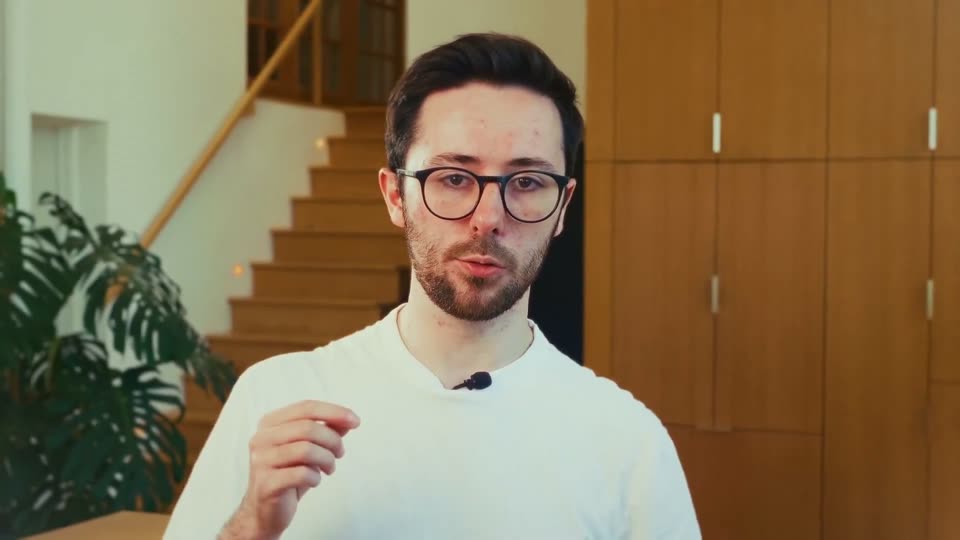
A bespectacled man in a white tee talks to camera in a bright room with a wooden staircase and plant behind him. A dark rounded prompt pill reading “How to answer a” slides in over his chest as the frame briefly blurs to a close-up, then settles back to the wide shot.
On-screen text: “every month”
Camera: Push in
17 · Feature reveal · 0:29–0:35
A dark and a light panel sit side by side: the left shows an urgent-message list, waveform and a cursor over a document; the right shows a green waveform above a checklist that fills with green checks. The left panel then slides away, leaving four feature pills on the right.
On-screen text: “Traditional sales rep”, “AI-native sales rep”, “Automated”, “Adaptive”, “Predictive”, “Seamless”
Techniques: Split screen, Cursor demo
Camera: Static
18 · Feature reveal · 0:35–0:36
A light dot-grid background holds a white rounded card with an animated green waveform. The title resolves at the top while four white pill labels slide down into a row beneath the card.
On-screen text: “AI-native sales rep”, “Automated”, “Adaptive”, “Predictive”, “Seamless”
Camera: Static
19 · Feature reveal · 0:36–0:37
On a pale dotted grid, a white rounded card holds a green-to-cyan audio waveform that pulses. The headline AI-native sales rep decodes from scrambled letters above it, while four white pills labeled Automated, Adaptive, Predictive, Seamless slide into a row below. Locked-off frame, quick pace.
On-screen text: “AI-native sales rep”, “Automated”, “Adaptive”, “Predictive”, “Seamless”
Techniques: Kinetic type
Camera: Static
20 · Feature reveal · 0:37–0:38
A dark chat interface floats at a 3D angle on a white dotted background beneath the gray headline 'AI-native sales rep'. The view zooms in and flattens to a close-up of a follow-up email being drafted inside the thread.
On-screen text: “AI-native sales rep”
Techniques: 3D mockup, UI zoom
Camera: Push in
21 · Feature reveal · 0:38–0:42
A dark messaging window, first seen close-up, tilts into 3D perspective against a light gray backdrop as the thread scrolls to reveal a suggested follow-up email, a PowerPoint proposal attachment, and a teammate's reply with a rocket reaction.
Techniques: 3D mockup
Camera: Pull out
22 · Feature reveal · 0:42–0:44
A black striped circular logo holds the right side over a faint dotted grid on white. Small rounded app icons, including a blue LinkedIn mark, a pink node graph, and white font and currency tiles, drift in from the left with soft depth blur.
Techniques: Parallax
Camera: Static
23 · Feature reveal · 0:44–0:50
A blurred black striped logo and 3D terminal window scale into focus over a white field of faint letters. The terminal types '$ agent start', 'starting up', 'connecting sources (4)' and a green 'ready in 1.2s' as a log window fades in top right.
Techniques: 3D mockup
Camera: Push in
24 · Feature reveal · 0:50–0:51
A black striped sphere logo anchors the left of a white field patterned with faint code. A tilted terminal window on the right types out startup lines ending in a green ready status, while a second log card hovers at the top right.
Techniques: 3D mockup
Camera: Static
25 · Feature reveal · 0:51–0:53
A tight crop of the proposal title pulls back to reveal the full CUSTOM PRICING PROPOSAL page, its body copy typing in line by line. A dark Hessian AI pill badge slides in from the right and holds.
Techniques: UI zoom
Camera: Pull out
26 · Feature reveal · 0:53–0:53
A large title hovers over a blurred proposal document, then the view pulls back to show the full page beside a white card with a recipient field, red pen icon and green Send email button. A black Hessian AI badge sits at the right edge.
On-screen text: “Hessian AI”
Techniques: UI zoom
Camera: Push in
27 · Feature reveal · 0:53–0:57
A blurred pricing document fills the background as an email composer card slides to center, its body text filling in while the cursor hovers the green Send email button. A black Hessian AI badge drifts around the card before it slides off to the upper left.
On-screen text: “Hessian AI”
Techniques: Cursor demo
Camera: Push in
28 · Feature reveal · 0:57–1:00
A white CRM Pipeline card holding a greeting, body copy and a red PDF icon floats above a blurred document. A black Hessian AI tag follows the cursor as it rests on the orange button, then the card drifts to the center.
Techniques: Cursor demo
Camera: Push in
29 · Feature reveal · 1:00–1:01
A sharp white card titled CRM Pipeline floats centered over a blurred document page. Inside it shows a short message, an orange button and a red PDF file icon. A second small card slides into the lower right corner.
Camera: Pull out
30 · Feature reveal · 1:01–1:01
A blurred document with red and green lines fills the background. In the center, a large black dollar amount counts up from $1 to $424, each new digit trailing a faded green echo to the right.
On-screen text: “$1”, “$4”, “$42”, “$424”
Techniques: Kinetic type
Camera: Static
31 · Feature reveal · 1:01–1:02
A green dollar figure, $537,600, sits centered on a plain white background. It resolves from a brief vertical blur into a clean, static state and then holds without further motion.
On-screen text: “$537,600”
Techniques: Kinetic type
Camera: Static
32 · Feature reveal · 1:02–1:05
A man with round glasses and a white t-shirt talks to the camera, gesturing with one hand, in a bright room with a wooden staircase and a leafy plant behind him. The shot racks from soft to sharp focus while a dollar figure stays locked in frame.
On-screen text: “$537,600”
Camera: Static
33 · CTA · 1:05–1:12
Three men sit on a gray couch against an exposed brick wall; the center speaker gestures while talking. White lowercase text 'hessian.sh' appears at the bottom center as a small white 3D cone shape drifts across it.
On-screen text: “hessian.sh”
Camera: Pull out
34 · Outro · 1:12–1:15
The Hessian logo, a striped circle mark beside the wordmark, sits centered on a white field with a faint grey dot grid. It opens soft and out of focus, sharpens over the first second, then cuts to black.
Camera: Pull out