4:28
MouthPad is now available
Augmental · Jul 2026
Augmental · 4:28 · AI-annotated
Augmental’s 4:28 launch film runs 133 scenes, about 2.0 s each. The product is on screen from the first frame and 4 features are revealed, with social proof. The call to action lands at 4:19 (97% in), over a voiceover. The film is a fast-cut montage that alternates sterile black 3D product renders, dim blue-lit lab shots, and warm handheld user footage, all tied together by a single white sans-serif subtitle line at the bottom of every frame. Pacing runs near 32 cuts per minute with hard cuts and no transitions, so the structure reads as a series of short proof beats: a named feature or user story appears, gets a quick live demo, then hands off to the next, ending on a plain black text card and a typed logo.
Is this your launch? to your site or press kit.
Augmental · Jul 2026
Hessian · B2B · May 2026
DJI · Hardware · Apr 2018
Films whose music sounds like this one, voice left out
Stord · Electronic dance-pop
Veed · Electronic dance music
A clear plastic mouthguard with a copper coil and a gold grid pad spins in 3D on black, turning from a front view to a side profile. A white caption sits below the device.
On-screen text: “The MouthPad is a trackpad”, “for your tongue.”
Techniques: 3D mockup
Camera: Push in
A man in a dark green tee holds a clear aligner with a small gold square toward the camera, then slides it into his mouth. The room behind him stays soft and out of focus. Subtitles at the bottom explain the tongue-controlled trackpad.
On-screen text: “The user uses their tongue on the trackpad on the palate”
Camera: Static
A bearded man lies on his back, mouth open, tongue raised, while a hand holds a phone at left showing a control app. Colored dots shift across the on-screen touchpad grid. A bottom caption explains the tongue-on-palate trackpad.
On-screen text: “The user uses their tongue on the trackpad on the palate”, “The user uses their tongue to move the trackpad control cursor.”
Camera: Static
A hand pushes a small silver cylinder into the side port of a transparent device on a white surface. The device has bubble-textured clear edges, an amber rectangular panel in the center, and thin copper wire loops.
Camera: Static
A clear dental aligner with a copper mesh plate and coiled copper wires sits on a white surface. Two dark rectangular modules attach to its sides as the device turns slightly in 3D.
Techniques: 3D mockup
Camera: Static
A macro shot of a circuit board with a blue lab glove in the corner, then a cut to a gold board holding a green chip and a dotted display. Shallow depth of field, teal background, locked-off framing. A white caption sits at the bottom.
On-screen text: “all limitations.”
Camera: Static
A person is seen from behind at a cluttered workbench in a dim lab, a bright light bar and a laptop with code glowing to the right. The camera holds still. A white subtitle caption sits along the bottom edge.
On-screen text: “At Augmental we've always considered the tongue”, “all limitations.”
Camera: Pan
Two men stand in a dim control room lined with glowing orange monitors and a bright horizontal light bar. The camera drifts from a side profile to a rear view of the long-haired man as a second man in a cap appears. Subtitles run along the bottom.
On-screen text: “At Augmental we've always considered the tongue”, “to be this very expressive and capable”
Camera: Push in
Two grayscale MRI scans of a head in profile sit side by side on black; the left is large and soft, the right smaller and sharper, showing the cervical spine. A source credit sits top left; a large “Augmental” wordmark slides in at the end.
On-screen text: “Source: Dr. Jens Frahm of the Max Planck Society”, “to be this very expressive and capable”, “Augmental”
Techniques: Split screen
Camera: Static
A hand reaches in from the left, touches the top of a dark box, then lifts it off a glossy surface so it slides out of frame to the right. A caption at the bottom reads Ooh, thank you.
On-screen text: “Ooh, thank you.”
Camera: Static
A person in a grey graphic t-shirt smiles while looking down at a small dark blue box held in their hand. The background shows blurred greenery and a window frame.
On-screen text: “Ooh, thank you.”
Camera: Pan
A hand holds a small blue box with its white lid open, tissue paper inside, against a gray floral bed. The box tilts slightly as the hand steadies it. A white caption reads Ooh, thank you. at the bottom.
On-screen text: “Ooh, thank you.”
Camera: Pull out
A man with curly hair and a goatee tilts his head back with his mouth open as a hand in a dark sleeve reaches into it. The background stays soft and blurred with green foliage behind a window.
Camera: Static
A tight close-up of a woman with red curly hair smiles as she brings a small blue flower-shaped candy to her open mouth. A pink fluffy prop sits blurred behind her hand.
Camera: Static
A person with red curly hair presses a clear aligner onto their upper teeth with their fingertips, mouth open in a smile. The shot is a tight close-up with shallow depth of field; a beaded bracelet and tattoos show on the hand.
Camera: Pull out
A gloved hand holds a clear dental aligner with an orange grid-textured pad, tilting and rotating it against a dark blue backdrop. The macro shot keeps the aligner in sharp focus while the hand and background blur.
On-screen text: “The MouthPad^ is an intraoral interface”
Camera: Static
A hand holds a small clear textured device with an orange core in close-up, turning it slightly. The background stays dark with a blurred amber grid of lights. A white caption sits along the bottom edge of the frame.
On-screen text: “The MouthPad^ is an intraoral interface”
Camera: Static
A dark close-up of a laptop screen showing an orange heatmap grid with a circular reticle at its center and a control panel of sliders on the left. A blurred hand reaches in from the lower left toward the display. White subtitles run along the bottom.
On-screen text: “The MouthPad is an intraoral interface”, “that lets you interact with computers without hands.”
Camera: Static
Extreme close-up of a man's mouth in profile against a dark blue, bokeh-lit background. His jaw opens wide then closes as a small object rests on his teeth. White subtitles read at the bottom edge.
On-screen text: “that lets you interact with computers without hands.”, “It rests on the top of your mouth.”
Camera: Static
A locked-off screen capture of the Windows Add a device dialog. A list of Bluetooth devices is shown; the cursor hovers over the AUGMENTAL entry, which displays Connecting with a small spinner. A subtitle caption sits along the bottom.
On-screen text: “It rests on the top of your mouth.”
Techniques: Cursor demo
Camera: Static
A tablet held at a tilted angle fills the frame, its bright screen showing a short text list and a virtual QWERTY keyboard. A person and a pink glow sit blurred in the dark background as the camera slowly pushes in.
On-screen text: “All demos were recorded live and no effects were added.”, “So this essentially enables you to use your tongue”, “in the same way you would use your finger”
Camera: Static
A 3D-tilted screen shows a game controller settings menu. It opens on a crossfade of two option lists, then the list scrolls upward past rows of Off/On toggle buttons while a blurred figure lingers in the background. A small white caption runs along the bottom.
On-screen text: “in the same way you would use your finger”, “to interact with a trackpad, control your cursor, activate clicks,”
Techniques: 3D mockup
Camera: Pan
A bearded man's face, soft-focused on the left, watches a tablet he holds in hand on the right. The tablet runs a video editor, its preview showing game footage with two call windows and a timeline of clips below. A white caption sits along the bottom edge.
On-screen text: “to interact with a trackpad, control your cursor, activate clicks,”, “All demos were recorded live and no effects were added.”
Camera: Static
A tilted close-up of a tablet held in a hand; the screen shows a grid of gray circles with one red dot and a thin line, while a finger taps the lower edge. Subtitles caption the bottom of the frame throughout.
On-screen text: “to interact with a trackpad, control your cursor, activate clicks,”, “①”, “what have you to control your computer.”
Techniques: Cursor demo
Camera: Static
A curly-haired man in a gray shirt speaks in a tight close-up, framed right of center against a blurred window. A partial figure in brown stands at the left edge. The locked-off shot carries a small disclaimer at the top and a subtitle at the bottom.
On-screen text: “All demos were recorded live and no effects were added.”, “what have you to control your computer.”
Camera: Static
A locked-off close-up holds on a woman with red curly hair in profile, mouth open mid-sentence, while a second woman with braids sits softly blurred behind her on a couch. A white subtitle runs along the bottom edge.
On-screen text: “All demos were recorded live and no effects were added.”, “Like, oh my goodness, like this is how it should be”
Camera: Static
A woman with red curls reclines in profile on the left while a second person in a graphic tee lies behind her. A hand holds a phone in the lower right, its screen cycling through an app feed of posts, as white captions quote the speaker.
On-screen text: “Like, oh my goodness, like this is how it should be”, “It's very seamless.”, “It's very easy to use. It's very intuitive.”
Camera: Static
A woman with red curly hair reclines on a couch while a second woman leans in, holding a tablet between them. Both smile and talk. The frame is locked off and static.
On-screen text: “All demos were recorded live and no effects were added.”, “It's very easy to use. It's very intuitive.”
Camera: Static
Framed by open white French doors, the camera pushes forward into a home office where two people face dual monitors, a small robot stands between them, and a woman watches from the right. White subtitles appear at the bottom.
On-screen text: “like a mouse.”, “We'd love to see what kind of projects you're looking into now.”
Camera: Push in
A locked-off, shallow-focus close-up of two monitors. The right screen is sharp, showing a dark interface with a grid of magenta and purple squares and a small yellow dot; the left screen is blurred. A white subtitle sits at the bottom.
On-screen text: “Can you show me how you copy a variable?”
Camera: Static
A dark code editor fills the frame with a context menu open over the code. A hand cursor glides down the menu list, settling on Copy as the list scrolls slightly. A white caption with black outline sits at the bottom center.
On-screen text: “Can you show me how you copy a variable?”
Techniques: Cursor demo
Camera: Static
Locked-off close-up of a person in profile, a boom microphone held near their mouth, with a second man soft-focused behind in a bright room. White subtitles appear at the bottom as the speaker finishes a line.
On-screen text: “Can you show me”, “Cool. As easy as that.”
Camera: Static
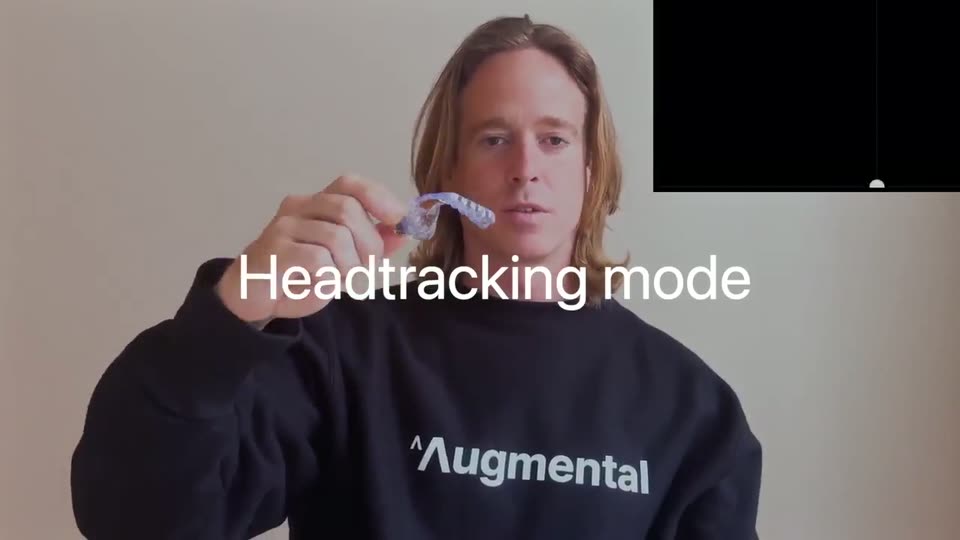
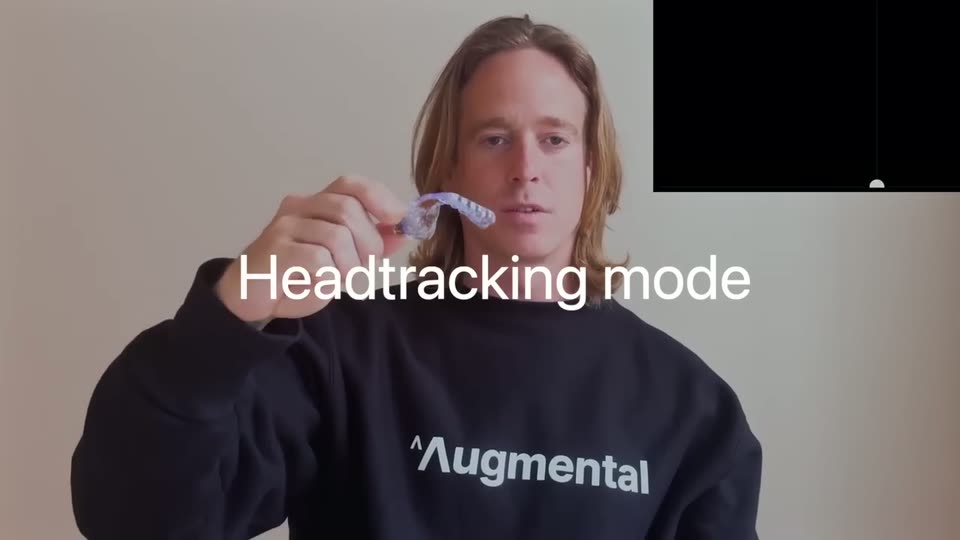
A long-haired man in a dark sweatshirt holds a small transparent 3D-printed piece with an orange accent between his fingers, tilting it toward the camera. A white dot follows his head inside a black box in the top right corner. A white caption reads Headtracking mode across the center.
On-screen text: “Headtracking mode”
Camera: Static
A hand holds a small clear 3D-printed object with copper wiring in front of a laptop. The screen shows a teal 3D scene of cats on a lawn and a control panel on the right. The hand shifts the object while a cursor moves across the screen.
Techniques: Cursor demo
Camera: Static
A clinician in blue gloves grips a white robotic arm while steadying a patient's head, a monitor with a cartoon image glowing behind them. The frame is locked off, capturing the hands-on interaction inside a clinical room.
On-screen text: “We believe not only can we, you know, assist with humans,”
Camera: Static
A close-up of a tablet shows a dental app where a blue-gloved hand spins a 3D tooth arch from a side angle to a front view, while a flat two-dimensional tooth chart stays fixed at the left edge.
On-screen text: “We believe not only can we, you know, assist with humans,”
Camera: Push in
Over-the-shoulder shot of a person at a desk, hands resting on the keyboard, facing two monitors. The left screen shows a 3D dental arch model turning in space, the right a pink and teal 3D tray. White subtitles run along the bottom edge.
On-screen text: “We believe not only can we, you know, assist with humans,”, “but we can really change the way that we evolve with our technology.”
Camera: Static
A close-up of a metallic print head hovers over two translucent blue lattice spheres on a reflective base, all bathed in cool blue light. The frame stays locked off while a white caption runs along the bottom edge.
On-screen text: “but we can really change the way that we evolve with our technology.”
Camera: Static
Three men stand in a dim lab lit cool blue, a bearded man at center and a man with sunglasses on his head at right both smiling, a microscope glows warm amber on the right edge. The frame stays locked as a subtitle line holds at the bottom.
On-screen text: “but we can really change the way that we evolve with our technology.”
Camera: Static
Extreme close-up of a gloved finger pressing a small orange grid sensor on a circuit board with metal terminals and a white clip. The hand taps the chip while the camera holds a tight, slightly tilted framing on the wooden workbench.
On-screen text: “but we can really change the way that we evolve with our technology.”, “CAST”, “So it's not this question of, oh, I'm losing my humanity,”
Camera: Static
A bearded man watches as a woman with curly hair peers into a microscope at a lab bench, backlit against a monitor showing a grid. The frame stays locked off while she leans into the eyepiece.
On-screen text: “So it's not this question of, oh, I'm losing my humanity,”
Camera: Static
Two men walk away down a sunlit residential street, one in a power wheelchair fitted with a head-mounted tracker. The locked-off camera holds behind them as voiceover subtitle lines cycle at the bottom of the frame.
On-screen text: “So it's not this question of, oh, I'm losing my humanity,”, “while I'm doing something else,”, “helps me really come back to life.”
Camera: Static
A man in a power wheelchair sits on a driveway in front of a garage, talking and gesturing while a person stands beside a dark minivan on the left. The camera is locked off.
On-screen text: “helps me really come back to life.”
Camera: Static
A man holds a clear blister pack with a brown rectangular device toward the camera in a shelved room. A phone Bluetooth settings panel sits on the left edge. A bottom subtitle reads the welcome line.
On-screen text: “Hello and welcome to another MouthPad^ demo.”
Techniques: Split screen
Camera: Static
A long-haired bearded man in a black sweatshirt stands in a room, both palms raised toward a phone on a stand, while a phone home screen with rapidly shuffling app icons plays in a left panel.
Techniques: Split screen
Camera: Static
A bearded man in a black sweatshirt holds both palms up in a stop gesture beside a phone on a stand. The left side shows a Google Maps screen that switches from a map to a keyboard and a settings panel.
Techniques: Split screen
Camera: Static
A man with long hair and a beard stands in a home office, hands raised, facing a phone on a red clamp. A left inset shows the phone's map screen switching from a grocery store search list to a driving route to Whole Foods Market.
Techniques: Split screen
Camera: Static
A man in a black beanie and sweatshirt sits at a desk, watching a laptop whose dark viewport shows a thin white 3D rod rotating. A pixelated “Click+drag” label is locked across the top and a running timecode ticks at the bottom.
On-screen text: “Click+drag”, “00:18:50:25”
Camera: Static
A man with long hair, a black beanie and a black sweatshirt sits at a desk in a cluttered room, looking at a laptop that shows a dark interface with small text. A microphone arm stretches across the foreground. The camera holds a locked-off wide shot.
Camera: Static
A black terminal screen shows a white monospace list of MouthPad training moves, M1 to M14. A white highlight bar scans down the list, moving from M1 to M7.
Camera: Static
A man in a black beanie and sweatshirt sits in a cluttered room, facing a laptop on a desk that shows a dark screen with a ring of gray circles. A white timecode on a black bar is locked at the bottom center.
On-screen text: “00:08:55:04”
Camera: Static
A black screen shows five circles in a cross, one bright white, while a white cursor drifts near the bottom circle. A small control panel in the top right holds a mouse icon, buttons, and a yellow hex grid with radiating lines.
On-screen text: “gmental”, “00:08:55:04”
Techniques: Cursor demo
Camera: Static
On black, a grid of small nodes, each a cluster of gray circles with one white circle beside a tiny interface panel showing a yellow grid and a waveform. The camera zooms out, the nodes shrink and multiply until a dense field fills the frame.
Camera: Static
A static screen capture of a clicking benchmark tool. A dark grid holds a magenta target chased by a cursor, flanked by a live stats readout and a webcam of a man on the left, and a control panel with a mouse icon and waveform on the right.
Techniques: Cursor demo
Camera: Static
A dark click-test interface fills the screen: a white cursor hops between small pink and white square targets on a grid while a stats column ticks up at left and a webcam of a man sits bottom-left. The grid fades out to reveal a large 8.51 score with two buttons.
On-screen text: “Tomás Baptista”
Techniques: Cursor demo
Camera: Static
A man in a black sweatshirt holds a gray handheld game console, its screen showing a fiery action game. He stands in a busy terminal with gate signs and a food counter behind him, glancing at the screen as the camera holds a steady handheld shot.
Camera: Static
Wide locked-off shot of a dark stage with a presenter standing right of center before a large screen. The screen shows a 3D render of a mechanical arm with exposed red and orange wiring, a stacked loop logo, and a pink panel with teal parallelograms. A blue-lit audience fills the foreground.
On-screen text: “DRAKES”, “B26”, “B27”
Techniques: 3D mockup
Camera: Static
A high overhead shot looks down on a vast blue-lit auditorium packed with seated audience. On the dark stage below, a presenter in a light shirt stands near a white table, gesturing toward a small round table holding a red device, while stage monitors line the edge.
Camera: Static
A wide stage shot holds a presenter at right and a seated person in a wheelchair at center before a giant screen showing a Figma canvas of wireframes and a circular video-call avatar. The camera pushes in slowly on the screen.
Camera: Static
A man in a black and white plaid shirt stands in profile on a dark stage, then turns and gestures toward a screen behind him that shows an animated line chart with blue, green and orange traces.
Camera: Static
A long-haired presenter stands on a dark stage while a Figma window mockup scales up and fades from translucent to opaque in front of him. The interface displays a grid of phone screens and a settings panel; a second presenter in a wheelchair sits at the stage's left edge.
Techniques: 3D mockup
Camera: Static
On a pink background, a vertical video of a man in a wheelchair sits left of a Figma window. Inside the canvas, a phone mockup fills with two property listing cards while the right panel collapses.
On-screen text: “CONFSG”
Techniques: Split screen
Camera: Static
A dark MouthPad settings window slides in from the left over aerial tree footage, settling into place with its sidebar. A white hand cursor glides to the sliders, pops a tooltip on Cursor mode, and drags the Left-Click strength handle; a man's webcam feed stays in the bottom-right corner.
Techniques: Cursor demo
Camera: Pan
A dark MouthPad settings window fills the frame over a blurred green backdrop. A hand cursor drags the Left-Click strength slider rightward, raising its value from 3 to 6 and extending the blue fill, while the other sliders and the sidebar menu stay still.
Techniques: Cursor demo
Camera: Static
A seated person in an office holds a clear mouthguard with an embedded orange square up to the camera, fingers pinching its edge. The hand tilts and rotates the device toward the lens while the office set, chairs and bikes stay softly in the background.
On-screen text: “MouthPad”, “Right-Click strength”
Camera: Push in
A man in a wheelchair raises a water bottle to his mouth in a bright office, then lowers it and rotates his chair to face away. The handheld camera tracks his turn past a beige sofa and wooden floor.
Camera: Static
A man in a motorized wheelchair rolls from the close foreground into the deep background of a bright office, raising his free hand. The static wide shot holds on the white sofas and wood floor as he recedes, with a white 3x label in the lower right corner.
On-screen text: “3x”
Camera: Static
A person in a wheelchair rolls forward across a bright office lounge, passing behind a beige sofa on a wooden floor, while a second sofa sits in the mid-ground. The locked-off wide shot holds the room steady as the figure approaches. A white '3x' label sits bottom right.
On-screen text: “3x”
Camera: Static
Static wide shot of an office lounge with beige sofas and a wood floor. A person in a power wheelchair drives a fast loop around the room, waving at the camera, while a white 3x speed label holds in the bottom right corner.
On-screen text: “3x”, “MARIOKART”, “005 1/3”
Techniques: Speed ramp
Camera: Static
A neon city race launches as a large yellow GO! pops in over the track and karts speed forward. A man in a red hoodie raises both hands in a bottom-right facecam inset.
Techniques: Split screen
Camera: Static
A Mario Kart race fills the frame as a kart speeds down a neon track toward a glowing finish sign, while a streamer in a red hoodie raises both hands in a small bottom-right window.
Techniques: Split screen
Camera: Static
A Mario Kart race plays out beneath a glowing MARIOKART sign in a neon 3D arena as a man in a red hoodie reacts with raised hands in a bottom-right picture-in-picture.
Techniques: Split screen
Camera: Static
A neon Mario Kart track fills the frame as a kart races forward past glowing signs, while a bearded man in a red hoodie raises both hands in a small bottom-right inset.
Techniques: Split screen
Camera: Static
A neon kart-racing track scrolls forward toward a checkered finish line, while a webcam inset in the lower right shows a bearded man in a red hoodie lifting both hands as he reacts.
Techniques: Split screen
Camera: Static
A split screen pairs a 3D kart racing game on the left with a live-action man in a red hoodie on the bottom right. He raises both hands toward the camera as a parrot-driven kart sits on a neon checkered track.
Techniques: Split screen
Camera: Static
A 3D neon race track scrolls forward behind a kart carrying a green bird, while a man in a red hoodie raises both hands in a bottom-right webcam inset.
Techniques: Split screen
Camera: Static
A third-person view of a Yoshi kart drives through a neon futuristic city track, while a bearded man in a red hoodie raises both hands in a bottom-right webcam inset.
Techniques: Split screen
Camera: Static
A neon-lit futuristic race track fills the frame as a green-hatted character drives a white kart forward. A rival kart tumbles off to the right. In the lower right, a picture-in-picture shows a bearded man in a red hoodie raising both hands.
Techniques: Split screen
Camera: Static
A 3D game arena with a parrot-driven car on a track fills the frame, while a smaller inset in the lower right shows a man in a red hoodie raising both hands. The view is split between the two.
Techniques: Split screen
Camera: Static
A live-action inset of a man in a red hoodie with raised hands sits in the bottom right corner of a Mario Kart gameplay screen. The game shows a character driving a kart on a wet, neon-lit track.
Techniques: Split screen
Camera: Static
A split screen displays a 3D racing game on a wet track alongside a man in a red hoodie who raises both hands in the bottom right corner.
Techniques: Split screen
Camera: Static
A rainy 3D city track fills the frame as a Yoshi kart drives toward three floating question-block crates. A man in a red hoodie sits in a bottom-right inset, hands raised, reacting to the play.
Techniques: Split screen
Camera: Static
A split-screen stream shows a rainy kart race across the top and bottom left, with a man in a red hoodie raising both hands in the bottom right corner.
Techniques: Split screen
Camera: Static
Split screen stages Mario Kart gameplay across the frame, a kart with a green character speeding on a neon track, while a bearded man in a red hoodie lifts both hands in the bottom right.
Techniques: Split screen
Camera: Static
A Mario Kart race fills the frame, a kart with a green cap drifting on a wet neon track under rain, while a bearded man in a red hoodie raises both open hands in a bottom-right corner inset.
Techniques: Split screen
Camera: Static
A first-person view of a kart racing game follows a white kart through a neon-lit city, while a picture-in-picture of a bearded man in a red hoodie raises his hands in the bottom right corner.
Techniques: Split screen
Camera: Static
A third-person view of a video game shows a character in a kart racing through a dark, neon-lit track. A webcam feed in the bottom right corner shows a man in a red hoodie raising his hands as he reacts to the screen.
Camera: Static
A full-bleed Mario Kart capture fills the frame, the kart advancing along a dark neon track with a HUD and minimap. A corner webcam shows a bearded man in a red hoodie raising both hands, watching the screen.
Techniques: Split screen
Camera: Static
A neon 3D kart track fills the left frame as a character rides a kart forward, while a man in a red hoodie holds both hands up in a bottom-right webcam inset. The split-screen layout stays fixed as the game camera advances.
Techniques: Split screen
Camera: Static
A split screen pairs a neon city race from a kart game on the left with a man in a red hoodie in the bottom right. He raises both hands and looks upward as the game camera tracks the kart forward.
Techniques: Split screen
Camera: Static
A green character drives a kart along a dark industrial track in a 3D racing game, while a bearded man in a red hoodie holds both hands up in a webcam inset at the bottom right.
Techniques: Split screen
Camera: Static
A Mario Kart race runs through a 3D industrial tunnel, the kart drifting on a green track with a green star burst, while a corner webcam shows a bearded man in a red hoodie lifting both hands.
Techniques: Particles
Camera: Static
A game car flips and bursts into a yellow flash as it picks up a bonus on a green arena, while a bearded man in a red hoodie lifts both hands in a small webcam window at the lower right.
Camera: Static
A locked-off screen capture of a browser shows a blocky first-person shooter, a rifle held in view as the in-game camera swings across the map. A small webcam tile on the right shows a participant's face, the name label cutting from one person to another.
Camera: Static
A locked-off screen capture shows a first-person shooter in a browser window on the left, the view panning across wooden walls and a painted sign, while a small webcam tile on the right shows a long-haired man with glasses talking.
Camera: Static
A locked-off screen capture shows a first-person shooter, the player aiming a rifle through a low-poly map while the HUD timer counts down; a webcam inset on the right switches from a seated man to one lying in bed.
Techniques: Split screen
Camera: Static
Three people, two in wheelchairs, fire confetti cannons in a sunlit room as a monitor behind them displays the game. The shot then cuts to a baby crawling on a wood floor between stacks of lettered blocks.
Techniques: Particles
Camera: Static
A baby in a pink and white top crawls toward the camera on a hardwood floor, framed by two tall stacks of colorful alphabet blocks. A woman in green and a person in a wheelchair watch from the living room background. The right block stack slides out of frame as the baby nears.
Camera: Static
A shaky handheld close-up of a baby's face fills the frame. The baby looks straight into the lens and smiles, with a wooden floor and a blurred figure moving in the background.
Camera: Push in
A locked-off view of a black canvas with scattered small circles and one highlighted dot, a cursor drifting nearby. A left sidebar holds a mouse control panel and two webcam feeds with name labels. A running timecode ticks at the bottom as a caption fades in at the end.
On-screen text: “what might get a little bit more towards”
Techniques: Cursor demo
Camera: Static
A black demo field holds five small target circles; a white cursor moves from circle to circle, filling each as it clicks. A left column shows a mouse-control panel and two webcam feeds of speakers. White subtitles and a timecode run along the bottom.
On-screen text: “what might get a little bit more towards”, “the fine control input sometimes.”, “And I gotta say, remarkable stuff with your control. That was good.”
Techniques: Cursor demo
Camera: Static
A dark Notes window floats over an aerial forest wallpaper beside a small webcam feed of a man. The note title is typed, then highlighted, and a ring of circular action buttons expands around the cursor to form a radial menu.
On-screen text: “Swipe toward to choose. Hold center for quick actions. Sign to close.”
Techniques: Cursor demo
Camera: Static
A locked-off isometric game view shows a character firing and dodging as damage numbers pop and the top-left score climbs. A white caption scales in at the center over the action.
On-screen text: “Made with the MouthPad”
Camera: Static
Locked-off gameplay capture of a steampunk action game: a hero dodges and shoots enemies in a dark arena as damage numbers pop and gear-framed HUD gauges tick. The white caption 'Made with the MouthPad' scales in at center and holds.
On-screen text: “Made with the MouthPad”
Techniques: Kinetic type
Camera: Static
An isometric steampunk game screen plays with a character striking enemies amid red sparks and floating damage numbers. A white headline reads “Made with the MouthPad” centered over the action, scaling up. The HUD compass, health bar and skill icons sit at the corners.
On-screen text: “Made with the MouthPad”
Techniques: Kinetic type
Camera: Static
A dim isometric game room shows a character striking enemies as a red vignette pulses around the edges. The white caption “Made with the MouthPad” sits centered and scales up over the action.
On-screen text: “Made with the MouthPad”
Techniques: Kinetic type
Camera: Static
A CAD screen shows a 3D grid where a rectangle sketch is drawn and extruded into a dark cube, then its edges are filleted into rounded corners. A touchpad control panel on the left lights up as the cursor orbits the model and a radial menu overlay maps the gestures.
Techniques: Cursor demo
Camera: Static
A screen recording shows a 3D CAD viewport with a gray rounded block on a grid; a cursor glides across it, a touchpad control panel and on-screen keyboard sit at the edges, and a radial menu appears on the right.
Techniques: Cursor demo, 3D mockup
Camera: Static
A CAD interface fills the frame: a dark rounded hexagonal prism tilts in the center viewport. A touchpad panel on the left flashes its grid pink, a radial menu and on-screen keyboard sit at right and bottom, and a small webcam inset shows the presenter.
Camera: Static
A vertical selfie clip shows a woman with glasses and a floral top in the foreground, while a smiling man with long hair points at the camera from behind. A white caption sits across the middle of the frame. The shot is locked off with slight handheld sway.
On-screen text: “Esther's takes her first ever selfie”
Camera: Static
A woman with glasses and a bearded man with long hair pose close together on a couch, the man grinning behind her head. A white caption sits centered across the frame, static, while the two hold the selfie angle.
On-screen text: “Esther's takes her first ever selfie”
Camera: Static
A woman with glasses scrunches her face toward the camera as a long-haired, bearded man grins over her shoulder, framed like a selfie. A white caption runs across the middle of the static shot.
On-screen text: “Esther's takes her first ever selfie”
Camera: Static
A selfie of a woman and a man with large white text across it cuts to a vertical phone video of a rider on a power chair bike on a sunlit paved path, with a black caption box and a small inset of a second angle.
On-screen text: “Esther's”, “first ever ser”, “Recorded with my iPhone and the MouthPad + power chair!!!”
Techniques: Split screen
Camera: Static
Two vertical clips play side by side: above, a helmeted cyclist rides up concrete steps, seen from behind; below, a cyclist and a rider in a power chair move along a paved path. A black caption box with white text sits across the center.
On-screen text: “Recorded with my iPhone and the MouthPad + power chair!!!”
Techniques: Split screen
Camera: Static
A cyclist in a grey shirt rides up concrete amphitheater steps, filmed from behind. A smaller inset at the bottom left shows a person in a power chair on the same steps. A black caption box sits over the center.
On-screen text: “Recorded with my iPhone and the MouthPad + power chair!!!”
Techniques: Split screen
Camera: Push in
A static wide shot of a bright lecture hall where students sit at round tables working on laptops while a person writes on a whiteboard. Subtitles appear at the bottom of the frame.
On-screen text: “Recorded with my iPhone”, “and the MouthPad + power”, “chair!!!”, “It allows me the opportunity”, “to engage with the content”, “during the lectures.”
Camera: Static
A study room fills the frame: students sit at white round tables while a laptop and a phone on a stand occupy the central table. Two people face the screen, one writing in a notebook. The camera holds still as a caption sits at the bottom.
On-screen text: “to engage with the content”, “during the lectures.”
Camera: Static
Students sit at round tables in a study hall. On the foreground table an open laptop shows a document, flanked by phones on mini tripods; a student steadies one mount while another writes notes. White subtitles run along the bottom. The camera stays locked off.
On-screen text: “to engage with the content”, “during the lectures.”, “I'm able to take notes,”
Camera: Static
A close-up of a tablet screen at an angle shows a dark virtual keyboard layered over a math equation editor. A cursor hovers and taps a key. White subtitles on a dark bar read at the bottom. The frame stays locked with a shallow depth of field.
On-screen text: “I'm able to take notes,”, “but then also participate in class.”
Techniques: Cursor demo
Camera: Static
A young person with curly hair tied back speaks in tight close-up, mouth open, eyes glancing downward, against a soft-focus pale wall. The locked-off frame holds while a white subtitle sits at the bottom.
On-screen text: “but then also participate in class.”
Camera: Static
A man in a motorized wheelchair with orange accents rides through an airport terminal, the camera tracking him past a white pillar and a yellow compost bin. He wears a black hoodie and holds a badge, pausing near a hedge as attendees sit in the background.
Techniques: Parallax
Camera: Push in
A handheld camera pans quickly across a crowded tech expo booth. A person in a black printed t-shirt holds a small red and black device at a white display table, while other attendees move through the frame, the fast pan blurring the image.
Camera: Pull out
A black robotic mobility scooter with a joystick screen and orange panels sits on a showroom floor. The camera orbits the device as a person in a dark jacket leans over the seat, with a white pedestal of small gadgets behind.
Camera: Pull out
Handheld shot of a trade show booth: a man in a wheelchair with an orange mouth-control device, a tablet playing a video of a hand, and a feature list on the backdrop. A dissolve opens a locked-off wide shot of the same booth, the presenter in a black sweatshirt seated beside the tablet.
On-screen text: “Hands-free control for your personal electronic devices.”
Camera: Push in
A first-person tank view in a war game drives across a grassy field toward a distant enemy tank, with a control HUD on the left. A streamer in a green shirt sits in a top-right webcam inset. The cannon fires, a bright muzzle flash filling the screen.
On-screen text: “Hands-free control for your personal electronic devices.”
Camera: Static
A tank fires, a shell detonates ahead, then the view settles on the tank hull as a red target destroyed banner pops at the top. A webcam of a streamer in a green shirt, eyes closed, holds the right column.
On-screen text: “LennyKoblica”
Techniques: Split screen
Camera: Static
A man with headphones speaks in a webcam window at top right, beside a dark app panel with a heart icon and alert badge; a blurred game view fills the bottom right. A black caption box below reads “All right, well,” then “any last thoughts?”
On-screen text: “All right, well,”, “any last thoughts?”
Camera: Static
A static screen capture of a video-call app: a dark control panel with a heart icon and a '1' badge sits left of a live tile showing a bearded man speaking in a bright room. White captions in black boxes cycle at the bottom as he talks.
On-screen text: “any last thoughts?”, “No, this is a this is awesome!”, “I've already checked the stock market,”, “Facebook, sent a text message, Call of Duty...”
Camera: Static
A locked-off flat interface view: a dark left panel holds a heart icon and a notification badge, while a video call tile on the right shows a smiling man in a dark jacket. A white caption on a black bar at the bottom lists the notifications.
On-screen text: “Facebook, sent a text message, Call of Duty...”
Camera: Static
A locked-off product screen shows a left icon panel, a top-right webcam of a smiling man wearing headphones, and a blurred lower view. Near the end a black caption box with white text appears, thanking the audience.
On-screen text: “You guys are awesome thank you very much!”
Camera: Static
A video call interface: a dark sidebar on the left lists a participant named costello, while a webcam feed of a smiling man fills the right. A black caption box at the bottom reads the thanks line, then swaps to a second line.
On-screen text: “Augmental”, “You guys are awesome thank you very much!”, “Yeah this is awesome!”
Camera: Static
A centered line of white text fades in on a black background, holds, then fades out. A second line fades in at the same position, holds, and fades to black.
On-screen text: “MouthPad is now for sale in the US”, “Get yours at augmental.tech”
Camera: Static
On a black background, a white peak mark appears at center, then the wordmark “Augmental” is typed out letter by letter beside it. The frame stays locked off as the logo settles.
On-screen text: “Augmental”
Techniques: Kinetic type
Camera: Static