1:03

Ageospatial (YC F26) - Launch
Ageospatial · Fintech · Sep 2026
Odin Robotics · 1:16 · AI-annotated
Odin Robotics’s 1:16 launch film runs 37 scenes, about 2.1 s each. The product is on screen from the first frame and 7 features are revealed. There is no explicit call to action; a voiceover carries the film. The video is built as a problem to solution arc: a brand card over factory b-roll, a flat-illustration and 3D-robot problem montage, then a long UI-and-footage demo of the platform's features, and a logo tagline close. Its style is a deep blue dot-grid canvas with white 3D arms and flat icons, mint-green accents for emphasis, a steady 104 bpm pace with about nine cuts a minute, and signature moves of odometer number rolls, horizontal robot carousels, and UI panels sliding over live footage.
Is this your launch? to your site or press kit.
Ageospatial · Fintech · Sep 2026
Sapient Intelligence · Aug 2026
A locked-off shot of a factory floor where two white robotic arms with green joints hover over a conveyor of white cylinders. The Odin Robotics logo and wordmark sit in white on the left, static over the footage.
On-screen text: “Odin Robotics”
Camera: Static
Flat blue illustration split by a thin vertical line into two panels. Left, a worker at a table stacks Job A, B, C cards; right, a worker holds a panel while menus cascade over a waiting robot arm. Cuts to a stat card with the number 15 025.
On-screen text: “Getting robots into production takes work.”, “Changing jobs.”, “Complicated controls.”, “15 025”, “New industrial robots in the US and Europe in 2025”, “World Robotics 2026 (US 38 428, Europe”
Techniques: Split screen
Camera: Static
On a blue background with a faint dot grid, a large mint-green number counts up from 87 263 to 111 482, its digits rolling like an odometer. Below it sit the caption “new industrial robots in the US and Europe in 2025” and a small source line, both static.
On-screen text: “111 482”, “new industrial robots in the US and Europe in 2025”, “Source: IFR World Robotics 2026 (US 38 428, Europe 73 054)”
Techniques: Kinetic type
Camera: Static
A white FANUC robotic arm sits in 3D on a blue hexagon background with a spec card to its right. The whole card slides left while a second ABB robot card slides in from the right, both motion-blurred.
On-screen text: “FANUC”, “CRX-10iA”, “10 kg”, “1.25 m”, “6”, “Payload”, “Reach”, “Axes”, “Palletizing, welding, assembly”, “1,000,000+ robots shipped”
Techniques: 3D mockup
Camera: Pan
A white 3D robot arm on a blue dotted backdrop rotates slowly as its spec card, listing name, payload, reach, axes and uses, slides off to the right; a second arm enters from the right edge.
On-screen text: “ABB”, “GoFa CRB15000”, “5 kg”, “0.95 m”, “6”, “Payload”, “Reach”, “Axes”, “Machine tending, assembly, packaging”, “500,000+ robots shipped”
Techniques: 3D mockup
Camera: Static
A white and teal robot arm holds left of a spec card on a blue dotted field. The pair slides left as a second white arm and its Stäubli spec card track in from the right, swapping models in a horizontal carousel.
On-screen text: “Yaskawa”, “HC200DPP”, “20 kg 1.70 m 6”, “Payload Reach Axes”, “Machine tending, palletizing, pick & pack”, “500,000+ robots shipped”, “Stäubli”, “TX2-60”, “4.5 kg 0.67 m 6”, “Payload Reach Axes”
Techniques: 3D mockup
Camera: Pan
A white robotic arm rotates on the left over a blue hexagon background while a spec block on the right crossfades from Stäubli TX2-60 to U-Factory xArm 7, swapping the model name, figures and use-case line.
On-screen text: “Stäubli”, “TX2-60”, “4.5 kg”, “0.67 m”, “6”, “Payload”, “Reach”, “Axes”, “Electronics, metal, food”, “U-Factory xArm 7 3.5 kg 0.70 m 7 Research, education”
Techniques: 3D mockup, Kinetic type
Camera: Pan
Two white six-axis robotic arms hold a pose on a blue field, then resolve into a single arm on the left. A right-hand spec block reads FAIRINO FR5 with 5 kg payload, 0.92 m reach, 6 axes and the line Pick & place, welding, palletizing.
On-screen text: “FAIRINO”, “FR5”, “5 kg”, “0.92 m”, “6”, “Payload”, “Reach”, “Axes”, “Pick & place, welding, palletizing”
Techniques: 3D mockup
Camera: Static
A white articulated robotic arm on a blue dotted grid rotates quickly, then multiplies into several arms scattered across the frame, each trailing motion blur.
Techniques: 3D mockup
Camera: Static
Six white robotic arms stand in a row on a blue grid backdrop, each posed differently and articulating slowly, the third holding a blue object.
Techniques: 3D mockup
Camera: Static
Dark blue panels fly in from the top and tilt into a staggered 3D row, each showing a robot controller screen or code window labeled TP, RAPID, VAL3, Blockly, Lua. Below them, six white robotic arms stand in a line on a blue grid floor.
On-screen text: “TP”, “RAPID”, “VAL3”, “Blockly”, “Lua”
Techniques: 3D mockup
Camera: Pull out
Six white 3D robot arms row on a blue dotted field, each cycling through poses. UI screens collapse into a horned-helmet logo, then a five-step pill row builds with green lines drawn to the arms. A white tagline fades in, then a product UI panel slides over the frame.
On-screen text: “One platform. From deployment to operation.”
Techniques: Morph, 3D mockup
Camera: Static
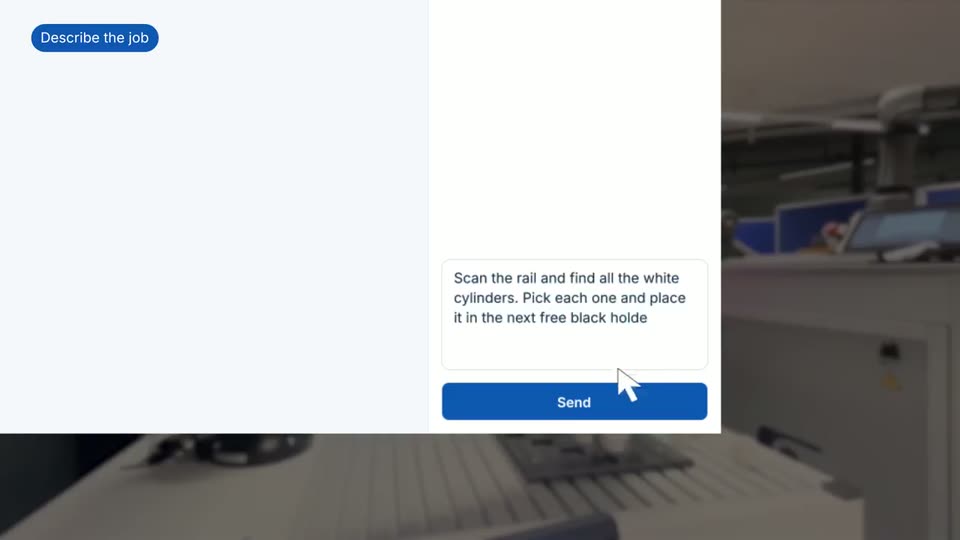
A white chat panel floats over a blurred factory floor. A job description types out line by line, a cursor clicks the blue Send button, and the panel slides left to reveal the workshop.
Techniques: Kinetic type, Cursor demo
Camera: Static
Blue caption 'Odin builds the workflow' sits top left over a flowchart. White node cards with colored icons appear one by one, linking into a path, then the view zooms out to reveal the full interface: dark sidebar, top status bar and a chat panel.
On-screen text: “Odin builds the workflow”
Techniques: UI zoom
Camera: Pull out
The Odin Robotics UI shows a node workflow. A cursor clicks Sim, opening a panel with a robot arm simulation and camera feed, then clicks Run on robot. A blue caption switches from “Check it on the digital twin” to “Run it on the arm”.
On-screen text: “Check it on the digital twin”, “Run it on the arm”
Techniques: Cursor demo
Camera: Pull out
Two white FANUC arms pick and place white caps on a black tray in a bright lab, filmed from a low side angle. A software panel top right switches from a node workflow to a telemetry view, and a blue badge and a speed label stay pinned in the corners.
On-screen text: “Live on the FANUC CRX-10iA”, “3× speed”, “WOdin Robotics”
Camera: Static
A white FANUC robot arm works over a black tray of white parts on a lab bench. A code panel slides in from the left under a blue label, and a yellow highlight steps down its lines. The footage plays at 3x speed.
On-screen text: “FANUC teach pendant program”, “3× speed”
Camera: Static
A white FANUC robot arm works over a conveyor in a workshop, a code panel labeled with the program sits left. A white dashboard screenshot of the Skills page scales in to fill the frame, hiding the robot.
On-screen text: “3× speed”
Techniques: Morph
Camera: Static
A robotics platform dashboard shows a Skills page: twelve episode cards fill with multicolored joint curves while a red dot records episodes 02 to 07. The step bar advances, and the view switches to a dataset summary with large stat numbers and a Hugging Face detail panel.
Techniques: Cursor demo
Camera: Static
A light product interface shows a Skills page with twelve waveform thumbnails and a Hugging Face panel. The frames counter ticks upward, a blue progress bar fills, and a cursor hovers over the format field.
Techniques: Cursor demo
Camera: Static
A dark-blue robot platform UI shows a Skills workflow and a four-step progress bar. The demo cards and heading fade out as a blue π0.5 tile slides to center, gains a white outline, and shows 'CNC pick & place' with a green 'Ready to deploy' pill.
Camera: Static
The Odin Robotics interface shows the Skills page with a deploy card, then switches to the workflow view: a wrist camera feed of the robot arm plays on the left while a Policy running badge appears on the right. The cursor sits on the Deploy button.
On-screen text: “π0.5 trained for pick & place”, “CNC tending · Pick”, “3× speed”
Techniques: Cursor demo
Camera: Static
A blue slide frames a workshop video: a white robotic arm with orange rings and a blue-black gripper reaches into a CNC machine to pick a part, while a small inset at lower left shows the wrist camera view. The clip runs at 3x speed.
On-screen text: “π0.5 trained for pick & place”, “Wrist camera”, “CNC tending · Pick”, “3× speed”
Techniques: Split screen
Camera: Pan
A white robot arm with orange joints works at a CNC machine, moving a small tool into the spindle at 3x speed. The footage sits in a blue slide with a title above and a caption below, and a lower-left inset labeled Wrist camera shows the gripper's point of view holding the tool.
On-screen text: “π0.5 trained for pick & place”, “Wrist camera”, “CNC tending · Pick”, “CNC tending · Place into machine”, “3× speed”
Techniques: Split screen, Speed ramp
Camera: Static
A factory-fleet dashboard fills the frame, a dark left nav beside a light grid of cell cards. The image starts ghosted and doubled, then sharpens as the card list scrolls up to show later cells.
Camera: Pan
A blue banner with the white headline 'Add a robot in minutes' tops a white panel of six robot cards, each showing payload, reach and axes plus a blue Add button. A cursor hovers over the UFACTORY card as the view zooms in, cropping the left sidebar.
On-screen text: “Add a robot in minutes”
Techniques: UI zoom
Camera: Static
A robotics deployment platform interface fills the frame: a dark left sidebar lists sections, the center shows a white robotic arm on a gray platform with colored blocks, and a right panel holds a numbered workflow. A white headline with a small cursor icon sits top-left over the blue background while the arm holds a steady pose.
On-screen text: “Add a robot in minutes”
Camera: Pull out
A green headline holds on a blue dotted field, then the frame cuts to a split-screen montage: a white robot arm filling a box on the left, a wrist-camera feed and an Isaac Sim recreation stacked on the right.
On-screen text: “Less setup work.”
Techniques: Split screen
Camera: Static
A blue layout splits the screen into three feeds: a real robot arm packing a box on the left, a wrist-camera view top right, and a 3D simulation bottom right. White labels name each feed; a caption reads 'Box filling' with 'Power bank' below.
On-screen text: “Real robot”, “YOLO · Wrist camera”, “Isaac Sim · Task recreation”, “Box filling”, “Power bank”, “2× speed”, “New arm, same workflow”
Techniques: Split screen, 3D mockup
Camera: Static
A blue slide splits into three panels: a real robot arm drops a green cable into a box, a wrist camera view with detection boxes, and a 3D simulation of the same task. Labels read 'Box filling' and 'Cable' at lower left.
On-screen text: “New arm, same workflow”, “Real robot”, “YOLO · Wrist camera”, “Isaac Sim · Task recreation”, “Box filling”, “Cable”, “2x speed”
Techniques: Split screen, 3D mockup
Camera: Static
A blue slide splits into three video panels: a real robot arm drops a charger into a box, a wrist camera shows colored detection boxes, and a 3D simulation mirrors the same task. White labels and the title sit on the blue field.
On-screen text: “New arm, same workflow”, “Real robot”, “YOLO · Wrist camera”, “Isaac Sim · Task recreation”, “Box filling”, “2× speed”, “Charger”
Techniques: Split screen
Camera: Static
A blue slide splits into three windows: a large left feed of a white arm dropping parts into a box, a top-right wrist-camera view with colored detection boxes, and a bottom-right 3D recreation of the same task. All three play at once while white labels caption each panel.
On-screen text: “New arm, same workflow”, “Real robot”, “YOLO · Wrist camera”, “Isaac Sim · Task recreation”, “Box filling”, “Adapter”, “2× speed”
Techniques: Split screen
Camera: Static
A light product interface shows a form for adapting a part, with a blue caption pill top left. The view scrolls down to reveal a review table with a red warning and a list of workflow steps, some flagged for validation.
On-screen text: “Change the part, see the impact”
Camera: Pan
A product table showing parameter changes and a workflow status list dissolves out, revealing a 3D grid of white robotic arms on tables in a bright factory floor, with a small caption at the bottom.
On-screen text: “Change the part, see the impact”, “Haas Lab - Parallel Simulation”
Techniques: 3D mockup
Camera: Pull out
On a blue-framed 3D viewport, rows of white robotic arms sit on white tables, each reaching down to a blue tray. The camera drifts across the grid as the arms move in unison, with white captions fixed at top and bottom.
On-screen text: “Train and test in simulation”, “Test motion before the arm moves.”, “Isaac Lab - Parallel simulation”
Techniques: 3D mockup, Parallax
Camera: Pull out
On a blue dotted background, a white bull icon sits at the center as pill labels for MuJoCo, ROS 2, Hugging Face, LeRobot, rerun, FOXGLOWE, Robot SDKs, and NVIDIA Isaac Lab fade in around it, linked by thin teal lines with small dots traveling outward.
On-screen text: “Test motion before the arm moves.”, “Isaac Lab - Parallel simulation”
Techniques: Particles
Camera: Static
On a blue field with a faint dot grid, the white Odin Robotics horned-helmet logo and wordmark hold center, locked off. Below, the pale-blue line “New job.” sits first, then “Same robots.” appears in green to complete the tagline, after which the frame holds.
On-screen text: “New job.”, “Same robots.”
Camera: Static