0:35

HireRoger - Your AI Sidekick
Augment Inc. · B2B · Jun 2025
Pletor · Sep 2026 · 0:40 · Full motion · AI-annotated
Pletor’s 0:40 launch film runs 25 scenes, about 1.6 s each. The product shows up at 0:02 and 4 features are revealed. The call to action lands at 0:34 (87% in). The video runs as a question, a logo lockup, then a chain of pill-framed headlines, each handing off to a UI or card demo, and closes on the URL. Its signature moves are rounded brand cards that scroll, stack and orbit in 3D rings, plus gradient washes and morphing type on a flat cream field.
Is this your launch? to your site or press kit.
Augment Inc. · B2B · Jun 2025
General Learning · Education · Nov 2024
Films whose music sounds like this one, voice left out
Google · Modern electronic dance music
Dalet Labs · Latin dance, electronic house
ElevenLabs · Upbeat electronic dance music
A pale gray field holds a centered headline that builds word by word in dark sans-serif, a faint blue N mark glowing behind the first words. Three small gray squares drift slowly across the frame as the text completes.
On-screen text: “What if your brand”
Techniques: Kinetic type
Camera: Static
A black brain outline sits centered between the words Had and Memory, with beige arrows pointing outward. Rounded photo cards of people and clothing scroll vertically along the left and right edges of the cream background.
On-screen text: “Had”, “Memory”
Camera: Static
A black brain icon sits center on a light gray field between the words Had and Memory. Rounded photo cards cascade diagonally down both edges, then the icon gives way to the multicolor pletOr 2.0 wordmark as the side words fade.
On-screen text: “Had”, “Memory”, “pletOr 2.0”
Techniques: Morph
Camera: Static
A cream background holds the black pletOr wordmark centered in a locked-off frame. The blue-purple gradient version number 2.0 fades in to the right of the wordmark, completing the lockup.
On-screen text: “pletOr 2.0”
Camera: Static
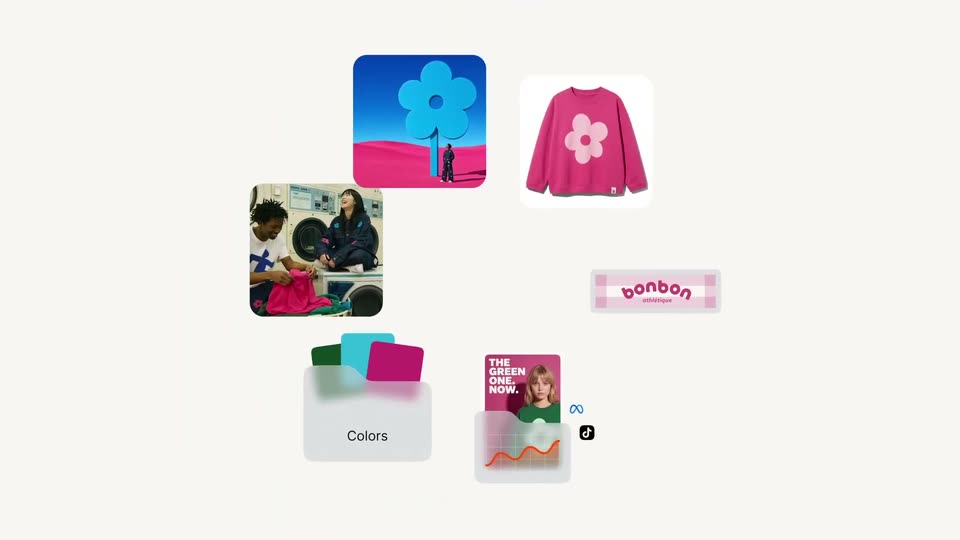
A row of six cards, a pink logo, a flower sweater, a flower illustration, a laundromat photo, a poster and a Colors folder, slides across a light gray field. The cards then rotate and gather into a tight overlapping cluster at center, settling into a stacked collage.
Camera: Pull out
A pile of rounded brand cards shuffles in the center of a pale grey field. The blue photo card, the white Audience card and the navy sweater card rotate, overlap and settle into a tidy row while the yellow and Colors cards tuck behind.
Camera: Static
A small rounded icon at center morphs from a colorful gradient-bordered brain into a black line-art brain, then flies to the upper left as a three-lobed logo, while the word Connect fades in beside it and shifts from green to orange to black.
On-screen text: “Connect”
Techniques: Morph
Camera: Static
On a cream background, a black rounded outline grows from a small pill into a wide frame around the headline, while app icons fade in and drift at the edges, each tagged with a small colored dot. Connect is red, with your black, tools blue.
On-screen text: “Connect with your tools”
Camera: Push in
On a pale cream field, a black rounded-rectangle outline holds the line “Use for any creative need,” its letters tinted by a left-to-right pink-to-blue gradient that settles to solid dark. A small Dropbox logo in the lower-left corner and a pink dot at the top edge fade out as the frame holds.
On-screen text: “Use for any creative need”
Techniques: Light sweep
Camera: Static
A product input screen on a pastel grid background that fades to plain light gray. A chat-bubble logo sits above a serif headline that shifts from pink-and-orange to black. Text is typed into the rounded field holding a plus button, a Brain/Acme pill, and an orange send button.
On-screen text: “What are we creating today?”, “Use for any creative need”
Techniques: Kinetic type
Camera: Static
A large serif headline sits above a white prompt field outlined in red. The field's text is typed, then the field collapses into a small pill holding the full prompt, the orange send button slides and shrinks, and a purple cursor arrow repositions to the top right.
Techniques: Cursor demo, Morph
Camera: Pull out
A light chat UI on white shows a back-to-school prompt bubble at right while a Thinking task list builds line by line on the left, rows sliding in, icons turning to checks. A rounded card fades at center, its pink-yellow gradient resolving into a photo of a walking person.
Camera: Static
A single photo card washed in pink and yellow gradient pulls back to reveal a board interface. A My Board pill and the gradient heading E-comm assets fade in at the top, while four image thumbnails arrange across the frame.
Techniques: UI zoom
Camera: Pull out
A light board view fills the frame, locked off. A header reads My Board with a zoom and expand control, and a row of four e-commerce photos sits under the label E-comm assets. The third and fourth thumbnails flicker between loaded photos and blank placeholders as the assets refresh.
Camera: Static
A two-pane product interface fades in from a dimmed state: a chat panel on the left lists thinking steps above an input box, while a board on the right reveals three rows of campaign images under section labels.
Camera: Static
A grid of rounded square tiles on a pale gray background fades in from soft pastel to full color. Each tile holds a lifestyle photo, a product shot, or a poster of flower-embroidered apparel, settling into a clean eight-by-four montage.
Camera: Push in
A grid of rounded photo tiles, each showing a person or garment with a flower motif, brightens from a faded state as pink checkmark badges pop in across the tiles, then a pink-white flash washes the whole grid out.
Camera: Static
A grid of blurred coral rounded squares dissolves into a smooth red-to-white gradient as a faint phone mockup with a runner image fades in at center.
Camera: Pan
A white phone mockup floats in 3D on a white field with a soft red glow top right, its screen showing a short-video feed of a girl in a white tee dancing on blue. The phone tilts and rotates slightly in perspective as it holds the feed.
On-screen text: “K”
Techniques: 3D mockup
Camera: Static
A product detail card for a pink flower sweatshirt sits on a pale gray field. The card glides left and shifts from a pink tint to white, while the menu, title and price text slide into position and the price scales up.
Camera: Static
A 3D phone mockup showing a social profile grid rotates from an angled view to a flat front face. A pink rounded card slides in from the left and a purple one from the right, the pink card revealing the product name and price.
On-screen text: “BonBon Flower Sweatshirt”, “Price: $89.00 USD”, “大”
Techniques: 3D mockup
Camera: Static
The headline Scale Up fades in at center as a cluster of rounded photo cards, showing people and apparel with flower logos, drifts in around it from the edges, then softens and blurs as the scene ends.
On-screen text: “Scale Up”
Techniques: Morph
Camera: Pan
A blurred burst of tilted product cards, with radiating lines, sharpens into a ring framing an empty center as the headline Scale Up fades out.
On-screen text: “Scale Up”
Techniques: 3D mockup
Camera: Static
A ring of small screen thumbnails rotates in 3D around a white center, where the headline While staying on your brand sits; the word brand then twists and morphs into a new word as the ring widens.
On-screen text: “While staying on your brand”
Techniques: 3D mockup, Morph
Camera: Pan
The black pletor wordmark and purple tagline hold center on a cream background as soft radial streaks dissolve. It cuts to a gradient-outlined pill revealing the URL Pletor.ai, with a purple cursor resting at the lower right.
On-screen text: “The creative system for Commerce”, “Pletor.ai”
Camera: Static