3:21

CALLBOOK AI | Product Demostration
Callbook · Mar 2025
Arvist’s 2:01 clip runs 27 scenes, about 4.5 s each. The product is on screen from the first frame and 1 feature is revealed. The video is one unbroken screen capture of the Arvist dashboard, anchored by a circular presenter webcam in the corner and large white outlined captions that swap phrase by phrase over the UI. Pacing is steady and tutorial-like: each click is narrated, and hand-drawn red arrows and ovals mark the exact element being discussed.
Is this your launch? to your site or press kit.
Callbook · Mar 2025
Retool · Developer tools · May 2025
Magic Patterns · Nov 2026
A static screen capture of the Arvist dashboard fills the frame, with a small circular presenter video and recording controls in the bottom-left corner. Large white outlined captions swap phrase by phrase across the center over the incidents chart and incident video thumbnails.
On-screen text: “Hi there,”, “Eitan here from the”, “And today I want to show you the”, “tools that we are building using”, “Vision AI to detect and monitor”, “safety risks in your warehouse.”, “Safety isn't just a checkbox.”, “It's the foundation of every”, “successful warehouse.”, “A small gap in PPE compliance can create injuries and downtime, and it's nothing that any warehouse wants to suffer from, especially during peak season. So let'”
Techniques: Kinetic type
Camera: Static
A compliance dashboard fills the browser window, showing incident charts and a blue safety score card. The page scrolls up slightly to center the score. A small presenter video and a white caption sit along the bottom edge.
On-screen text: “We can look at the safety score,”
Camera: Static
A presenter's webcam overlays the lower-left of a full-screen ARVIST compliance dashboard. A red arrow points at the personal protective equipment line, then a hand-drawn white oval circles it while the speaker talks. Subtitles run along the bottom.
On-screen text: “We can look at the safety score,”, “and, hey,”, “with regards to the”, “PPE compliance, the”, “personal protective”, “equipment compliance,”, “we can basically do better.”
Camera: Static
A dashboard screen fills the frame, showing incident bar charts, a safety score donut and a grid of flagged camera thumbnails. A small presenter video with a playback bar sits in the lower left, and a white caption overlays the bottom center.
On-screen text: “Further investigate what”
Camera: Static
A browser window shows the Arvist safety dashboard. A cursor clicks the Last 7 Days tab, then opens the Filter by incident menu and picks Workers Missing Personal Protection Equipment, updating the chart and count. A presenter's webcam sits bottom left, white captions run along the bottom.
On-screen text: “can be done here.”, “Let's have a look at”, “the last seven days”, “and filter the overall”, “incidents by worker missing”, “personal protective equipment.”, “okay,”, “so we now have a focus on the”, “PPE compliance in the last week.”
Techniques: Cursor demo
Camera: Static
A browser window shows a dashboard with a dark left sidebar, an incident line chart, two bar charts, and a grid of tagged warehouse video clips on the right. A circular presenter feed and a media control bar sit at the bottom left, and a large caption spans the lower edge.
On-screen text: “PPE compliance in the last week.”
Camera: Static
A browser window shows the Arvist compliance dashboard with incident charts and camera thumbnails, while a presenter's face sits in a bottom-left corner and a red arrow marks the camera list. White subtitles caption the voiceover as the page scrolls up.
On-screen text: “And we can look at the areas”, “in the warehouse.”, “We can see that in the repair”, “area there are a”, “lot of incidents.”, “And also in the work area.”, “And let's say that we now want”, “to focus on the work area.”
Techniques: Cursor demo
Camera: Pan
A compliance dashboard fills the screen with a presenter's webcam in the lower-left corner. A cursor opens the Camera dropdown, selects Work Area, and the incident video thumbnails refresh. White outlined captions run along the bottom.
On-screen text: “We can filter all the videos”, “that are kept by the work area”, “and see the recent videos of PPE”, “compliance issues that occurred”
Techniques: Cursor demo
Camera: Static
A dashboard interface displays line and bar charts beside a grid of incident video thumbnails. The screen scrolls slightly upward while a large white caption remains fixed at the bottom.
On-screen text: “compliance issues that occurred”
Camera: Static
A browser window shows the Arvist dashboard with incident charts, a safety score panel and a grid of warehouse video thumbnails; a small circular presenter video sits at bottom left. A white outlined caption reads across the lower frame.
On-screen text: “compliance issues that occurred”
Camera: Static
A dashboard interface fills the screen, showing an incident line chart and a grid of video thumbnails. A red arrow points to the View All link, and large white captions cycle across the bottom. A small circular presenter feed sits in the lower left corner.
On-screen text: “in this area.”, “Let's switch to the broader view”, “to see all the videos.”
Camera: Static
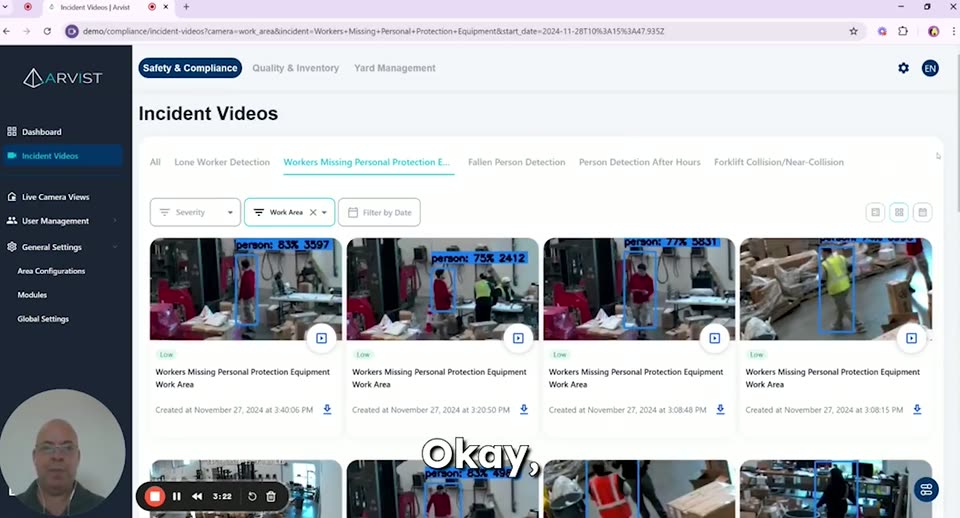
A browser window shows the ArVist incident videos page. The thumbnail grid fills in from a loading state into cards with blue detection boxes and confidence scores. A small presenter webcam sits in the lower left corner as a white caption appears at the bottom.
On-screen text: “Okay,”
Camera: Static
A browser view of the Arvist incident videos grid, each thumbnail a warehouse clip with a blue bounding box around a worker, sits static while a circular presenter webcam holds the lower-left corner and white outlined captions roll in along the bottom.
On-screen text: “Okay,”, “so now we can really see all the”
Camera: Static
The Arvist incident videos dashboard fills the frame, a grid of PPE compliance video thumbnails with Low tags scrolling up slightly, a small circular webcam of a presenter sits in the bottom left corner, and a white outlined caption reads across the bottom.
On-screen text: “so now we can really see all the”
Camera: Pan
A static view of the Arvist dashboard fills the frame, a dark sidebar on the left and a grid of warehouse incident thumbnails on the right. A circular presenter webcam sits in the lower left corner above a media control bar.
Camera: Static
A browser view of the Arvist incident dashboard shows a grid of warehouse video thumbnails with blue person-detection boxes, a left navigation sidebar and filter bar, plus a small circular webcam feed of the presenter at lower left. A white outlined caption spans the bottom.
On-screen text: “recent videos of PPE compliance”
Camera: Static
A browser window shows the Arvist incident videos page, a grid of video thumbnails with blue person-detection boxes and confidence labels. A small circular webcam of a presenter sits in the bottom-left corner. A large white caption spans the bottom of the frame.
On-screen text: “recent videos of PPE compliance”
Camera: Static
A white Incident Videos dashboard fills the frame, showing a grid of warehouse video thumbnails with blue AI bounding boxes around workers. A presenter sits in a small circle at the lower left while bold white subtitle captions swap across the bottom.
On-screen text: “recent videos of PPE compliance”, “the work place in”, “And let's watch one of these”
Camera: Static
The Incident Videos interface dims as a video player modal opens in the center, showing a black screen with a play icon and the label Workers Missing Personal Protection Equipment. A white caption sits at the bottom.
On-screen text: “And let's watch one of these”
Camera: Static
A dimmed dashboard sits behind a centered modal playing a warehouse clip, where a blue detection box tracks a worker. A small round webcam feed sits bottom left, player controls sit below, and a caption runs along the bottom edge.
On-screen text: “videos. We can just launch it,”
Camera: Static
A dimmed compliance dashboard sits behind a video player modal that opens with a black frame and a loading spinner, while a cursor hovers at its center. A small circular presenter feed and a playback bar sit at the bottom.
On-screen text: “videos. We can just launch it,”, “Okay, and”
Techniques: Cursor demo
Camera: Static
A dimmed dashboard sits behind a centered video player showing a warehouse camera feed, with a small circular presenter webcam in the lower left. A white outlined caption builds word by word along the bottom edge.
On-screen text: “And we can enlarge the video and”
Techniques: Kinetic type
Camera: Static
A dimmed ARVIST dashboard sits behind a centered white modal holding a warehouse video player with a timestamp overlay. A white caption with black outline reads across the bottom. The frame is locked off and static.
On-screen text: “And we can enlarge the video and”
Camera: Static
A locked-off high-angle security camera view of a warehouse floor filled with cardboard boxes on pallets and forklifts along the back wall; a worker in a red shirt moves near the packing tables on the right. White subtitle lines swap in at the bottom.
On-screen text: “we can enlarge the video, and”, “basically we can have a look at”, “a few seconds of each time that”, “our system has detected a”, “PPE compliance issue”
Camera: Static
A locked-off view of the Arvist web app, dimmed behind a video player overlay showing warehouse footage with a ticking timestamp. White outlined captions at the bottom swap from “PPE compliance issue.” to “This gives you the option to” while a presenter’s webcam sits in the corner.
On-screen text: “PPE compliance issue.”, “This gives you the option to”
Techniques: Kinetic type
Camera: Static
A flat screen recording of the Arvist Incident Videos page shows a grid of warehouse clips with blue person-detection boxes and confidence percentages. A small circular presenter feed sits bottom-left while white outlined captions cycle through phrases along the bottom.
On-screen text: “This gives you the option to”, “have full visibility into what's”, “going on in your warehouse and”, “take corrective actions,”, “improve education,”, “or take actions in order to”, “improve overall PPE compliance”, “in your warehouse.”
Techniques: Kinetic type
Camera: Static
The ARVIST dashboard fills the frame on the Incident Videos page, a grid of warehouse camera clips with blue person bounding boxes and confidence percentages. A circular webcam of the presenter sits in the lower left corner. A large white caption reads 'in your warehouse.' across the bottom.
On-screen text: “in your warehouse.”
Camera: Static