1:35

Introducing Confetti — Build hardware from a single prompt
Confetti · Consumer · Oct 2026
Juicebox · Nov 2026 · 2:50 · AI-annotated
Juicebox’s 2:50 launch film runs 14 scenes, about 12 s each. The product is on screen from the first frame and 4 features are revealed. The call to action lands at 2:32 (89% in), over a voiceover. Tone: friendly, conversational, instructional. Background: a blue-to-purple gradient with the white Juicebox logo top-left, and a small rounded presenter webcam tile pinned bottom-right. Fonts: clean geometric sans-serif, regular weight, used for UI labels and headings. Music mood: none detected (no music under the voiceover). Summary: a single presenter narrates a straight-line feature tour over a locked-off screen recording, with the camera tile shrinking into a corner as each panel of the app
Is this your launch? to your site or press kit.
Confetti · Consumer · Oct 2026
Loom · Productivity · Oct 2021
A man in a black shirt and white earbuds speaks to camera inside a centered square video-call tile on a blue-to-purple gradient. The white Juicebox logo sits in the top left. The frame is locked off; he talks in an office with desks and glass partitions.
Camera: Static
A man in a black t-shirt sits in a centered video tile on a blue-to-purple gradient, with the Juicebox logo top left. The tile shrinks to the bottom right as the PeopleGPT interface expands across the screen, revealing a left sidebar and a search field with example queries.
Camera: Static
A locked-off view of the Juicebox PeopleGPT interface fills the frame, a small presenter webcam sits in the bottom-right corner. A search query is typed into the input box, filter chips light up, then a cursor clicks Apply Filters as a status toast appears.
Techniques: Cursor demo
Camera: Static
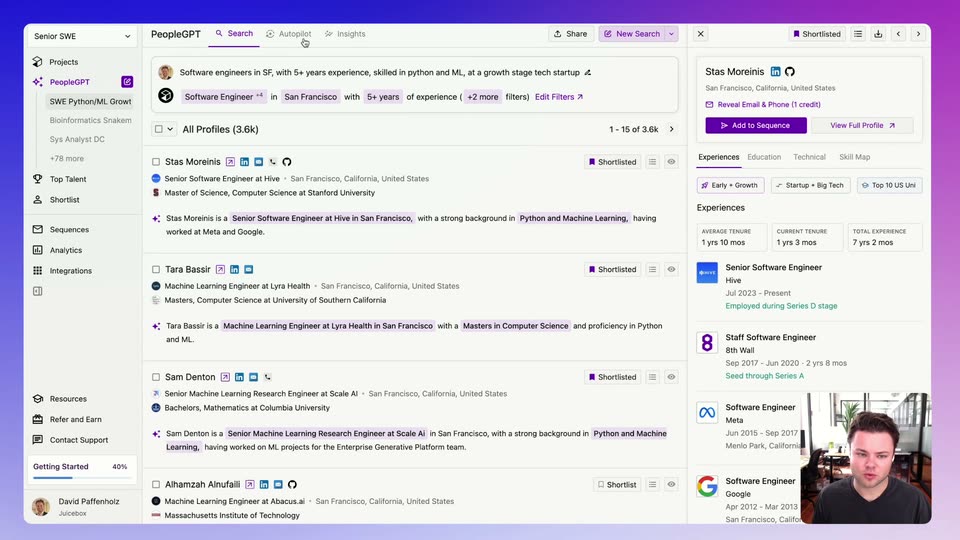
Four candidate rows show spinners under “Assessing profile...” that resolve into one-line AI summaries with highlighted keywords. The cursor hovers across the text, then the view cuts to a profile detail page with highlights and an experience timeline. A small webcam feed of the presenter sits bottom-right.
Techniques: Cursor demo
Camera: Static
A recruiting tool's profile panel fills the screen while the activity feed on the right loads with a spinner, then a list of profile views appears. The cursor hovers over the highlight cards, then clicks the close button to reveal the candidate list behind the panel.
Techniques: Cursor demo
Camera: Static
A product interface displays a list of candidate profiles and a details panel. A cursor moves to the Autopilot tab in the top navigation bar. A small webcam feed of a presenter sits in the bottom right corner.
Techniques: Cursor demo
Camera: Static
A screen recording of the PeopleGPT Autopilot interface, with a presenter's webcam in the corner, shows a cursor typing a criterion and clicking Confirm. The view cuts to a results table filling with match scores and check marks, a row expands to explain matches, and confetti bursts at 750.
Techniques: Cursor demo, Particles
Camera: Static
A candidate results table sits behind a centered modal titled 'Adding 6 profiles to sequence'. A cursor hovers the two dropdown fields, then the dialog switches to a loading spinner reading 'Finding contact info and generating emails...'. A small face-cam of the presenter occupies the bottom-right corner.
Techniques: Cursor demo
Camera: Static
A modal titled 'Adding 5 profiles to sequence' sits over the PeopleGPT dashboard. The cursor scrolls the dialog through three email steps, highlights a sentence in blue, then rests on the purple Confirm & Add button. A webcam feed of the presenter stays in the bottom right.
Techniques: Cursor demo
Camera: Static
A wide view of the PeopleGPT autopilot results table fills the frame, listing candidate names, companies and match scores in rows. A small webcam inset of a man sits in the bottom right corner, and a cursor moves across the top navigation tabs.
Techniques: Cursor demo
Camera: Static
A product dashboard loads from a spinner into a talent-insights grid of maps and bar charts, the view scrolling down through the panels. A webcam of the presenter sits in the corner, the cursor moves, and the sidebar switches to the sequences view.
Techniques: Cursor demo
Camera: Pan
A full-screen email sequences dashboard. A cursor clicks the 30 Days toggle and the line chart redraws with two filled peaks, then the cursor crosses the stat cards and clicks Shortlist, switching to an empty contacts list reading Loading your profiles. A webcam feed of a presenter sits bottom-right.
Techniques: Cursor demo
Camera: Static
A rounded app window on a purple gradient shows a contacts view: a spinner reads Loading, then the table fills with 35 rows of names, statuses and roles. A cursor hovers over cells while a small webcam feed of a man sits in the corner.
Techniques: Cursor demo
Camera: Static
A dashboard screen of the PeopleGPT app fills the frame, showing a San Francisco map, a Top Locations list, and a Key Takeaways panel where AI bullet points type in. A small webcam video of a presenter occupies the bottom-right corner.
Camera: Static