0:32

Introducing Linear For Agents
Linear · Productivity · May 2025
Retool · May 2025 · 2:48 · Full motion · AI-annotated
Retool’s 2:48 launch film runs 26 scenes, about 6.5 s each. The product is on screen from the first frame and 3 features are revealed. There is no explicit call to action; a voiceover carries the film. The video is a screen-recording feature tour: a black Retool logo opens, an announcement voiceover plays over a fast teaser of the generated dashboard, then the editor is walked through step by step (prompt, plan, generate, recolor, history, manual edit) and a logo card closes. Its style is flat and utilitarian, built from a near-white UI palette with green and indigo accents, a neutral sans-serif typeface, and a steady measured pace where the signature moves are smooth zooms into the canvas, a
Is this your launch? to your site or press kit.
Films whose music sounds like this one, voice left out
Lance · Upbeat corporate electronic
DJI · Electronic
OpenAI · Modern electronic
On a black field, the white ReTool wordmark and icon fade in at center, hold, then the wordmark fades out leaving the icon alone, which then fades to black.
On-screen text: “Retool”
Camera: Static
A blank dotted canvas reveals a music store inventory dashboard as an AI copilot panel slides in from the left. Stat cards, an item table and a pie chart settle into place, then a search field is typed with 'gu' and 'pian', filtering the table to one row.
Camera: Static
The screen shows a dashboard builder tool. The left pane holds an AI Copilot code tree and a written app summary. The right pane renders a music store inventory dashboard with stat cards, a search field holding the word piano, a one-row table, and a pie chart.
Camera: Static
A light chat panel shows a copilot message titled Music Store Transaction Tracker App with a numbered feature list. A generating box expands into a component tree (page1, dashboard, transactionsSection, newTransactionModal) while the view scrolls up and a cursor drags the right scrollbar.
Techniques: Cursor demo
Camera: Pan
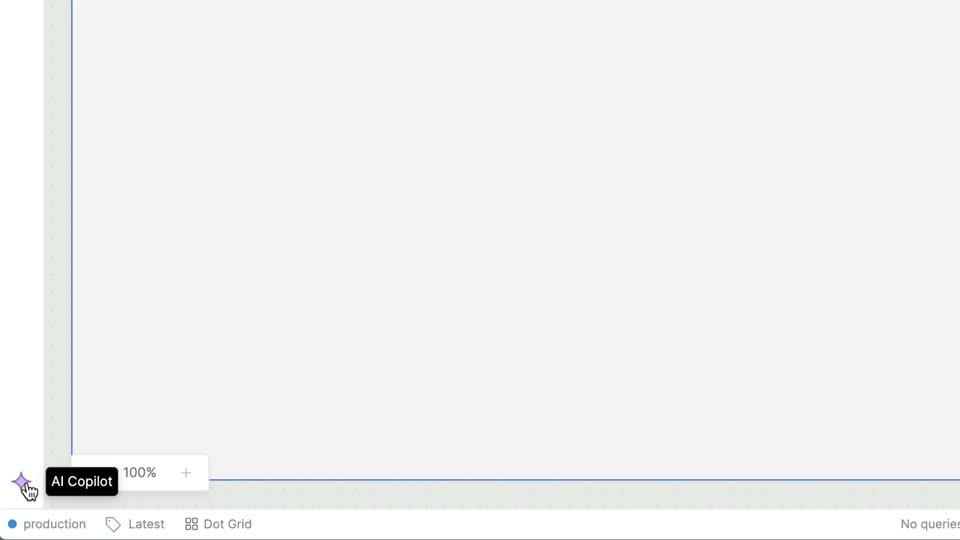
The empty editor canvas fills the frame, then the view zooms into the bottom-left corner. A cursor moves to the purple star icon and clicks it, opening the Retool Copilot panel with its prompt field and model selector.
Techniques: UI zoom, Cursor demo
Camera: Static
A cursor opens the model dropdown, hovers options with dark tooltips, types a dashboard prompt and sends it. The view zooms into the chat where a plan checklist appears; the cursor unchecks a step, renames a schema field, and approves, ending on a seeded data table.
Techniques: Cursor demo, UI zoom
Camera: Pull out
A chat panel shows a music inventory table with a green Accept button; a cursor clicks it, the table scrolls, and the status bar switches to a spinning 'Determining components and resources' then 'Generating' with a Stop control.
Techniques: Cursor demo
Camera: Static
A light copilot panel scrolls down through a generation log. A component tree and a logic tree load with small spinning loaders beside each named item, while a blank canvas and a 100% zoom control stay fixed on the right.
Camera: Pan
A split interface shows a code-generation chat on the left and the generated dashboard on the right. The left panel updates to a feature summary with review buttons while the right fills with an inventory table and pie chart; a cursor hovers over the Accept all button.
Techniques: Cursor demo
Camera: Static
A document panel on the left lists dashboard features beside a music store inventory dashboard with stat cards, a table and a pie chart on the right. The frame zooms out to show the full dashboard, then a save notification appears in the left panel.
Techniques: UI zoom
Camera: Pull out
A screen recording of an app builder shows an AI Copilot panel beside a music store inventory dashboard. A blue outline highlights the inventory table, then the Add New Item button, as a cursor hovers over it and a function tooltip appears.
Techniques: Cursor demo
Camera: Static
A no-code builder screen shows a dashboard with an open Add New Inventory Item form. The view zooms into the form, a cursor selects the Date Added field, and the right panel switches to that component's properties, highlighting a calendar prefix icon.
Techniques: UI zoom, Cursor demo
Camera: Push in
The screen splits into an AI code panel on the left and a music inventory dashboard on the right. A cursor types into the search box, and the table below filters from five rows down to one and back as the query changes.
Techniques: Cursor demo
Camera: Static
A white dashboard shows a music inventory table and pie chart. A cursor slides to the green Add New Item button, presses it, and a centered modal form titled Add New Inventory Item fades in over the dimmed interface.
Techniques: Cursor demo
Camera: Static
A flat screen capture of a dashboard builder shows a music inventory table and a pie chart beside a properties panel. The cursor drifts across the canvas, the panel scrolls, and the view zooms in on the chart and panel.
Techniques: Cursor demo, UI zoom
Camera: Push in
A data table and a pie chart titled Items by Category fill a light interface. A cursor moves from the zoom control to a purple sparkle icon on the left rail, and an AI Copilot tooltip pops up beside it.
Techniques: Cursor demo
Camera: Static
The AI chat panel on the left receives a brand-colors prompt and streams 'Copilot is thinking' plus generating components and logic steps. Meanwhile the dashboard preview on the right updates live, re-coloring its pie chart and table chips.
Camera: Pan
A Retool app builder fills the screen. The left panel cuts from a component tree to a saved chat thread, while the center dashboard shifts from an empty pie-chart view to a populated inventory table, showing two generated versions of the same app.
Camera: Static
A flat studio interface shows an AI chat panel on the left with the History menu open. A cursor glides down the list and picks a thread, swapping the prompt and the checklist below. The right side holds a static Music Store Inventory dashboard with a table of instruments.
Techniques: Cursor demo
Camera: Static
A cursor clicks the History button in the AI Copilot panel, opening a dropdown of saved threads. The cursor selects Holiday Music Store Catalog, and the interface updates to show a new chat prompt and a product list dashboard on the right.
Techniques: Cursor demo
Camera: Static
A static split view of the product. The left panel holds the AI Copilot chat with a five-point Application Plan, all checked, and a Plan approved button. The right panel shows the Holiday Catalog dashboard with a product table.
Camera: Static
An app-builder view pairs a music store inventory dashboard with a properties panel. A cursor types a new label into the Text field, updating the green button live, then selects dashboard regions to switch the panel between component and app settings.
Techniques: Cursor demo
Camera: Static
A light UI screen shows a component palette left of an empty canvas. A cursor hovers a purple sparkle icon and an AI Copilot tooltip pops up, then the view switches to a Retool Copilot panel with a wireframe app sketch, text and a prompt field.
Techniques: Cursor demo
Camera: Static
After a brief intro card, the Retool Copilot chat panel shows the AI generating an app: collapsible sections list components and queries while spinners turn and items appear one by one. The right canvas stays blank with a 100% zoom control.
Camera: Static
A builder canvas displays a music store inventory dashboard with stat cards, a pie chart and a table. The cursor clicks component containers, the blue selection outline jumps from the chart to the table, and the blocks swap order, moving the table above the chart.
Techniques: Cursor demo
Camera: Static
On black, a small white three-bar mark fades in at center, then the word Retool resolves beside it, letters scrambling into place, and the lockup holds before fading to black.
On-screen text: “Retool”
Techniques: Kinetic type
Camera: Static