
1:08
Explore
00:00:00 / 01:52:02
- Length
- 1:52
- Scenes
- 12 · 9.3 s avg
- Product on screen
- 0:00
- Call to action
- 1:46 · 95%
- Voiceover
- Yes
- Views
- 396K on YouTube
as of November 21, 2026
Juicebox’s 1:52 launch film runs 12 scenes, about 9.3 s each. The product is on screen from the first frame. The call to action lands at 1:46 (95% in), over a voiceover. A talking-head intro on a gradient hands off to one continuous screen recording of the recruiting agent, with the presenter kept in a small webcam tile the whole time. Slow, long-take pacing with tilt-to-flat window transitions, a confetti burst on launch, and a purple-accented UI define the look.
Footage neededEstimated needs: 3 capture groups — your screens or recordings · 1 filmed passage — shoot, supply or replace
Is this your launch? to your site or press kit.
More like this

Introducing Juicebox Agents, scene by scene
· 12 scenes as text
01 · Product intro · 0:00–0:10
A man in a teal shirt talks to the camera inside a rounded video-call window, centered on a blue-to-purple gradient. The Juicebox wordmark sits in the top left. Behind him, a modern office shows an orange wall, a white desk, a monitor, and a plant.
On-screen text: “Juicebox”
Camera: Static
02 · Product intro · 0:10–0:12
A man in a teal shirt appears in a rounded video-call window centered on a purple-to-blue gradient, the Juicebox logo fixed top left. The window then fades as a product canvas overlays it, adding a left icon sidebar and a dashed white board.
On-screen text: “Juicebox”
Camera: Pull out
03 · Demo · 0:12–0:31
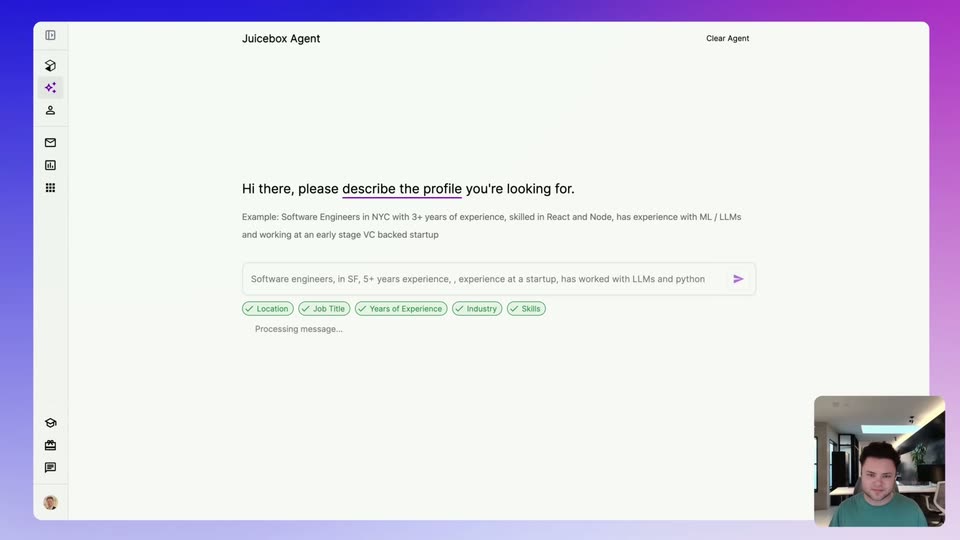
A flat Juicebox Agent screen on a purple gradient. An input field types a search query as green filter tags light up in order, then a processing line appears and the view swaps to a new agent message. A small webcam of a man in teal sits bottom-right.
Camera: Static
04 · Demo · 0:31–0:35
A white product interface on a purple gradient shows an agent message and a purple Review Profiles button. A cursor glides to the button and clicks it, opening a profile review panel with candidate details, while a small webcam feed of a man sits in the lower right corner.
Techniques: Cursor demo
Camera: Static
05 · Demo · 0:35–0:45
A tilted 3D window flattens into a profile-review screen with a small webcam tile bottom right. A cursor clicks Reject, a feedback box opens, and the cursor types a note before the view switches to a chat panel.
Techniques: 3D mockup, Cursor demo
Camera: Static
06 · Demo · 0:45–0:53
A white agent chat on a purple gradient background cycles through loading statuses, then updates its prompt and button, before cutting to a profile review screen with a candidate card and match reasons. A small webcam feed of a man sits in the bottom right corner.
Camera: Static
07 · Demo · 0:53–1:00
Light hiring-agent interface shows a candidate review panel with match criteria and Approve buttons. A cursor clicks Approve, the profile card dissolves through three candidates, then the screen fades to white as a chat message appears. A small video-call window of a man sits in the corner.
Techniques: Cursor demo
Camera: Static
08 · Demo · 1:00–1:01
A white agent interface on a purple gradient background shows a chat message that fades out, then a new prompt with a dropdown and a purple Confirm button fades in. A small webcam feed of a man in a room sits in the bottom-right corner throughout.
Camera: Static
09 · Demo · 1:01–1:12
A white agent interface prompts the user to pick an email sequence; the cursor opens the dropdown, selects an option and clicks Confirm. The view then asks how many profiles to contact daily with three tier buttons, before a processing indicator fades in.
Techniques: Cursor demo
Camera: Static
10 · Demo · 1:12–1:27
A cursor clicks through a setup wizard in a white agent interface, picking a contact rate and approval option, then presses a purple start button. A burst of multicolored confetti fills the panel before the view cuts to a stats dashboard. A small webcam feed of a man sits bottom-right.
Techniques: Cursor demo, Particles
Camera: Static
11 · Demo · 1:27–1:46
A Mission Control dashboard fills the frame on a purple gradient, with a line chart, stat cards, and lead lists. A cursor traces the chart line, dragging a tooltip, then clicks Settings to open an approval-type dialog. A small webcam of a man sits bottom-right.
Techniques: Cursor demo
Camera: Static
12 · CTA · 1:46–1:52
A product dashboard fills the frame, showing a purple email-volume chart, a grid of stat tiles, and two lead lists. A black pill with juicebox.ai sits at the bottom center, while a small webcam video of a man in a teal shirt talks in the bottom-right corner.
On-screen text: “juicebox.ai”
Camera: Static