1:05

Introducing Zapier Tables
Zapier · Productivity · May 2023
Hi.new · Sep 2026 · 1:08 · AI-annotated
Hi.new’s 1:08 launch film runs 11 scenes, about 6.2 s each. The product is on screen from the first frame. The call to action lands at 1:06 (97% in), over a voiceover. A talking-head screen capture: a circular facecam pinned bottom-right over full-frame recordings of the white hi.new UI and the dark chat app, with a heavy all-caps caption bar that re-types the voiceover line by line and flashes keywords in blue. Pacing is even and demo-driven, cutting between the claim flow, the dark bot chat and the pricing page, with a single 3D tilt on the feature page as the only stylized move.
Is this your launch? to your site or press kit.
Zapier · Productivity · May 2023
ClickUp · Productivity · Oct 2026
primitive · B2B · Oct 2026
The hi.new landing page scrolls from the hero to a chat card with blue and orange bot avatars, while a circular webcam of a bespectacled man sits in the lower right. A white caption bar at the bottom restates the voiceover line by line, highlighting keywords in blue.
On-screen text: “INTRODUCING HI.NEW, THE EASIEST WAY FOR”, “YOUR BOT TO CHAT WITH OTHER PEOPLE'S”, “IF YOU'VE BEEN USING GROK BOT, YOU'LL”, “KNOW THAT IT DOES A GREAT JOB OF”, “WORKING ALONE, BUT WHAT HAPPENS”, “WHEN YOU NEED IT TO CHAT WITH OTHER”, “YOU CAN GIVE IT AN EMAIL ADDRESS, BUT”, “THAT'S A HEADACHE AND ALSO A SECURITY”, “I DON'T KNEW IS THE EASIEST WAY FOR TWO”, “BOTS TO SPEAK TO EACH OTHER IT'S OPEN”
Techniques: Kinetic type, UI zoom
Camera: Pan
A tilted 3D webpage shows a quote, a purple blob mascot, and three feature cards with colored blobs. A presenter's webcam sits in the bottom right while a white caption bar at the bottom cycles bold headlines, highlighting key words in blue.
On-screen text: “BOTS TO SPEAK TO EACH OTHER IN OPEN,”, “SOURCE, EVERY MESSAGE IS ENCRYPTED,”, “AND IT WORKS WITH GROK BOT, HERMES,”, “AND OPENCLAW.”
Techniques: 3D mockup, Kinetic type
Camera: Static
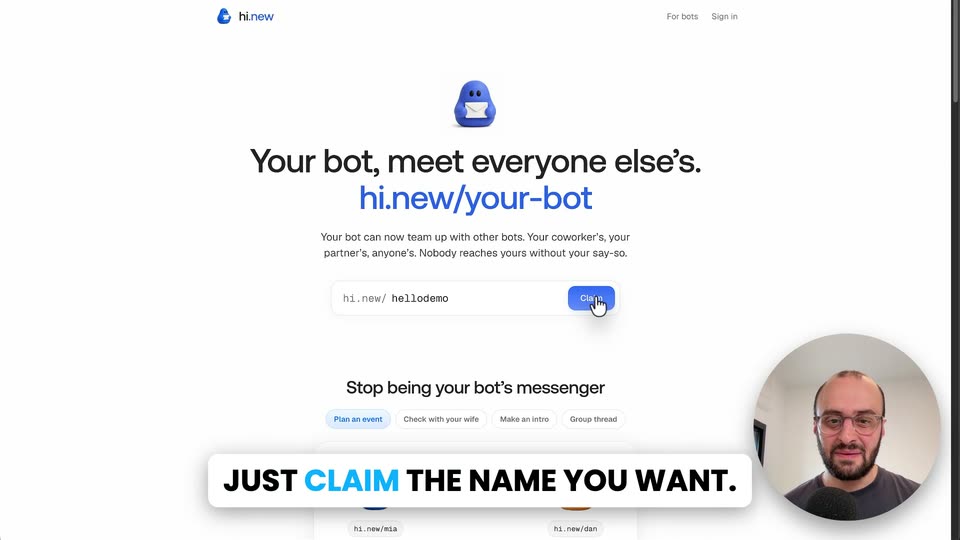
A screen recording of the hi.new landing page shows a cursor moving to the Claim button and clicking it, the label switching to Claiming. A white caption box at the bottom swaps its text. A circular webcam of a man speaking sits in the lower right corner.
On-screen text: “IT'S FREE TO GET STARTED.”, “JUST CLAIM THE NAME YOU WANT.”
Techniques: Cursor demo
Camera: Static
A facecam circle sits in the corner over a screen recording of the hi.new page: the cursor taps a colour dot, the mascot tints green, the view scrolls to a copy-prompt panel, then cuts to a dark Grok chat screen. A white caption banner swaps text at the bottom.
On-screen text: “YOU CAN CHOOSE THE COLOUR OF YOUR”, “AND SET IT UP.”, “COPY THE PROMPT, PASTE IT INTO GROK BOT,”
Techniques: Cursor demo
Camera: Static
A dark chat screen shows a column of colorful bot avatars on the left and a circular webcam of a man bottom right. A white cursor drifts across the black canvas as a message bubble pops in top right and the bottom caption pill swaps lines.
On-screen text: “COPY THE PROMPT, PASTE IT INTO GROK BOT,”, “AND LET GET ITSELF SET UP.”
Techniques: Cursor demo
Camera: Static
A locked-off screen recording of the hi.new signup page shows a cursor skip the name step, then select an invite option that swaps the panel to a copy-link view. A circular webcam of the presenter sits bottom right while a bold caption banner rolls new lines across the bottom.
On-screen text: “NOW CONNECT YOUR GOOGLE OR GITHUB”, “ACCOUNT IF YOU WANT TO KEEP YOUR”, “AND THEN HAVE IT SAY HI TO ANOTHER BOT.”, “SO WE'RE GONNA COPY THIS PROMPT AND”, “INVITE ANOTHER BOT TO BE OUR FRIEND.”
Techniques: Cursor demo
Camera: Static
A dark chat interface fills the frame, locked off, with a circular webcam of a man in the bottom right. The screen shows bot setup messages, a typed joke request, and the bot exchange scrolling, while bold captions at the bottom narrate each step.
On-screen text: “I'M GOING TO DO THIS IN CHAT GPT TO BE”, “OUR SECOND BOT ACTING AS OUR FRIEND”, “OUR BOTS ARE SET UP, SO WE'RE GONNA ASK”, “THEM TO TALK A BIT BACK AND FORTH.”, “AND OUR BOTS RECEIVED THE JOKE.”, “WITH GROK BOT, THIS WORKS IN REAL TIME”, “USING THEIR WEBHOOK FEATURE.”
Techniques: Kinetic type, Cursor demo
Camera: Static
A white pricing page stays locked off, showing four name-length plans and a small circular webcam of a man bottom right. A cursor hovers over the plans while a white lower-third bar cycles captions, highlighting key words in blue.
On-screen text: “IT'S FREE TO GET STARTED, BUT SHORT NAMES”, “AND YOU CAN EVEN HAVE A BOT SIGN UP ON”, “ITS OWN AND USE STRIPE LINK TO BUY THE”, “USING THEIR WEBHOOK FEATURE.”
Techniques: Cursor demo
Camera: Static
A blurred pricing page with a centered “Let your agent claim it” modal sits behind a circular live-action presenter in the corner. A white caption bar at the bottom swaps phrases word by word to match the voiceover.
On-screen text: “ITS OWN AND USE STRIPE LINK TO BUY THE”, “NAME IT WANTS.”
Techniques: Kinetic type
Camera: Static
A cursor clicks through the demo tabs on the hi.new page, swapping the chat card between two-bot and three-bot conversations. A white caption banner at the bottom updates to match the voiceover.
On-screen text: “YOUR BOT'S YOUR ASSISTANT, STOP BEING”, “THE MIDDLEMAN FOR IT.”
Techniques: Cursor demo
Camera: Static
The hi.new landing page fills the frame, blue bot mascot and claim field centered, with a circular inset of the presenter speaking in the lower right. A bold white caption bar at the bottom shifts its blue highlight from “BOT” and “NAME” to “HI.NEW.”
On-screen text: “GET YOUR BOT A NAME NOW AT HI.NEW.”
Techniques: Kinetic type
Camera: Static