0:21
Explore
Alex Danilowicz - Launching our new Chrome Extension: copy paste any website, edit and
Magic Patterns · Nov 2026 · 0:30 · Full motion · AI-annotated
- Length
- 0:30
- Scenes
- 8 · 3.8 s avg
- Product on screen
- 0:00
- Features shown
- 1
- Voiceover
- No
- Views
- 1.8K on X
as of November 23, 2026
00:00:00 / 00:30:17
- Length
- 0:30
- Scenes
- 8 · 3.8 s avg
- Product on screen
- 0:00
- Features shown
- 1
- Voiceover
- No
- Views
- 1.8K on X
as of November 23, 2026
Magic Patterns’s 0:30 launch film runs 8 scenes, about 3.8 s each. The product is on screen from the first frame and 1 feature is revealed. There is no explicit call to action. One continuous flow: a blur-to-focus title card, then an unbroken screen-recording journey from the browser extension through the app, closed by a fade-to-white end card, with no hard cuts. Signature moves are the dotted-grid stage, opacity fades between shots, and the headline snapping from blur into sharp focus.
No filming indicatedEstimated needs: 4 capture groups — your screens or recordings
Is this your launch? to your site or press kit.
More like this



Alex Danilowicz - Launching our new Chrome Extension: copy paste any website, edit and, scene by scene
· 8 scenes as text
01 · Product intro · 0:00–0:01
A faint dot-grid background holds a large dark headline that snaps into focus from a blurred, shadowed state, with a small two-tone logo and brand name settling in beneath it.
On-screen text: “Copy paste website”, “Magic Patterns”
Techniques: Kinetic type
Camera: Static
02 · Product intro · 0:01–0:01
A light dotted background holds a centered black headline and a small brand lockup. A browser window showing a restaurant website fades in beneath the text, filling most of the frame.
On-screen text: “Copy paste website”, “Magic Patterns”
Camera: Static
03 · Feature reveal · 0:01–0:07
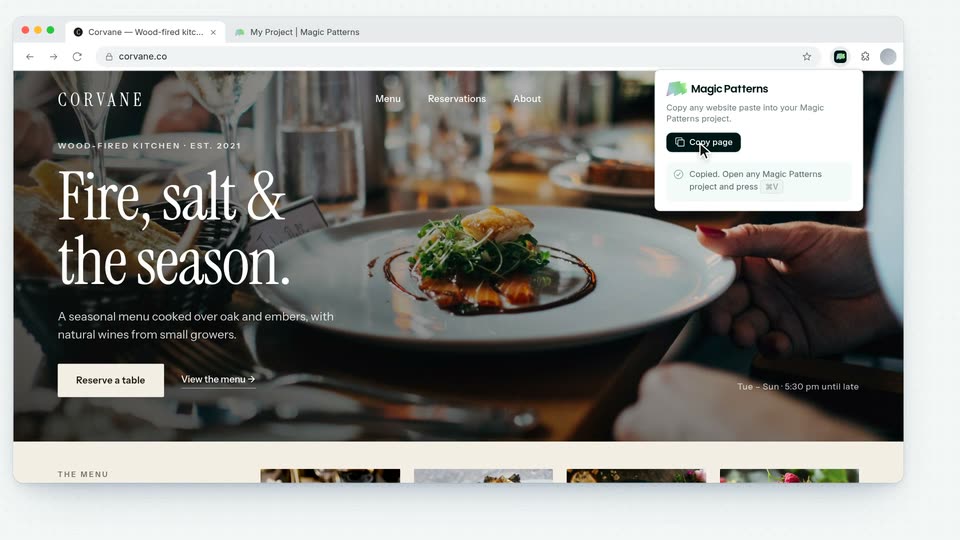
A browser window displays a restaurant website with a plated-dish hero image. A cursor clicks the Magic Patterns extension icon, a popup opens, the cursor clicks Copy page, and a copied confirmation message appears below the button.
Techniques: Cursor demo
Camera: Static
04 · Feature reveal · 0:07–0:08
A three-panel app interface fades in from low opacity to full on a dotted gray background. The left sidebar lists project files, the center panel offers three import options, and the right panel shows a chat input. A cursor drifts near the top.
Camera: Static
05 · Feature reveal · 0:08–0:10
A three-panel product interface sits on a dotted background. A cursor opens a nested dropdown at the top left, hovers a second-level item, then the menu closes and a Command and V key badge appears over the center option list.
Techniques: Cursor demo
Camera: Static
06 · Demo · 0:10–0:25
A design tool UI centers a restaurant website preview. A cursor types a dark-mode prompt into the right chat, the preview switches to a dark theme with brass buttons, then the cursor opens Visual Edit, changes the headline text and color, and types a new prompt.
Techniques: Cursor demo
Camera: Static
07 · Demo · 0:25–0:27
A three-panel product interface fills the frame. The center document fills with three website thumbnails as the right chat panel updates with a response. The screen then fades to white, leaving a small Magic Patterns logo card centered.
On-screen text: “Magic Patterns”
Camera: Static
08 · Outro · 0:27–0:30
A light gray dotted background holds a centered text stack: a small Magic Patterns logo lockup, a large black headline, and a gray subline with a small circular icon. The frame starts out of focus, pulls into sharp focus, then holds still.
On-screen text: “Magic Patterns”, “Copy paste website”, “into MagicOS”
Camera: Static