2:50

Juicebox - The Leading AI Recruiting Platform
Juicebox · Nov 2026
Arcade · 2:56 · Clip · AI-annotated
Arcade’s 2:56 clip runs 15 scenes, about 12 s each. The product is on screen from the first frame and 2 features are revealed. The video is a straight locked-off UI walkthrough: settings dialogs, inline variable tokens and a share panel are demoed in quick cursor-led cuts, then the published deck plays as a retro pixel game. Its signature moves are the small micro-interactions (typing, toggles, a confetti burst) and the hard cut from clean SaaS chrome to the bright game preview.
Is this your launch? to your site or press kit.
Juicebox · Nov 2026
CueBench · B2B · Jul 2026
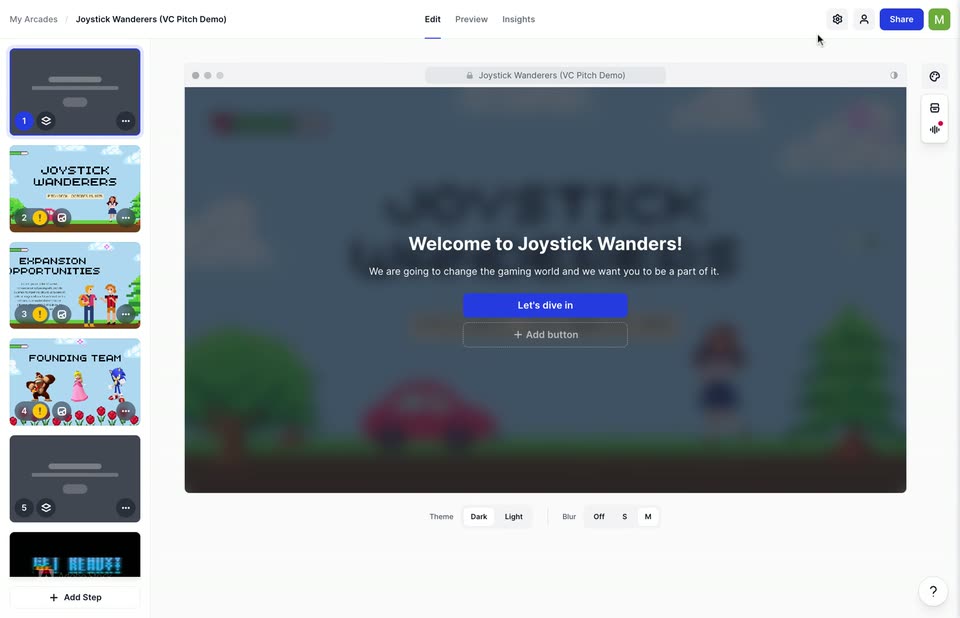
A locked-off view of a pitch-deck editor: a left rail of slide thumbnails, a center browser frame with a blurred game scene, a welcome headline and two buttons, theme toggles below. A cursor glides to the top-right gear and a Settings tooltip pops up.
Techniques: Cursor demo
Camera: Static
A white Settings dialog sits centered over a dimmed app window; the cursor moves from the top bar into the dialog, clicks the Variables tab, then the Add variable button, types first_name into the new row, and confirms it with a checkmark.
Techniques: Cursor demo
Camera: Static
A locked-off view of a landing-page editor shows a blurred pixel-art preview with a centered heading and two buttons. A cursor clicks the heading and types 'Hey {{first_name}},' in front of it, then hovers the settings icon at top right.
Techniques: Cursor demo
Camera: Static
A dimmed app workspace with a white Settings modal centered over a dark game preview. A cursor leaves the settings gear, hovers the Variables tab, and drifts back, while the modal stays on the General tab showing Title and Description fields.
Techniques: Cursor demo
Camera: Static
A Settings dialog with the Variables tab open sits over a dimmed editor. A cursor clicks the ellipsis on a variable row, an inline name field expands, the cursor types investor and confirms it, adding a second variable row. The cursor then drifts to the close icon.
Techniques: Cursor demo
Camera: Static
A landing page editor with a step list on the left shows a blurred pixel-art scene under a white headline and two buttons. A cursor selects the subline and replaces the word you with the variable {{investor}}.
Techniques: Cursor demo
Camera: Static
A locked-off view of a step-builder editor shows a pixel-art slide with three game characters and the title FOUNDING TEAM. A cursor selects a blue speech bubble, opens its text properties panel, then deletes the bubble.
Techniques: Cursor demo
Camera: Static
A slide editor interface shows a preview pane that switches from a welcome slide with two buttons to a pixel-art Founding Team slide, while the selected thumbnail in the left rail moves from step one to step four.
Camera: Static
Locked-off full window, a cursor works through the Arcade editor: it clicks a hotspot on the pixel-art canvas, opens a text panel, types a greeting with a name variable, saves it as a speech bubble, then opens the share panel, toggles publish, and fills two custom links. Confetti bursts.
Techniques: Cursor demo, Particles
Camera: Static
A light-gray blank canvas sits centered on a white interface. A top toolbar slides in from above, revealing a breadcrumb, Edit and Preview tabs, and a blue Share button, while the ARCADE logo and Sign in button drop down beneath it.
Camera: Static
A locked-off view of a web app screen. A top bar holds breadcrumb text, Edit and Preview tabs, a blue Share button and a green avatar. Below, an ARCADE logo sits left of a large empty light-gray canvas, with a Sign in button at right.
Camera: Static
A white app screen shows a browser preview of a pixel-art pitch deck. A dark welcome overlay with a Let's dive in button fades out after the cursor clicks it, revealing a retro game title screen, then the slide switches to an Expansion Opportunities layout.
Techniques: Cursor demo
Camera: Static
Locked-off view of the ARCADE app's Preview tab: a pixel-art slide reads EXPANSION OPPORTUNITIES over two standing characters; a cursor hovers the replay button and the slide crossfades to a FOUNDING TEAM scene with Mario, Zelda and Sonic among flowers.
Techniques: Cursor demo
Camera: Static
A web app previews a pixel-art game. A FOUNDING TEAM screen shows a gorilla, a princess and a blue hedgehog over a tulip row; a blue chat bubble pops in by the gorilla. It cuts to a JOYSTICK WANDERERS title screen with a pink car and a walking pixel girl.
Camera: Static
The ARCADE interface sits in Preview mode, framing a pixel-art game title screen: black pixel text JOYSTICK WANDERERS over a blue sky, with a heart health bar, a pink car, a walking character and trees. A cursor hovers the refresh icon, popping a Replay tooltip. The frame stays locked.
Techniques: Cursor demo
Camera: Static